






FIX PXE Boot Failures Task Sequence Delays with SCCM 2002 | KB 4567007
Let’s fix PXE Boot Failures Task Sequence delays with SCCM 2002. As I mentioned in the ConfigMgr 2002 known issues., there is a known issue with the Configuration Manager (ConfigMgr) 2002 version.
The KB4567007 is a hotfix released by Microsoft to fix the PXE boot and TS slowness issue with the SCCM version 2002. More details about the hotfix https://support.microsoft.com/en-gb/help/4567007/pxe-boot-fails-after-updating-to-configuration-manager-current-branch
NOTE! – Ensure you install KB4563473 (The tenant attaches hotfix) before installing the above hotfix. If KB4563473 is installed after this update, contact Microsoft Customer Support for assistance in manually re-applying the changes from KB 4567007.
| Index |
|---|
| FIX KB4567007 |
| Installation Process |
| Summary – Update package installation KB4567007 |
| KB4567007 Installation Completed |
| Progress |
| Results |
| 2002 Site Version |
FIX KB4567007 – FIX PXE Boot Failures Task Sequence
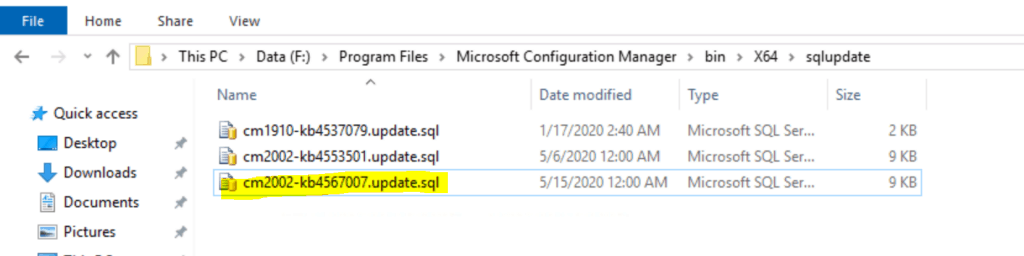
It seems the KB4567007 updates the SQL database to fix the issue as per the KB file information.

NOTE! – There is no client update available for KB4567007 hotfix.
The following is the list of fixes available in the hotfix KB4567007:
- Operating system deployment task sequences fail during the PXE boot process.
- This occurs more frequently in environments with many packages in the task sequence.
- The SMSPXE.log file will show a time difference of 30 seconds or more between the corresponding Operation: BootRequest and Operation: BootReply entries.
- No explicit errors were recorded before the boot process times out.
- In addition, the Resolving Task Sequence Dependencies process for a task sequence may take considerably longer than expected when multiple dependencies are present.
- In both cases, the CPU usage of the Microsoft SQL Server on the site database will be higher than expected.
| File version | File size | Date | Time | Platform | |
|---|---|---|---|---|---|
| cm2002-kb4567007.update.sql | Not Applicable | 8319 | 15-May-2020 | 00:00 | Not Applicable |
Installation Process
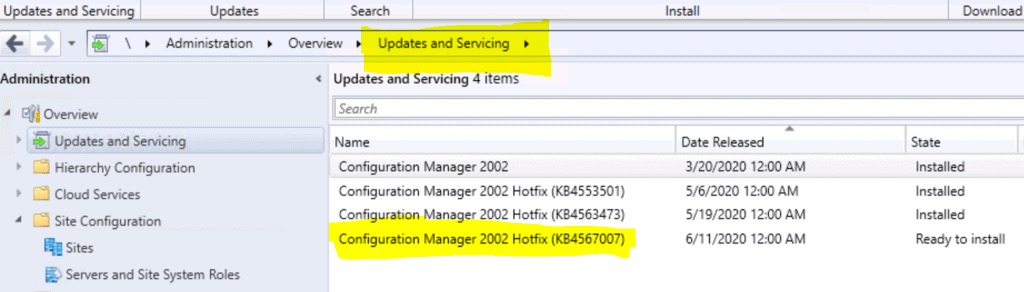
Navigate – \Administration\Overview\Updates and Servicing
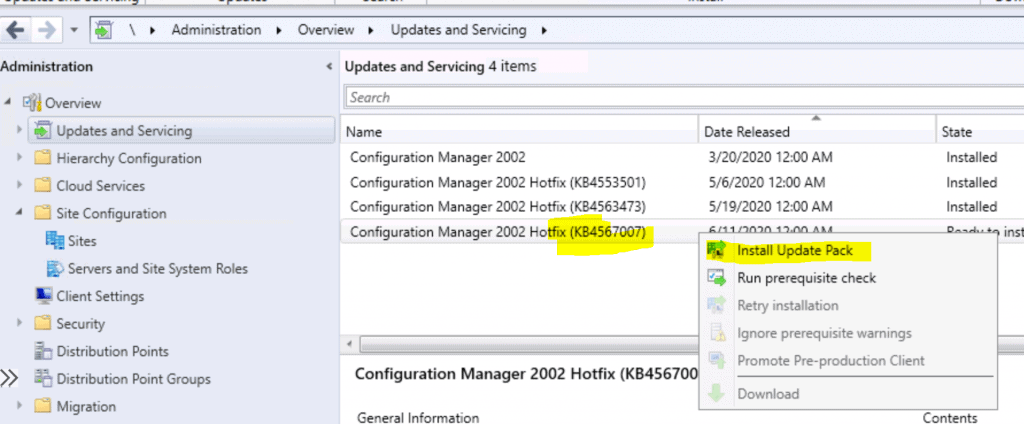
Right-click on KB4567007 update and select Install Update Pack.
After installing the Update Pack, Click on NEXT
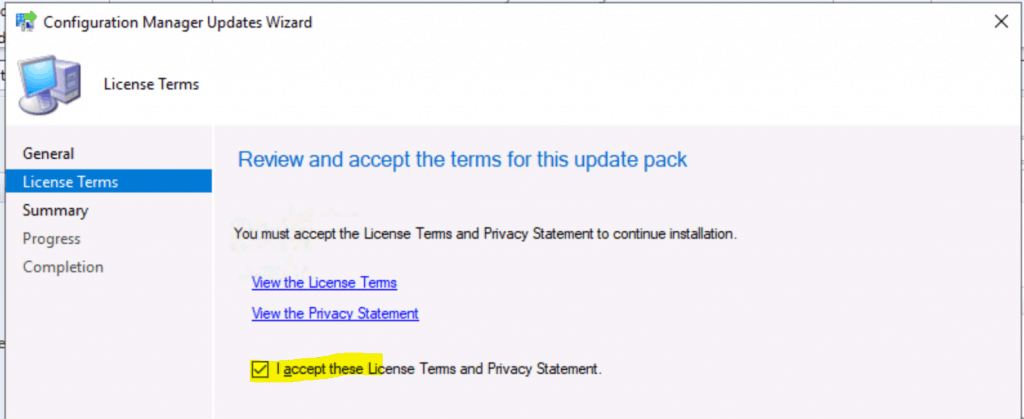
- Click on Accept and Next.
Summary – Update package installation KB4567007
Install Update Package Configuration Manager 2002 Hotfix (KB4567007)
Prerequisite warnings will be ignored
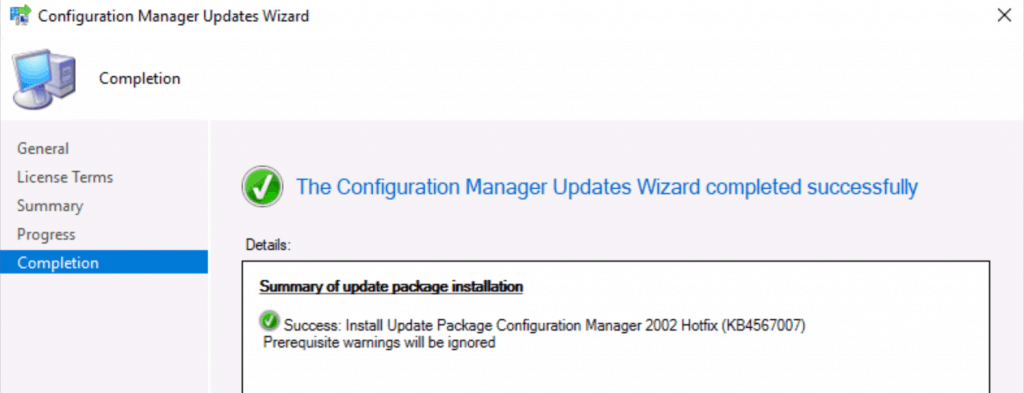
KB4567007 Installation Completed
Completed the update wizard.
Progress
Navigate – \Monitoring\Overview\Updates and Servicing Status\Configuration Manager 2002 Hotfix (KB4567007)
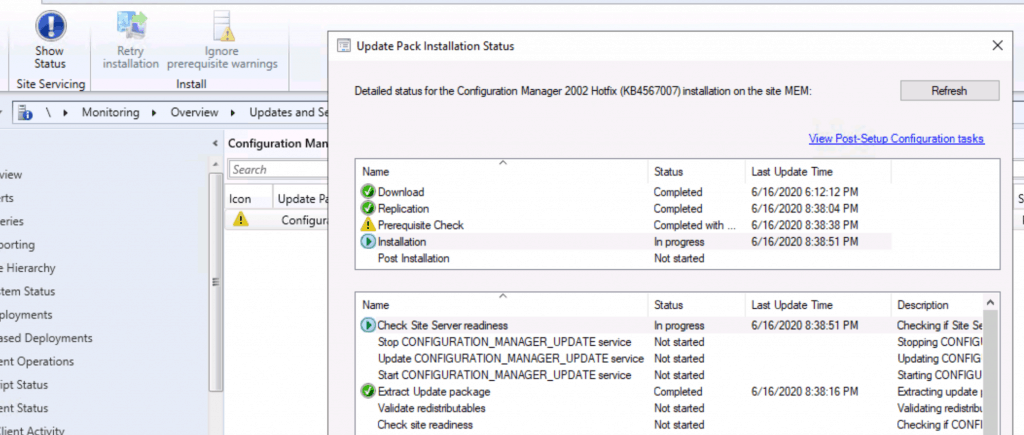
Results
Successfully installed the hotfix KB4567007 to fix PXE Boot Failures Task Sequence Delays with SCCM 2002.

2002 Site Version
After updating KB4567007, the site version was 5.00.8968.1031.
Resources
- SCCM 2002 Installation Step-by-Step Guide | MEMCM | ConfigMgr
- SCCM 2002 Known Issues Bugs Fixes | ConfigMgr
- ConfigMgr 2002 List of New Features Enhancements MEMCM SCCM #SCCM #ConfigMgr #MEMCM
We are on WhatsApp. To get the latest step-by-step guides and news updates, Join our Channel. Click here –HTMD WhatsApp.
Author
Anoop C Nair is Microsoft MVP! He is a Device Management Admin with more than 20 years of experience (calculation done in 2021) in IT. He is a Blogger, Speaker, and Local User Group HTMD Community leader. His primary focus is Device Management technologies like SCCM 2012, Current Branch, and Intune. He writes about ConfigMgr, Windows 11, Windows 10, Azure AD, Microsoft Intune, Windows 365, AVD, etc.




Does this update the client version or boot image , or does it just address the SQL issue
StaffI didn’t check that yet but as per the kB it’s only sql change.
Does it really change the site version to 5.00.8968.1031? We have installed this hotfix successfully, but our site version has not changed.
StaffNo I’m working on post to explain this
@Amit Same issue here for me.
“Updates and Servicing Status” shows “Configuration Manager 2002 Hotfix (KB4567007)” as successfully installed but site version remains at 5.00.8968.1000 when I expected to see 5.00.8968.1031.
StaffYes this is a cosmetic issue as I explained https://www.anoopcnair.com/sccm-2002-site-version-confusion-hotfix-kb4567007-update-configmgr/
Anoop covers site version confusion in this post:
https://www.anoopcnair.com/sccm-2002-site-version-confusion-hotfix-kb4567007-update-configmgr/
Hi Anoop, you are doing great. I am facing this issue after upgrading my SCCM to 2002. After upgrading I got only one hotfix KB4567007 and SCCM MMC, so I have isntalled that also, but it didn’t fix this pxe boot issue. I didn’t get any update in between these two mentioned updates. Can you please help what to do and fix this pxe boot issue.
StaffThis could be some different issue with wds or something. Might be worth a restart of server might help … also check https://forum.howtomanagedevices.com/endpointmanager/osd/pxewds-reinstallation-issue/