






SCCM Client InActive Obsolete Status Using SQL Query | ConfigMgr
Let’s use SQL queries to analyze SCCM Client Inactive Obsolete Status. I keep getting questions about ConfigMgr SQL queries in the HTMD forum.
If you have inactive SCCM clients, adjust the client status settings at the site level. These settings determine when to mark clients as inactive and can be configured to send alerts for low client activity. Afterwards, use the Configuration Manager console to monitor client health and activity.
According to Microsoft, a device is online when connected to its assigned management point and sends regular messages. The client is offline if the management point doesn’t receive notifications for five minutes. A client is active if it has communicated with Configuration Manager in the past seven days and inactive if it hasn’t requested a policy update, sent a heartbeat message, or sent hardware inventory in seven days.
I found a helpful SQL query for identifying ConfigMgr client status based on collections. This query can teach you how to use a CASE statement, declare SCCM collections, and inner join two ConfigMgr views in a SQL query. It’s a great way to learn important SQL query syntaxes that can be useful for working with ConfigMgr and understanding its data sources better.

- Monitor ConfigMgr Client Status from SCCM Console | Online | Offline
- SCCM Application Deployment Status using SQL Query Custom Report
- SCCM Patch Status SQL Query Based on Particular Collection | ConfigMgr
| Index |
|---|
| SQL Query – SCCM Client InActive Obsolete Status |
| Results – SCCM Client InActive Obsolete Status |
SQL Query – SCCM Client InActive Obsolete Status
Let’s find out the SCCM client’s Active, Inactive, and obsolete Status. The following steps will help you create a custom report to determine the status of the active, inactive, and obsolete Configuration Manager clients.
- Open the SQL Management Studio.
- Click on the New Query button.
- Select the CM_MEM database from the drop-down menu.
- MEM is the ConfigMgr site code.
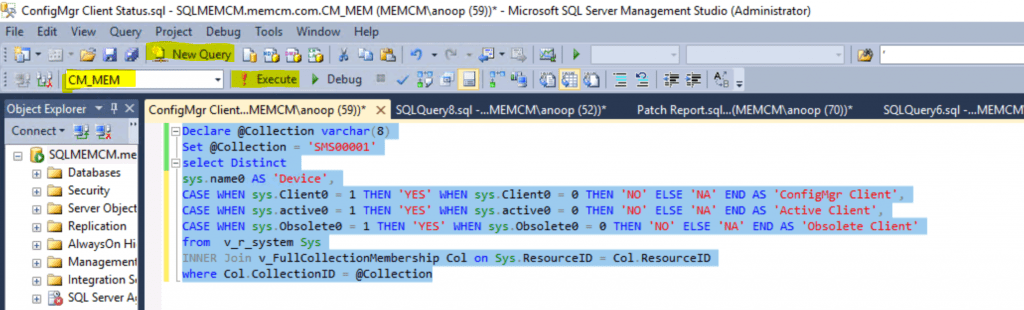
Copy the following SQL query to find the client status.
- Click on the Execute button.
Declare @Collection varchar(8)
Set @Collection = 'SMS00001'
select Distinct
sys.name0 AS 'Device',
CASE WHEN sys.Client0 = 1 THEN 'YES' WHEN sys.Client0 = 0 THEN 'NO' ELSE 'NA' END AS 'ConfigMgr Client',
CASE WHEN sys.active0 = 1 THEN 'YES' WHEN sys.active0 = 0 THEN 'NO' ELSE 'NA' END AS 'Active Client',
CASE WHEN sys.Obsolete0 = 1 THEN 'YES' WHEN sys.Obsolete0 = 0 THEN 'NO' ELSE 'NA' END AS 'Obsolete Client'
from  v_r_system Sys
INNER Join v_FullCollectionMembership Col on Sys.ResourceID = Col.ResourceID
where Col.CollectionID = @Collection
Results – SCCM Client InActive Obsolete Status
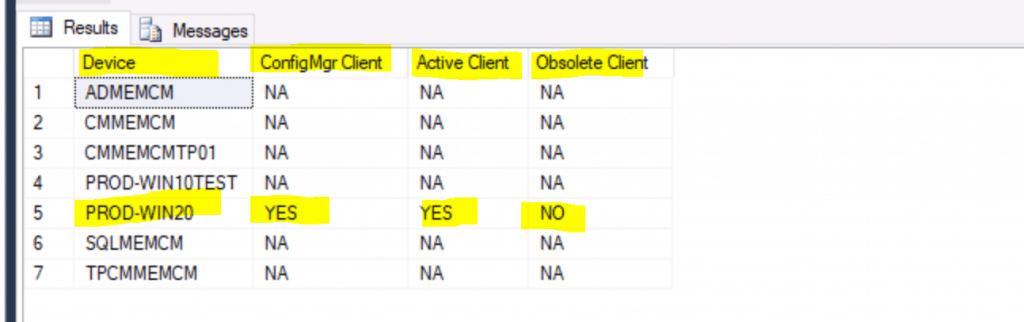
Let’s see the results of the above client status SQL query:
| Device | ConfigMgr Client | Active Client | Obsolete Client |
|---|---|---|---|
| ADMEMCM | NA | NA | NA |
| CMMEMCM | NA | NA | NA |
| CMMEMCMTP01 | NA | NA | NA |
| PROD-WIN10TEST | NA | NA | NA |
| PROD-WIN20 | YES | YES | NO |
| SQLMEMCM | NA | NA | NA |
| TPCMMEMCM | NA | NA | NA |
Resources
- Monitor ConfigMgr Client Status from SCCM Console | Online | Offline
- ConfigMgr Custom Report for Chrome Browser | SCCM | SQL Query
- Creating custom report models for Configuration Manager in SQL Server Reporting Services.
We are on WhatsApp. To get the latest step-by-step guides and news updates, Join our Channel. Click here –HTMD WhatsApp.
Author
Anoop C Nair is Microsoft MVP! He is a Device Management Admin with more than 20 years of experience (calculation done in 2021) in IT. He is a Blogger, Speaker, and Local User Group HTMD Community leader. His primary focus is Device Management technologies like SCCM 2012, Current Branch, and Intune. He writes about ConfigMgr, Windows 11, Windows 10, Azure AD, Microsoft Intune, Windows 365, AVD, etc.




Discussion