






FIX SCCM OSD Machine Domain Join Issue ldap_add_s failed: 0x35 0x216d
Hi, My name is Ankit Shukla. In my first post, let’s discuss FIX SCCM OSD Machine Domain Join Issue ldap_add_s failed: 0x35 0x216d. My Posts will help you find the solution, but if you start following them, you will see the approach we need to follow while troubleshooting issues.
I have worked in SCCM/MECM technology for over seven years. I will share my experience and issues that I have faced in my IT career and post a solution for them.
I was setting up OSD from scratch in the new AD Forest for Windows 10 machines. While imaging machines were using MECM during the testing phase, I faced an issue: After a few successful imaging machines, they failed to join the domain.
A few machines were built successfully with the same task sequence, but it stopped without making any changes to the task sequence.

Troubleshooting ldap_add_s failed: 0x35 0x216d
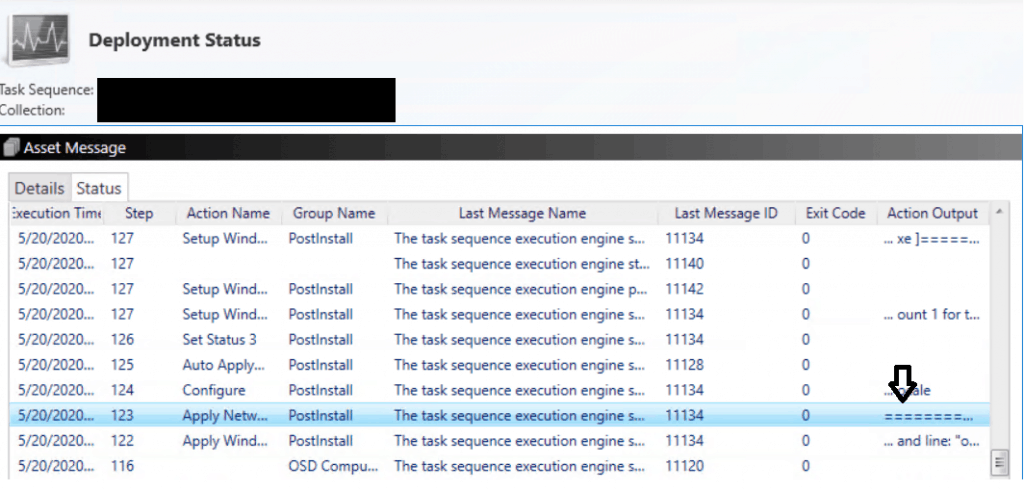
Let’s try to FIX SCCM OSD Machine Domain Join Issue ldap_add_s failed: 0x35 0x216d. The first step was to check the task sequence ‘Apply Network Settings’ Step.
After checking the Deployment status of the Task Sequence from the Monitoring Node, I was guided to Look for the error in NetSetup.log (Path C: WindowsDebugNetSetup.log).
- After Checking NetSetup.log and setuperr.log
- (Path %Systemdrive%\panther\UnattendGC\)
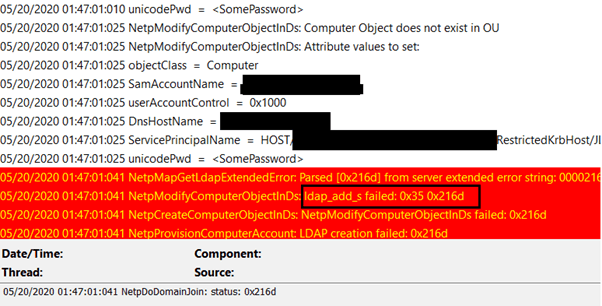
- The error clearly showed that the machine was unable to join the domain.
NetSetup.log
Check the following log file to get more details -> NetSetup.log:
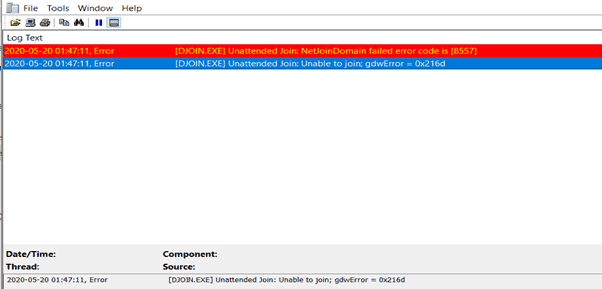
Setuperr.log
You need to check this log to get more details ->Setuperr.log.
Further Analysis – FIX SCCM OSD Machine Domain Join Issue ldap_add_s failed: 0x35 0x216d
The next step was to check the Task Sequence step ‘Apply Network Settings‘ and verify the account used to join the domain. I used an account, not a domain administrator, as it was in the testing phase. I Logged into the problematic machine as a Local Admin defined in TS and tried to manually join the machine in the domain with the same account in Task Sequence. It failed with the same error.
NOTE! Don’t use the Domain Admin account to join Windows 10 and Windows 11 devices into the domain; instead, use the service account delegated permissions to perform the domain join action. Thanks to Martin Wüthrich for highlighting this on the Twitter thread.
I used different accounts manually to join the machine to the domain successfully. During the testing, it was also noticed that ‘domain users’ can join machines to the domain.
Gathering info resulted in the ms-DS-MachineAccountQuota attribute issue on the newly configured AD forest.
By default, a domain user can join ten computer accounts to a domain, which is incorrect from a security perspective. Only Domain Administrators should have access to join machines. As discussed above, the service account should be used to perform the domain join action.
Checking the properties in AD gave me the exact count (Connect to your Active directory via ‘dsa.msc‘ and see below that ‘Advance Features’ is enabled)
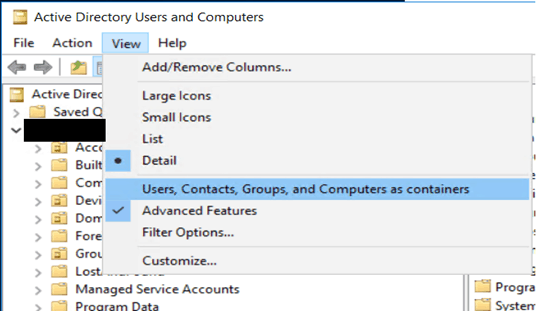
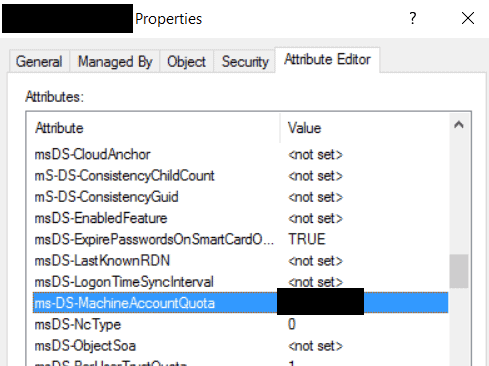
Right-click on the domain’s properties and go to the attribute editor. Please search for the ms-DS-MachineAccountQuota and see its value. The value set here is the number of machines to which each domain user can join a computer account.
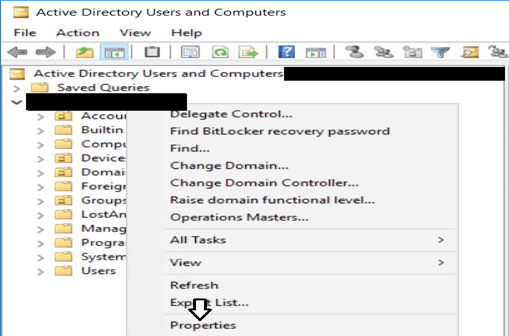
Properties of the computer object
You can also use the PowerShell command to get this detail.
Get-ADObject ((Get-ADDomain).distinguishedname) -Properties ms-DS-MachineAccountQuota

FIX SCCM OSD Machine Domain Join Issue ldap_add_s failed: 0x35 0x216d
Ideally, this value should be ‘0’ from a security point of view, so double-click on the attribute value and change it. A value of 0 means that domain users are not allowed to add computer accounts
That’s it I used the Domain admin account service account with minimum required delegated permissions for domain join in the Task Sequence step and since then machines are getting joined to a domain without issue during imaging, but using a different account guided me to this issue which I think is a valuable outcome of troubleshooting.
Thanks to Martin Wüthrich for highlighting the domain join account scenario on the Twitter thread. He also suggested setting msds-machineaccountquota to 0, which he always configures in a Domain.
Happy Learning!
Resources
- SCCM OSD Troubleshooting using SMSTS Log with Vishal | ConfigMgr
- OSD Known Issues Troubleshooting Guide |SCCM |ConfigMgr
We are on WhatsApp. To get the latest step-by-step guides and news updates, Join our Channel. Click here –HTMD WhatsApp.
Author
Ankit Shukla has worked in IT since 2012, specializing in SCCM/MECM for the last seven years. He has extensive experience in this tool, including migration, infrastructure design, OSD, custom SQL reporting, and client-side troubleshooting. Through his blog posts, he aims to share his knowledge and provide solutions to the issues he has encountered. His primary goal is to reach out to support team members and SCCM admins in organizations, helping them overcome challenges and improve their understanding of the platform.




Perhaps security would be better served to setup a service account with the minimum permissions to join\delete a machine from the domain. Using a domain admin account may cache the credentials of that domain admin account on every machine you build, which at least briefly, (until that accounts password is changed) allow malware bad actors to access or compromise the account and laterally move through the domain machines? A remote possibility but the concept of “minimum privilege” applied here may be the safest approach.
StaffWe are still in configuring stage and as a testing purpose a dedicated domain join account was created, but you are right a service account with least permissions is the best practice from security perspective.
Welldone mate..very knowledgeable post.
It itself answers many doubts WRT the implementation.
Cheers!!!
StaffThanks Harshit