






SCCM Client Version Dashboard SQL Query Custom Report
Find more details on SCCM Client Version Dashboard SQL Query Custom Report. Let’s see how to create a custom SCCM Client Version Dashboard using a report builder and SQL query.
Since the release of the Configuration Manager (aka SCCM) Current Branch, admins must analyze and keep their environments up to date with the latest client and server versions. No registration or email ID is required to access this query. Here you go!
If we manage a large environment, upgrading clients can be a headache to monitor. There is always the ‘Automatic Client Upgrade’ option, but depending on your infrastructure, many follow the instructions to upgrade the client in a controlled manner. More details here.
How can you track the progress of different client versions in your environment? Share an SQL Query to fetch these details, and then subscribe to your mailbox to track the progress.

- Manage Windows 11 Readiness Dashboard using SCCM
- SCCM 2403 New Key Features and Improvements
- New Features in SCCM Technical Preview 2401
You can check the latest version of the SCCM client from the following blog post. More Details: SCCM Versions Build Numbers Client.
| Index |
|---|
| SQL Query SCCM Client Version Dashboard |
| Results – SQL Query SCCM Client Version Dashboard |
| Create a Report Subscription – SCCM Client Version Dashboard |
| Identify SCCM Client Issues |
SQL Query SCCM Client Version Dashboard
This SQL Query will help you use the ‘when’ statement and declare it according to your environment. I have included specific client versions in this query; you can add others according to your environment.
NOTE! – To check the client versions, follow SCCM Client Versions.
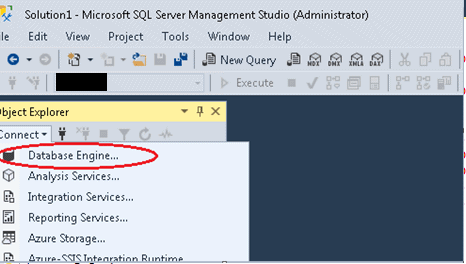
Open the SQL Management Studio.
- Connect to your Database Engine.
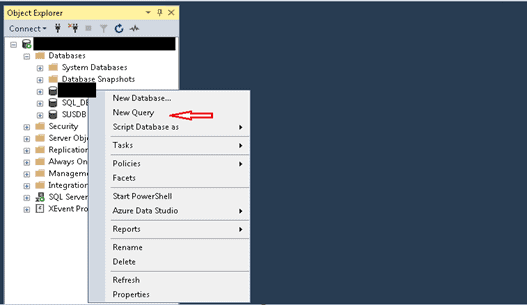
Right-click on your database and click on ‘New Query.’
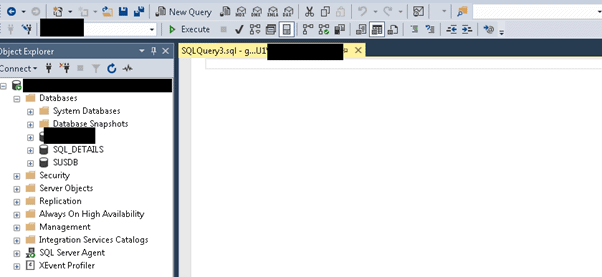
You will see a new page where you can write an SQL query.
Copy the SQL query below to find the status of the client version.
select sys.Client_Version0, "CM Name"=
case sys.Client_Version0
when '5.00.8325.1000' then 'CM1511 without hotfix (5.00.8325.1000)'
when '5.00.8355.1306' then 'CM1602 (5.00.8355.1306)'
when '5.00.8355.1000' then 'CM1602 without hotfix (5.00.8355.1000)'
when '5.00.8498.1008' then 'CM1702 (5.00.8498.1008)'
when '5.00.8577.1005' then 'CM1710 (5.00.8577.1005)'
when '5.00.8692.1509' then 'CM1806 with hotfix (5.00.8692.1509)'
when '5.00.8692.1008' then 'CM1806 without hotfix (5.00.8692.1008)'
when '5.00.8740.1012' then 'CM1810 without Hotfix (5.00.8740.1012)'
when '5.00.8740.1042' then 'CM1810 with Hotfix (5.00.8740.1042)'
when '5.00.8853.1020' then 'CM1906 with Hotfix (5.00.8853.1020)'
when '5.00.8913.1012' then 'CM1910 (5.00.8913.1012)'
when '5.00.8968.1021' then 'CM2002 with Hotfix (5.00.8968.1021)'
when '5.00.9012.1015' then 'CM2006 (5.00.9012.1015)'
when '5.00.9040.1010' then 'CM2010 (5.00.9040.1010)'
when '5.00.9049.1008' then 'CM2103 (5.00.9049.1008)'
when '5.00.9058.1012' then 'CM2107 (5.00.9058.1012)'
when '5.00.9058.1047' then 'CM2107 with Hotfix (5.00.9058.1047)'
when '5.00.9068.1005' then 'CM2111 (5.00.9068.1005)'
else 'Others(non-Clients)'
End,count(*) [Total]
from v_R_System sys
where sys.Name0 not like 'unknown' and
sys.Client_Version0 not like '' and sys.Client_Version0 not like '0.0%'
group by sys.Client_Version0
order by [Total] desc
Click on Execute to get the results.
NOTE! – Feel free to add more components to the SCCM Client Version Dashboard dashboard. Let me know in the comments if you have any specific requirements.
Results – SQL Query SCCM Client Version Dashboard
The following results provide details of the SCCM client version. This SQL Query-based SCCM Client Version Dashboard helps track client upgrade scenarios for your SCCM environment.
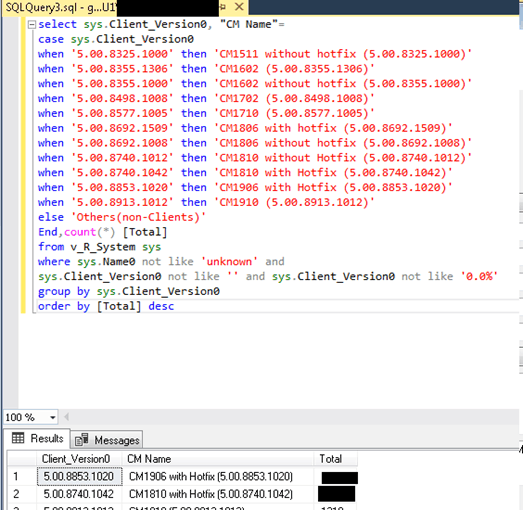
Additional Tips—Follow my post Here on how to create this using the report builder. Just copy and paste this query and get the desired results. Give it a name like ‘SCCM Client Upgrade Tracker Dashboard’.
Create a Report Subscription– SCCM Client Version Dashboard
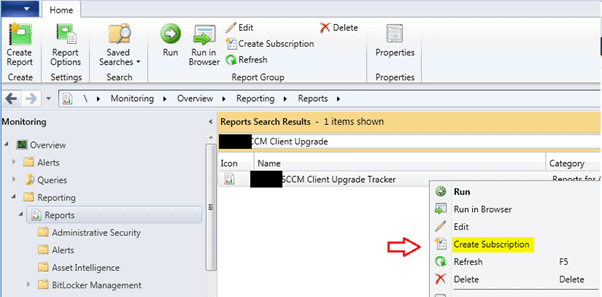
Once you have created this report, right-click on this report and click ‘create subscription’.
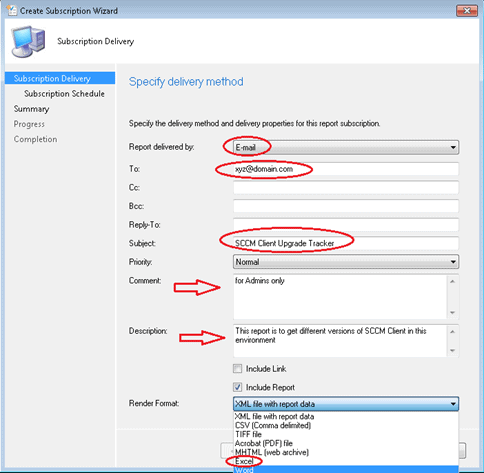
Fill in the details accordingly, try different options as I have chosen email, provided a name to the report, recipient’s email address, and description, and selected ‘Include Report‘ as an Excel file and click on next.
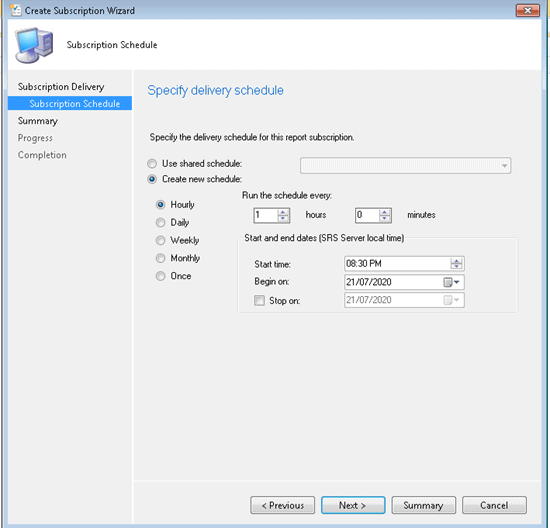
You can choose the schedule at which time and interval you want the report, select that, and then next>>next>>next, and done. That’s it!
Configure a report server for email delivery: Configure report server email delivery.
Identify SCCM Client Issues
You have identified the unhealthy clients, and now it’s time to identify the issues. I recommend segregating or grouping unhealthy clients based on issues. This method will help you fix the problems systematically.
I have listed the most common issues I found in different environments. I recommend creating collections for the following issue and adding devices to the respective collections depending on the issue. These collections would help to track the client issues in a better way.
It’s not easy to identify and segregate the clients according to their issues. However, I recommend using a client status node and SCCM SQL reports to segregate the unhealthy SCCM clients. I’m sure SCCM reports will help you find and fix SCCM client health issues.
Resources
- https://docs.microsoft.com/en-us/sql/sql-server/install/configure-a-report-server-for-e-mail-delivery-ssrs-configuration-manager?view=sql-server-2014
- https://www.anoopcnair.com/sccm-version-numbers-build-number-client/
We are on WhatsApp. To get the latest step-by-step guides and news updates, Join our Channel. Click here –HTMD WhatsApp.
Author
Ankit Shukla, an IT professional with over seven years of experience, has worked on SCCM/MECM since 2012. During this time, he has extensively dealt with various aspects of the tool, such as migration, infrastructure designing, OSD, custom SQL reporting, and client-side troubleshooting. Ankit’s blog posts reflect his hands-on experience addressing issues and providing practical solutions. The primary aim of his posts is to cater to the audience, comprised of support team members and SCCM admins in organizations.




Discussion