






Understanding TCP Reverse Connect Flow for AVD using Event Logs
You can Understand the TCP Reverse Connect Flow for AVD using Event Logs. Let’s quickly review the WVD event logs using TCP Reverse Connect technologies. You can also check this internal process of RDP connection through the secure channel from Windows 10 devices.
In the previous post, I have a WVD Troubleshooting Options Tips Tricks – Windows Virtual Desktop. There could be many ways to perform WVD troubleshooting as per Microsoft docs.
I’m going to share my experience in this blog post. I was analysing TCP Reverse connect technology used in WVD using the event logs (Microsoft-Windows-RemoteDesktopServices-RdpCoreCDV/Operational).
Reverse TCP (Transmission Control Protocol) is a form of network communication where a connection is initiated from the target system to the attacker’s system instead of vice versa.

| Index |
|---|
| WVD TCP Reverse Connect Technology |
| WVD Related Events Logs Event ID 229 |
| Adding Additional Headers |
| Contacting WVD RD Gateway |
| Connecting to the Nearest Azure Backbone |
| TCP Reverse Connect Completed |
WVD TCP Reverse Connect Technology
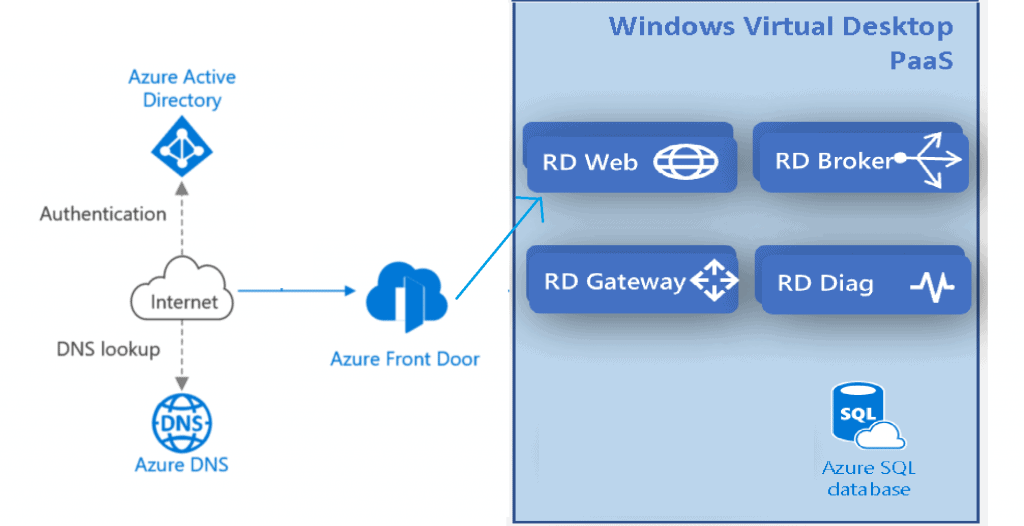
For the WVD TCP reverse connect technology, we don’t need to open any inbound ports, even the default RDP port, TCP/3389. Instead, an agent creates an outbound connection using TCP/443 into the WVD management plane. Azure is your reverse proxy for RDP traffic.
The following diagram explains the connection details. It might help you understand the WVD event log flow.
WVD Related Events Logs Event ID 229
All the following events are taken from Microsoft-Windows-RemoteDesktopServices-RdpCoreCDV/Operational.
CUM RDP Listener Reverse Connect Tcp Udp
‘Got connection for named pipe’ in CUMRDPListenerReverseConnectTcpUdp::OnNamedPipeConnectionCompleted at 5172 err=[0x0]
Reverse TCP Connect Context
‘ReverseTCPConnectContext::HandleRequest’ in CUMRDPListenerReverseConnectTcpUdp::ReverseTCPConnectContext::HandleRequest at 4970 err=[0x0]
Adding Additional Headers
Adding an extra header to secure authentication.
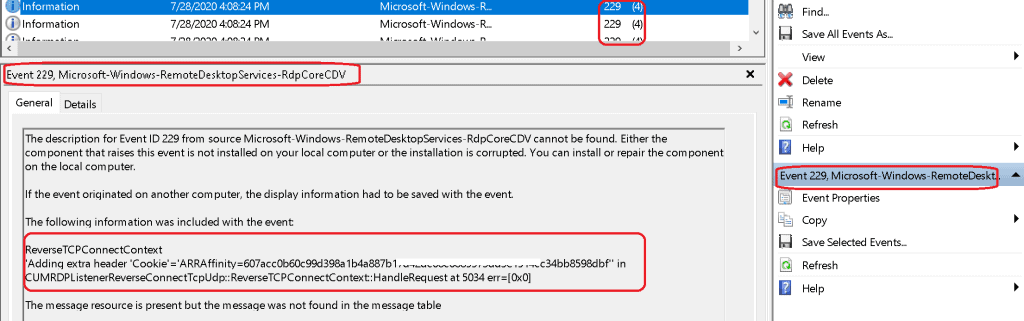
‘Adding extra header ‘Cookie’=’ARRAffinity=f0ae4aa2de7044dc11cff22d08a382782347f334ad1816b1aa6f1a6e6d72” in CUMRDPListenerReverseConnectTcpUdp::ReverseTCPConnectContext::HandleRequest at 5034 err=[0x0]
Adding extra header ‘ms-wvd-activity-hint’
‘Adding extra header ‘ms-wvd-activity-hint’=’ms-wvd-hp:99c34ceb-9ed1-41a2-c9ea-08d86484831” in CUMRDPListenerReverseConnectTcpUdp::ReverseTCPConnectContext::HandleRequest at 5034 err=[0x0]
Adding extra header ‘X-MS-User-Agent’=’com.microsoft.wvd.agent to get authenticated with WVD RD gateway.
‘Adding extra header ‘X-MS-User-Agent’=’com.microsoft.wvd.agent/1.0.2116.3600” in CUMRDPListenerReverseConnectTcpUdp::ReverseTCPConnectContext::HandleRequest at 5034 err=[0x0]
Contacting WVD RD Gateway
Contacting the nearest WVD RD Gateway in Singapore https://rdgateway-c101-sin-r1.wvd.microsoft.com/
‘Starting Reverse Connect GUID=’b13d33bf-e7b1-42u3-b347-f80a7ef98765′ URI=’https://rdgateway-c101-sin-r1.wvd.microsoft.com/api/v2/Connections/reverse/b16dh33bf-e7b1-42e0-b347-f80a7ef12745?RDmiGatewayToken=CfDJ8CK-Jasjdajdhasjkdhby7-g3b2okHpyasdkjuS1_NasdkiJG
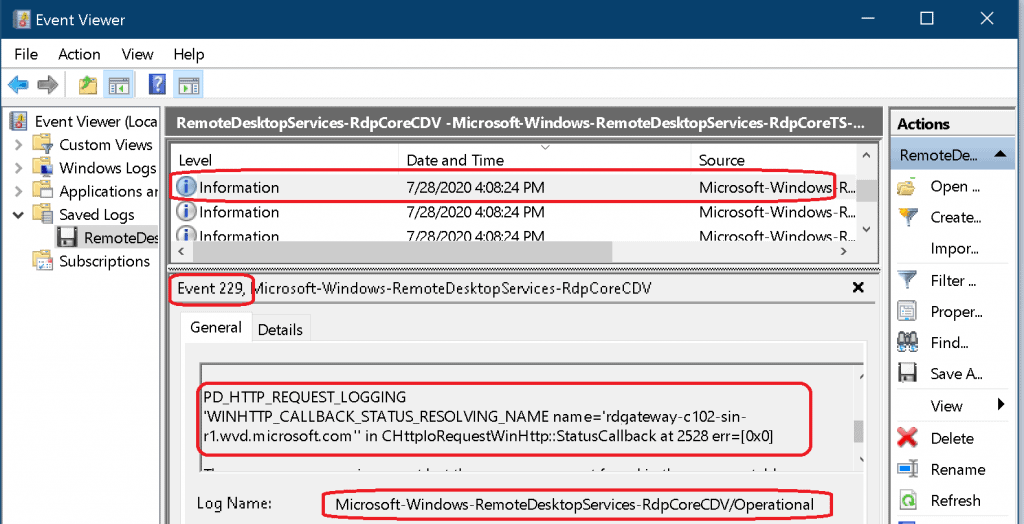
Resolving the Name of WVD RD Gateway – DNS?
‘WINHTTP_CALLBACK_STATUS_RESOLVING_NAME name=’rdgateway-c101-sin-r1.wvd.microsoft.com” in CHttpIoRequestWinHttp::StatusCallback at 2528 err=[0x0]
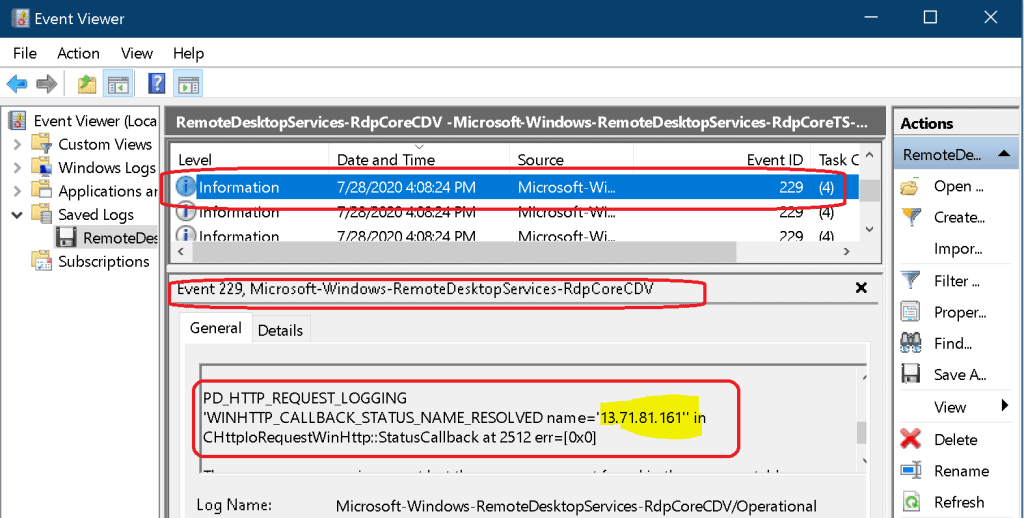
Resolved the Name of WVD RD Gateway to IP
‘WINHTTP_CALLBACK_STATUS_NAME_RESOLVED name=’104.211.242.104′‘ in CHttpIoRequestWinHttp::StatusCallback at 2512 err=[0x0]
Connecting to the Nearest Azure Backbone
Now Connecting to Nearest Azure Backbone (?) to Reach the VM – From south India it’s reaching out Azure Chennai Region?
‘WINHTTP_CALLBACK_STATUS_CONNECTING_TO_SERVER IP=’104.211.242.104′‘ in CHttpIoRequestWinHttp::StatusCallback at 2520 err=[0x0]
‘WINHTTP_CALLBACK_STATUS_CONNECTED_TO_SERVER IP=’104.211.242.104” in CHttpIoRequestWinHttp::StatusCallback at 2516 err=[0x0]
TCP Reverse Connect Completed
Reverse connect succeeded – TCP reverse connect completed for WVD completed.
‘Closing Request Handle=0x6e559840‘ in CHttpIoRequestWinHttp::WebSocketCompleteUpgrade at 1972 err=[0x0]
‘Sending reply to WVD Agent. Reverse connect succeeded.‘ in CUMRDPListenerReverseConnectTcpUdp::ReverseTCPConnectContext::OnConnectionCompleted at 5106 err=[0x0]
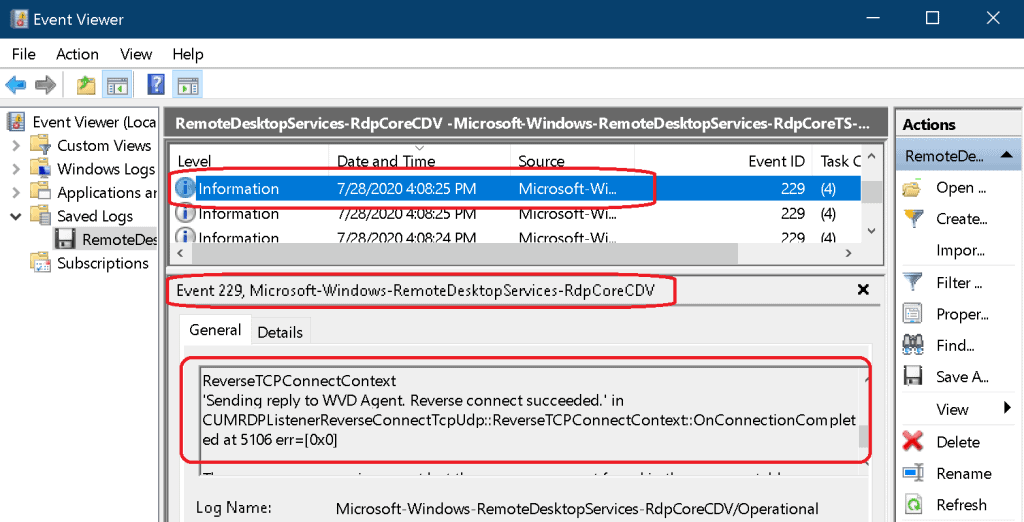
‘Reverse connection (websocket) successfully completed‘ in CUMRDPListenerReverseConnectTcpUdp::OnConnectionCompleted at 5257 err=[0x0]
‘OnConnectionCompleted(TCP reverse connect completed)’ in CUMRDPListenerReverseConnectTcpUdp::OnConnectionCompleted at 5338 err=[0x0]
‘Set RDPTransportMode to TCP+UDP.‘ in CUMRDPListenerReverseConnectTcpUdp::OnConnectionCompleted at 5382 err=[0x0]
ReverseTCPConnectContext
‘Sending reply to WVD Agent. Reverse connect succeeded.’ in CUMRDPListenerReverseConnectTcpUdp::ReverseTCPConnectContext::OnConnectionCompleted at 5106 err=[0x0]
CUMRDPListenerReverseConnectTcpUdp
‘UDP port number for SxS stack not set. UDP listener won’t be enabled.’ in CUMRDPListenerReverseConnectTcpUdp::GetUdpPort at 4703 err=[0x0]
CUMRDPListenerReverseConnectTcpUdp
‘Reverse connection (websocket) successfully completed‘ in CUMRDPListenerReverseConnectTcpUdp::OnConnectionCompleted at 5257 err=[0x0]

Resources
- WVD Troubleshooting Options Tips Tricks – Windows Virtual Desktop
- WVD Architecture Changes for v2 | New Portal Admin Experience
We are on WhatsApp. To get the latest step-by-step guides and news updates, Join our Channel. Click here –HTMD WhatsApp.
Author
Anoop C Nair is Microsoft MVP! He is a Device Management Admin with more than 20 years of experience (calculation done in 2021) in IT. He is a Blogger, Speaker, and Local User Group HTMD Community leader. His primary focus is Device Management technologies like SCCM 2012, Current Branch, and Intune. He writes about ConfigMgr, Windows 11, Windows 10, Azure AD, Microsoft Intune, Windows 365, AVD, etc.




Discussion