






Office 365 Apps End of Support Dates | Version vs Build Number
Let’s check the Office 365 Supported Versions at a given time. This post lets you quickly look at Office 365 Apps’ End-of-Support Dates. The Microsoft 365 apps (a.k.a. Office 365 apps) version details can help build the SQL/CMPivot queries to check for out-of-support devices.
The version and build numbers provided in this documentation are relevant to Microsoft 365 Apps for enterprise, Microsoft 365 Apps for business, and the subscription-based versions of the desktop applications for Project and Visio.
Microsoft recently changed the name of Office 365 apps to Microsoft 365 apps. In this post, I will use a mix of both names.
Before discussing the supported versions of Office 365 apps, let’s review the details of support scenarios and channels.

Microsoft 365 Apps Updates
Two types of updates are available for Office 365, similar to Windows 10 update cycles.
- Feature Updates—The Microsoft 365 Apps Feature updates are a significant upgrade to the product, with new features and improvements.
- Quality Updates—The Microsoft 365 Apps quality updates are monthly security (2nd Tuesday) and other quality updates.
- Microsoft 365 Apps CDN Base URL for Office 365 Pro Plus
- How to Change Office 365 Update Channel with SCCM Run Script.
- Deploy Office 365 ProPlus Microsoft 365 Apps using SCCM
- Deploy Microsoft 365 Apps MS Teams Using Intune MEM
Channels
Four (4) update channels are available for Office 365 apps. These channels mainly define the frequency of feature updates. All the update channels also provide quality updates.
- Current Channel
- Monthly Enterprise Channel
- Semi-Annual Enterprise Channel (Preview)
- Semi-Annual Enterprise Channel
Frequency of Channel Update Schedule
Let’s see what the channel update frequency is. The Semi-Annual Enterprise Channel and Semi-Annual Enterprise Channel (preview) update frequency is every six months.
| SR | Channel Name | Frequency of Release |
|---|---|---|
| 1 | Current Channel | No Set Schedule (Released whenever ready) |
| 2 | Monthly Enterprise Channel | Every Month |
| 3 | Semi-Annual Enterprise Channel | Every 6 Months (Jan & July) |
Monthly and Semi-Annual enterprise channels are updated on the second Tuesday of the release month!
NOTE: The semi-annual Enterprise Channel (preview) is released in March and September of every year.
Support Period for Update Channels
Now, let’s check the support period for updated channels. The table below provides more information about the support period in months.
| SR | Channel Name | Support Period |
|---|---|---|
| 1 | Current Channel | Until the New Version is Released |
| 2 | Until the New Version is Released | 2 Months |
| 3 | Semi-Annual Enterprise Channel (Preview) | 6 Months |
| 4 | Semi-Annual Enterprise Channel | 14 Months |
Version vs Build Numbers
I find the version and build numbers of Microsoft 365 apps (a.k.a. Office 365 apps) confusing. Let’s try to understand them before checking the supported versions.
Let’s try to check the details of the Windows 10 version. In another blog post, I explained Windows 10 Major Minor Build Rev | Where Can I Get Details.
Office 365 App build number of 2008 = 16.0.13127.20408. The 2008 version of the Office 365 app is not supported anymore.
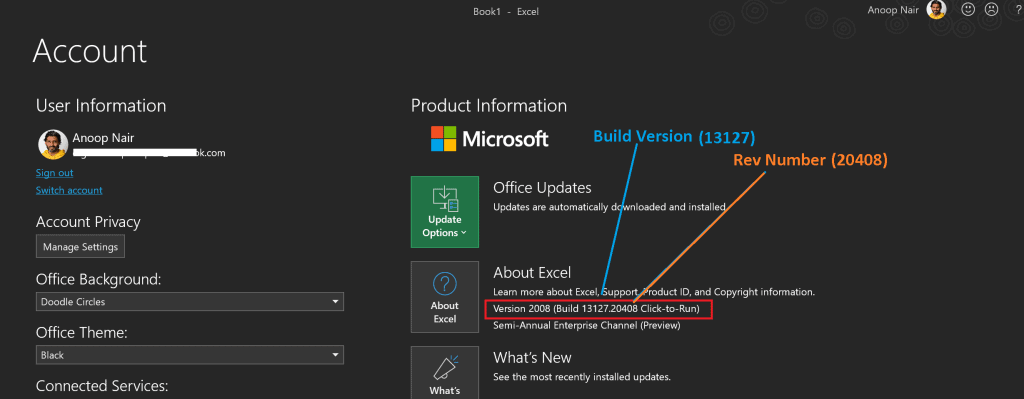
Office 365 Apps major.minor.build.rev = 16.0.13127.20408
- Major – 16
- Minor -0
- Build 13127 (build number for version 2008)
- Rev – 20408
NOTE! – As per my understanding, the rev version is updated with quality updates, and the build version is updated with every feature update.
Supported Versions
Microsoft 365 Apps support is based on the version numbers. It’s also important to note that each version number has a unique build number. The build number can help you create a report listing unsupported devices.
For example, Build 13127 (build number for version 2008).
| SR | Channel Name | Version (Build) | End of Support |
|---|---|---|---|
| 1 | Current Channel | 2008 (13127) | Until Version 2009 is released |
| 2 | Monthly Enterprise Channel | 2007 (13029) | 10th Nov 2020 |
| 3 | Monthly Enterprise Channel | 2006 (13001) | 13th Oct 2020 |
| 4 | Semi-Annual Enterprise Channel (Preview) | 2008 (13127) | 9th Mar 2021 |
| 5 | Semi-Annual Enterprise Channel | 2002 (12527) | 14th Sep 2021 |
| 6 | Semi-Annual Enterprise Channel | 1908 (11929) | 9th Mar 2021 |
Resources
- Update History of Office 365 Apps – https://docs.microsoft.com/en-us/officeupdates/update-history-microsoft365-apps-by-date
- ConfigMgr CMPivot Query for Out-of-Support Office 365 ProPlus
- SCCM Out of Support Versions of Office 365 Semi-Annual Channel
We are on WhatsApp. To get the latest step-by-step guides and news updates, Join our Channel. Click here –HTMD WhatsApp.
Author
Anoop C Nair is Microsoft MVP! He is a Device Management Admin with more than 20 years of experience (calculation done in 2021) in IT. He is a Blogger, Speaker, and Local User Group HTMD Community leader. His primary focus is Device Management technologies like SCCM 2012, Current Branch, and Intune. He writes about ConfigMgr, Windows 11, Windows 10, Azure AD, Microsoft Intune, Windows 365, AVD, etc.




This needs reviewing! I think there’s at least one more channel: Current Channel (Preview).
Thanks!