






FIX SCCM Client WMI Issues | ConfigMgr | WMImgmt Errors
Let me share my years of experience with FIX SCCM Client WMI Issues. Most Configuration Manager client-related issues can be fixed automatically using the CCMEval Tool. However, some other issues need manual intervention.
WMI is an essential component in SCCM as it facilitates the connection between the client and the server. It also provides the capability to manage Windows PCs remotely using scripts or applications that interact with WMI. Additionally, SCCM relies on the Win32_Service class to effectively monitor the services installed on your clients.
The Windows Management Instrumentation Command-line (WMIC) utility is a valuable command-line interface for effectively managing data and operations on a Windows computer through the Windows Management Instrumentation (WMI) framework. The WMIC enables users to interact with WMI on Windows, offering extensive capabilities for managing and troubleshooting Windows systems.
Sometimes, the SCCM client components may be corrupt or damaged, leading to Software Center malfunction. In such cases, you can initiate the Configuration Manager client repair process to address the issue. Alternatively, you can utilize the “ccmrepair.exe” command to repair the damaged components and restore the proper functioning of the Software Center.

| Index |
|---|
| Description: FIX SCCM Client WMI Issues |
| Scope your Issue: FIX SCCM Client WMI Issues |
| Components need to check |
| Fix SCCM Client WMI Issues |
- Windows 10 WMI Explorer Details for Configuration Manager – Intune
- SCCM Troubleshooting Steps for Newbies with Flowcharts
Description: FIX SCCM Client WMI Issues
Regarding troubleshooting related to the SCCM Agent (Anything and everything associated with the SCCM Client, i.e., Agent Installation, Patching, SCEP, etc.), we have tried all the available options related to the error we see in the logs. Then we reach one point where we raise our hands (at least, to be honest, I do) to seek help from our HTMD forum in search of answers.
Important: HTMD Forum—99 times out of 100, we get solutions, workarounds, or guidance that point us in the right direction.
In this article, we won’t discuss any generic error code defined in the product, i.e
- ID 2: The system cannot find the file specified
- ID 5: Access Denied
- ID 7: Reboot Required
However, we will learn some steps explained by MS that should be checked at the client’s end to ensure things are in place.
You might be wondering why there is already one intense dive article and a flow chart about the same https://www.anoopcnair.com/sccm-troubleshooting-steps/ explained briefly by Anoop, so I am writing another one.
As I mentioned, we will not read about error codes and fixes. In general, what do I need to check at the client end to ensure the issue is not caused by components required by the SCCM Agent to function properly from an OS perspective?
Scope your Issue: FIX SCCM Client WMI Issues
Before getting into actual troubleshooting steps, it’s important to emphasize that while it may seem obvious, the better you understand the problem you’re experiencing, the quicker and easier it will be for you to fix it.
Whether you’re tasked with fixing a problem that you are experiencing yourself or a problem reported to you by someone in your organization, it is recommended that you take a moment and answer the following questions:
- What precisely isn’t working and/or what is your goal?
- What is the frequency or pattern of the issue? Is the problem still happening?
- How did you become aware that the problem exists?
- Has this ever worked? If so, when did it stop? Was anything changed in the environment right before it stopped working?
- What percentage of clients are affected?
- What has been done already (if anything) to try to fix it?
- Know the exact version of the client and the version of the server. Are these systems up to date?
- What do affected clients have in common (e.g. same subnet, AD site, domain, physical location, site, site system, etc.)?
Important: If troubleshooting issues related to WMI on Windows Server OS, please refrain from recreating the repository.
Components need to check
I will start this with WMI because WMI causes most issues that are not easily solved.
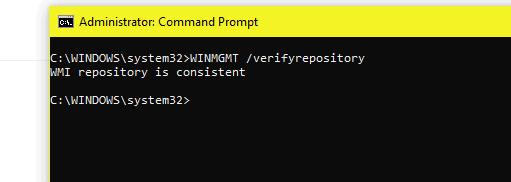
- Is WMI Consistent? Try WINMGMT /verifyrepository?
- WMI Repository is consistent
Does Reinstall Configmgr Client fix the problem?
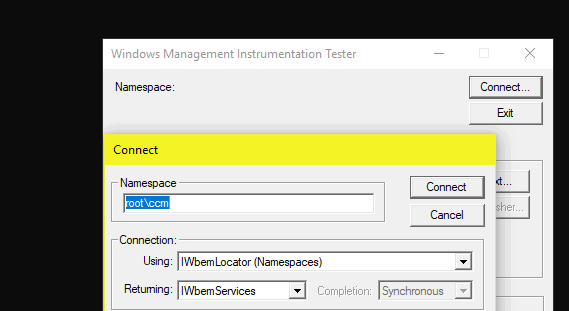
Do we get any message when we try manually connecting to WMI?
- Open WBEMTEST
- Connect Root\ccm

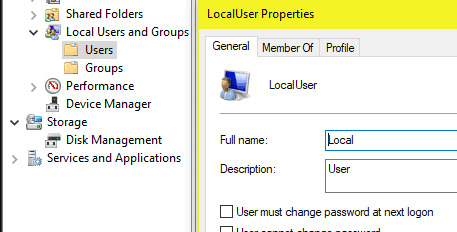
What happens if we make use of a local admin as a test?
Important: If troubleshooting issues related to WMI on Windows Server OS, please refrain from recreating the repository.
Next is permissions: Verify if the below permissions are intact.
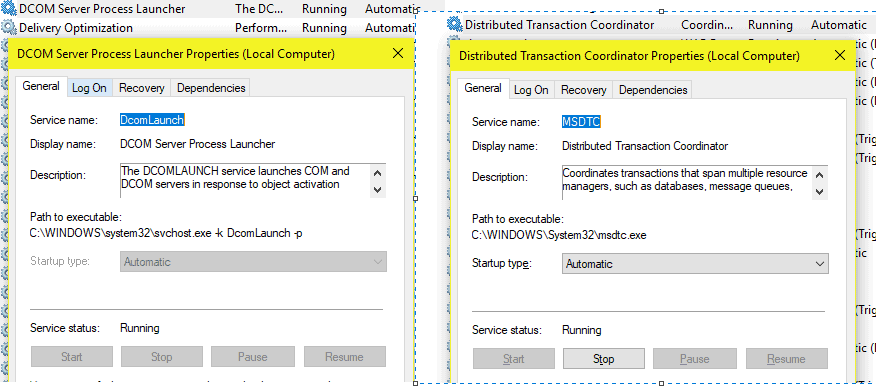
Verify that the DCOM Server Process Launcher and Distributed Transaction Coordinator services have been started.
Fix SCCM Client WMI Issues
How to FIX SCCM Client WMI Issues?
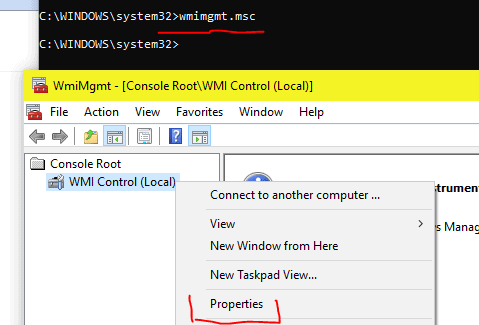
- Go to WMImgmt.msc > WMIcontrol (local), right-click and select properties.
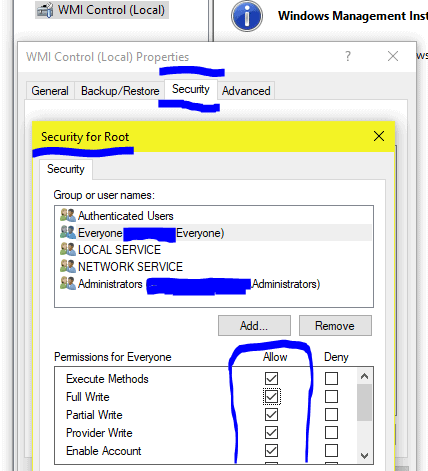
- Select the Security tab and check if the user “everyone” has full permission for the Root and CCM folders.
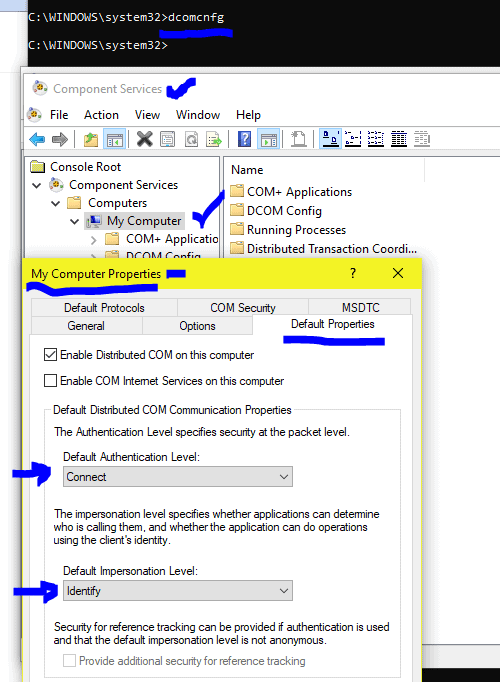
- Go to “dcomcnfg” from CMD and expand “Component Services“> Computers > My computer.
- Right-click My Computer and select the properties tab.
- In the Properties Window, select the “Default Properties” tab, check Enable Distributed COM on this computer, and set the default authentication level to “connect” and the default impersonation level to “identity.”
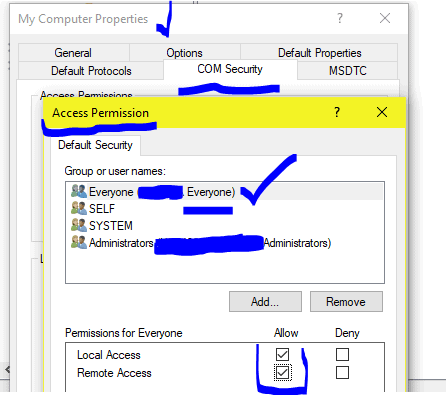
Click on the COM security tab in the same window. In the Access permissions box, select Edit limits and give full permissions to the user “everyone” if they haven’t been given already.
The same needs to be done in the Edit default tab. In the Launch and Activation Permission box, user everyone should also be given full permission.
Note: None of these checks are required to be in order.
Disclaimer: The information provided on the site is for general informational purposes only. All information on the site is provided in good faith, however, we make no representation or warranty of any kind, express or implied regarding the accuracy, adequacy, validity, reliability, availability, or completeness of any information on the website.
Resources
- SCCM Logs and Quick Tips to Read Logs
- FIX Software Center Crash Error SCNotification Has Stopped Working| SCCM | ConfigMgr
- Install SCCM Client Manually Using Command Line
- How to Build Configuration Manager Technical Preview LAB |SCCM 2002.2
Author
Deepak Rai is a Technical Lead with over 14 years of experience in IT. He specializes in SCCM, Intune, and Azure. Throughout his career, he has worked on various platforms such as Active Directory, Exchange, Veritas NETBACKUP, Symantec Backup Exec, NDMP devices like Netapp, EMC Data Domain, Quantum using Backup Exec 2010 and 2012, and HP StorageWorks 4048 MSL G3. He also has experience in data deduplication-related troubleshooting. Ultimately, he returned to his roots as an IT Engineer focusing on SCCM technology.




Excellent article, thank you!
StaffGlad you liked. Thanks a lot.