






How to Install Configure Integrate SolarWinds Patch Manager
How to Install Configure Integrate SolarWinds Patch Manager. In this post, I will cover the installation and configuration of SolarWinds Patch Manager if you’re specifically looking for the best solution for 3rd party application patching.
How can we patch third-party applications without much headache? The following post would be helpful: How to Tackle Your Java Vulnerabilities with the Help of SolarWinds Patch Manager.
1. Download the trial version of SolarWinds Patch Manager from here. How do you install, configure, and integrate SolarWinds Patch Manager?
2. Another advantage of the SolarWinds patch manager is that it can be installed on your desktop. However, please note that Solarwinds doesn’t support the patch manager web console on the same server as a WSUS Server. The installation process is very straightforward. I’ve selected express setup. This installs all programs and features, including the patch manager server, console, and web console.
Table of Contents
How to Install, Configure, and Integrate SolarWinds Patch Manager
The following are the prerequisites required for successfully installing SolarWinds Patch Manager. The patch manager installer will automatically take care of all the downloads and installations of prerequisites—there is NO need to download prerequisites separately and install them.
(a) WSUS Console (b) Update KB2734608 for WSUS 3.0 SP2 (c) SQL Server Express 2008 R2 SP1 (d) SQL server 2012 System CLR Types (e) SQL Server 2012 Management Objects
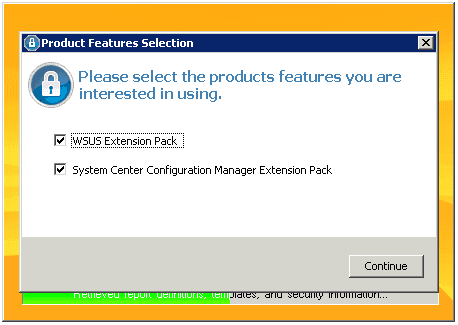
3. SolarWinds Patch Manager setup will take 15-20 minutes, depending on your internet connectivity, as it requires downloading prerequisites and installation. Once you launch the patch, the manager will ask you to select the product features you want to use: WSUS Extension Pack and System Center Configuration Manager Extension Pack. This configuration will automatically integrate the patch manager with SCCM and WSUS.
- How to Setup SCCM ConfigMgr Co-Management Video Tutorials
- Learn How to Connect Data from SCOM Azure Nagios SolarWinds ServiceNow
- SCOM 2025 is here with the Latest System Center
- Monitoring Folders Files with SCOM OpsMgr
- How to Create Nested Azure AD Dynamic Groups
- SCCM Management Pack – How to Fine Tune SCOM Alerts
4. The SolarWinds patch manager allows you to select the domains or workgroups to manage. If the domains or workgroups are not listed, you can add them manually using the add button at the bottom of the screen.
On the next screen, you can provide the ConfigMgr site server details to register the site server in the SolarWinds patch Manager. After that, you must give the WSUS server details for WSUS integration. The next screen will ask you to create a patch management group, a virtual or logical group created for collection-managed devices. The following screenshot will tell you about the three steps covered above.
5. The following wizard will help configure a third-party update pack. This service will enable automated synchronization of third-party catalogs and their respective updates and software packages. It would require an internet connection. This sync process will connect to the SolarWinds website to retrieve the list of available catalogs and their respective vendors and products.
The following vendor product information was discovered in my sync process: Adobe Systems Acrobat 11 Catalog, Hewlett-Packard Client Updates Catalog, Hewlett-Packard Server Updates Catalog, Dell Server Updates Catalog, Dell Business Client Update Catalog, Adobe Systems Reader 10 Catalog, Adobe Systems Acrobat 10 Catalog, SolarWinds Update (Notification Only) Catalog, and Adobe Systems Reader 11 Catalog.
Please select all the third-party products you want to sync automatically and import them to Solarwinds Patch Manager. The Next wizard will allow you to select the Sync schedule for the latest updates. There are more useful options, like removing updates older than 60 days, etc.
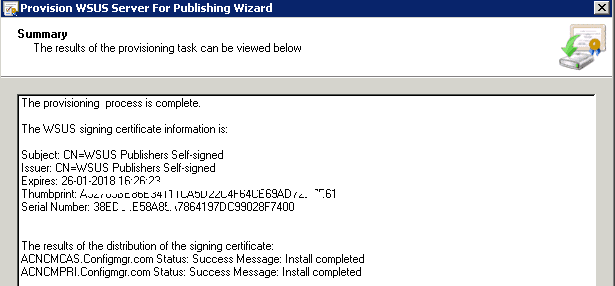
The next step is to provide the WSUS server to publish the packages. The signing certificate will also be published as required servers in the hierarchy. How to Install, Configure, and Integrate SolarWinds Patch Manager.
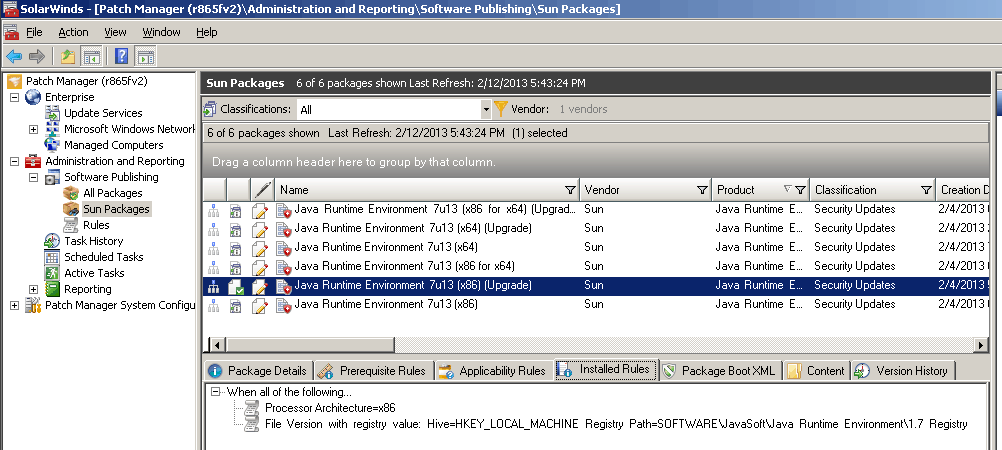
6. As mentioned in the initial post, I’ve selected Sun Java updates. The following screenshot shows the packages available for Sun Java updates. How to Install, Configure, and Integrate SolarWinds Patch Manager.
| Name |
|---|
| Java Runtime Environment 7u13 upgrade |
Resources
We are on WhatsApp now. To get the latest step-by-step guides, news, and updates, Join our Channel. Click here – HTMD WhatsApp
Author
Anoop C Nair is Microsoft MVP from 2015 onwards for consecutive 10 years! He is a Workplace Solution Architect with more than 22+ years of experience in Workplace technologies. He is a Blogger, Speaker, and Local User Group Community leader. His main focus is on Device Management technologies like SCCM and Intune. He writes about technologies like Intune, SCCM, Windows, Cloud PC, Windows, Entra, Microsoft Security, Career etc…


Hi Anoop,
Hope you are doing good. article was useful and it is very informative. Would you be interested in a unique article in the patch management niche.
Screenshots under point 2 and point 4 are not appearing. It shows a cross sign. Can you please check and upload the screenshots again.
StaffSorry some how I missed those screenshots ..but I couldn’t find it in my DB as well 🙁