






How to Analyse Active Directory Nested Group NTFS Share Permission
How to Analyse Active Directory Nested Group NTFS Share Permission. Do you have problems with NTFS permissions and are tired of going through Windows Explorer, checking the permissions, and correcting them?
A tool can help you with this. You can also audit Active Directory Nested Group’s NTFS and Share Permission Issues.
Latest post – Free SCCM Training Part 1 | 17 Hours Of Latest Technical Content | ConfigMgr Lab HTMD Blog. The HTMD community has produced free SCCM training that includes over 37 hours of the latest technical content. The latest Intune training content by HTMD is Intune Design Decisions Free Training | Version 1 Starter Kit | Basic.
We have already produced 63 Episodes of Free Intune Training for Device Management Admins. I have combined both parts of the seasons of this SCCM (Configuration Manager) training into one blog post here.
We have also prepared the Top 50 Latest SCCM Interview Questions and Answers and Top 50 Latest Intune Interview Questions And Answers.
Table of Contents
How to Analyse Active Directory Nested Group NTFS Share Permission
SolarWinds has a Free Tool, “Permissions Analyzer for Active Directory,” which allows us to determine effective NTFS permissions and shares. SolarWinds Free Permission Analyzer tool can assess the NTFS and Share permissions assigned via Active Directory nested groups.

- How to Configure SCCM Active Directory System Discovery
- Fix SCCM SCEP Related Client Side Issues Part 2 | ConfigMgr | Defender | Endpoint Protection
The installation of this tool takes only 2 minutes. Download the Free Permissions Analyzer Tool. The advantage is that we can run this tool remotely to check the NTFS permissions. You don’t need to log in to each server to check the share and security (NTFS) permissions.
Just provide the UNC path of the share, and the tool will give you output that is very easily understandable. This graphical representation helps to understand the issues and resolve them.
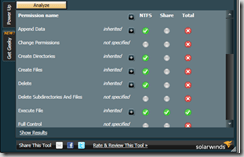
The output will be in the following form:- Permission Name, Inherited permission or not, NTFS, Share, and Total. When a user reports a problem accessing a network share, we want to check whether the user has the appropriate NTFS and share permissions.
Windows Explorer is the way to assess the situation. However, if you’re supporting an organization with many users, the servers are located in different Data Centers. Connecting to each server and checking the NTFS permissions from Windows Explorer is straightforward. To view the effective NTFS permissions for a particular user or group, click “Advanced” in the Security properties and then click “Effective Permissions.”
You can access more details about the tool once you install “SolarWindsPermissionsAnalyzerTool.MSI” on your workstation. Look for the Permissions Analyzer.htm file. This file contains all the requirements, recommendations, steps, etc.
Also, IT pros are always confused about the difference between NTFS and Share permissions in a shared folder. NTFS is the permission that provides access ( read, write, amend, etc.) to users or Active Directory groups.
However, the share is just shared permission. The user can see that share but won’t be able to access the content if they do not have proper NTFS permissions.
We are on WhatsApp now. To get the latest step-by-step guides, news, and updates, Join our Channel. Click here – HTMD WhatsApp.
Author
Anoop C Nair is Microsoft MVP from 2015 onwards for consecutive 10 years! He is a Workplace Solution Architect with more than 22+ years of experience in Workplace technologies. He is a Blogger, Speaker, and Local User Group Community leader. His main focus is on Device Management technologies like SCCM and Intune. He writes about technologies like Intune, SCCM, Windows, Cloud PC, Windows, Entra, Microsoft Security, Career etc…


Discussion