






ConfigMgr CMPivot Improvements | SCCM 2006 Additional Features
Hi, Today, I am explaining the ConfigMgr CMPivot Improvements with version 2006. The architecture of CMPivot is based on fast-channel notification. CMPivot is a new in-console and standalone utility in ConfigMgr that now provides access to your environment’s real-time device state.
CMPivot is a feature that allows you to efficiently evaluate the current state of devices within your environment and initiate necessary actions based on the assessment.
When you input a specific query, CMPivot swiftly performs it in real-time across all connected devices within the specified collection, providing instant insights into your devices’ status.
You can run the CMPivot queries from the Admin center (Intune portal). You can read more details in the following post: Run CMPivot Queries from Intune Portal | SCCM | ConfigMgr.

| Index |
|---|
| Parity between CMPivot Versions |
| No Collection Dependency |
| Device Pivot Drill Down Options |
| Device Name is Visible |
| Removed Create Collection |
Parity between CMPivot Versions
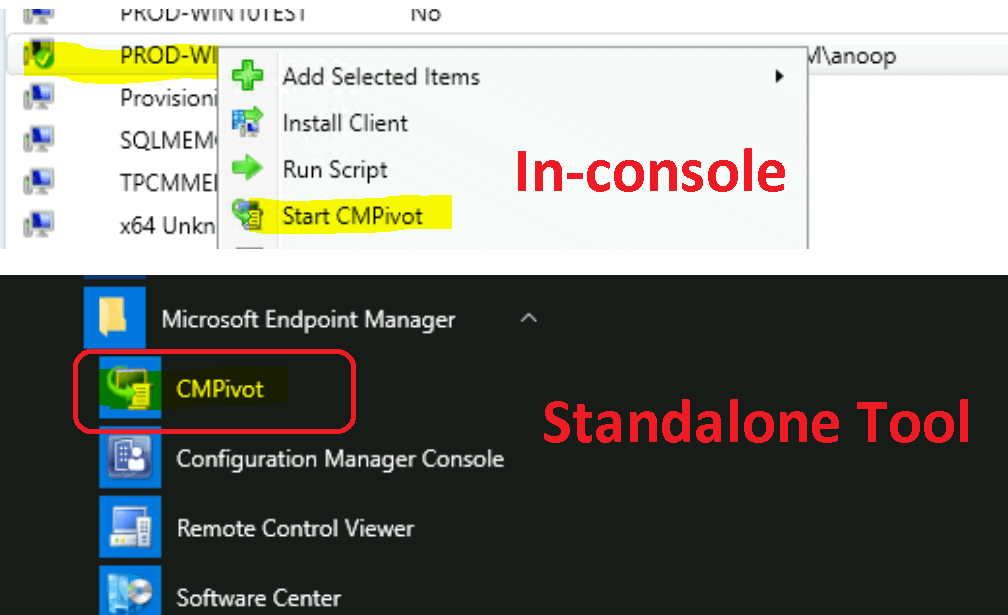
Since the ConfigMgr 2006 release, the functions available in CMPivot standalone and CMPivot launched from the admin console have the same features. Microsoft docs confirm that there will be parity between the two versions of CMPivot.
No Collection Dependency
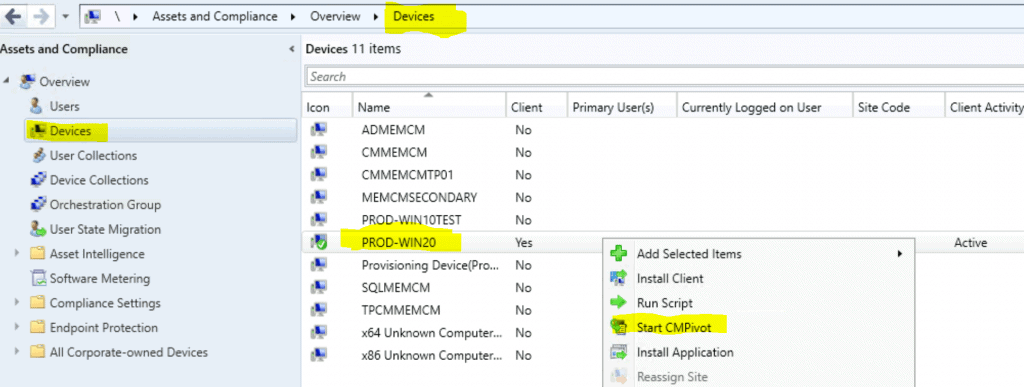
You don’t need to go to collections and select any collection to launch the ConfigMgr CMPivot. Using the admin console, you can launch the CMPivot from an individual device or multiple devices from the devices node.
- Launch Console
- Navigate Assets and Compliance – Devices
- Select one or more devices from the Devices node.
- Right-click and Select Start CMPivot
Device Pivot Drill Down Options
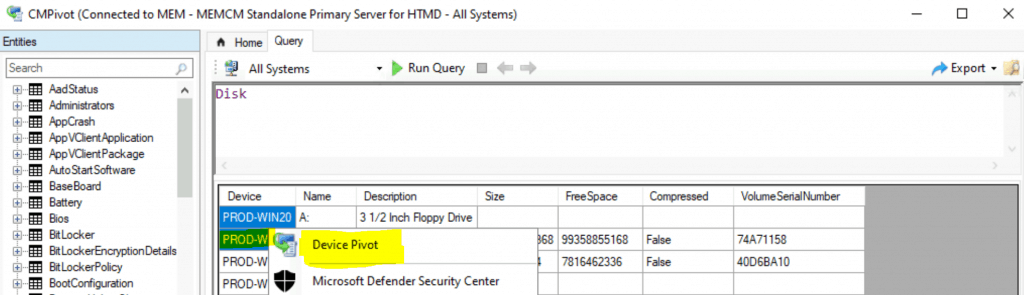
The CMPivot Drill down options are available with SCCM 2006 versions. As shown in the screen capture below, you can drill down using the Device Pilot option. The drill-down can be done based on the current results of CMPivot.
This device pilot option change allows you to drill in without querying the more extensive set of devices from the original collection. This also helps to avoid creating additional collections!
Device Name is Visible
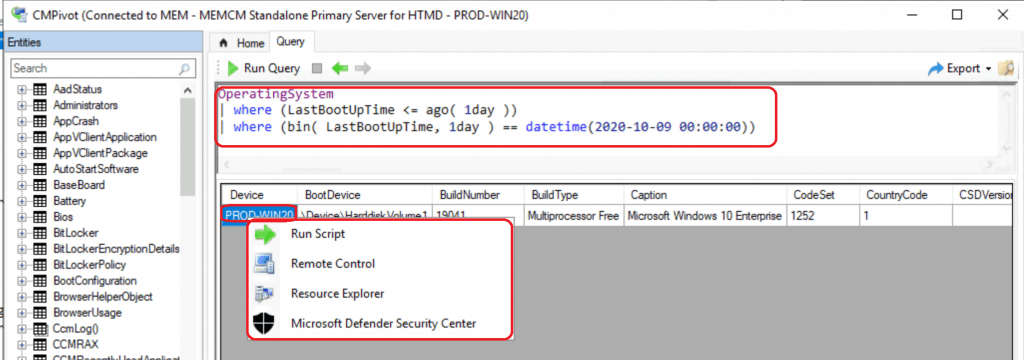
As you can see in the screenshot below, the PROD-WIN20 is shown on the top bar of the CMPivot window, and this is the Device’s name.
When you select multiple devices, the total number of devices selected is listed at the top of the window. It will show the total number of devices instead of the name of the single Device.

Removed Create Collection
The create collection option is removed from the right-click options of CMPivot results. This is good to avoid SCCM admins and helpdesk people creating new collections.
Now, we have only the following right-click options from CMPivot results:
- Device Pilot (this option is shown only when you have more than one Device in the result)
- Run Script
- Remote Control
- Resource Explorer
- Microsoft Defender Security Center
Resources
- CMPivot changes for version 2006
- ConfigMgr 2006 Production Version Generally Available | SCCM
- SCCM CMPivot Architecture Fast Channel | ConfigMgr
We are on WhatsApp. To get the latest step-by-step guides and news updates, Join our Channel. Click here –HTMD WhatsApp.
Author
Anoop C Nair is Microsoft MVP! He is a Device Management Admin with more than 20 years of experience (calculation done in 2021) in IT. He is a Blogger, Speaker, and Local User Group HTMD Community leader. His primary focus is Device Management technologies like SCCM 2012, Current Branch, and Intune. He writes about ConfigMgr, Windows 11, Windows 10, Azure AD, Microsoft Intune, Windows 365, AVD, etc.




Discussion