






ConfigMgr Client Logs Details | SCCM
Let’s analyze the ConfigMgr client logs from the Windows 10 device. Understanding the log file structure from the client side is essential for the initial troubleshooting of the SCCM Tenant attachment.
In Microsoft Configuration Manager, various client and site server components generate individual log files to record detailed process information. These logs contain valuable data that can be used to diagnose and resolve potential system issues.
By default, Configuration Manager automatically enables logging for client and server components, ensuring that relevant information is captured for troubleshooting purposes.
Configuration Manager log files are plain text and can be viewed using any text reader like Notepad. This allows easy troubleshooting and information gathering. When troubleshooting SCCM issues, it is essential to locate the ConfigMgr log files in various directories on clients, servers, and site servers.

Location of the client logs files – C:\Windows\CCM\Logs
| Index |
|---|
| Toast Notification Logs |
| Endpoint Analytics Logs |
| Software Center Logs |
| Office Related Logs |
| Software Update Logs |
| PowerShell Script |
| General |
| Client Install/Repair Logs |
| Application Logs |
| Content Related Logs |
| Policy Related Logs |
| Power Management-Related Logs |
| Reboot Related Logs |
| Windows Analytics Log |
| Endpoint Protection Logs |
| Desktop Analytics |
| Compliance Related Logs |
| Co-Management Related Logs |
| Asset Intelligence |
Toast Notification Logs
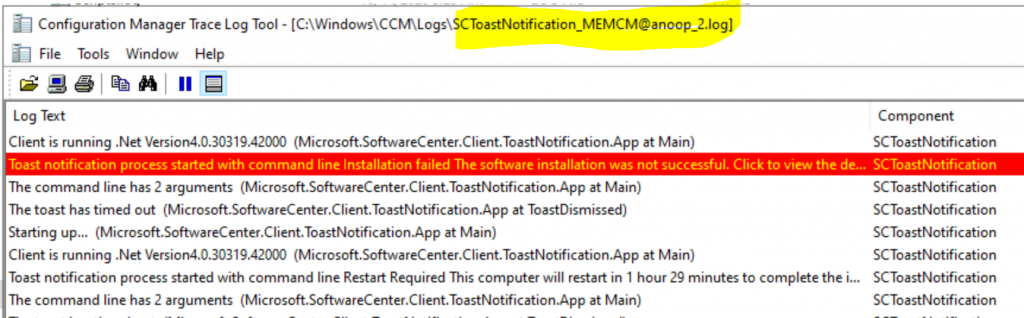
When you have trouble getting toast notifications from the client side, refer to the following location from the Windows 10 ConfigMgr Client.
| Log File | Description |
|---|---|
| SCToastNotification__<domain>@<username>_1.log | Toast Notification – Toast Notification Related Activities are stored here. |
Endpoint Analytics Logs
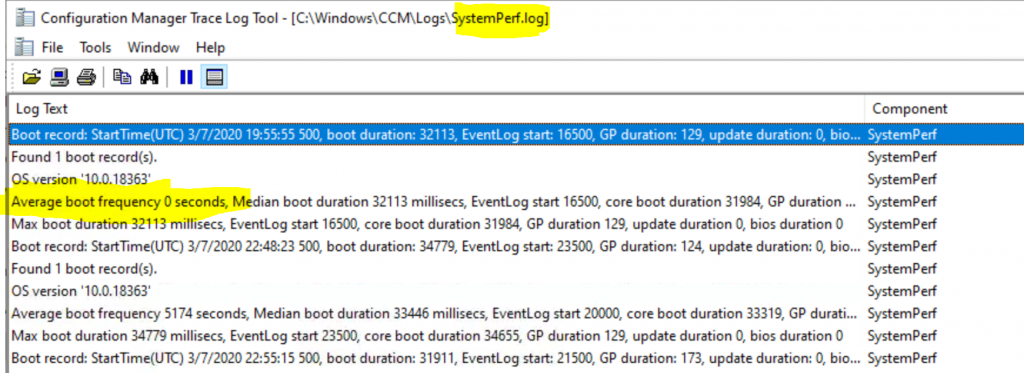
You can refer to the following log files related to endpoint analytics from the Windows 10 client device.
| Log File | Description |
|---|---|
| SystemTempLockdown.log | Endpoint Analytics – Records the execution of endpoint analytics policy and uploads client data to the site server. |
| SensorWmiProvider.log | Endpoint Analytics – Records the activity of the WMI provider for the endpoint analytics sensor. |
| SensorEndpoint.log | Endpoint Analytics – Records the execution of endpoint analytics policy and upload of client data to the site server. |
| SensorManagedProvider.Log | Endpoint Analytics – Records the gathering and processing of events and information for endpoint analytics. |
| SystemPerf.log | Endpoint Analytics – System Performance details are recorded endpoint |
Software Center Logs
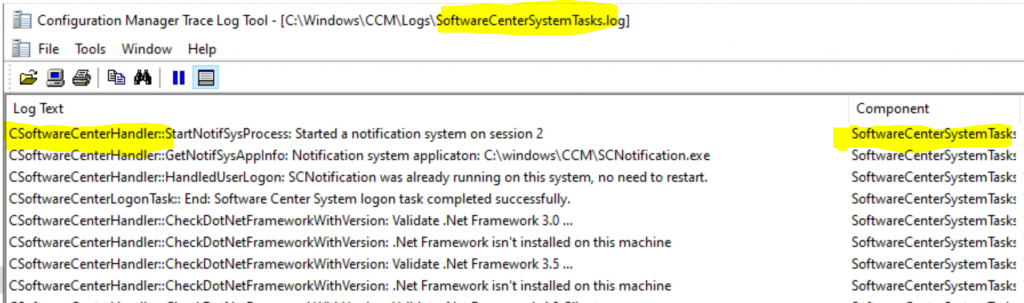
This section of the guide shall help you understand the log files related to Software Center-related tasks.
| Log | Description |
|---|---|
| SoftwareCenterSystemTasks.log | Software Center – Records activities related to Software Center prerequisite component validation |
| SCClient_<domain>@<username>_1.log SCClient_MEMCM@anoop_2.log | Software Center – Records the activity in Software Center for the specified user on the client computer |
| SCClient_<domain>@<username>_1.log SCClient_MEMCM@anoop_6.log | Software Center – Records the activity in the Software Center for the specified user on the client computer |
Office Related Logs
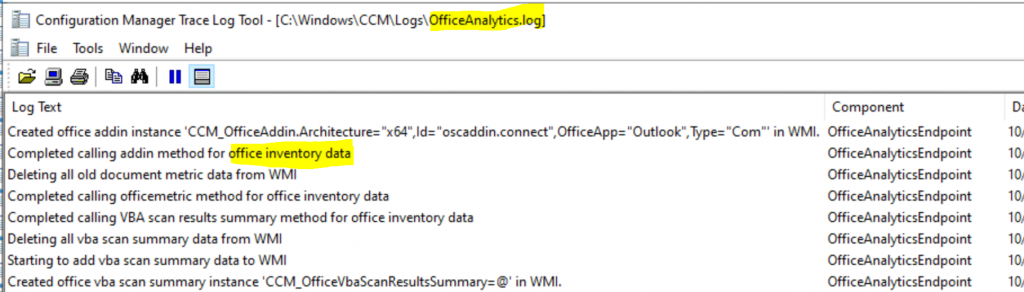
Office-related logs are documented in this section and in the software update section below.
| Log | Description |
|---|---|
| OfficeAnalytics.log | Office – Office device inventory details |
Software Update Logs
This section of the guide shall help you understand the log files related to Software Update-related tasks.
| Log | Description |
|---|---|
| AlternateHandler.log | Software Updates – Microsoft 365 Apps for enterprise client updates |
| UpdatesStore.log | Software Updates – Records details about compliance status for the software updates that were assessed during the compliance scan cycle |
| ScanAgent.log | Software Updates – Records details about scan requests for software updates, the WSUS location, and related actions |
| UpdatesHandler.log | Software Updates – Records details about software update compliance scanning and about the download and installation |
| StateMessage.log | Software Updates – Records details about software update state messages that are created and sent to the MP |
| WUAHandler.log | Software Updates – Records details about the Windows Update Agent on the client when it searches for software updates |
| DeltaDownload.log | Software Updates – Records information about the download of express updates & updates downloaded using DO |
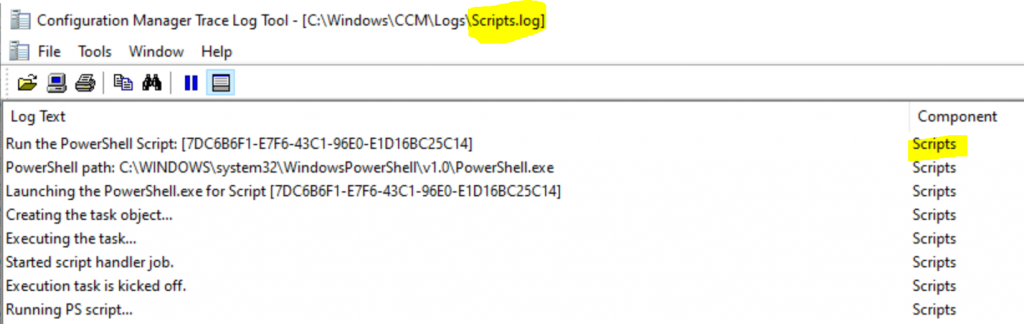
PowerShell Script
This section of the guide will help you understand the log files related to PowerShell script-related tasks.
| Log | Description |
|---|---|
| Scripts.log | PowerShell Scripts – Run Script Related Activities are recorded here |
General
This section covers all the general categories of the logs.
| Log | Description |
|---|---|
| CertificateMaintenance.log | General – MP/SUP/DP Details – Records the client activity for locating management, software update, and distribution points. |
| LocationServices.log | General – MP/SUP/DP Details – Records the client activity for locating management points, software update points, and distribution points. |
| UpdateTrustedSites.log | General – Record Details of trusted sites – Add Default Portal To Trusted Sites |
| Ccm32BitLauncher.log | General – Records actions for starting applications on the client marked run as 32 bit |
| CCMSDKProvider.log | General – Records activities for the client SDK interfaces |
| CcmSqlCE.log | General – Records activities for the SQL Server Compact Edition (CE) that the client uses |
| Scheduler.log | General – Records activities of scheduled tasks for all client operations |
| CcmExec.log | General – Records activities of the client and the SMS Agent Host service |
| CcmMessaging.log | General – Records activities related to communication between the client and MP |
| SmsClientMethodProvider.log | General – Records activity for sending client schedules |
| CcmRestart.log | General – Records client service restart activity |
| CcmEval.log | General – Records Configuration Manager client status evaluation activities |
| UpdatesDeployment.log | General – Records details about deployments on the client, including software update activation, evaluation, and enforcement |
| UserAffinity.log | General – Records details about user device affinity |
| CCMVDIProvider.log | General – Records information for clients in a virtual desktop infrastructure (VDI) |
| wedmtrace.log | General – Records operations related to write filters on Windows Embedded clients |
| StatusAgent.log | General – Records status messages that are created by the client components |
| ClientLocation.log | General – Records tasks that are related to client site assignment |
| CcmNotificationAgent.log | General – Records the activities of the notification agent |
| MaintenanceCoordinator.log | General – Records the activity for general maintenance tasks for the client |
| CcmEvalTask.log | General – Records the SCCM client status evaluation activities |
| Diagnostics.log | General – Records the status of client diagnostic actions |
| smscliui.log | General – Maintains certificates for Active Directory Domain Services and MP. |
| UserAffinityProvider.log | General – Technical details from the component that tracks user device affinity |
| CertEnrollAgent.log | General – Windows Hello for Business client Activities |
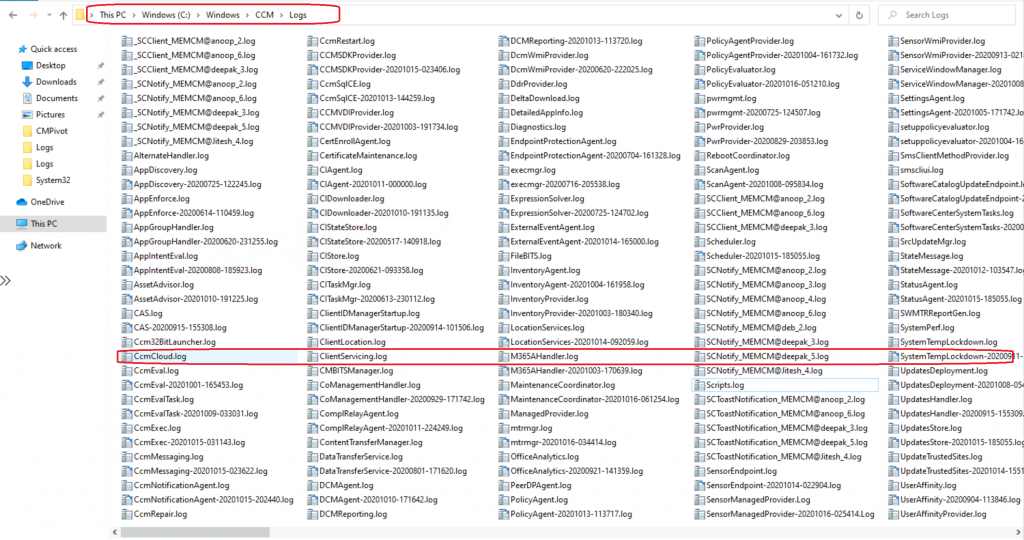
Client Install/Repair Logs
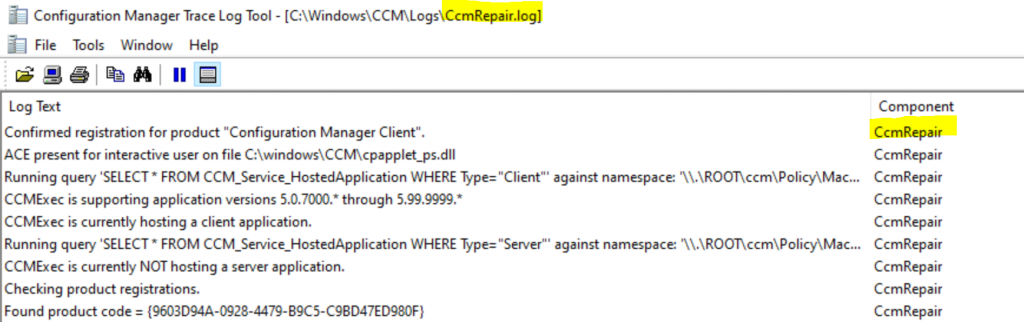
This guide section shall help you understand the log files related to Client Install/Repair script-related tasks.
| Logs | Description |
|---|---|
| ClientIDManagerStartup.log | Install – Records information for client deployment state messages during auto-upgrade and client piloting. |
| ClientServicing.log | Install – Records information for client deployment state messages during auto-upgrade and client piloting |
| CcmRepair.log | Install – Records the repair activities of the client agent |
Application Logs
This section of the guide shall help you to understand the log files related to Application-related tasks.
| Log | Description |
|---|---|
| AppGroupHandler.log | Application – Records detection and enforcement information for application groups |
| DetailedAppInfo.log | Application – Collect application information for DetailedAppInfo WMI class |
| AppEnforce.log | Application – Enforcement actions |
| SettingsAgent.log | Application – Enforcement of specific applications, records orchestration of application group evaluation |
| SoftwareCatalogUpdateEndpoint.log | Application – Records activities for managing the URL for the Application Catalog shown in Software Center |
| SrcUpdateMgr.log | Application – Records activity for installed Windows Installer applications that are updated with current distribution point source locations |
| ExpressionSolver.log | Application – Records details about enhanced detection methods |
| execmgr.log | Application – Records details about packages and task sequences that run |
| AppIntentEval.log | Application – Records details about the current and intended state of applications |
| AppDiscovery.log | Application – Records details about the discovery or detection of applications on client computers. |
| VirtualApp.log | App-v – Records information specific to the evaluation of Application Virtualization (App-V) deployment types |
Content Related Logs
Check out the SCCM client content-related logs in this section of the post.
| Logs | Description |
|---|---|
| PeerDPAgent.log | Content – Peer Cache DP related information stored in this log |
| DataTransferService.log | Content – Records all BITS communication for policy or package access |
| FileBITS.log | Content – Records all SMB package access tasks |
| CAS.log | Content – Records details when distribution points are found for referenced content |
| CMBITSManager.log | Content – Records information for Background Intelligent Transfer Service (BITS) jobs on the device |
| ContentTransferManager.log | Content – Schedules the BITS or SMB to download or access packages |

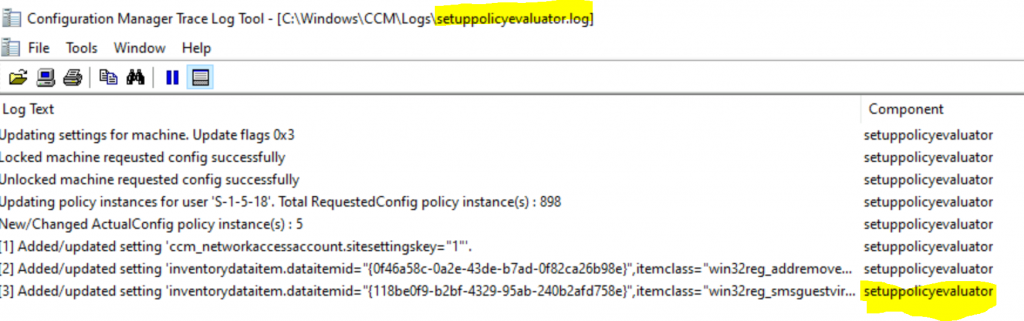
Policy Related Logs
Check out the SCCM client Policy related logs in this post section.
| Log | Description |
|---|---|
| setuppolicyevaluator.log | Policy – Records configuration and inventory policy creation in WMI |
| PolicyEvaluator.log | Policy – Records details about the evaluation of policies on client computers |
| PolicyAgentProvider.log | Policy – Records policy changes |
| PolicyAgent.log | Policy (Content) – Records requests for policies made by using the Data Transfer Service |
Power Management-Related Logs
Check out the ConfigMgr client Power Management-related logs in this post section.
| Log | Description |
|---|---|
| pwrmgmt.log | Power Management – Records the activities of the power management provider (PWRInvProvider) hosted in the WMI service. |
| PwrProvider.log | Power Management – Records the power management provider’s (PWRInvProvider) activities hosted in the WMI service. |
Reboot Related Logs
This section tells us about the reboot-related activities during the software updates.
| Log | Descriptions |
|---|---|
| RebootCoordinator.log | Reboot – Records details about the coordination of system restarts on client computers |
Windows Analytics Log
Check out the ConfigMgr client Windows Analytics log in this post section.
| Logs | Description |
|---|---|
| WindowsAnalytics.log | Windows Analytics – Records the details about Windows Analytics settings are enabled or Commercial ID is empty. |
Endpoint Protection Logs
When you have trouble accessing Endpoint Protection from the client side, you can refer to the following location from the Windows 10 ConfigMgr Client.
| Logs | Description |
|---|---|
| EndpointProtectionAgent.log | Endpoint Protection – Records details about the installation of the Endpoint Protection client and the application |
| ExternalEventAgent.log | Endpoint Protection – Records the history of Endpoint Protection malware detection and events related to client status |
Desktop Analytics
Check out the ConfigMgr client Desktop Analytics log in this post section.
| Log | Description |
|---|---|
| M365AHandler.log | Desktop Analytics – Information about the Desktop Analytics settings policy |
Compliance Related Logs
Check out the ConfigMgr client Compliance and Baseline related log in this post section.
| Logs | Description |
|---|---|
| DCMAgent.log | Compliance – Information about the evaluation, conflict reporting, and remediation |
| CIStateStore.log | Compliance – Records changes in state for configuration items |
| CIDownloader.log | Compliance – Records details about configuration item definition downloads |
| CIAgent.log | Compliance – Records details about the process of remediation and compliance |
| CIStore.log | Compliance – Records information about configuration items |
| DcmWmiProvider.log | Compliance – Records information about reading configuration item synclets from WMI |
| DCMReporting.log | Compliance – Records information about reporting policy platform results into state messages for CI |
| CITaskMgr.log | Compliance – Records tasks for each application and deployment type |
Co-Management Related Logs
Check out the ConfigMgr client Co-Management related log in this post section.
| Log | Description |
|---|---|
| CcmCloud.log | Co-Management – CCM_Cloud Client Config |
| DdrProvider.log | Co-Management – MDM enrolment details. Records Workloads are managed by SCCM |
| ComplRelayAgent.log | Co-Management – Records information for the co-management workload for compliance policies |
| CoManagementHandler.log | Co-Management – Use to troubleshoot co-management on the client |
Asset Intelligence
This section of the post provides more details about Asset Intelligence logs. This might help troubleshoot further issues related to AI.
| Log | Description |
|---|---|
| AssetAdvisor.log | AI – Records the activities of Asset Intelligence inventory actions |
Resources
- SCCM Logs Files | 5 Log File Reading Tips | ConfigMgr
- Updated List of Log files from Microsoft https://docs.microsoft.com/en-us/configmgr/core/plan-design/hierarchy/log-files
- CMTrace SCCM log file reading tool
- SCCM Support Center Log Viewer
We are on WhatsApp. To get the latest step-by-step guides and news updates, Join our Channel. Click here –HTMD WhatsApp.
Author
Anoop C Nair is Microsoft MVP! He is a Device Management Admin with more than 20 years of experience (calculation done in 2021) in IT. He is a Blogger, Speaker, and Local User Group HTMD Community leader. His primary focus is Device Management technologies like SCCM 2012, Current Branch, and Intune. He writes about ConfigMgr, Windows 11, Windows 10, Azure AD, Microsoft Intune, Windows 365, AVD, etc.




Hi
very nice information for client installation