






ConfigMgr Windows 10 Multi-Session Support for WVD | SCCM
The ConfigMgr 1906 version supports Windows 10 Enterprise Multi-Session. The WVD-enhanced support options are available with the latest versions of SCCM. Let’s quickly view ConfigMgr Windows 10 Multi-Session Support for WVD.
Windows 10 enterprise multi-session support is only for Windows Virtual Desktop (WVD) solution. WVD Windows 10 multi-session is similar to a terminal server. Some of these virtual devices allow multiple concurrent active user sessions.
The previous post, SCCM Intune Support for VDI Devices Persistent Non-Persistent, provides more thoughts on SCCM/Intune VDI and WVD support.
ConfigMgr now disables user policies on any device that allows these multiple-user sessions. Even if you enable user policies, the SCCM client disables those policies by default on these devices, which include Windows 10 Enterprise multi-session.

NOTE: You can’t use co-management with a client running WVD Windows 10 multi-session VMs.
- AVD Intune Support Is Available For Windows 10 Or Windows 11 Multi-Session
- AVD Windows 11 Multi-Session Intune Hybrid Azure AD Support
- AVD GA Generally Available World Wide With App Attach
| Index |
|---|
| ConfigMgr Client Settings for Windows Multi-Session |
| Configuration Item for Windows 10 Multi-Session VMs |
| Requirement Rules |
| Enable User Policy on Windows 10 Multi-Session VMs |
ConfigMgr Client Settings for Windows Multi-Session
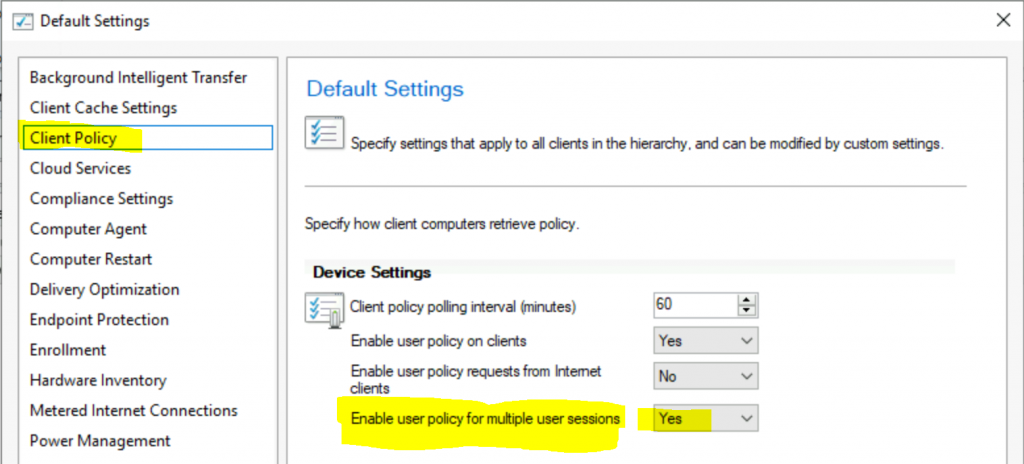
You must enable ConfigMgr Current Branch Client settings for Windows Virtual Desktop (WVD) Windows 10 Multi-session VMs.
- Navigate to \Administration\Overview\Client Settings
- Open the Client Settings (preferably custom client settings)
- Client Policy Enable User Policy for multiple user sessions: Yes
- Click OK to save the settings.
Configuration Item for Windows 10 Multi-Session VMs
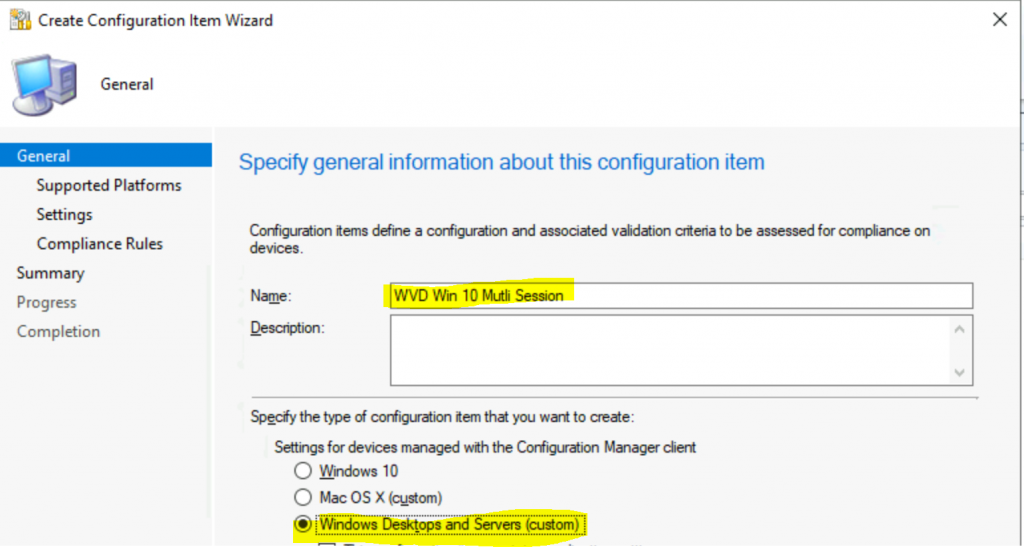
You can now create a Configuration Item (CI) for WVD Windows 10 multi-session VMs.
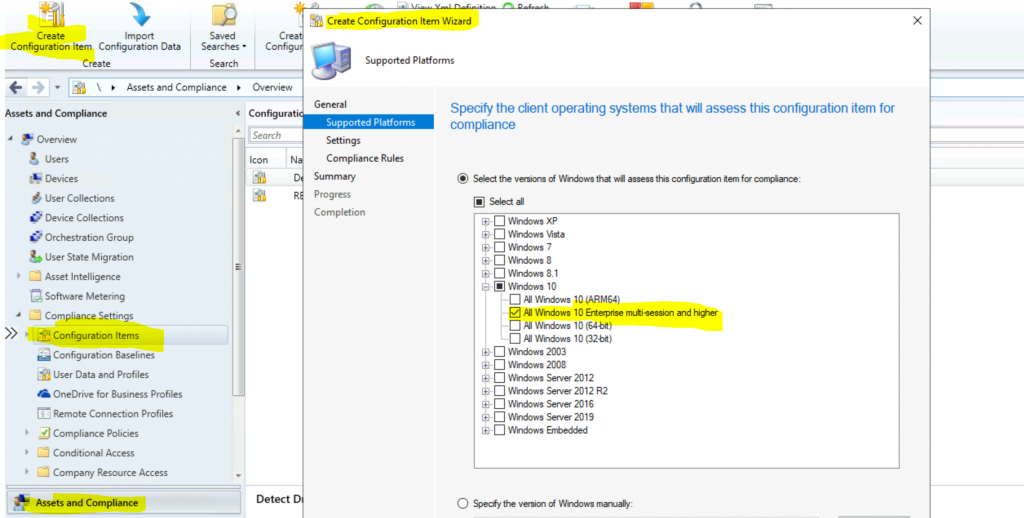
- Navigate to \Assets and Compliance\Overview\Compliance Settings\Configuration Items
- Click on Create New Configuration Item
- Enter the name of the CI – WVD Windows 10 Multi-Session
- Select Windows Desktops and Servers (custom)
After clicking the Next button, make sure to unselect all checkbox options. Then, locate and click on the + symbol adjacent to the Windows 10 option. Once the submenu is expanded, look for and enable the Windows 10 Enterprise multi-session and higher option.
- Finally, click on the “Next” button to proceed.
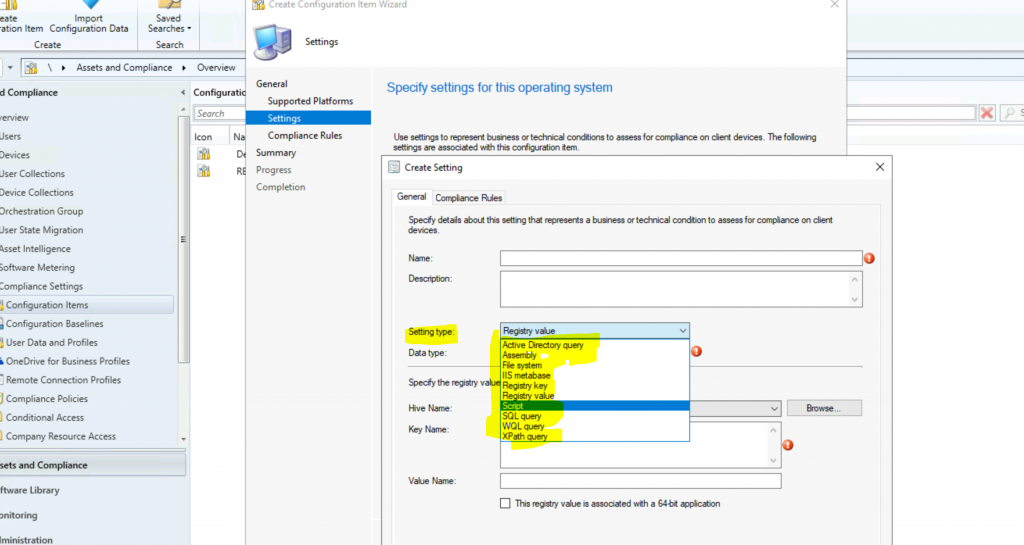
Enable the settings required for your WVD Windows 10 Multi-session VMS—more details about Configuration Item (How to build CI for Windows clients).
- The following Windows versions are supported:
- All Windows 10 multi-session
Requirement Rules
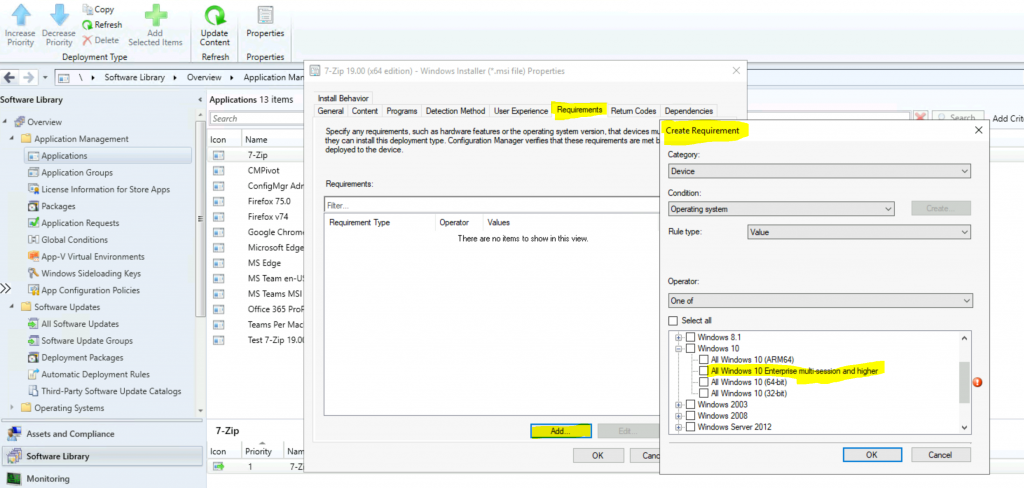
You can select the Windows 10 enterprise multi-session as one of the operating systems from the application requirement rules.
- Navigate to \Software Library\Overview\Application Management\Applications
- Select the Deployment Types tab
- Go to properties of deployment type
- Click on the Requirements tab
- Click on the Add button
- Select Device as Category
- Select Condition as Operating System
- Click on the + symbol near Windows 10
- Enable the option Windows 10 Enterprise multi-session and higher
- Click OK to save the configuration
Enable User Policy on Windows 10 Multi-Session VMs
User policy is disabled by default on Windows 10 Multi-session devices. You can use this “PolicyEnableUserPolicyOnTS” from version 1906 onwards to enable the SCCM user policy for Windows 10 multi-user.
Set this property to true to enable user policy on a Windows 10 multi-session Windows Virtual Desktop VM. If PolicyEnableUserPolicyPolling is set to false, this property is ignored.
NOTE! – If you enable this property, you accept any potential performance impact on these devices. Also, there could be conflicts with some of the policies.
Resources
We are on WhatsApp. To get the latest step-by-step guides and news updates, Join our Channel. Click here –HTMD WhatsApp.
Author
Anoop C Nair is Microsoft MVP! He is a Device Management Admin with more than 20 years of experience (calculation done in 2021) in IT. He is a Blogger, Speaker, and Local User Group HTMD Community leader. His primary focus is Device Management technologies like SCCM 2012, Current Branch, and Intune. He writes about ConfigMgr, Windows 11, Windows 10, Azure AD, Microsoft Intune, Windows 365, AVD, etc.




Great post as usual. Just a note, if you use FSLogix app masking, you can’t manage masked applications with SCCM
StaffThank you for the clarification
I concur with Alessandro. Great post. You make SCCM’ing a lot easier! Thank you!!!