






Create Microsoft Store Apps in SCCM Application
Today, I will explore creating Microsoft Store Apps in SCCM application. Microsoft Store for Business enables organizations to make store applications available to SCCM admins automatically.
This guide teaches you how to find, acquire, manage, and distribute free and paid store apps to ConfigMgr and deploy them to Windows 10 devices. Make sure you have already completed the connection configuration between SCCM and MSfB.
The Microsoft Store for Business and Education offers a platform for discovering and acquiring Windows apps tailored for your organization. Connecting the store to Configuration Manager allows you to synchronize the list of acquired apps seamlessly.
These apps can then be conveniently accessed and deployed from the Configuration Manager console, streamlining the deployment process.

- Deploy Microsoft Store Apps Using ConfigMgr | SCCM
- SCCM Sync With MSfB Microsoft Store For Business | ConfigMgr
- Add Microsoft Store Application To ConfigMgr | SCCM | MSfB
- Deploy Microsoft Store Apps Using ConfigMgr | SCCM HTMD
| Index |
|---|
| Create Microsoft Store Apps in SCCM Application |
| Results |
NOTE! – Microsoft deprecated this feature, so it wasn’t available after the 2022 November release of SCCM.
Create Microsoft Store Apps in SCCM Application
I hope you already completed the activities mentioned in the previous posts regarding connection configuration between SCCM and MSfB and Added the Microsoft Store Application to ConfigMgr.
Now let’s see how to Create a ConfigMgr Application Object for Microsoft Business Store App.
- Launch Admin Console
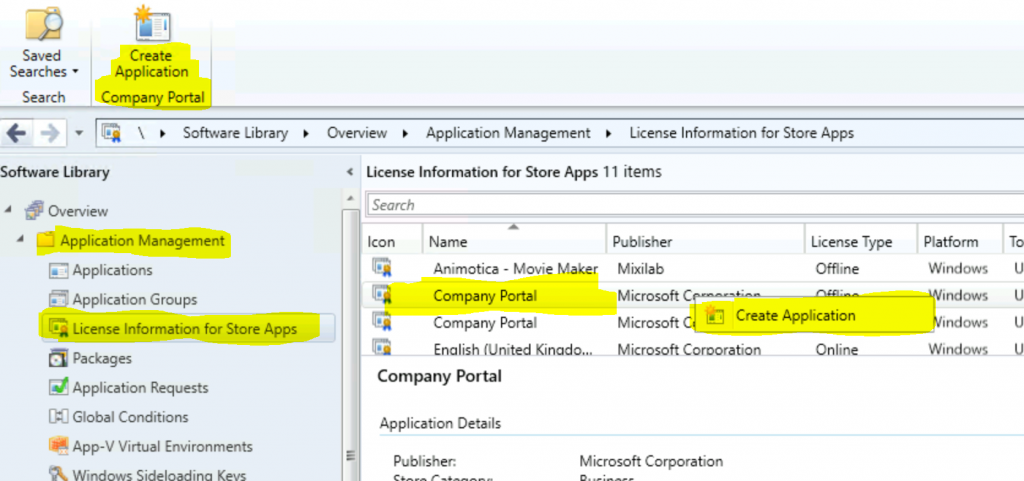
- Navigate to \Software Library\Overview\Application Management\License Information for Store Apps.
- Select and Right-click on the Company Portal app from Microsoft Store
- Click on the Create Application option (or you can use the ribbon menu option to create Microsoft Store for Business application deployment)
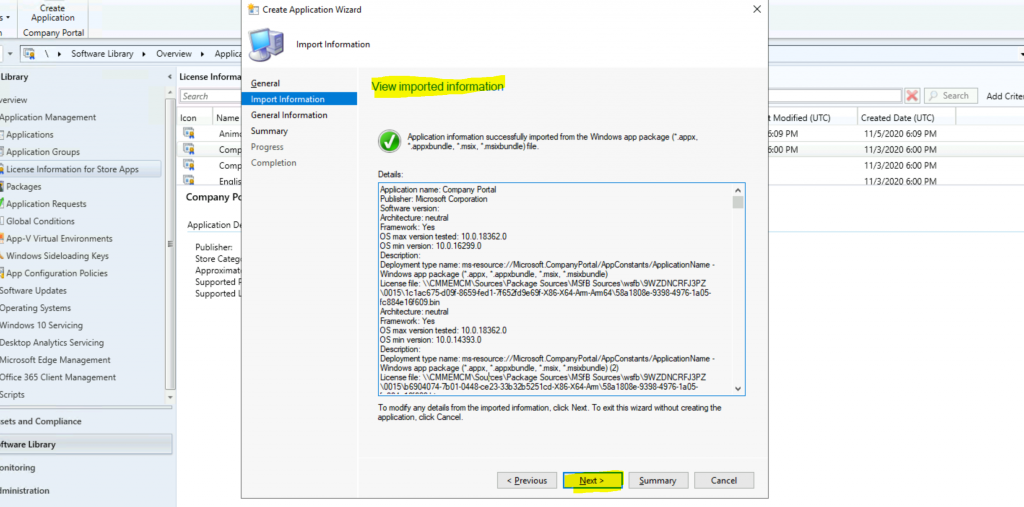
Click on the Next button from the Create Volume Purchased Application page on the Create Application Wizard.
- Import all the information of applications from Microsoft Store for Business and click on the Next button to continue.
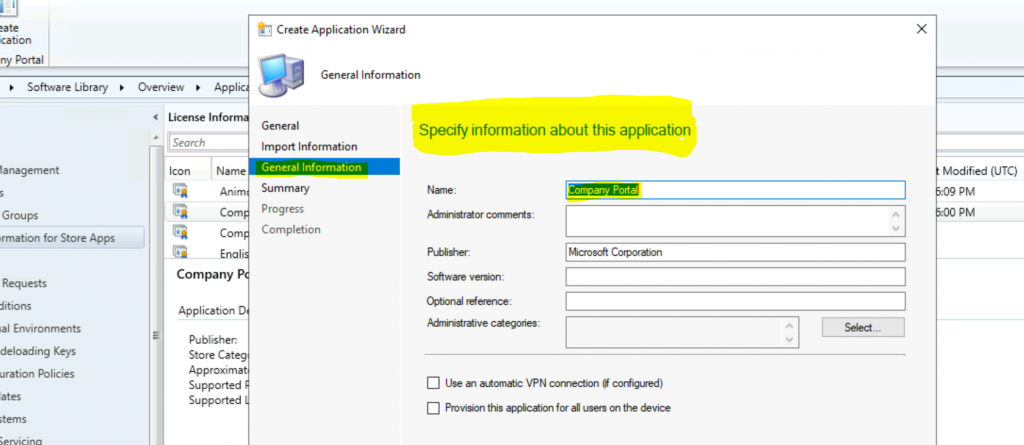
All the information is already populated on the Specify information about this application page (create application wizard).
NOTE! – All the metadata information imported from Microsoft Store for business
Click on the Next, Next, and Close buttons from the Summary page.
Results
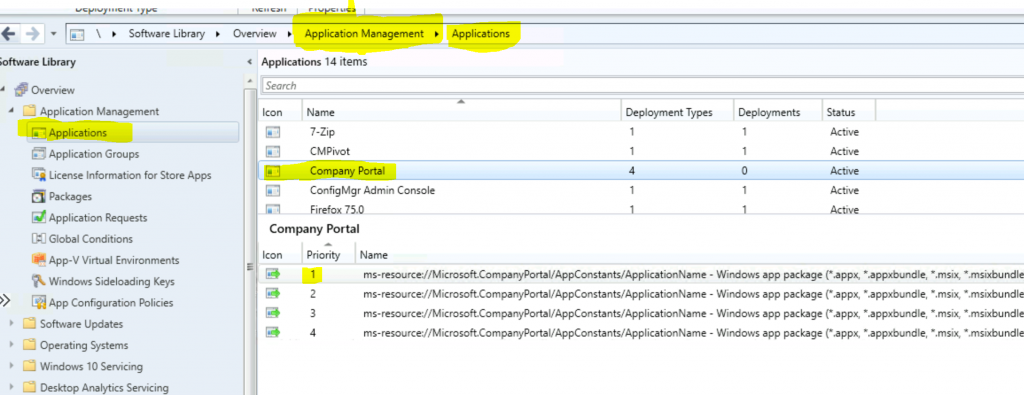
The creation process for Microsoft Business Store Apps using ConfigMgr is completed. The MSfB offline application is ready to deploy, similar to any other SCCM application.
- Navigate to \Software Library\Overview\Application Management\Applications
- Check for the Company Portal Offline application
Resources
- Prerequisites for Microsoft Store for Business and Education
- How to Deploy Windows Store Apps via Intune to Windows 10 Devices
We are on WhatsApp. To get the latest step-by-step guides and news updates, Join our Channel. Click here –HTMD WhatsApp.
Author
Anoop C Nair is Microsoft MVP! He is a Device Management Admin with more than 20 years of experience (calculation done in 2021) in IT. He is a Blogger, Speaker, and Local User Group HTMD Community leader. His primary focus is Device Management technologies like SCCM 2012, Current Branch, and Intune. He writes about ConfigMgr, Windows 11, Windows 10, Azure AD, Microsoft Intune, Windows 365, AVD, etc.
Application name: Company Portal
Publisher: Microsoft Corporation
Software version:
Architecture: neutral
Framework: Yes
OS max version tested: 10.0.18362.0
OS min version: 10.0.16299.0
Description:
Deployment type name: ms-resource://Microsoft.CompanyPortal/AppConstants/ApplicationName - Windows app package (*.appx, *.appxbundle, *.msix, *.msixbundle)
License file: \CMMEMCM\Sources\Package Sources\MSfB Sources\wsfb\9WZDNCRFJ3PZ\0015\1c1ac675-d09f-8659-fed1-7f652fd9e69f-X86-X64-Arm-Arm64\58a1808e-9398-4976-1a05-fc884e16f609.bin
Architecture: neutral
Framework: Yes
OS max version tested: 10.0.18362.0
OS min version: 10.0.14393.0
Description:
Deployment type name: ms-resource://Microsoft.CompanyPortal/AppConstants/ApplicationName - Windows app package (*.appx, *.appxbundle, *.msix, *.msixbundle) (2)
License file: \CMMEMCM\Sources\Package Sources\MSfB Sources\wsfb\9WZDNCRFJ3PZ\0015\b6904074-7b01-0448-ce23-33b32b5251cd-X86-X64-Arm\58a1808e-9398-4976-1a05-fc884e16f609.bin
Architecture: neutral
Framework: Yes
OS max version tested: 10.0.16299.0
OS min version: 10.0.10586.0
Description:
Deployment type name: ms-resource://Microsoft.CompanyPortal/AppConstants/ApplicationName - Windows app package (*.appx, *.appxbundle, *.msix, *.msixbundle) (3)
License file: \CMMEMCM\Sources\Package Sources\MSfB Sources\wsfb\9WZDNCRFJ3PZ\0015\4285e4f2-7963-5c85-42d6-fb4a776c6547-X86-X64-Arm\58a1808e-9398-4976-1a05-fc884e16f609.bin
Architecture: neutral
Framework: Yes
OS max version tested: 10.0.14393.0
OS min version: 10.0.10240.0
Description:
Deployment type name: ms-resource://Microsoft.CompanyPortal/AppConstants/ApplicationName - Windows app package (*.appx, *.appxbundle, *.msix, *.msixbundle) (4)
License file: \CMMEMCM\Sources\Package Sources\MSfB Sources\wsfb\9WZDNCRFJ3PZ\0015\8b8cccab-9b4b-d834-9f41-1f3d24642873-X86-X64-Arm\58a1808e-9398-4976-1a05-fc884e16f609.bin
Detection Method:
Name:Microsoft.CompanyPortal
Publisher:Microsoft Corporation
Architecture: neutral
Resource ID:~
Version:2020.918.802.0
Publisher ID:8wekyb3d8bbwe
Windows app dependencies:
Name: Microsoft.NET.Native.Framework.2.2
MinVersion: 2.2.27405.0
Architecture: arm
Name: Microsoft.NET.Native.Runtime.2.2
MinVersion: 2.2.27328.0
Architecture: arm
Name: Microsoft.Services.Store.Engagement
MinVersion: 10.0.18101.0
Architecture: arm
Name: Microsoft.UI.Xaml.2.3
MinVersion: 2.31912.11002.0
Architecture: arm
Name: Microsoft.VCLibs.140.00
MinVersion: 14.0.27810.0
Architecture: arm
Name: Microsoft.NET.Native.Framework.2.2
MinVersion: 2.2.27405.0
Architecture: x64
Name: Microsoft.NET.Native.Framework.2.2
MinVersion: 2.2.27405.0
Architecture: x86
Name: Microsoft.NET.Native.Runtime.2.2
MinVersion: 2.2.27328.0
Architecture: x64
Name: Microsoft.NET.Native.Runtime.2.2
MinVersion: 2.2.27328.0
Architecture: x86
Name: Microsoft.Services.Store.Engagement
MinVersion: 10.0.18101.0
Architecture: x64
Name: Microsoft.Services.Store.Engagement
MinVersion: 10.0.18101.0
Architecture: x86
Name: Microsoft.UI.Xaml.2.3
MinVersion: 2.31912.11002.0
Architecture: x64
Name: Microsoft.UI.Xaml.2.3
MinVersion: 2.31912.11002.0
Architecture: x86
Name: Microsoft.VCLibs.140.00
MinVersion: 14.0.27810.0
Architecture: x64
Name: Microsoft.VCLibs.140.00
MinVersion: 14.0.27810.0
Architecture: x86
Content location: \CMMEMCM\Sources\Package Sources\MSfB Sources\wsfb\9WZDNCRFJ3PZ\0015\1c1ac675-d09f-8659-fed1-7f652fd9e69f-X86-X64-Arm-Arm64
Number of files: 16
Content files:
Microsoft.CompanyPortal.appxBundle
Microsoft.NET.Native.Framework.2.2_arm.appx
Microsoft.NET.Native.Runtime.2.2_arm.appx
Microsoft.Services.Store.Engagement_arm.appx
Microsoft.UI.Xaml.2.3_arm.appx
Microsoft.VCLibs.140.00_arm.appx
Microsoft.NET.Native.Framework.2.2_x64.appx
Microsoft.NET.Native.Framework.2.2_x86.appx
Microsoft.NET.Native.Runtime.2.2_x64.appx
Microsoft.NET.Native.Runtime.2.2_x86.appx
Microsoft.Services.Store.Engagement_x64.appx
Microsoft.Services.Store.Engagement_x86.appx
Microsoft.UI.Xaml.2.3_x64.appx
Microsoft.UI.Xaml.2.3_x86.appx
Microsoft.VCLibs.140.00_x64.appx
Microsoft.VCLibs.140.00_x86.appx
Detection Method:
Name:Microsoft.CompanyPortal
Publisher:Microsoft Corporation
Architecture: neutral
Resource ID:~
Version:2019.918.709.0
Publisher ID:8wekyb3d8bbwe
Windows app dependencies:
Name: Microsoft.NET.Native.Framework.1.7
MinVersion: 1.7.27413.0
Architecture: arm
Name: Microsoft.NET.Native.Runtime.1.7
MinVersion: 1.7.25531.0
Architecture: arm
Name: Microsoft.Services.Store.Engagement
MinVersion: 10.0.18101.0
Architecture: arm
Name: Microsoft.UI.Xaml.2.0
MinVersion: 2.1810.18003.0
Architecture: arm
Name: Microsoft.VCLibs.140.00
MinVersion: 14.0.27323.0
Architecture: arm
Name: Microsoft.NET.Native.Framework.1.7
MinVersion: 1.7.27413.0
Architecture: x64
Name: Microsoft.NET.Native.Runtime.1.7
MinVersion: 1.7.25531.0
Architecture: x64
Name: Microsoft.Services.Store.Engagement
MinVersion: 10.0.18101.0
Architecture: x64
Name: Microsoft.UI.Xaml.2.0
MinVersion: 2.1810.18003.0
Architecture: x64
Name: Microsoft.VCLibs.140.00
MinVersion: 14.0.27323.0
Architecture: x64
Name: Microsoft.NET.Native.Framework.1.7
MinVersion: 1.7.27413.0
Architecture: x86
Name: Microsoft.NET.Native.Runtime.1.7
MinVersion: 1.7.25531.0
Architecture: x86
Name: Microsoft.Services.Store.Engagement
MinVersion: 10.0.18101.0
Architecture: x86
Name: Microsoft.UI.Xaml.2.0
MinVersion: 2.1810.18003.0
Architecture: x86
Name: Microsoft.VCLibs.140.00
MinVersion: 14.0.27323.0
Architecture: x86
Content location: \CMMEMCM\Sources\Package Sources\MSfB Sources\wsfb\9WZDNCRFJ3PZ\0015\b6904074-7b01-0448-ce23-33b32b5251cd-X86-X64-Arm
Number of files: 16
Content files:
Microsoft.CompanyPortal.appxBundle
Microsoft.NET.Native.Framework.1.7_arm.appx
Microsoft.NET.Native.Runtime.1.7_arm.appx
Microsoft.Services.Store.Engagement_arm.appx
Microsoft.UI.Xaml.2.0_arm.appx
Microsoft.VCLibs.140.00_arm.appx
Microsoft.NET.Native.Framework.1.7_x64.appx
Microsoft.NET.Native.Runtime.1.7_x64.appx
Microsoft.Services.Store.Engagement_x64.appx
Microsoft.UI.Xaml.2.0_x64.appx
Microsoft.VCLibs.140.00_x64.appx
Microsoft.NET.Native.Framework.1.7_x86.appx
Microsoft.NET.Native.Runtime.1.7_x86.appx
Microsoft.Services.Store.Engagement_x86.appx
Microsoft.UI.Xaml.2.0_x86.appx
Microsoft.VCLibs.140.00_x86.appx
Detection Method:
Name:Microsoft.CompanyPortal
Publisher:Microsoft Corporation
Architecture: neutral
Resource ID:~
Version:2017.1121.758.1000
Publisher ID:8wekyb3d8bbwe
Windows app dependencies:
Name: Microsoft.NET.Native.Framework.1.7
MinVersion: 1.7.25531.0
Architecture: arm
Name: Microsoft.NET.Native.Runtime.1.7
MinVersion: 1.7.25531.0
Architecture: arm
Name: Microsoft.Services.Store.Engagement
MinVersion: 10.0.1706.0
Architecture: arm
Name: Microsoft.VCLibs.140.00
MinVersion: 14.0.25426.0
Architecture: arm
Name: Microsoft.NET.Native.Framework.1.7
MinVersion: 1.7.25531.0
Architecture: x64
Name: Microsoft.NET.Native.Runtime.1.7
MinVersion: 1.7.25531.0
Architecture: x64
Name: Microsoft.Services.Store.Engagement
MinVersion: 10.0.1706.0
Architecture: x64
Name: Microsoft.VCLibs.140.00
MinVersion: 14.0.25426.0
Architecture: x64
Name: Microsoft.NET.Native.Framework.1.7
MinVersion: 1.7.25531.0
Architecture: x86
Name: Microsoft.NET.Native.Runtime.1.7
MinVersion: 1.7.25531.0
Architecture: x86
Name: Microsoft.Services.Store.Engagement
MinVersion: 10.0.1706.0
Architecture: x86
Name: Microsoft.VCLibs.140.00
MinVersion: 14.0.25426.0
Architecture: x86
Content location: \CMMEMCM\Sources\Package Sources\MSfB Sources\wsfb\9WZDNCRFJ3PZ\0015\4285e4f2-7963-5c85-42d6-fb4a776c6547-X86-X64-Arm
Number of files: 13
Content files:
Microsoft.CompanyPortal.appxBundle
Microsoft.NET.Native.Framework.1.7_arm.appx
Microsoft.NET.Native.Runtime.1.7_arm.appx
Microsoft.Services.Store.Engagement_arm.appx
Microsoft.VCLibs.140.00_arm.appx
Microsoft.NET.Native.Framework.1.7_x64.appx
Microsoft.NET.Native.Runtime.1.7_x64.appx
Microsoft.Services.Store.Engagement_x64.appx
Microsoft.VCLibs.140.00_x64.appx
Microsoft.NET.Native.Framework.1.7_x86.appx
Microsoft.NET.Native.Runtime.1.7_x86.appx
Microsoft.Services.Store.Engagement_x86.appx
Microsoft.VCLibs.140.00_x86.appx
Detection Method:
Name:Microsoft.CompanyPortal
Publisher:Microsoft Corporation
Architecture: neutral
Resource ID:~
Version:2017.812.648.1000
Publisher ID:8wekyb3d8bbwe
Windows app dependencies:
Name: Microsoft.NET.Native.Framework.1.3
MinVersion: 1.3.24201.0
Architecture: arm
Name: Microsoft.NET.Native.Runtime.1.4
MinVersion: 1.4.24201.0
Architecture: arm
Name: Microsoft.VCLibs.140.00
MinVersion: 14.0.24123.0
Architecture: arm
Name: Microsoft.NET.Native.Framework.1.3
MinVersion: 1.3.24201.0
Architecture: x64
Name: Microsoft.NET.Native.Runtime.1.4
MinVersion: 1.4.24201.0
Architecture: x64
Name: Microsoft.VCLibs.140.00
MinVersion: 14.0.24123.0
Architecture: x64
Name: Microsoft.NET.Native.Framework.1.3
MinVersion: 1.3.24201.0
Architecture: x86
Name: Microsoft.NET.Native.Runtime.1.4
MinVersion: 1.4.24201.0
Architecture: x86
Name: Microsoft.VCLibs.140.00
MinVersion: 14.0.24123.0
Architecture: x86
Content location: \CMMEMCM\Sources\Package Sources\MSfB Sources\wsfb\9WZDNCRFJ3PZ\0015\8b8cccab-9b4b-d834-9f41-1f3d24642873-X86-X64-Arm
Number of files: 10
Content files:
Microsoft.CompanyPortal.appxBundle
Microsoft.NET.Native.Framework.1.3_arm.appx
Microsoft.NET.Native.Runtime.1.4_arm.appx
Microsoft.VCLibs.140.00_arm.appx
Microsoft.NET.Native.Framework.1.3_x64.appx
Microsoft.NET.Native.Runtime.1.4_x64.appx
Microsoft.VCLibs.140.00_x64.appx
Microsoft.NET.Native.Framework.1.3_x86.appx
Microsoft.NET.Native.Runtime.1.4_x86.appx
Microsoft.VCLibs.140.00_x86.appx




Discussion