






ConfigMgr OSD Troubleshooting Known Issues Guide Part 2 | SCCM
I’m back with the ConfigMgr OSD Troubleshooting and OSD Known Issues Guide Part 2. Let’s understand how to fix the complex and confusing ConfigMgr OSD error. It was frustrating to troubleshoot and find the root cause of the issue.
This blog post thoroughly examines the Troubleshooting Guide for OSD Known Issues in SCCM ConfigMgr. This comprehensive guide delves into specific issues and provides detailed fixes. Additionally, we will reference various troubleshooting steps covered in previous posts to offer a comprehensive view of the topic.
I want to share my recent experience with the SCCM OSD Known Issues Troubleshooting Guide, which I have already updated to OSD Known Issues Troubleshooting Guide | SCCM | ConfigMgr Part 1.
This article is for IT and Configuration Manager administrators managing a predominantly on-premises PC management infrastructure. It helps them accelerate PC preparation by addressing common errors, resulting in less effort and broader coverage.

- OSD Known Issues Troubleshooting Guide | SCCM | ConfigMgr
- SCCM OSD Task Sequence Ultimate Guide 5 Understand Process
| Index |
|---|
| Issue Description |
| ConfigMgr OSD Troubleshooting |
| Root Cause |
| Fix |
Issue Description
We are back with another issue during TS. We tried to deploy “Windows 10 V 1909,” but it failed to enable “.NET 3.5.”
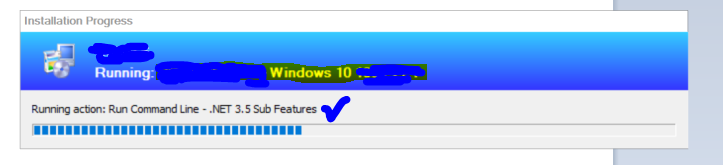
- We continue the previous blog, “OSD Known Issues and Troubleshooting“.
Please read all about it. - Whitepaper https://www.anoopcnair.com/download-whitepaper-on-top-10-best-practices-on-windows-10-osd-with-sccm-configmgr/
- Best Practices https://www.anoopcnair.com/windows-10-osd-best-practices/
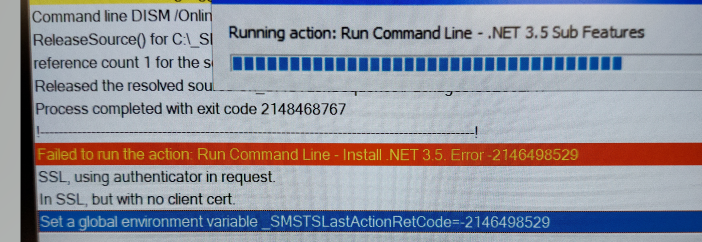
- The error printed in the SMSTS log is below.
Running action: Run Command Line- .Net 3.5 Sub Features
Failed to run the action: Running action: Run Command Line- .Net 3.5 Error 2146498529
SSL, using authenticator in request.
In SSL, but with no client cert
Set a global environment variable_SMSTSLastActionRetCode=2146498529
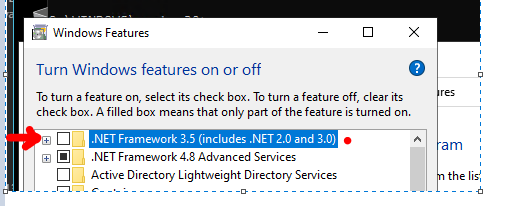
The box below the screenshot should be checked through the TS step to enable .NET 3.5.
After trying everything, I posted “How To Manage Devices” on our forum. I got ideas about offline and DISM from Ankit, Jitesh, and Rajul. I have mentioned the fix in the forum, but we will also discuss it here.
ConfigMgr OSD Troubleshooting
The following are the troubleshooting steps performed to fix the SCCM OSD error.
- DISM
- PS Script
- Offline Installer
MS says you need the Internet to enable the legacy version of “.NET” because it requires CAB Files to download if you read the https://docs.microsoft.com/en-us/dotnet/framework/install/dotnet-35-windows-10.
Not only that. You need a specific SXS folder based on the OS version. For example, we can’t use the SOURCE/SXS from Windows 10 V 1806 if we want to enable .NET on Windows 10 V 1909. I am assuming this was done to reduce the image size.
The most straightforward version of the fix was to inject it in WIM itself using DISM, but my hands were tied because I don’t manage the OSD part (TS, Boot Image, Boot Media, WIM, etc.). I can only troubleshoot.
Root Cause
After continuous OSD troubleshooting, we decided it was unrelated to SCCM. Let’s examine it from a core OS perspective.
I started reading logs collected from the failed machines.
- All logs with their description – In-depth:- https://www.anoopcnair.com/configmgr-client-logs-details-sccm-client-log/
- Log reading tips https://www.anoopcnair.com/sccm-logs-files-list-of-configmgr-log-files/
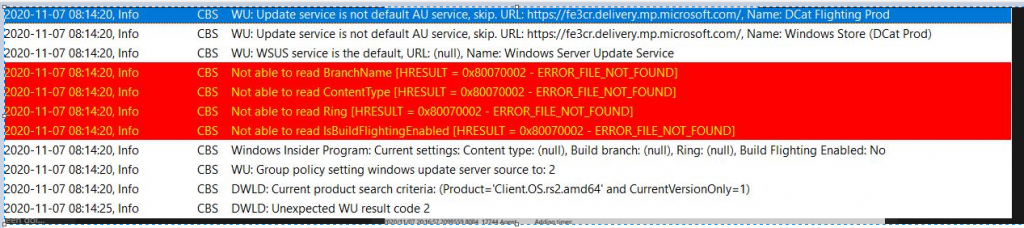
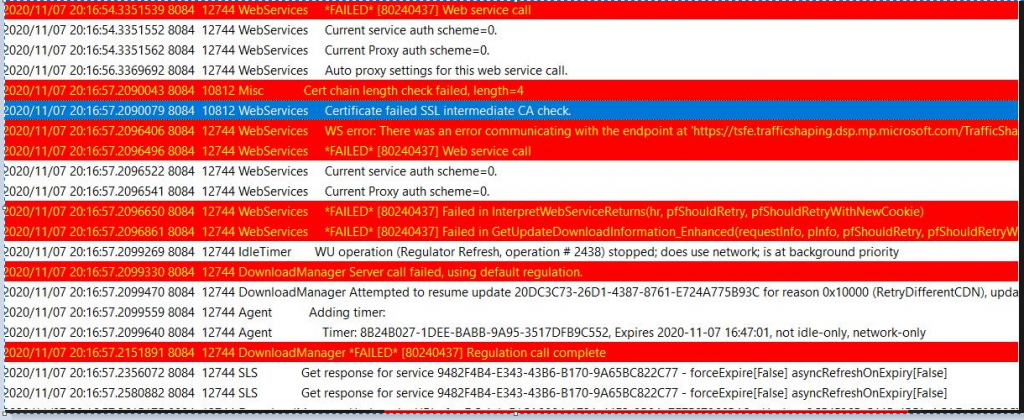
I came to one CBS log at the location “C: WindowsLogsCBS.” It clearly says I am trying to download supporting files from the MS Site over the Internet.
Fix
I asked the firewall team to whitelist the URL, and boom. We are back in business.
Resources
- SCCM OSD Task Sequence Troubleshooting Steps by Step Ultimate Guide with SMSTS.log
- Learn How to Troubleshoot SCCM Task Sequence Debugger
We are on WhatsApp. To get the latest step-by-step guides and news updates, Join our Channel. Click here –HTMD WhatsApp.
Author
Deepak Rai is a Technical Lead with over 14 years of experience in IT. He specializes in SCCM, Intune, and Azure. Throughout his career, he has worked on various platforms such as Active Directory, Exchange, Veritas NETBACKUP, Symantec Backup Exec, NDMP devices like Netapp, EMC Data Domain, Quantum using Backup Exec 2010 and 2012, and HP StorageWorks 4048 MSL G3. He also has experience in data deduplication-related troubleshooting. Ultimately, he returned to his roots as an IT Engineer focusing on SCCM technology.




Discussion