






Fix Unable to Download Contents from Cloud DP Issue ConfigMgr KB 4575790
Let’s fix Unable to Download Contents from Cloud DP Issue ConfigMgr using the new KB4575790.
After installing the following HFRU ConfigMgr 2006 Hotfix KB4578605 SCCM | Update Rollup | 22 Fixes, an issue was reported that could not download the content from the ConfigMgr Cloud distribution point.
The new KB 4575790 was released on November 20, 2020 (Friday, Redmond time), to fix the cloud DP issue.
The issue is that the client won’t be able to download ccmsetup.exe and the client installation file (ccmsetup.cab) from Azure blob storage.

NOTE! In the previous post, I discussed the known issues and Fixes of Configuration Manager 2006
- Setup Co-Management Cloud DP Azure Blob Storage
- SCCM 1906 Known Issues – List Of Fixes
- Remove SCCM CMG Cloud Management Gateway
- FIX KB5020276 Domain Join Hardening Changes Using SCCM Task Sequence | 0xaac (2732) Error
| Index |
|---|
| Do not Install KB4575787 |
| Required? |
| Upgrade Path |
| Issues Fixed |
| Install KB4575790 |
| Progress |
| Results |
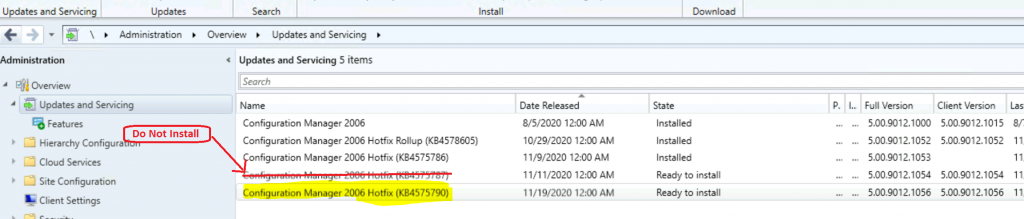
Do not Install KB4575787
Configuration Manager 2006 Hotfix (KB4575787) was superseded by the newest KB, 4575790. The new KB includes all the fixes related to Co-management Enrollment Takes Longer, so you don’t need to install it.
Required?
This fix is required if the KB4578605 HFRU for the SCCM 2006 update rollup is installed.
Upgrade Path
If you plan to upgrade to the 2006 version of ConfigMgr, please follow the upgrade patch mentioned below.
- Upgrade to SCCM 2006
- Install KB4578605 HFRU Update with 22 Fixes
- Install Hotfix KB4575790
- Install Client updates after installation of KB4575790
Issues Fixed
KB 4575790 fixes two issues: Client setup cannot download contents from a cloud distribution point in SCCM.
- When a CMG is configured to use a cloud distribution point, ccmsetup.exe cannot download the client installation file (ccmsetup.cab) from Azure blob storage. This issue delays the client’s installation or upgrade because it will fall back to using another MP if available.
- ConfigMgr Internet-facing clients using PKI client certificates for authentication cannot install or upgrade after the following update rollup is installed.
Install KB4575790
The installation process of Hotfix KB 4575790 to fix the admin console crash for the 2006 version of SCCM is as follows: You must install the hotfix on the CAS or the stand-alone primary server.
The child’s primary servers shall get automatically updated. The ConfigMgr secondary server installation needs to be initiated manually from the console. The secondary site can be upgraded only after its parent primary site is updated.
- Launch the Configuration Manager Console,
- Select the Administration tab,
- Expand Overview -> Select Updates and Services
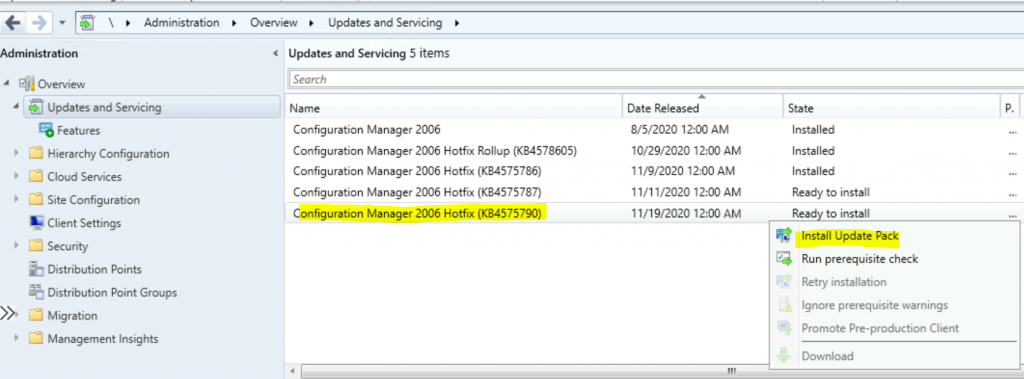
- The update Configuration Manager 2006 KB 4575790 is Ready to install stage
- Right-click on the update and click on Install Update Pack
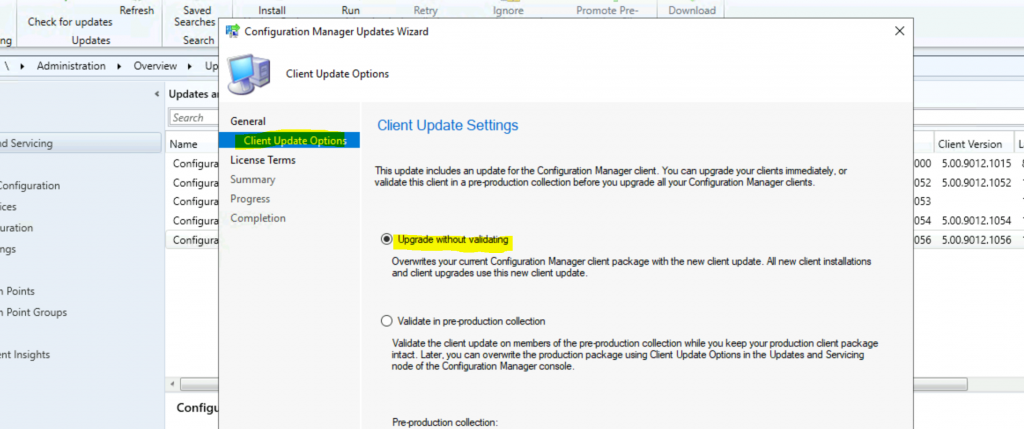
- Client Upgrade options of Configuration Manager Updates Wizard
- Click on the Next button to continue
- Accept the agreement and click the Next button.
- Complete the Configuration Manager Updates Wizard by clicking the Next, Next, and Close buttons.
Progress
- Check the status of the installation – from \Monitoring\Overview\Updates and Servicing Status\Configuration Manager 2006 Hotfix (KB4575790)
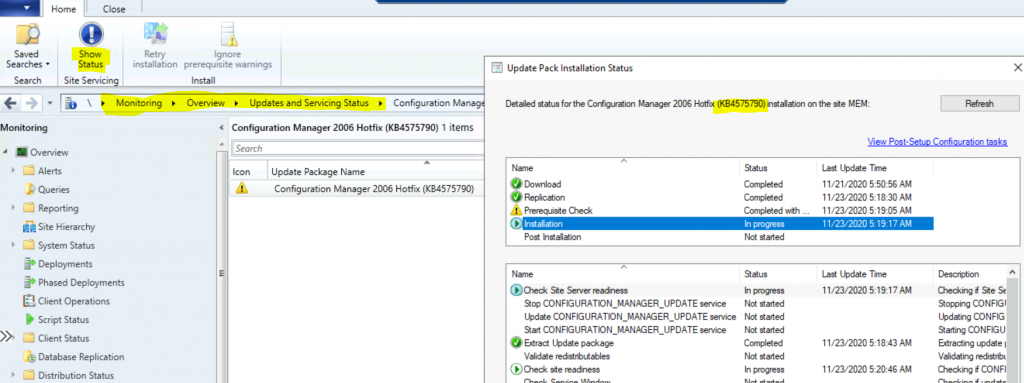
NOTE! – I have fixed a minor issue while installing KB4575790 by restarting the primary server.
Results
Let’s check the results here.
- \Monitoring\Overview\Updates and Servicing Status\Configuration Manager 2006 Hotfix (KB4575790)
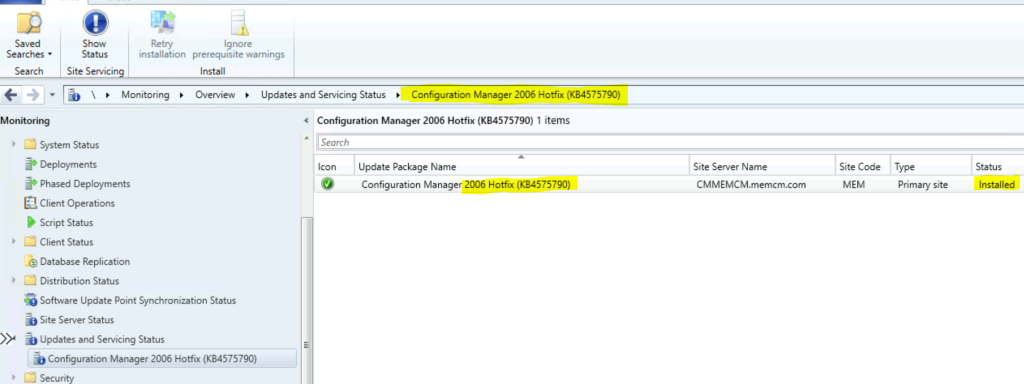
Console Upgrade is the last stage of the update in a normal scenario. However, no console update is required for the hotfix KB4575790.
- Client Version 5.00.9012.1056
- Full Site Version 5.00.9012.10526
- Site version 5.00.9012.1000
- Console Version 5.2006.1026.3000
Resources
- SCCM Secondary Server Hotfix Installation Guide | ConfigMgr
- Fix ConfigMgr Console Terminates Unexpectedly Error | SCCM 2006
We are on WhatsApp. To get the latest step-by-step guides and news updates, Join our Channel. Click here –HTMD WhatsApp.
Author
Anoop C Nair is Microsoft MVP! He is a Device Management Admin with more than 20 years of experience (calculation done in 2021) in IT. He is a Blogger, Speaker, and Local User Group HTMD Community leader. His primary focus is Device Management technologies like SCCM 2012, Current Branch, and Intune. He writes about ConfigMgr, Windows 11, Windows 10, Azure AD, Microsoft Intune, Windows 365, AVD, etc.




Discussion