Skip to content
Fix SCCM Report Server cannot Open a Connection Error ConfigMgr

Fix SCCM Report Server cannot Open a Connection Error ConfigMgr

Written By Anoop C Nair
Last Updated July 23, 2026
Posted In SCCM
SHARE

Let’s see how to fix SCCM Report Server Cannot Open a Connection to the Report Server Database Error. Configuration Manager has rich capabilities for collecting large amounts of information from endpoints.

Once collected, this information is stored in the ConfigMgr SQL DB and retrieved through SSRS reports.

You can refer to the video tutorial about Reporting Services point from here. I have a previous blog post with the list of default SCCM 2012 reports List of SCCM 2012 Default Reports.

You can refer to the details of the SQL installation and SQL reporting service role installation from the previous blog posts: 1. SQL Server—Installation 2. SQL Server Database Migration.

Patch My PC

Issue

The SSRS report gave the error message: The report server cannot open a connection to the report server database.

http://sqlmemcm/Reports/Pages/Folder.aspx

Note: The report server cannot open a connection to the report server database. The log on failed. (rsReportServerDatabaseLogonFailed) Get Online Help The report server cannot open a connection to the report server database. The log on failed. (rsInternalError) Get Online Help
The user name or password is incorrect. (Exception from HRESULT: 0x8007052E)
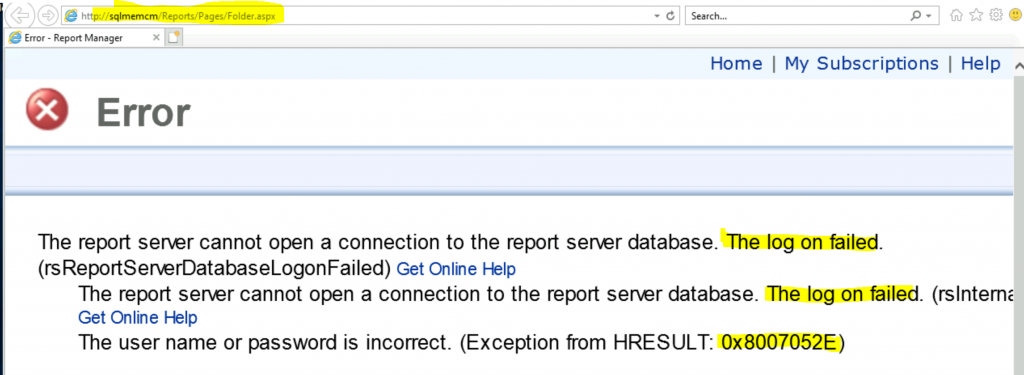
Fix SCCM Report Server cannot Open a Connection Error ConfigMgr - Fig.1
Fix SCCM Report Server cannot Open a Connection Error ConfigMgr – Fig.1

FIX SSRS Reporting Issue

Let’s check how to fix this issue name or password is incorrect. I’m trying to check the DB connectivity using the following tool. Also, don’t miss the notes section below.

  • Launch SQL Server Reporting Services Configuration Manager from the start menu
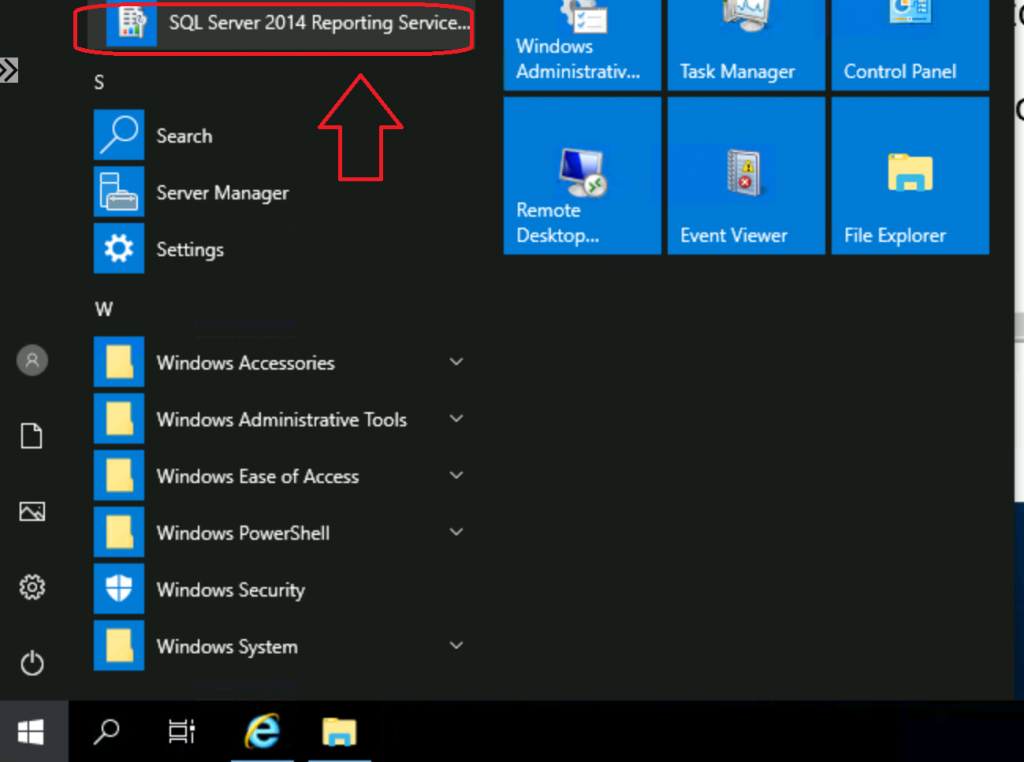
Fix SCCM Report Server cannot Open a Connection Error ConfigMgr - Fig.2
Fix SCCM Report Server cannot Open a Connection Error ConfigMgr – Fig.2

Click on the Find button to check the available servers and Report server instances

  • Click on the Connect button to continue.
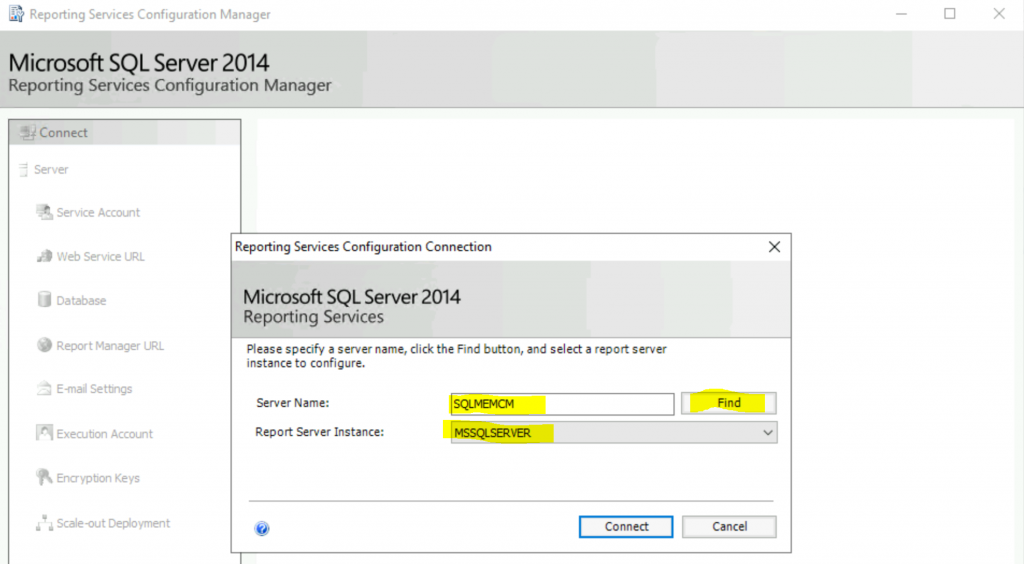
Fix SCCM Report Server cannot Open a Connection Error ConfigMgr - Fig.3
Fix SCCM Report Server cannot Open a Connection Error ConfigMgr – Fig.3

Make sure the SQL reporting service is running.

Use the Reporting Services Configuration Manager tool to define or modify settings for the Report Server and Report Manager. If you installed Reporting Services in files-only mode, you must configure the Web service URL, the database, and the Report Manager URL.
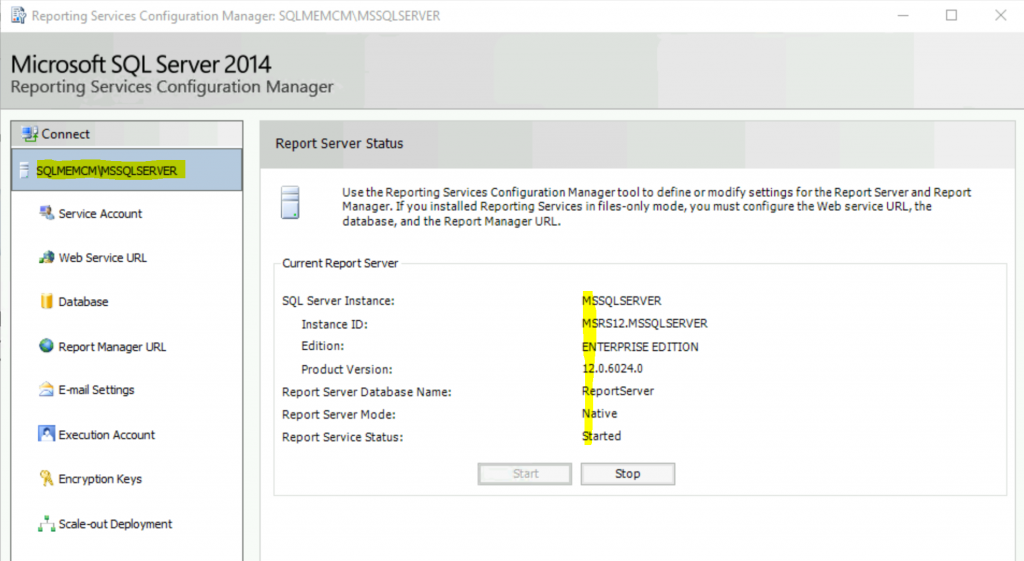
Fix SCCM Report Server cannot Open a Connection Error ConfigMgr - Fig.4
Fix SCCM Report Server cannot Open a Connection Error ConfigMgr – Fig.4

Specify a Built-in Account or Windows Domino user account to run the report server service.
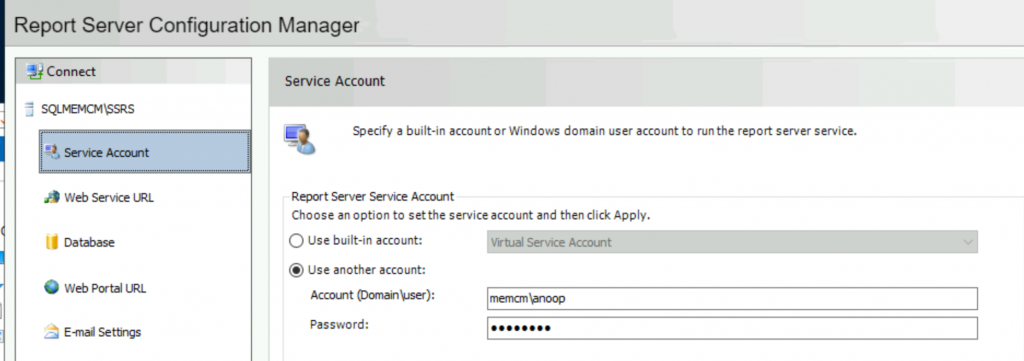
Fix SCCM Report Server cannot Open a Connection Error ConfigMgr - Fig.5
Fix SCCM Report Server cannot Open a Connection Error ConfigMgr – Fig.5

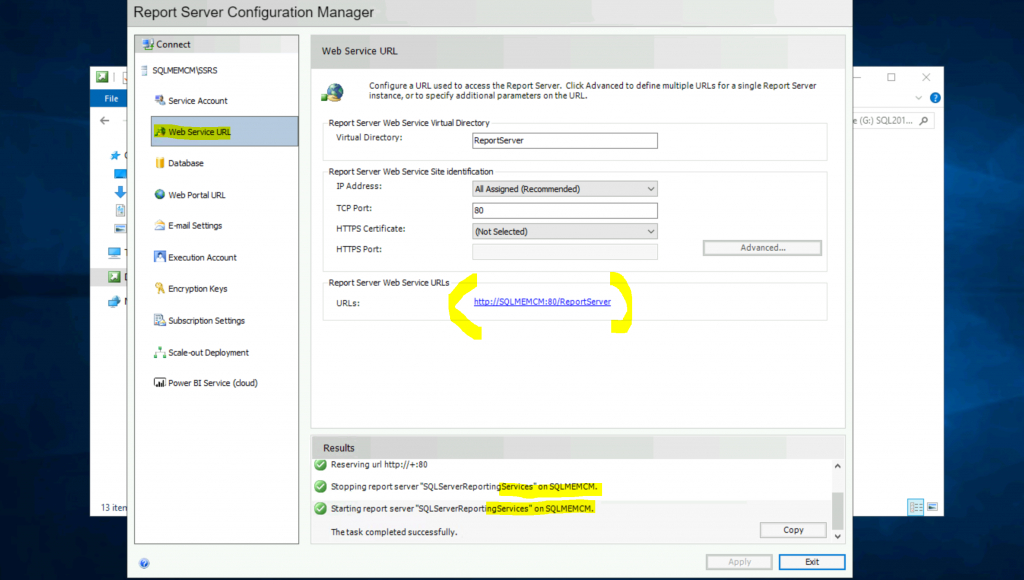
Report Server Web Service is not configured. Default values have been provided to you. To access these defaults simply press the APPLY button, or else change them and then press Apply.
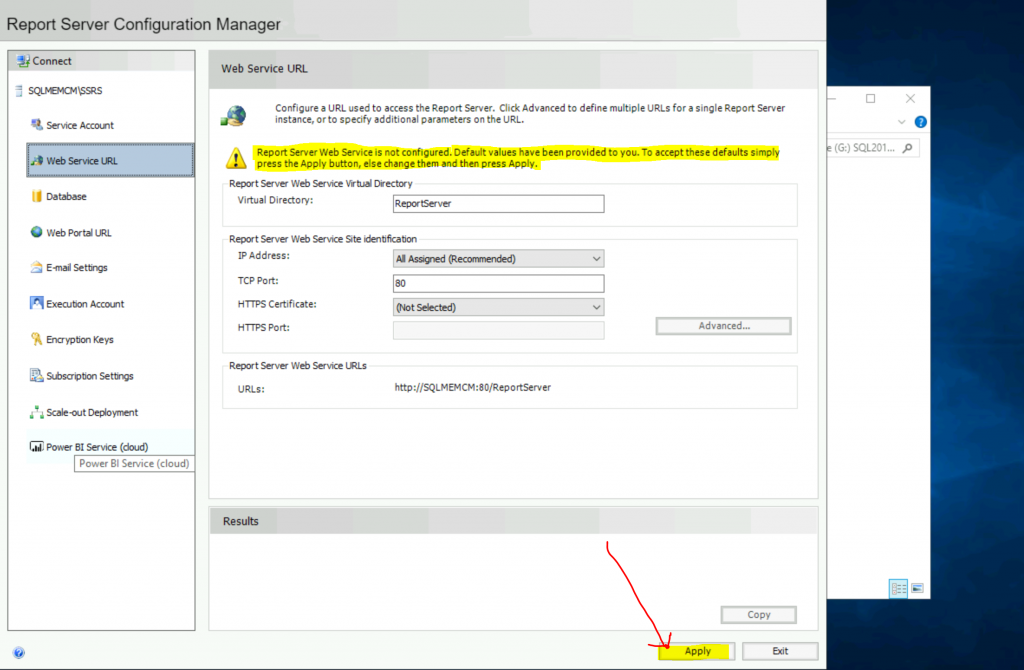
Fix SCCM Report Server cannot Open a Connection Error ConfigMgr - Fig.6
Fix SCCM Report Server cannot Open a Connection Error ConfigMgr – Fig.6

Wait to complete the configuration of the web service URL for the SSRS reporting service.
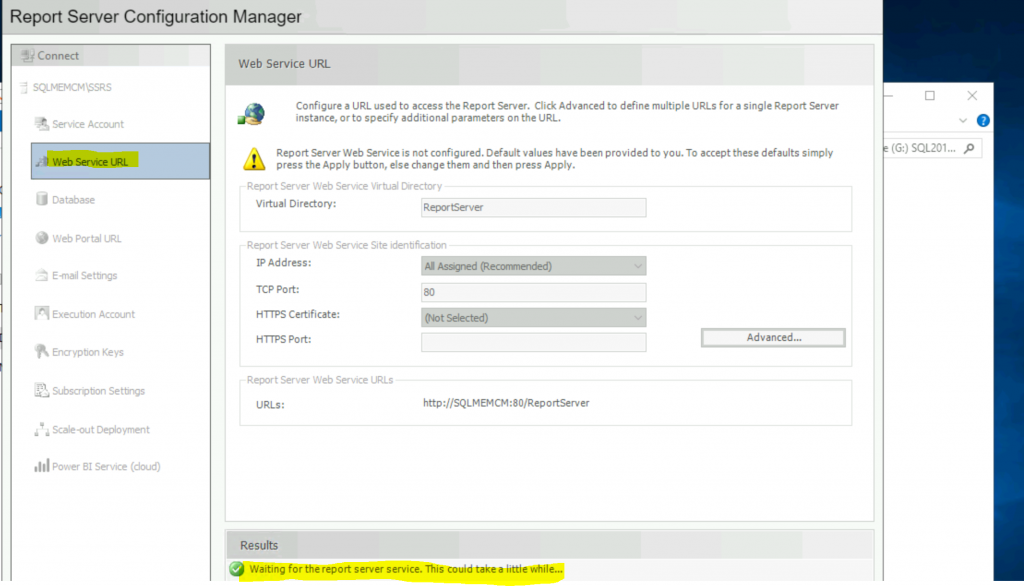
Fix SCCM Report Server cannot Open a Connection Error ConfigMgr - Fig.7
Fix SCCM Report Server cannot Open a Connection Error ConfigMgr – Fig.7

Now, the configuration is completed.

  • Click on the Exit button.
Fix SCCM Report Server cannot Open a Connection Error ConfigMgr - Fig.8
Fix SCCM Report Server cannot Open a Connection Error ConfigMgr – Fig.8

Click on Database

  • Click on Change Credentials

Because it gave the wrong username or password error, you need to click on change credentials and enter the correct username and password.
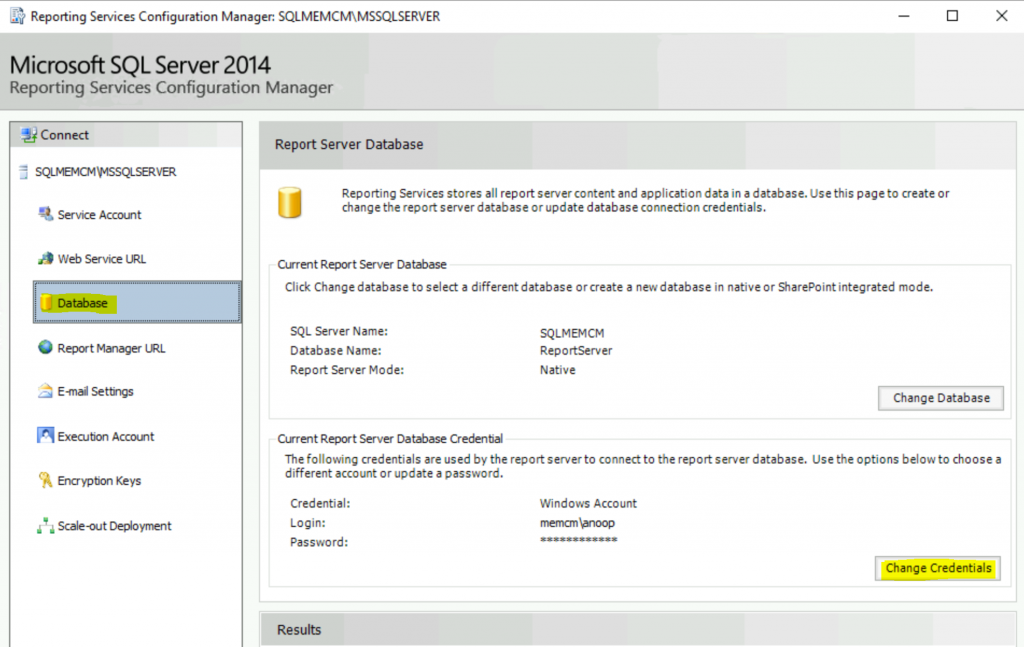
Fix SCCM Report Server cannot Open a Connection Error ConfigMgr - Fig.9
Fix SCCM Report Server cannot Open a Connection Error ConfigMgr – Fig.9

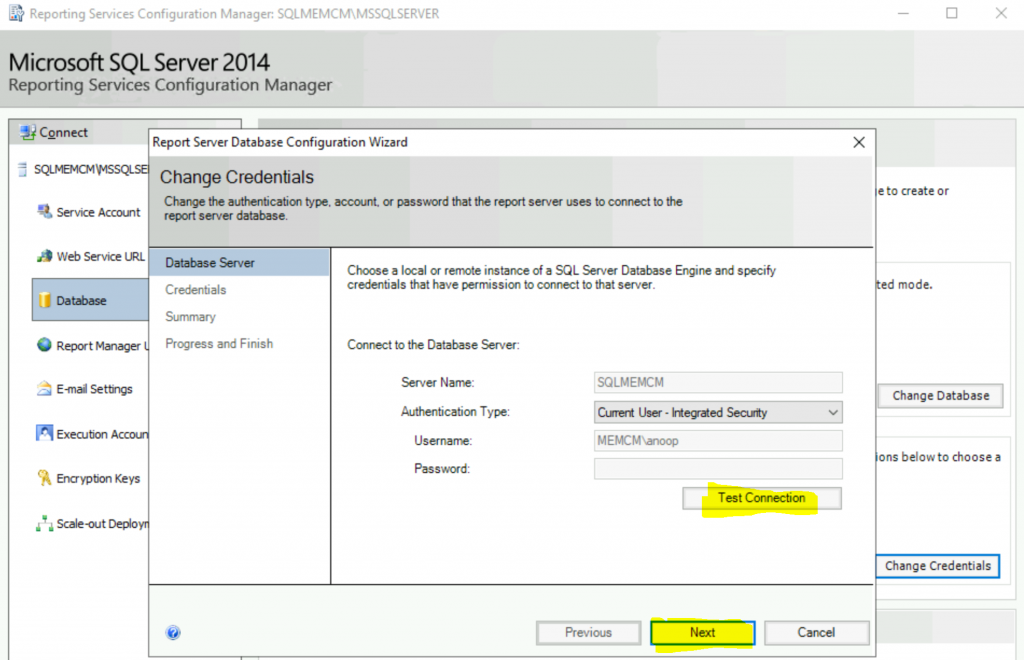
Click on Test Connection

  • Click on the Next button
Fix SCCM Report Server cannot Open a Connection Error ConfigMgr - Fig.10
Fix SCCM Report Server cannot Open a Connection Error ConfigMgr – Fig.10

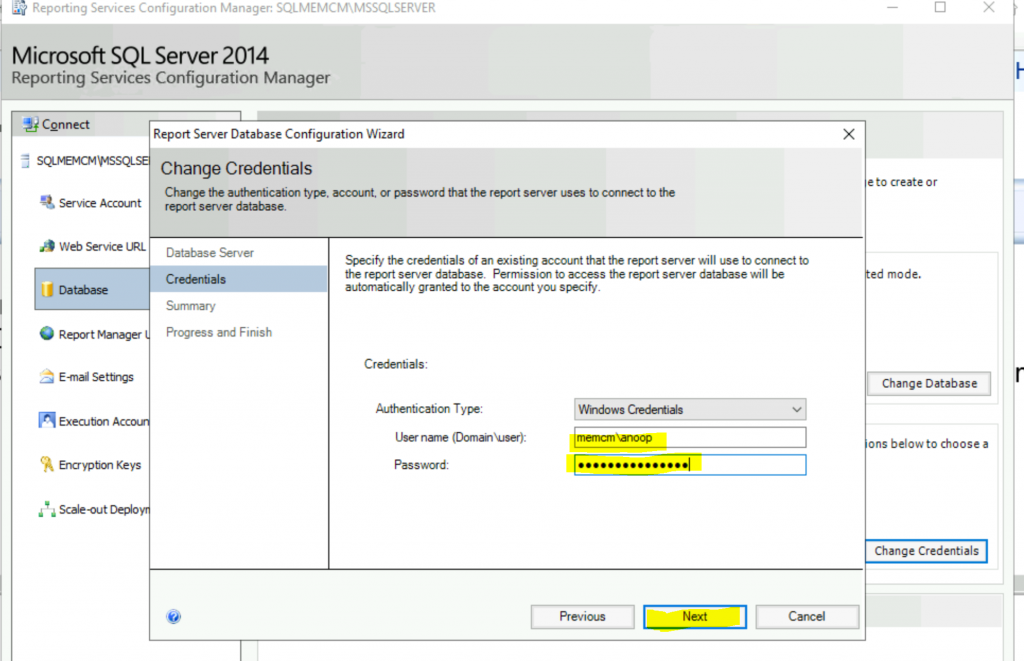
Enter the username and password

  • Click the Next button.
Fix SCCM Report Server cannot Open a Connection Error ConfigMgr - Fig.11
Fix SCCM Report Server cannot Open a Connection Error ConfigMgr – Fig.11

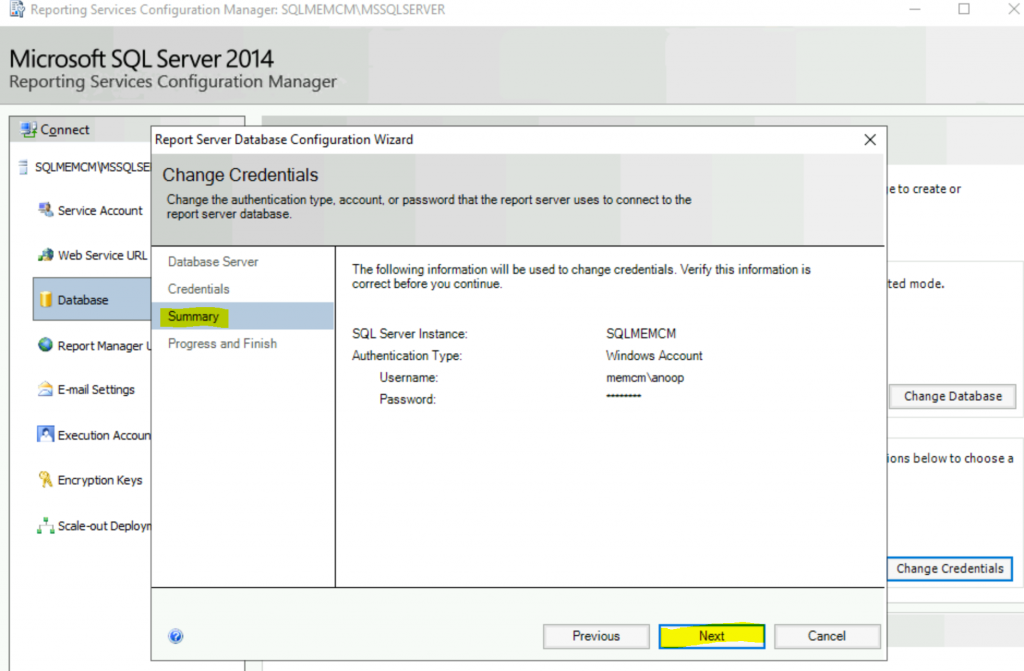
The following information will be used to change credentials.

SQL Server InstanceSQLMEMCM
Authentification TypeWindows Account
User Namememcm\anoop
Password*******
Fix SCCM Report Server cannot Open a Connection Error ConfigMgr – Table 1

Click the Next button to continue.

Fix SCCM Report Server cannot Open a Connection Error ConfigMgr - Fig.12
Fix SCCM Report Server cannot Open a Connection Error ConfigMgr – Fig.12

Click on the Finish button.

This wizard won’t check whether the username and password are incorrect. So be careful.
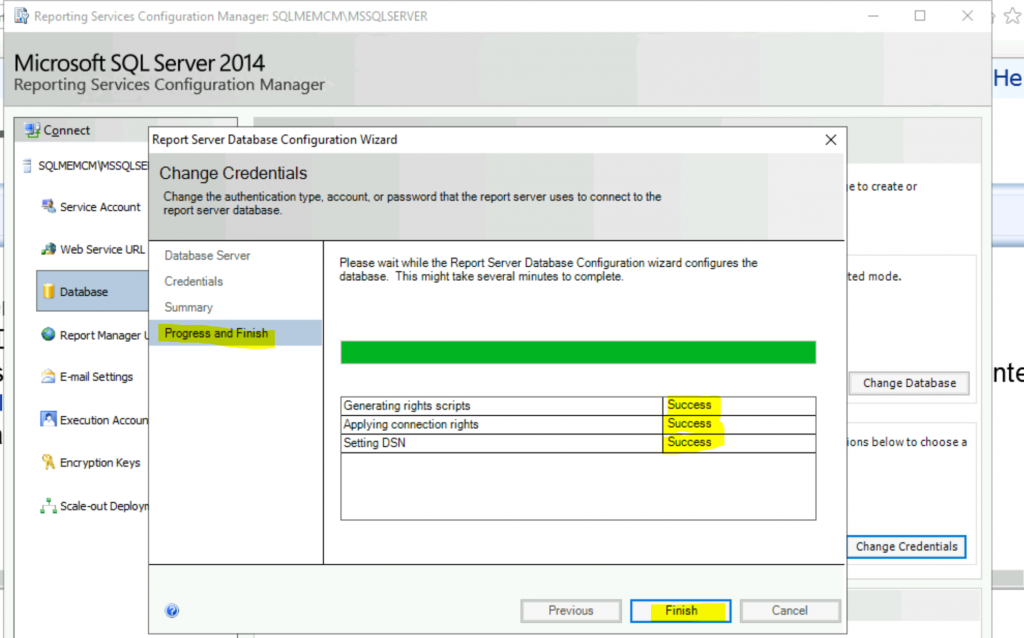
Fix SCCM Report Server cannot Open a Connection Error ConfigMgr - Fig.13
Fix SCCM Report Server cannot Open a Connection Error ConfigMgr – Fig.13
  • Click on the Exit button.

Results

After changing the user name and password, you might get a different error if you have not configured the reporting service point role. You must configure A reporting services point from the Configuration Manager console.
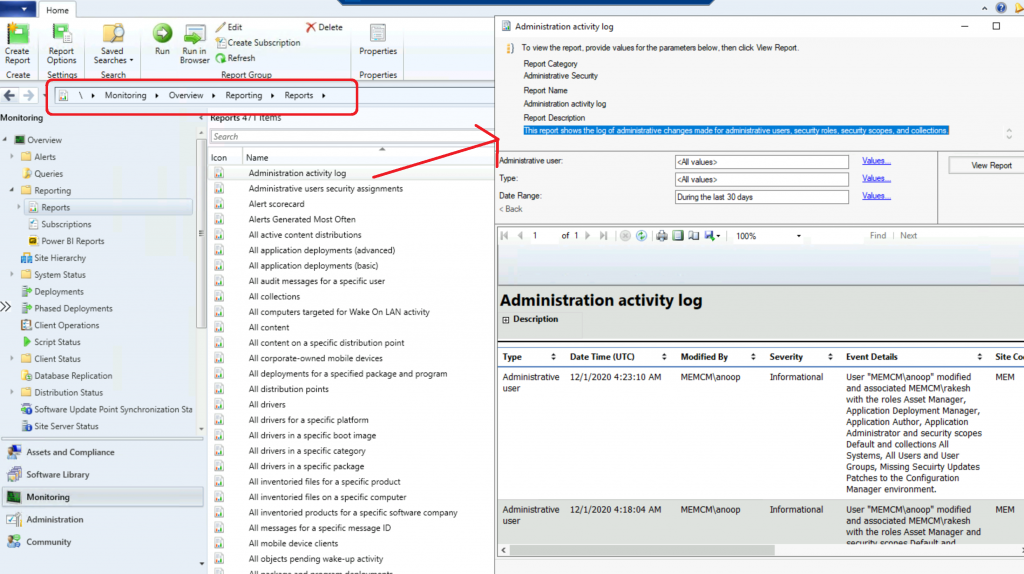
Fix SCCM Report Server cannot Open a Connection Error ConfigMgr - Fig.14
Fix SCCM Report Server cannot Open a Connection Error ConfigMgr – Fig.14

Resources

We are on WhatsApp. To get the latest step-by-step guides and news updates, Join our Channel. Click here –HTMD WhatsApp.

Author

Anoop C Nair is Microsoft MVP! He is a Device Management Admin with more than 20 years of experience (calculation done in 2021) in IT. He is a Blogger, Speaker, and Local User Group HTMD Community leader. His primary focus is Device Management technologies like SCCM 2012, Current Branch, and Intune. He writes about ConfigMgr, Windows 11, Windows 10, Azure AD, Microsoft Intune, Windows 365, AVD, etc.


Written by

Anoop C Nair is Workplace Technology solution architect with 25+ years of experience in global enterprise organizations such as JP Morgan, Capgemini, etc. Microsoft Certified Trainer. Microsoft MVP from 2015 onwards for consecutive 11+ years! He also conducts Intune and modern workplace tech training for enterprise organizations. He is Blogger, Speaker, and Founder of HTMD Community and HTMD Conference. His main focus is on Device Management technologies like Intune, Windows, Cloud PC. He writes about technologies like Intune, SCCM, Windows, Cloud PC, Windows, Entra, Microsoft Security.

Discussion · 1 comment

  1. I have upgraded SCCM database from 2008R2 to 2016SP1. SSRS also upgraded to 2016. Report Server is working fine.Reports are running but unable to detect SSRS in SCCM. Any specific reason?

Join the discussion

Your email address will not be published. Required fields are marked *

Related guides

Intune

Windows 11 KB5101650 KB5099414 July 2026 Patch and 3 Zero Day Vulnerabilities and 570 Flaws

Key Takeaways Windows 11 KB5101650 KB5099414 July 2026 Patch and 3 Zero Day Vulnerabilities and 570 Flaws! In the July 2026 Patch, Microsoft introduced new features designed to improve the overall Windows experience. The update adds enhancements to Windows Update for more flexible update management and introduces Point-in-Time Restore, providing an additional recovery option for […]

AC Anoop C Nair 9 min read
Intune

2026 June KB5094126 KB5093998 Windows 11 Patch | 3 Zero Day Vulnerabilities and 200 Flaws

Key Takeaways 2026 June KB5094126 KB5093998 Windows 11 Patch | 3 Zero Day Vulnerabilities and 200 Flaws! The June 2026 Windows 11 Patch Tuesday update brings several improvements to File Explorer. It adds support for additional archive formats, including UU, CPIO, XAR, and NuGet Packages (NUPKG). The update also preserves View and Sort preferences in […]

AC Anoop C Nair 10 min read
Intune

2026 May KB5089549 KB5087420 Windows 11 Patch | 0 Zero Day Vulnerabilities and 120 Flaws

Key Takeaways The Windows 11 May 2026 Patch KB5089549 KB5087420 Update brings important security fixes, performance improvements, and reliability enhancements across the operating system. The update introduces new features such as Xbox Mode for gaming, File Explorer improvements, enhanced input and sharing experiences, better taskbar and Windows Hello reliability, and additional enterprise management capabilities for […]

AC Anoop C Nair 8 min read
SCCM

ConfigMgr 2603 Introduces New Early Update Enrollment Process

Key Takeaways In this post we are discussing the ConfigMgr 2603 Introduces New Early Update Enrollment Process. Microsoft has officially released Configuration Manager version 2603 to the Early Update Ring, giving organizations an opportunity to test upcoming improvements before the global production rollout. The release is targeted at enterprises running ConfigMgr version 2409 or later […]

AC Anoop C Nair 3 min read