






New Hotfix Available for ConfigMgr 2010 | 9 Fixes | SCCM | KB4594176 | Configuration Manager
Let’s have a quick look at New Hotfix Available for ConfigMgr 2010. Microsoft released the new SCCM 2010 Hotfix KB4594176 to Fix nine(9) known issues.
This hotfix applies to all environments installed during the release of the opt-in version. It is also needed if you update ConfigMgr 2010 using an opt-in PowerShell script.
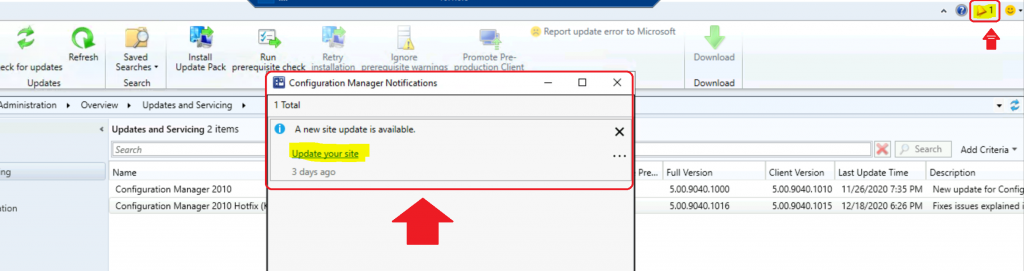
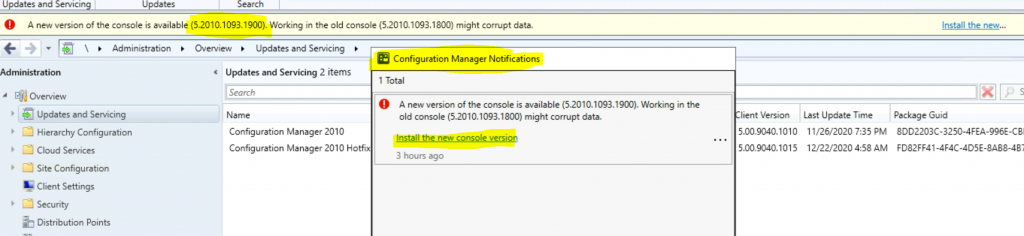
I received a console notification that a new site update is available for ConfigMgr 2020. A hyperlink option will directly take you to the update.
However, in this case, the hyperlink was not working for me. I have sent a frown for this issue from the SCCM console itself.

Table of Contents
2010 Release Details
I have already published a step-by-step guide for the ConfigMgr 2010 production release. You can refer to SCCM Primary Server Upgrade to 2010. The upgrade checklist and prerequisites are also converted into that step-by-step guide.
- Latest SCCM 2103 Hotfix List | ConfigMgr | Configuration Manager
- FIX SCCM Update Not Available Issue Error 2146233079
- SCCM 2203 Upgrade Guide with Top 5 Best New Features
I have a list of the top 5 picks of ConfigMgr 2010 new features. I think these new features are really helpful for SCCM admins with day-to-day activities. ConfigMgr 2010 is Generally Available now without an opt-in version script. Microsoft released the SCCM opt-in version of 2010 on November 30, 2020.
Applicability
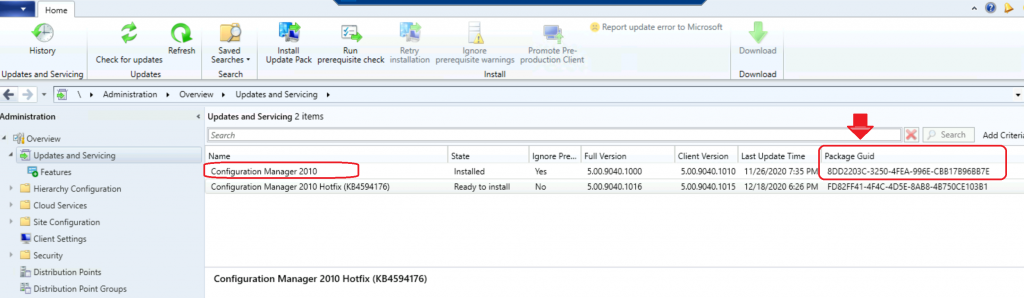
The new hotfix available for ConfigMgr 2010 KB4594176 is available only for the following Package GUIDs.
8DD2203C-3250-4FEA-996E-CBB17B96BB7E
D5054056-F41C-4E61-90A7-4F135B76F806 *
* Note: the client version will not change for customers who installed an early update ring with this package GUID.
9 Fixes were Released for ConfigMgr 2010
The following table details the known issues of ConfigMgr 2010. To fix all nine known issues with SCCM 2010, you can install KB4594176.
| Fixes Included in KB4594176 |
|---|
| After creating multiple orchestration groups, only the first group works as expected. Clients that belong to other orchestration groups beyond the first will receive the incorrect policy, resulting in unexpected results such as not installing software. |
| If you have a highly available site server, when you update to version 2010, the site server in passive mode fails to update. This issue is due to a Microsoft Monitoring Agent (MMA) change for Microsoft Defender Advanced Threat Protection. The required MMA files aren’t copied to all necessary locations. |
| After onboarding to Desktop Analytics, apps’ Importance values do not appear in the Apps tab of the Microsoft Endpoint Manager admin center. Additionally, apps deployed with SCCM may not be listed on the Apps tab. |
| The SCCM console terminates unexpectedly when viewing the preview of query results with a large result set. |
| The SCCM console terminates unexpectedly if there is a zero-byte ConsoleUsage-{date}-{time}.xml file under %USERPROFILE%\AppData\Local\Microsoft\ConfigMgr10. If this issue occurs, check for and delete the zero-byte file. |
| For version 2010 early update ring, if you use a PKI-based certificate for operating system boot media, configure it for SHA256 with the Microsoft Enhanced RSA and AES provider. For later releases, including the globally available version 2010, this certificate configuration is recommended but not required. The certificate can be a v3 (CNG) certificate. |
| Device compliance status on the Software Update Dashboard may show an incorrect count of devices and an incorrect compliance percentage. |
| Device compliance status on the Software Update Dashboard may show an incorrect count of devices and incorrect compliance percentage. |
Installation
The installation process of Hotfix KB4594176 for ConfigMgr 2010 Primary Server is similar to all the other Hotfix installations. You must install the hotfix on the CAS or the stand-alone primary server.
The child primary servers shall get automatically updated.
- Launch the Configuration Manager Console,
- Select the Administration tab,
- Expand Overview -> Select Updates and Services,
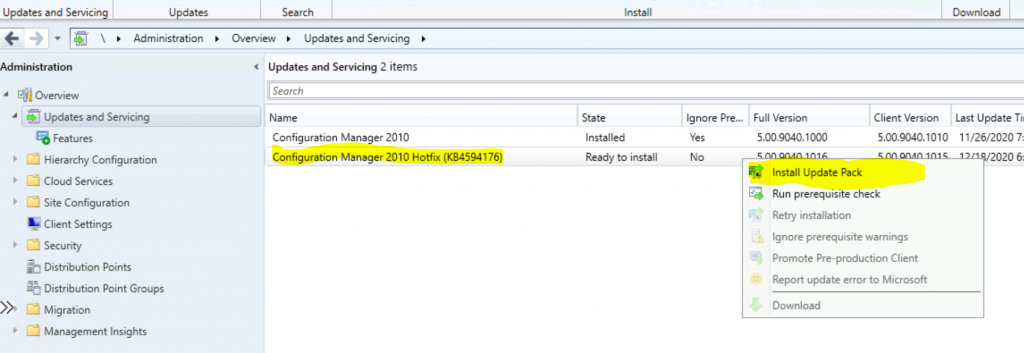
- The update Configuration Manager 2010 Hotfix KB4594176 is Ready to install stage,
- Right-click on the update and click on Install Update Pack.
Click Next. Select Client Update Settings.
- Click on Next.
- Accept the license and click on Next to continue.
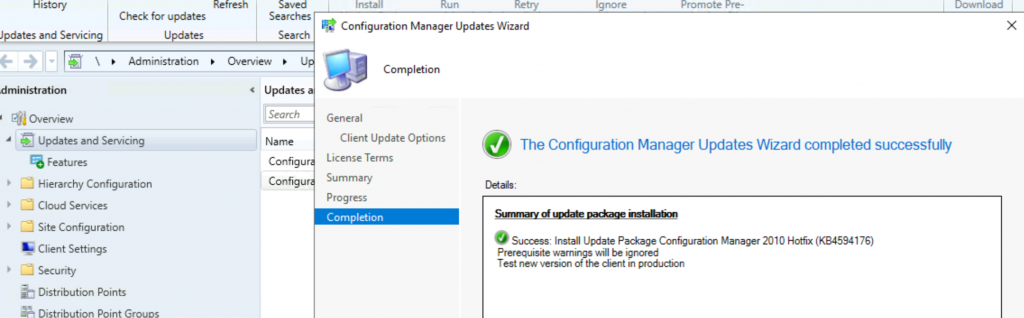
- Click Next, Next, and close to start the ConfigMgr 2006 Hotfix (KB4594176).
Secondary Server HotfixUpdate
I’ve explained how to install hotfixes on SCCM secondary servers in the previous blog posts. will let you read through the Secondary Server Hotfix Installation Guide, Fix Secondary Server Recovery Failed Issue, and Secondary Server Hotfix Installation Status.
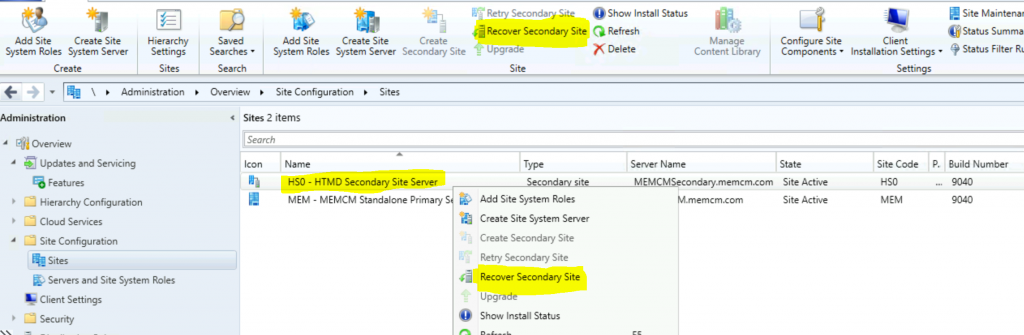
Don’t worry about the configurations of the secondary site after the recovery; they will stay intact. Follow the steps mentioned below:
To update a secondary site in the ConfigMgr console. Click Administration, click Site Configuration, click Sites, and click Recover Secondary Site.
- Then, select the secondary site you want to upgrade to with the latest SCCM 2010 hotfix.
- The primary site then reinstalls that secondary site by using the updated files.
Version
You can see the updated version numbers of ConfigMgr 2010 below.
- Full Version 5.00.9040.1016
- Client Version 5.00.9040.1015
- Console Version 5.2010.1093.1900
- Site Version – 5.0.9040.1000
Resources
We are on WhatsApp. To get the latest step-by-step guides and news updates, Join our Channel. Click here –HTMD WhatsApp.
Author
Anoop C Nair is Microsoft MVP! He is a Device Management Admin with more than 20 years of experience (calculation done in 2021) in IT. He is a Blogger, Speaker, and Local User Group HTMD Community leader. His primary focus is Device Management technologies like SCCM 2012, Current Branch, and Intune. He writes about ConfigMgr, Windows 11, Windows 10, Azure AD, Microsoft Intune, Windows 365, AVD, etc.




Discussion