






Fix SCCM Third-Party Updates Trust Failed Issue
Let’s understand how to fix the SCCM Third-Party Updates Trust Failed Issue. Recently, I have seen an issue with third-party software update syncs.
Some of the syncs are failing with TRUST-related errors. I tried initiating the sync manually without any success. In this post, we’ll find out how to fix this issue.
The step-by-step guide completes the third-party Software Update setup. The process guide covers most third-party software updates and troubleshooting scenarios. The troubleshooting blog post provides more details about log files.
In the test environment, I use only the default/out-of-the-box third-party update catalogs (a.k.a. Partner catalogs) available in Configuration Manager (a.k.a. SCCM). Custom catalogs are also available from different vendors and service providers. The Free SCCM Catalogs post provides a list of free third-party catalogs.

Table of Contents
Issue SCCM Third-Party Updates Trust Failed Issue
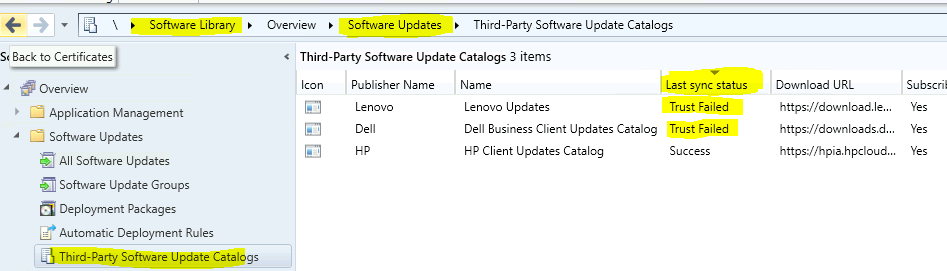
Let’s analyze the Trust Failed error for Lenovo and Dell partner catalogs. The HP catalog seems to sync successfully. As you can see in the following screenshot, the third-party sync failed for Dell and Lenovo catalogs.
- Fix SCCM Client-Side Patching or Software Updates Issues Troubleshooting Tips
- SCCM Third-Party Software Updates Step-by-Step Troubleshooting Process Guide
- To check whether you have the same problem – Navigate to \Software Library\Overview\Software Updates\Third-Party Software Update Catalogs.
- Check the Last Sync Status Column.
SMS_ISVUPDATES_SYNCAGENT.log
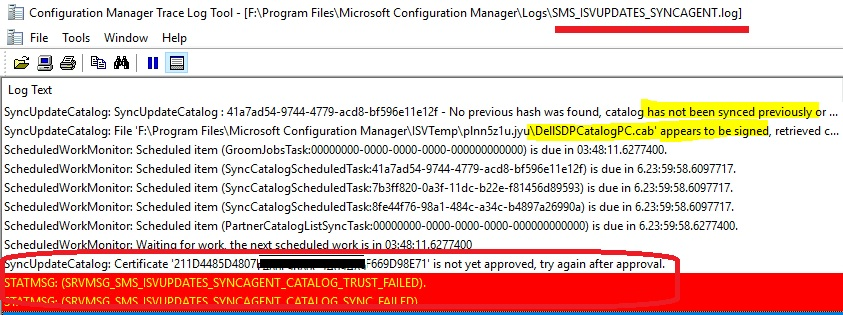
The log file SMS_ISVUPDATES_SYNCAGENT.log is your friend here to analyze further issue SCCM third-party software update catalog sync issues. This log file is in the default log location on the primary or CAS server.
- Opened the SMS_ISVUPDATES_SYNCAGENT.log log file with CMTrace.
- Search with the Keyword DELL (because Dell catalog sync is failed).
- Error Messages are right there:
SyncUpdateCatalog: SyncUpdateCatalog : 41a7ad54-9744-4779-acd8-bf596e11e12f - No previous hash was found, catalog has not been synced previously or hash was reset.
SyncUpdateCatalog: File 'F:\Program Files\Microsoft Configuration Manager\ISVTemp\plnn5z1u.jyu\DellSDPCatalogPC.cab' appears to be signed, retrieved certificate, checking signature…
ScheduledWorkMonitor: Scheduled item (GroomJobsTask:00000000-0000-0000-0000-000000000000) is due in 03:48:11.6277400.
SyncUpdateCatalog: Certificate '211D4485D4807F486E99D98E71' is not yet approved, try again after approval.
STATMSG: (SRVMSG_SMS_ISVUPDATES_SYNCAGENT_CATALOG_TRUST_FAILED).
Launcher : Work item SyncUpdateCatalog has completed queued time was 00:00:00.3878648 run time was 00:00:01.3577095
I could also see the same errors for Lenovo Catalog updates as well.
SyncUpdateCatalog: SyncUpdateCatalog : 8fe44f76-98a1-484c-a34c-b4897a26990a - No previous hash was found, catalog has not been synced previously or hash was reset.
SyncUpdateCatalog: File 'F:\Program Files\Microsoft Configuration Manager\ISVTemp\if2ycodc.v5l\LenovoUpdatesCatalog2v2.cab' appears to be signed, retrieved certificate, checking signature…
SyncUpdateCatalog: Certificate 'B9D8C79DD172D23694B91' is not yet approved, try again after approval.
STATMSG: (SRVMSG_SMS_ISVUPDATES_SYNCAGENT_CATALOG_TRUST_FAILED).

Analysis
So, essential notes from these logfile snippets are given below:
- It seems there are new catalogs from Dell and Lenovo (?) – No previous hash was found, the catalog has not been synced previously, and the hash was reset.
- Status Message – STATMSG: (SRVMSG_SMS_ISVUPDATES_SYNCAGENT_CATALOG_TRUST_FAILED)
- The main Error – Certificate ‘XYZ’ has not yet been approved; try again after approval.
Resolution
The above lines of the log file indicate that this concerns new certificates. Let’s proceed to resolution now. Let’s try to fix the third-party catalog sync issue.
| Resolution |
|---|
| Navigate to \Administration\Overview\Security\Certificates. |
| Sort the with the Status column. |
| Find out the Blocked certificates. |
- Navigate to \Administration\Overview\Security\Certificates.
- Sort the with the Status column.
- Find out the Blocked certificates.
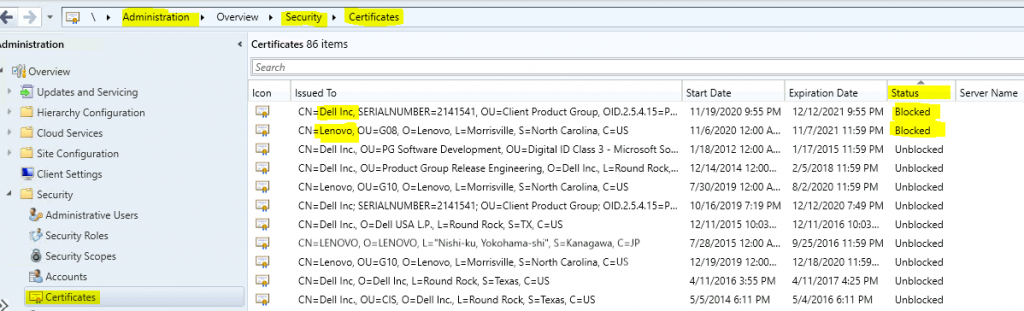
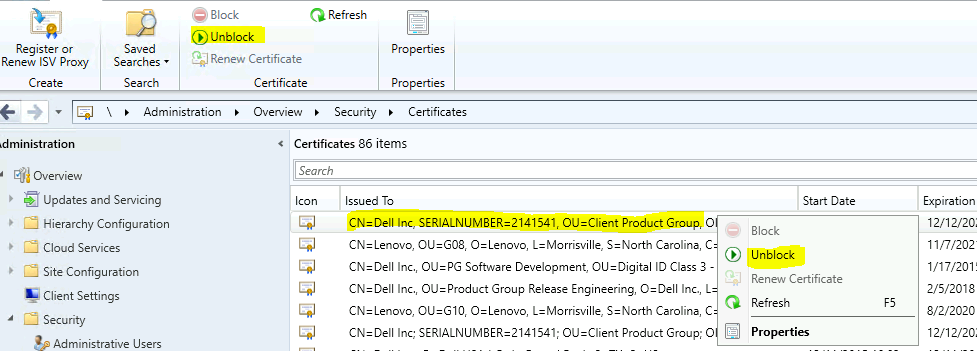
Right-click on the Dell certificate. Select the Unblock button.
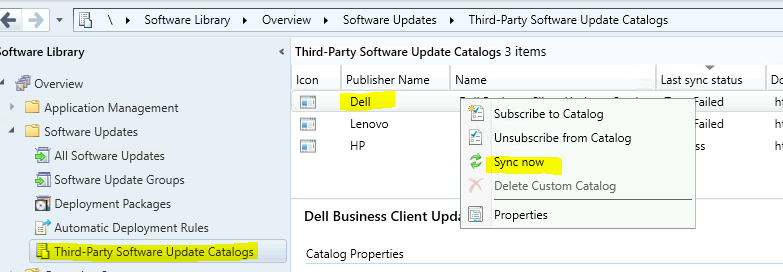
Go back to \Software Library\Overview\Software Updates\Third-Party Software Update Catalogs. Right-click on Dell Catalog. Select the Sync Now option.
- Select Yes from the Sync Catalog pop-up window.
Check the log file SMS_ISVUPDATES_SYNCAGENT.log. The DELL third-party software update sync was completed successfully.
SyncUpdateCatalog: Skipping 'NVIDIA Quadro Desktop Graphics Driver,27.21.14.5239,A00' (Update:'ce132397-bb6b-4985-bc14-1c4dd36d7f8c') Vendor 'Dell' Product:'Drivers and Applications' due to it's classification: 'Updates'.
STATMSG: (SRVMSG_SMS_ISVUPDATES_SYNCAGENT_CATALOG_SYNCED).
SyncUpdateCatalog: 0 updates were synchronized to WSUS successfully, and 0 failed to publish.
SyncUpdateCatalog: SyncUpdateCatalog : 8fe44f76-98a1-484c-a34c-b4897a26990a - Completed.

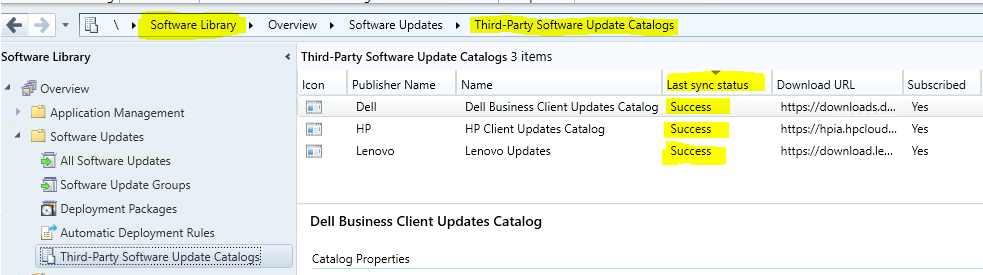
To confirm the update catalogs sync – Navigate to \Software Library\Overview\Software Updates\Third-Party Software Update Catalogs. Check the Last Sync Status column in the console.
- Success is a good sign!
Resources
- Free Catalog List – SCCM Third-Party Updates Post 2
- SCCM Third-Party Updates Step by Step Background Process Guide Post 3
- How to Install, Configure and Integrate with SCUP 2017 with SCCM
- How to Publish 3rd Party Abode Acrobat Patches via SCCM SCUP 2017
We are on WhatsApp now. To get the latest step-by-step guides, news, and updates, Join our Channel. Click here – HTMD WhatsApp.
Author
Anoop C Nair is Microsoft MVP! He is a Device Management Admin with more than 20 years of experience (calculation done in 2021) in IT. He is a Blogger, Speaker, and Local User Group HTMD Community leader. His primary focus is Device Management technologies like SCCM 2012, Current Branch, and Intune. He writes about ConfigMgr, Windows 11, Windows 10, Azure AD, Microsoft Intune, Windows 365, AVD, etc.




status success but cannot download yet. the same error occurred selection is expired or metadata only.
please advice
StaffA certificate is approved?
What happens when you have your 3rd Party Updates code-signing cert expire that’s already signed 3rd party updates from BOTH partner and custom catalogs?
What we are seeing now is that updates won’t download/install since the cert expired, even though the new cert is in place. Not finding any info on how to “re-sign” all 3rd party updates with the new cert! Any help would be appreciated!!
Hi, we have started getting this error when we run the HP catalog sync:
SyncUpdateCatalog: Downloading file: ‘https://hpia.hpcloud.hp.com/downloads/sccmcatalog/HpCatalogForSms.latest.cab’ to ‘D:\ConfigMGR\ISVTemp\rcd4gfli.1gk\HpCatalogForSms.latest.cab’.
STATMSG: (SRVMSG_SMS_ISVUPDATES_SYNCAGENT_CATALOG_DOWNLOAD_FAILED). SMS_ISVUPDATES_SYNCAGENT 9/11/2023 11:04:14 AM 1504 (0x05E0)
SyncUpdateCatalog: An unexpected error ocurred attempting to download catalog ‘HP Client Updates Catalog’ from path ‘https://hpia.hpcloud.hp.com/downloads/sccmcatalog/HpCatalogForSms.latest.cab’ :
SyncUpdateCatalog: Exception type: WebException SMS_ISVUPDATES_SYNCAGENT 9/11/2023 11:04:14 AM 1504 (0x05E0)
SyncUpdateCatalog: Exception HRESULT: -2146233079
SyncUpdateCatalog: Exception Message: The request was aborted: Could not create SSL/TLS secure channel.
Do you maybe have some idea, what could be done? (i have tried TLS/SSL protocols, Edge downloads cab file normally, IE says:
Turn on TLS 1.0, TLS 1.1, and TLS 1.2 in Advanced settings and try connecting to https://hpia.hpcloud.hp.com again. If this error persists, it is possible that this site uses an unsupported protocol or cipher suite such as RC4 (link for the details), which is not considered secure.
Thank you!
hi Crt,
we are having the same thing when we have been asked to disable TLS 1.0 and TLS 1.1. have you managed to resolve it or raise it with HP