






ConfigMgr Allow User Proxy for Software Update Scans | SCCM | Configuration Manager
Let’s understand how ConfigMgr can help configure Allow User Proxy for Software Update Scans. Microsoft announced changes to WSUS with HTTP Communications and proxy with the Windows 10 September 2020 update.
Microsoft recommends having an HTTPS connection between (a secured connection) required for software update scans (SCCM and WSUS).
You don’t have to read this post further if your organisation uses a system proxy. This post applies only if your organization uses a user-based proxy.
The software update scans against WSUS will fail when configuring the user proxy. The fix or workaround for the scan failures caused by this issue is explained in the section below.

Table of Contents
Issue (Security Enhancement)
The WSUS security enhancement related to scanning is pointed out in the below list. These changes could cause some issues if your WSUS connections are not secured. In this post, we will find out how to resolve the problems caused by these WSUS changes using the ConfigMgr client setting policy.
- Fix SCCM WSUS with HTTP Proxy Communication Issues | ConfigMgr
- Top 5 New Features of SCCM 2010 | ConfigMgr
- SCCM ConfigMgr How to Setup Co-Management – Firewall Ports Proxy Requirements
- WSUS Scanning behavior changed.
- No longer fall back to USER proxy for scanning WSUS servers.
- HTTP-based WSUS servers will be secure by default.
- Switch to the system proxy instead of using the proxy.
- A client scanning for updates against an HTTP-based WSUS will no longer be allowed to leverage a user proxy by default.
- Capability for customers to pin certificates (cert-pinning).
Enable User Proxy for Software Update Scans
As mentioned in the above section, using user-based proxy authentication for WSUS (software update) scanning is not recommended. Many organizations are (still) using a user proxy instead of a system proxy. In my experience, the changes required at the proxy level might take many months (sometimes years).
| Software Updates Scan Proxy Types |
|---|
| User-based proxy |
| System proxy |
Prerequisite
The Microsoft WSUS and Configuration Manager (a.k.a. SCCM) teams solved this user proxy issue by scanning WSUS. With the 2010 version of ConfigMgr, you can configure a “special (NOT RECOMMENDED)” policy to have a successful WSUS scan.
- ConfigMgr 2010 or later
How to Allow User Proxy for Software Update Scans
Let’s see how to enable the new option from Client Settings, allowing a user proxy for software update scans.
- Navigate to \Administration\Overview\Client Settings
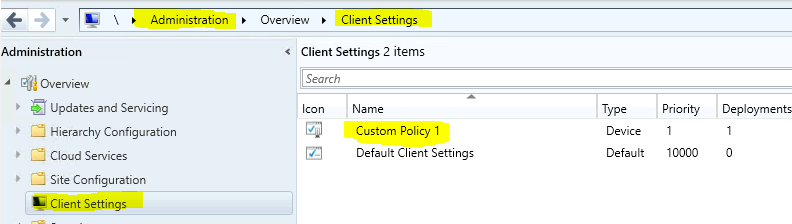
NOTE! – I don’t recommend changing the Default client settings policy. You are better off with a custom client setting policy and deploying it to the device collection.
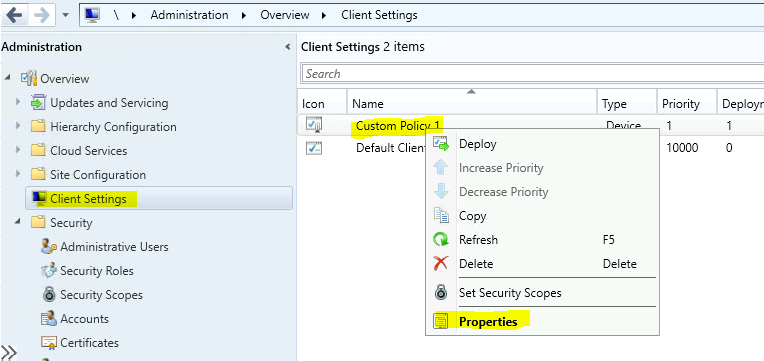
- Right-click on Custom client settings policy.
- Select the Properties option.
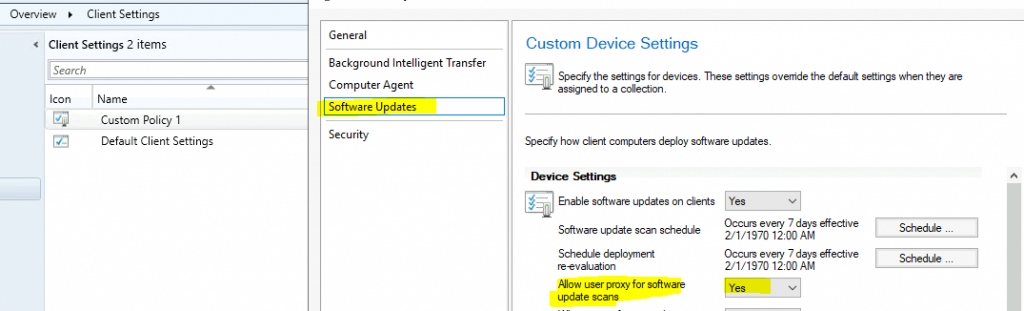
Select the Software Updates section. Select Yes from the drop-down option to allow a user proxy for software update scans (WSUS).
- Click on OK to save the settings.
Windows 10 CSP Policies
If you are looking for Windows 10, CSP can perform similar software updates or WSUS scanning settings.
- Update/SetProxyBehaviorForUpdateDetection
- The integer value 1 Allows a user proxy to be used as a fallback if detection using the system proxy fails.
More WSUS-enhanced security details are available in the following post. Scan changes and certificates add security for Windows devices using WSUS for updates.
We are on WhatsApp now. To get the latest step-by-step guides, news, and updates, Join our Channel. Click here – HTMD WhatsApp.
Author
Anoop C Nair is Microsoft MVP! He is a Device Management Admin with more than 20 years of experience (calculation done in 2021) in IT. He is a Blogger, Speaker, and Local User Group HTMD Community leader. His primary focus is Device Management technologies like SCCM 2012, Current Branch, and Intune. He writes about ConfigMgr, Windows 11, Windows 10, Azure AD, Microsoft Intune, Windows 365, AVD, etc.




Discussion