






Machine Policy Request Evaluation Cycle Client Action SCCM ConfigMgr
Let’s understand the ConfigMgr Client Action called Machine Policy Request & Evaluation Cycle in more detail. Users/admins can initiate the Machine Policy Request & Evaluation Cycle to speed up inventory during troubleshooting scenarios from Windows 10 clients. In this post, I will cover the details of this action on the client side.
I explained the Hardware Inventory Collection Cycle in the previous post. However, it’s also essential to understand ConfigMgr Client Component Status details for troubleshooting. Each client component has three different status details: installed, disabled, and enabled.
Many admins get confused between the ConfigMgr Client App and the SCCM Software Center. Both are different, and client actions are available with the ConfigMgr Client App (a.k.a. Configuration Manager Application) in the control panel.
This post provides all the details about the Machine Policy Request Evaluation Cycle Client Action in SCCM ConfigMgr. This feature helps manage and evaluate client policy requests effectively.

Table of Contents
Machine Policy Request & Evaluation Cycle
As of the ConfigMgr 2010 version, 8 (eight) client actions are available in Configuration Manager client application properties. The Machine Policy Request & Evaluation Cycle Cycle client action is the Fourth (4th) one from the top.
Navigate to:
- You can install the client app from any computer with an SCCM client.
- Open Command Prompt
- Run the following command – Control smscfgrc
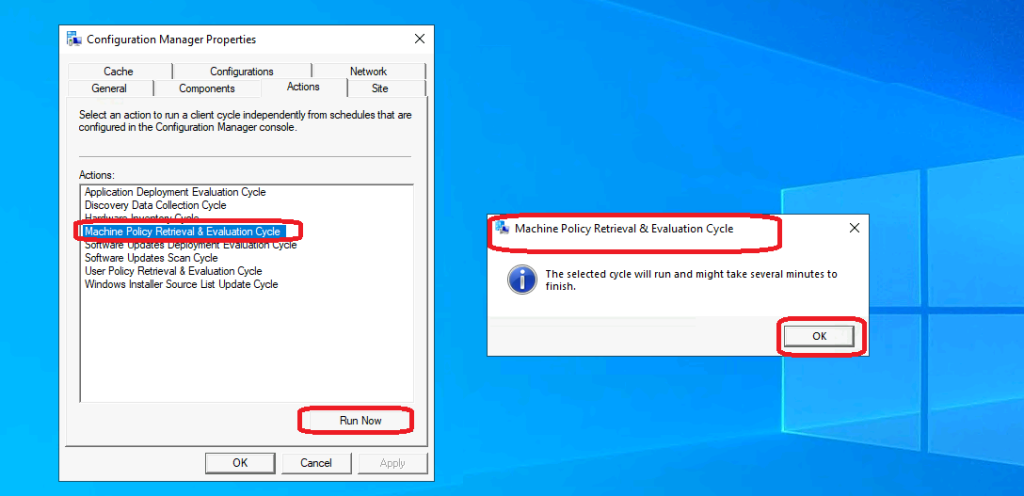
- Click on the Actions tab
- Select Machine Policy Request & Evaluation Cycle
- Click on OK from the Machine Policy Request & Evaluation Cycle popup window.
- Deep Dive SCCM Application Model Troubleshooting – Client End
- ConfigMgr Software Updates Deployment Evaluation Cycle | Client Action | SCCM | Configuration Manager
Background Processes
This SCCM client action Machine Policy Request & Evaluation Cycle “immediately” triggers the re-evaluation of the machine policy process from the Windows 10 client.
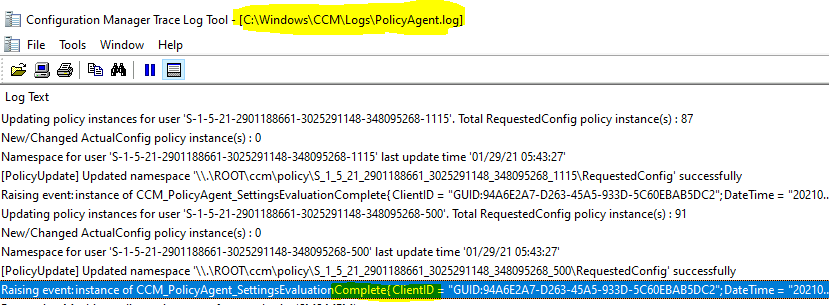
Let’s understand the machine policy retrieval & evaluation process via log files. When you initiate this action from the ConfigMgr client app, you can see the Policy Agent agent is triggered. It checks with MP to retrieve the latest policy for the device. The default machine policy interval can be configured on Client settings.
NOTE! – I have mentioned that the Discovery Data Collection action didn’t reinstate the client record that I deleted from the admin console. However, I have noticed that the SCCM client action Machine Policy Request & Evaluation Cycle helped to get the client device record back into the SCCM console.
- smscliui.log
- Perform Action: Request & Evaluate Machine Policy – {8EF4D77C-8A23-45c8-BEC3-630827704F51}. Message sent, id={640775EF-9CB0-4EED-B4FB-B1C741F4C69B}
- PolicyAgent.log
- Requesting Machine policy assignments from authority ‘SMS:MEM’
- Raising event:instance of CCM_PolicyAgent_AssignmentsRequested
- Processing Machine assignments from ‘SMS: MEM’. The new cookie is ‘2021-01-29 05:24:52.830’.
- Compiling policy assignment ‘{c210d8f2-9cfb-4fa5-bf3e-aa1db068ea1b}’ (ver. 1.00) from ‘SMS:MEM’ (2021-01-29 05:24:52.830)
- Policy Windows/All_x64_Windows_8_and_higher_Client/VI/VS/U version 1.00 hash SHA256:509D5 already exists on client
- [PolicyUpdate] Updated namespace ‘\.\ROOT\ccm\policy\S_1_5_21_2901188661_3025291148_348095268_1105\RequestedConfig’ successfully
- Raising event:instance of CCM_PolicyAgent_SettingsEvaluationComplete
- [Assignment Request] No new assignments for Machine Prod-Win20
Logs
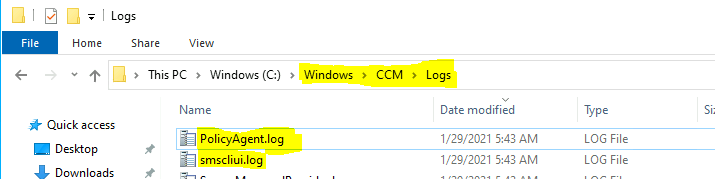
The following log files recorded a few entries when I triggered the Machine Policy Request & Evaluation Cycle. More details about SCCM clients logs are available here.
| Log |
|---|
| smscliui.log |
| PolicyAgent.log |
Resources
- ConfigMgr Client Action Discovery Data Collection Cycle | SCCM
- Discovery Data Collection action
- Hardware Inventory Collection Cycle
- ConfigMgr Client App Vs SCCM Software Center
We are on WhatsApp now. To get the latest step-by-step guides, news, and updates, Join our Channel. Click here – HTMD WhatsApp.
Author
Anoop C Nair is Microsoft MVP! He is a Device Management Admin with more than 20 years of experience (calculation done in 2021) in IT. He is a Blogger, Speaker, and Local User Group HTMD Community leader. His primary focus is Device Management technologies like SCCM 2012, Current Branch, and Intune. He writes about ConfigMgr, Windows 11, Windows 10, Azure AD, Microsoft Intune, Windows 365, AVD, etc.




Discussion