






ConfigMgr Client Action Hardware Inventory Collection Cycle | SCCM | Configuration Manager
Let’s understand the ConfigMgr Client Action called Hardware Inventory Collection Cycle in more detail. Users/admins can initiate the Cycle to speed up inventory as part of troubleshooting scenarios from Windows 10 clients. In this post, I will cover the details of this action on the client side.
In the previous post, I explained the application deployment evaluation cycle. However, it’s also essential to understand ConfigMgr Client Component Status details for troubleshooting. Each client component has three different status details: installed, disabled, and enabled.
Many admins get confused between the ConfigMgr Client App and the SCCM Software Center. Both are different, and client actions are available with the ConfigMgr Client App (a.k.a. Configuration Manager Application) in the control panel.
This post covers all the ConfigMgr Client Action Hardware Inventory Collection Cycle details.

Table of Contents
Hardware Inventory Collection Cycle
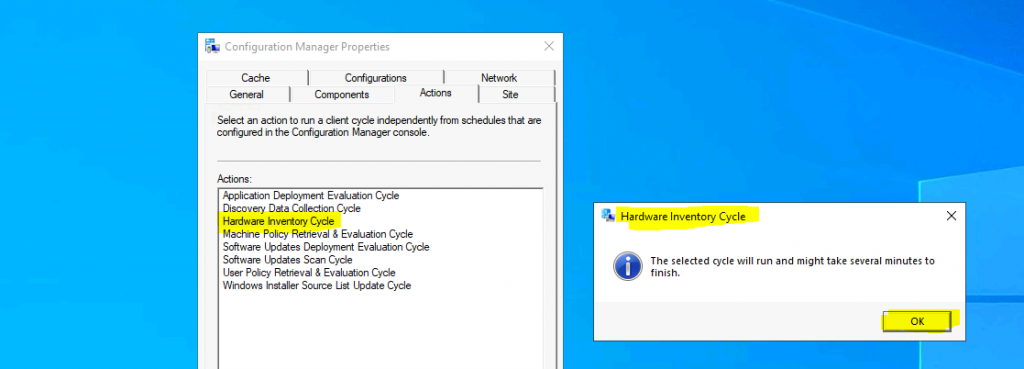
As of the ConfigMgr 2010 version, 8 (eight) client actions are available in Configuration Manager client application properties. The Hardware Inventory Collection Cycle client action is the third (third) one from the top.
| Hardware Inventory Collection Cycle |
|---|
| You can install the client app from any computer with an SCCM client. |
| Open Command Prompt |
| Run the following command – Control smscfgrc |
| Click on the Actions tab |
| Select Hardware Inventory Collection Cycle |
| Click on OK from the Hardware Inventory Collection Cycle popup window |
- How to Trigger SCCM Client Agent Actions Using PowerShell Script
- SCCM ConfigMgr Asset Intelligence Reports | Default Reports | Configuration Manager
Background Processes
This SCCM client action, Hardware Inventory Collection Cycle, “immediately” triggers the Inventory collection process from the Windows 10 client.
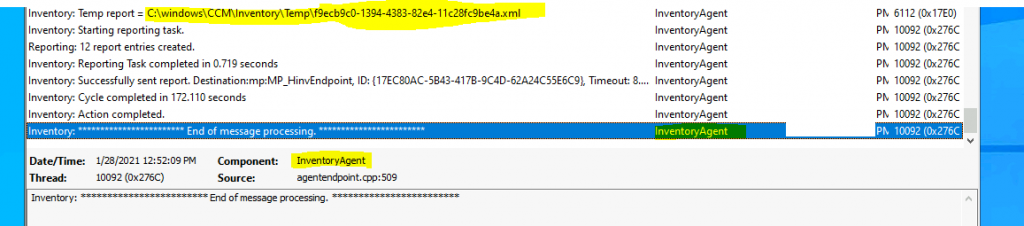
Let’s understand the inventory collection process via log files. The inventory agent is triggered when you initiate this action from the ConfigMgr client app. It starts collecting all the Software and Hardware details from the computer. The data collected is based on the hardware inventory configuration in the client settings.
- smscliui.log
- Perform Action: Hardware Inventory Collection Cycle – {00000000-0000-0000-0000-000000000101}. Message sent, id={D3511F63-41EC-4E88-A9AD-C2FF55BFF4D8}
- InventoryAgent.log
- Inventory: * Start of message processing. *
- Inventory: Temp report = C:\windows\CCM\Inventory\Temp\bbf1c889-06c3-4b3d-8bca-a9f4687b9024.xml
- Inventory: Successfully sent report. Destination:mp:MP_HinvEndpoint, ID: {56591937-736A-4941-B577-1736445B2D3F}, Timeout: 80640 minutes MsgMode: Signed, Not Encrypted
- Inventory: Cycle completed in 177.266 seconds
- Inventory: End of message processing.
Logs
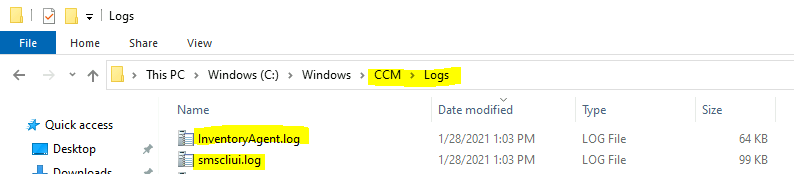
The following log files recorded a few entries when I triggered the Hardware Inventory client action. More details about SCCM clients logs are available here.
- smscliui.log
- InventoryAgent.log
Resources
- ConfigMgr Client Action Discovery Data Collection Cycle | SCCM
- ConfigMgr Client App Vs SCCM Software Center
We are on WhatsApp now. To get the latest step-by-step guides, news, and updates, Join our Channel. Click here – HTMD WhatsApp.
Author
Anoop C Nair is Microsoft MVP! He is a Device Management Admin with more than 20 years of experience (calculation done in 2021) in IT. He is a Blogger, Speaker, and Local User Group HTMD Community leader. His primary focus is Device Management technologies like SCCM 2012, Current Branch, and Intune. He writes about ConfigMgr, Windows 11, Windows 10, Azure AD, Microsoft Intune, Windows 365, AVD, etc.




Discussion