






Fix SCCM ConfigMgr Tip Not Able to Create Requirement for Deployment Type
Fix SCCM ConfigMgr Tip: I Am Not Able to Create Requirement for Deployment Type. Here’s one more quick ConfigMgr Role-Based Administration (RBA) tip.
I’ve already published several posts about RBA Gotchas and troubleshooting tips here. In this post you will get all the details of the Fix SCCM ConfigMgr Tip Not Able to Create Requirement for Deployment Type. More details are explained below.
Again, this is a short and quick post about RBA and security scopes. You must cooperate with administrative users and security scopes to resolve RBA related issues.
When you have a multi-tiered hierarchy (similar to the setup I mentioned in my previous posts and referred to above), you’ll have to spend time designing security role scopes in SCCM 2012.

Table of Contents
Fix SCCM ConfigMgr Tip Not Able to Create Requirement for Deployment Type
Here is the scenario. When “Application Administrator” (Default Security Role comes with CM 2012) tries to “create requirement” for a new app model –> deployment type, then he cannot find any of the default condition drop-down lists.
- Windows 11 Checkpoint Cumulative Updates
- Windows Device Configuration Policies Migrating to Unified Settings Platform in Intune
- How to Change Location and Language in the Copilot
- SCCM ConfigMgr Current Branch Backup Recovery Options
So, give a background: these conditions you see in the create requirement window are nothing but “Global Conditions”. SCCM ConfigMgr Tip cannot create the requirement for the deployment type.
For example, “Total Physical Memory” is one of the default conditions or global conditions. Fix SCCM ConfigMgr Tip Not Able to Create Requirement for Deployment Type?
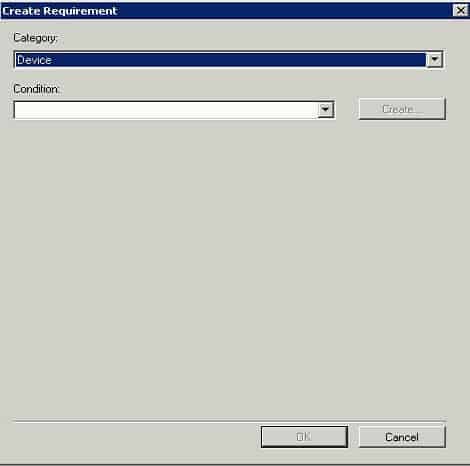
Why can’t the Application Administrator create or add requirements for the deployment type? Global Conditions are securable objects, and we can assign security scopes to each global condition.
In my scenario, the global condition/s security scope settings never change to the customized scope. Fix SCCM ConfigMgr Tip Not Able to Create Requirement for Deployment Type?
All the global conditions are assigned to the “Default” scope; hence, the application administrator couldn’t locate them in the “Create Requirement” window.
The solution was to assign the correct security scope/s for all global conditions.
Resources
- Free SCCM Training Part 1 | 17 Hours Of Latest Technical Content | ConfigMgr Lab HTMD Blog (anoopcnair.com)
- How To Disable SCCM Application Deployment | ConfigMgr | MEMCM – HTMD Blog #2 (howtomanagedevices.com)
We are on WhatsApp now. To get the latest step-by-step guides, news, and updates, Join our Channel. Click here – HTMD WhatsApp
Author
Anoop C Nair is Microsoft MVP! He is a Device Management Admin with more than 20 years of experience (calculation done in 2021) in IT. He is a Blogger, Speaker, and Local User Group HTMD Community leader. His primary focus is Device Management technologies like SCCM 2012, Current Branch, and Intune. He writes about ConfigMgr, Windows 11, Windows 10, Azure AD, Microsoft Intune, Windows 365, AVD, etc.




Discussion · 1 comment