






ConfigMgr SCCM Untrusted Forest AD System Discovery Issue
ConfigMgr SCCM Untrusted Forest AD System Discovery Issue. The most complex and multi-tiered environments require performing AD System Discovery across untrusted forests.
Recently, I’ve faced an issue with untrusted forest AD system discovery. Using an Active Directory Forest Account, I can publish MP details into the “System Management” container of the untrusted forest.
So, name resolution and firewall ports are fine between the forests or Domain Controllers. This is one of the most interesting real-world scenarios I have come across.
Table of Contents
ConfigMgr SCCM Untrusted Forest AD System Discovery Issue
When I tried to enable Active Directory System Discovery in SCCM 2012, it was not working. I looked at “adsysdis.log,” and as always, log files are very helpful in SCCM 2012. Following were the errors I could see in the discovery process log.

- Fix SCCM Untrusted Forest Remote DP Installation Error 0x800706BA ConfigMgr Endpoint Manager
- SCCM Task Sequence Boot Media Creation from Untrusted Forest DP ConfigMgr Endpoint Manager
- SCCM Untrusted Forest Issues Require the Site Server to Initiate Connection ConfigMgr MEMCM
- Easy Steps to Copy SCCM Task Sequence for Deployment
INFO: Processing search path: ‘LDAP://OU=COMPUTERS,DC=SCCMUAT,DC=ACNCONFIGMGR’.
INFO: Impersonating user [SCCMUAT\SVC_CM12_AD_FOREST] to discover objects.
INFO: Full synchronization requested
ERROR: Failed to bind to ‘LDAP://OU=COMPUTERS,DC=SCCMUAT,DC=ACNCONFIGMGR’ (0x8007054B)
INFO: CADSource::fullSync returning 0x8007054B
INFO: Reverting from impersonated user to default user.
ERROR: Failed to enumerate directory objects in AD container LDAP://OU=COMPUTERS,DC=SCCMUAT,DC=ACNCONFIGMGR
Here are some more details about the configuration of AD system Discovery. I’ve configured AD system discovery to discover the systems in the untrusted forests. As you know, I need to provide container path or LDAP query details. I’ve given the LDAP query “LDAP://OU=COMPUTERS, DC=configmgr1,DC=com.”
I was getting the following error 0x8007054B, and that error translates to “The specified domain either does not exist or could not be contacted.” Now, what ….ConfigMgr SCCM Untrusted Forest AD System Discovery Issue.
It’s an error message that is almost clear: The system or site server cannot find the domain details. How can I resolve this? I’m not excellent at Active Directory. ConfigMgr SCCM Untrusted Forest AD System Discovery Issue.
Troubleshoot – SCCM Untrusted Forest AD System Discovery Issue
As mentioned at the start of this post, I don’t have any other external issues with the site server and untrusted forest. Also, I can publish MP details into an untrusted forest Active Directory.
Sitecomp.log came to help me again in this scenario. How? I wanted to find out how MP details are being published in the untrusted forests and how communication occurs between the site server and the untrusted forest. So, in sitecomp.log, I could see the following entries.
Processing forest ConfigMgr1.com.
Publishing account user account configmgr1\SVC_CM12_AD_FOREST will be used
DS Root:DC=configmgr1,DC=com
Searching for the System Management Container.
LDAP://ACNCMRFOR.ConfigMgr1.com/CN=System Management,CN=System,DC=configmgr1,DC=com container exists.
FIX – SCCM Untrusted Forest AD System Discovery Issue
Oh, yes. You could see it was using the following LDAP query to communicate with an untrusted forest.
“LDAP://ACNCMRFOR.ConfigMgr1.com/CN=System Management,CN=System,DC=configmgr1,DC=com”
After seeing that LDAP query, I could relate it to the AD System Discovery configuration. I added the remote forest domain controller name to the LDAP query of AD System Discovery, and it started working!!! The LDAP query used is given below.
“LDAP://ACNCMRFOR.ConfigMgr1.com/OU=COMPUTERS,DC=configmgr1,DC=com”
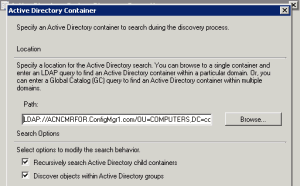
You can get more details in the “adsysdis.log” file (below). Remember, the site server or local DNS should resolve the names of the systems discovered from the untrusted forests.
Otherwise, the systems you’ve discovered don’t appear in the CM 12 console.
DNS records or name resolutions must be in place to create DDRs (Data Discovery Record) for all discovered systems. ConfigMgr SCCM Untrusted Forest AD System Discovery Issue.
INFO: Search provider = ‘LDAP’
INFO: Domain controller = ‘ACNCMRFOR.configmgr1.com’
INFO: Succeed to cached binding for LDAP://ACNCMRFOR.configmgr1.com/RootDSE
INFO: Include groups option will be ignored during incremental discovery.
INFO: search filter = ‘(&(uSNChanged>=93223)(|(objectCategory=group)(&(objectClass=user)(objectCategory=computer))))’
INFO: ads path = ‘LDAP://ACNCMRFOR.configmgr1.com/OU=COMPUTERS,DC=configmgr1,DC=com’
INFO: Bound to ‘LDAP://ACNCMRFOR.configmgr1.com/OU=COMPUTERS,DC=configmgr1,DC=com’
INFO: Successfully completed directory search
INFO: AD Discovery under container LDAP://ACNCMRFOR.configmgr1.com/OU=COMPUTERS,DC=configmgr1,DC=com found 0 objects
INFO: ——– Finished to process search scope (LDAP://ACNCMRFOR.configmgr1.com/OU=COMPUTERS,DC=configmgr1,DC=com) ——–
Improved Security with Kerberos – Comment from Pavel Yurenev
Microsoft is continuously working on improving its security protocols. One of the directions is to use Kerberos instead of NTLM – and, therefore, use FQDNs instead of NetBIOS domain names.
Instead of specifying the domain controller name in the LDAP path, better try the following solution:
1) Install 2022-02 Cumulative Update for Windows on ConfigMgr Site Server
2) Specify the discovery and publishing accounts as FQDN\DiscoveryUser instead of NetBIOS\DiscoveryUser:
e.g.
Contoso.com\DiscoveryUser
Instead of:
CONTOSO\DiscoveryUser
Resources
We are on WhatsApp now. To get the latest step-by-step guides, news, and updates, Join our Channel. Click here – HTMD WhatsApp
Author
Anoop C Nair is Microsoft MVP! He is a Device Management Admin with more than 20 years of experience (calculation done in 2021) in IT. He is a Blogger, Speaker, and Local User Group HTMD Community leader. His primary focus is Device Management technologies like SCCM 2012, Current Branch, and Intune. He writes about ConfigMgr, Windows 11, Windows 10, Azure AD, Microsoft Intune, Windows 365, AVD, etc.




Thanks a lot for this contribution! I faced exactly the same Problem and was able to fix it using your instructions. Thank you.
Hello,
Thanks a lot, I faced exactly the same Problem…
But for me, into my SCCM environment with AD 2012 R2 and SCCM 1606:
Replace: “OU=COMPUTERS” by “CN=COMPUTERS”
idem for “USERS” container for Groups and Users discovery methods (LDAP Query)
Best regards,
Were you getting 1355 error . Can you please share the complete solution you have applied
StaffWhich version of sccm ?
So SCCM attempting to run discovery on an untrusted domain. I can connect and resolve server names in both directions, SCCM to untrusted domain, untrusted domain to SCCM. DNS resolution is working. I have done all this and more and still receive “ERROR: Failed to look up DNS forest GUID error = 1355”. I have removed and republished the forest, ensured that the System Management container is re populated with all the correct entries and it is. I have run mplist and mpcert on the DC and those work correctly. I have tried multiple versions of the LDAP string and I can see that it is connecting to the AD which I can browse in the system discovery item so I know the connection is fine but this error 1355 persists and stops the discovery of the items in the container. SCCM 2002 (Hotfix rollup KB4560496). Any help would be appreciated, I have a number of these untrusted domains to add and this is the first!
StaffHave you tried to use a specific domain controller fqdn in the forest discovery setting with in SCCM console ? That setting helped me many times to solve the issues
Yes and I can see it resolving to the correct DC in the adsysdis.log. Here are the entries in the log (names replaced to protect the innocent):
INFO: ——– Starting to process search scope (LDAP://../DC=,DC=) ——–
INFO: Processing search path: ‘LDAP://../DC=,DC=’.
INFO: Impersonating user [\SVC_SCCM_CLIENTPUSH] to discover objects.
INFO: Incremental synchronization requested
INFO: CADSource::incrementalSync returning 0x00000001
INFO: New DC DNS name = ‘..’
INFO: New highest committed USN = ‘7741830’
INFO: New service object invocation Id = ‘ecd1eb309e8d8344b1051082c25abc00’
INFO: Search provider = ‘LDAP’
INFO: Domain controller = ‘..’
ERROR: Failed to look up DNS forest GUID error = 1355
INFO: CADSource::fullSync returning 0x80004005
INFO: Reverting from impersonated user to default user.
ERROR: Failed to enumerate directory objects in AD container LDAP://../DC=,DC=
INFO: ——– Finished to process search scope (LDAP://../DC=,DC=) ——–
StaffAh indeed this is strange … This is domain.com dns lookup is failing …it seems … if you enter DC.domain.com instead of domain.com might help … have you already tried this ?
Sorry Anoop, this post stripped out some information. Please see below which has a better version of the log details. Yes I have tried it with the DC name as well as just the domain. From the SCCM server I can ping both the DC and domain by IP and name:
INFO: ——– Starting to process search scope (LDAP://DC_Name.madeup.test/DC=madeup,DC=test) ——–
INFO: Processing search path: ‘LDAP://DC_Name.madeup.TEST/DC=madeup,DC=TEST’.
INFO: Impersonating user [madeup\SVC_SCCM_CLIENTPUSH] to discover objects.
INFO: Incremental synchronization requested
INFO: CADSource::incrementalSync returning 0x00000001
INFO: New DC DNS name = ‘DC_Name.madeup.test’
INFO: New highest committed USN = ‘7741830’
INFO: New service object invocation Id = ‘ecd1eb309e8d8344b1051082c25abc00’
INFO: Search provider = ‘LDAP’
INFO: Domain controller = ‘DC_Name.madeup.test’
ERROR: Failed to look up DNS forest GUID error = 1355
INFO: CADSource::fullSync returning 0x80004005
INFO: Reverting from impersonated user to default user.
ERROR: Failed to enumerate directory objects in AD container LDAP://DC_Name.madeup.TEST/DC=madeup,DC=TEST
INFO: ——– Finished to process search scope (LDAP://DC_Name.madeup.test/DC=madeup,DC=test) ——–
StaffHello Sorry I was checking about this https://snipboard.io/pEvGCY.jpg settings \Administration\Overview\Hierarchy Configuration\Active Directory Forests
If you have tried this I will surely try this. I have seen this resolves some of the discovery issues.
The following error is kind of generic access denied error – error …but the specific DC might help there also
INFO: CADSource::fullSync returning 0x80004005
INFO: Reverting from impersonated user to default user.
ERROR: Failed to enumerate directory objects in AD container
Better version of the log:
INFO: ——– Starting to process search scope (LDAP://DC Server.madeup.test/DC=madeup,DC=test) ——–
INFO: Processing search path: ‘LDAP://DC Server.madeup.TEST/DC=madeup,DC=TEST’.
INFO: Impersonating user [madeup\SVC_SCCM_CLIENTPUSH] to discover objects.
INFO: Incremental synchronization requested
INFO: CADSource::incrementalSync returning 0x00000001
INFO: New DC DNS name = ‘DC Server.madeup.test’
INFO: New highest committed USN = ‘7741830’
INFO: New service object invocation Id = ‘ecd1eb309e8d8344b1051082c25abc00’
INFO: Search provider = ‘LDAP’
INFO: Domain controller = ‘DC Server.madeup.test’
ERROR: Failed to look up DNS forest GUID error = 1355
INFO: CADSource::fullSync returning 0x80004005
INFO: Reverting from impersonated user to default user.
ERROR: Failed to enumerate directory objects in AD container LDAP://DC Server.madeup.TEST/DC=madeup,DC=TEST
INFO: ——– Finished to process search scope (LDAP://DC Server.madeup.test/DC=madeup,DC=test) ——–
Yes, that’s exactly as I have it set. I did that today. Yesterday I removed the forest and made sure it cleared out the System Management folder in AD on the untrusted domain, which it did and then today I added it in exactly as you advise here and it repopulated correctly. I am at a bit of a loss, nothing I have found on the internet so far seems to resolve this issue.
StaffI’m sure you already used untrusted forests account here – https://snipboard.io/citjPH.jpg if so I don’t have any other comments …apart from looking at event logs at domain side to understand whether there are any hints there.
Anoop, there is nothing in the event logs on the DC in the untrusted domain. I am wondering if this might be something to do with the DNS server being 2012 R2 in the SCCM domain and the one in the untrusted domain being 2008 R2. Maybe the issue is not with the target domain but the DNS server in the SCCM domain. Every article I have seen say that the recommended steps should fix it but I have literally tried everything. Looks like a MS call will need to be raised. Thanks for your time
StaffThis might be one of the rare occasion host file comes to rescue.
Can you try to add this DC server entries into SCCM primary server host file. This can help us to eliminate those complex scenarios with DNS.
What you think ?
I’m a few steps ahead of you there. I have added both the entries for the server and the domain in to the hosts file and can ping not only the DC but all other servers in the untrusted domain by name and IP from the SCCM server, therefore, I assume DNS is working correctly. I can also ping the SCCM server from the untrusted domain by name and IP address, routing has been set to allow this. I just added a hosts entry on the DNS server and the conditional forwarder now automatically resolves the DC but it has made no difference to the discovery. I have a feeling it is going to be something really simple, its going to be a registry that is 1 not 0, but rest assured I will post it if MS manage to solve the issue.
StaffThank you for the update Steve !
Microsoft continuously works on improving the security protocols. One of the directions is to use Kerberos instead of NTLM – and therefore use FQDNs instead of NetBIOS domain names.
Instead of specifying the domain controller name in LDAP path, better try the following solution:
1) Install 2022-02 Cumulative Update for Windows on ConfigMgr Site Server
2) Specify the discovery and publishing accounts as FQDN\DiscoveryUser instead of NetBIOS\DiscoveryUser: e.g.
Contoso.com\DiscoveryUser
Instead of:
CONTOSO\DiscoveryUser
Hope this helps!