






ConfigMgr CMPivot Favorite Query | SCCM SQL Query to Find out Saved | vSMS_CMPivotFavorite
Let’s discuss ConfigMgr CMPivot Favorite Query | SCCM SQL Query to Find out Saved | vSMS_CMPivotFavorite. I accidentally found the ConfigMgr CMPivot favourite query option to save your favourite queries.
I thought it would be helpful to share it here so you don’t have to save the CMPivot queries in OneNote or some other place. CMPivot’s favourite option is useful when downloading the CMPivot query published in Community Hub.
CMPivot allows you to evaluate the state of devices in your environment faster and act. When you enter a query, CMPivot will run it in real-time on all presently connected devices in the selected collection.
In the following post, ConfigMgr CMPivot Query to Find Clients not Part of Any Boundary Groups | SCCM, I explained how to download and start using the CMPivot query from the Community Hub. However, I was confused about where to find the downloaded CMPivot query.

Table of Contents
How to Save ConfigMgr CMPivot Favorite Query?
It’s interesting to know that downloading the CMPivot query from Community Hub will automatically add it as a CMPivot favorite query. Let’s see where this favorite query icon is in CMPivot.
- Launch the CMPivot tool from the console or standalone tool.
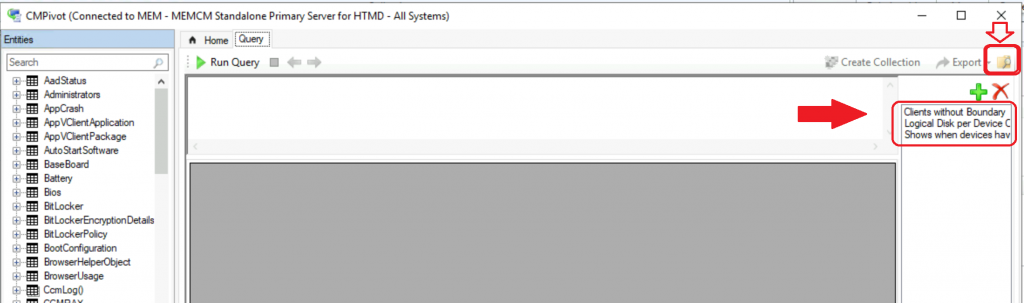
- Click on the icon on the right-side corner of the CMPivot tool.
- The following screenshot shows a list of queries. Some downloaded this query from Community Hub, and others were manually saved.
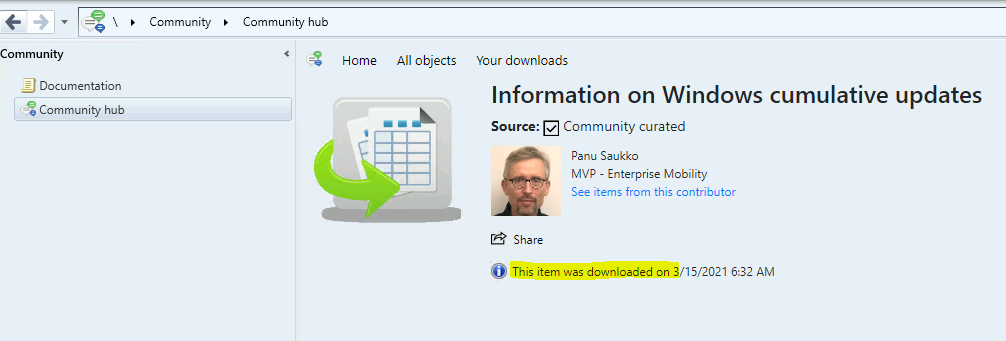
I have downloaded another query from Community Hub published by MVP colleague Panu Saukko.
I have closed and reopened the CMPivot tool.
- Click on the CMPivot Favorite query icon.
- The Windows Cumulative Update CMPivot query is available under the Favorite query.
// Shows the pie chart of Windows 10/2016/2019 cumulative update versions
OperatingSystem
| project Device, BuildNumber
| join (Registry('HKLM:\\Software\\Microsoft\\Windows NT\\CurrentVersion')
| where Property =='UBR' | project Device, CU=Value)
| project Device, FullBuild=strcat(BuildNumber,'.',tostring(CU))
| summarize count() by FullBuild
| render piechart with(title='Windows CUs')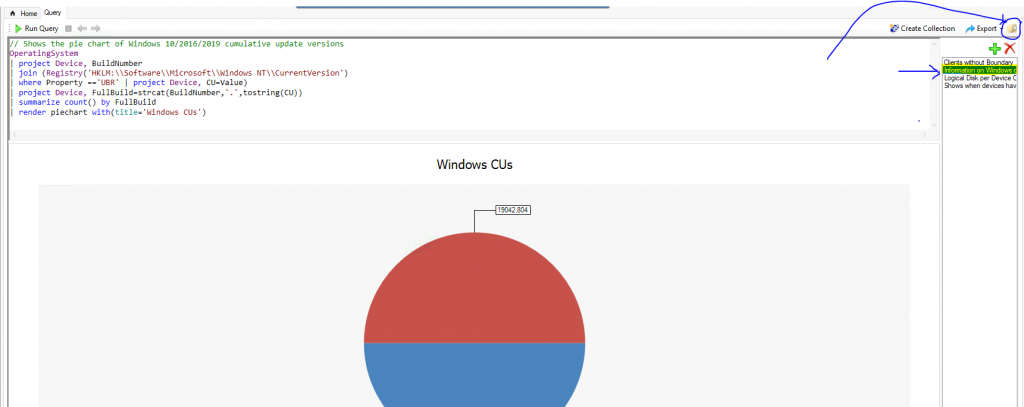
- Latest Fixes for SCCM 2203 KB14244456 Hotfix Update Rollup
- ConfigMgr 2203 Known Issues and Fixes
- Dot Net Version Details using SCCM CMPivot Query
- How to Collect Intune Error Details using SCCM CMPivot Best Option
- Latest SCCM 2103 Hotfix List | ConfigMgr | Configuration Manager
vSMS_CMPivotFavorite
The SQL view vSMS_CMPivotFavorite gets you the details of all the admins’ CMPivot favorite queries. So, you might see some interesting data from this view. Be careful if you want to keep your query a secret, even though I don’t recommend keeping it.
You can run the following SQL query from SQL Management Studio to determine which SCCM admins’ favourite CMPivot queries are in your environment.
Select * from vSMS_CMPivotFavorite

The following table gives more information about CMPivot favorite query view.
| Script Guid | User Name | Name | Query |
|---|---|---|---|
| 7DC6B6F1-E7F6-43C1-96E0-E1D16BC25C14 | MEMCM\anoop | Shows when devices have restarted in the last seven days | OperatingSystem | where LastBootUpTime <= ago(7d) | summarize count() by bin(LastBootUpTime,1d) | render timechart |
| 7DC6B6F1-E7F6-43C1-96E0-E1D16BC25C14 | MEMCM\anoop | Clients without Boundary | CcmLog(‘LocationServices’) | where LogText contains ‘Client is not in any boundary group.’ | project Device, LogText, DateTime |
| 7DC6B6F1-E7F6-43C1-96E0-E1D16BC25C14 | MEMCM\anoop | Logical Disk per Device Chart | LogicalDisk | summarize sum( FreeSpace ) by Device | order by sum_ desc | render column chart |
Resources
We are on WhatsApp now. To get the latest step-by-step guides, news, and updates, Join our Channel. Click here – HTMD WhatsApp.
Author
Anoop C Nair has been Microsoft MVP from 2015 onwards for 10 consecutive years! He is a Workplace Solution Architect with more than 22+ years of experience in Workplace technologies. He is also a Blogger, Speaker, and Local User Group Community leader. His primary focus is on Device Management technologies like SCCM and Intune. He writes about technologies like Intune, SCCM, Windows, Cloud PC, Windows, Entra, Microsoft Security, Career, etc.




Do you know if it’s possible to add favorite queries to all users’ CMPivot favorites? I can see the favorites I’ve made, but other users don’t see my favorites. I think that would be a great feature to provide favorites to the helpdesk for example.
This is really great information Anoop! Thank you for sharing all of the useful and timely information that you do.