






Fix ConfigMgr 2010 Rollup Update Issue with Hotfix KB5001670 | SCCM
Let’s see how to Fix ConfigMgr 2010 Rollup Update issue with Hotfix KB5001670. Microsoft released another hotfix, KB5001670, for ConfigMgr 2010.
This Hotfix helps fix Endpoint Analytics-related issues, such as Devices not reporting App Usage Data errors.
I have a post about the known issues of Configuration Manager 2010. More details available – SCCM 2010 Known Issues Bugs & Fixes. With the release of the 2010 rollup update KB4600089, most of those known issues are fixed.
The production version of 2010 is generally available. It is available to all SCCM infrastructure with an online Service Connection Point. It would be best to have any of the following versions of ConfigMgr: 1906, 1910, 2002, and 2006.

Table of Contents
Applicable?
Is hotfix KB5001670 applicable to your environment? Do you need to install this update on your primary and secondary servers? Is there any client update related to this KB?
Well, this KB article requires a client update. I recommend installing this KB if your SCCM environment meets the following criteria.
- 28 Issues Fixed with ConfigMgr 2010 Update Rollup Hotfix KB4600089 | SCCM | Configuration Manager
- Latest SCCM 2103 Hotfix List | ConfigMgr | Configuration Manager
- SCCM 2103 Known Issues Fixes | ConfigMgr | Configuration Manager
- ConfigMgr Superseded By Supersedes Columns | SCCM | Configuration Manager
- Fix Microsoft Connected Cache MCC Server Component Installation Fails Issue | SCCM | ConfigMgr
Have you completed the Tenant Attach process and installed the rollup update for 2010? If so, you might have already noticed an error resembling the following in the log file called SensorManagedProvider.log file on Windows 10 devices.
Other exception - Value was either too large or too small for an Int32.,    at System.Number.ParseInt32(String s, NumberStyles style, NumberFormatInfo info)
   at System.Convert.ToInt32(String value, IFormatProvider provider)
   at Microsoft.ConfigurationManagement.SensorFramework.SrumUtilHelper.ImportCsvToDataTable[T](String filePath)
Update Hotfix KB5001670 on the Primary Server
Installing this update, KB5001670 is as straightforward as installing any other hotfix on a standalone primary server or CAS server. The child’s primary servers will be automatically updated.
- Launch the Configuration Manager Console.
- Select the Administration tab.
- Expand Overview -> Select Updates and Services.
- The update Configuration Manager 2010 Hotfix KB5001670 is Ready to install stage.
- Click on Install Update Pack.
- Click Next.
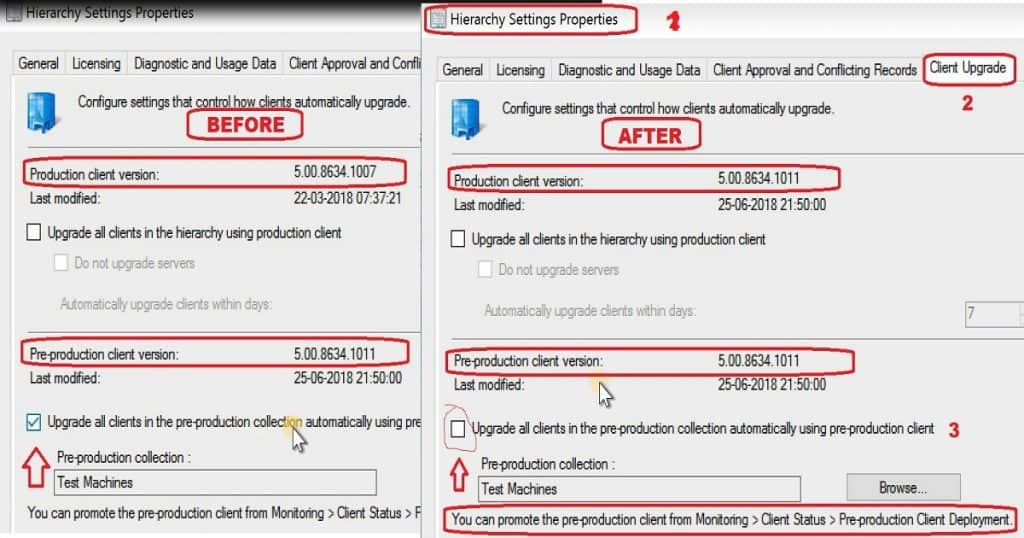
- Select Client Update Settings. More details about the pre-prod client testing option are given in the following post – SCCM Client Upgrade – Promote Pre-Production Client To Production (anoopcnair.com)I selected this option for LAB Upgrade without validating.
- Validate in pre-production collection
- Click on Next.
- Accept the license and click on Next to continue.
- Check the Summary of the updated package installation
- Click on Close to complete Configuration Manager Updates Wizard.
Recovery Secondary Site
You can install the KB5001670 on the secondary server using the following method.
- To update a secondary site in the ConfigMgr console.
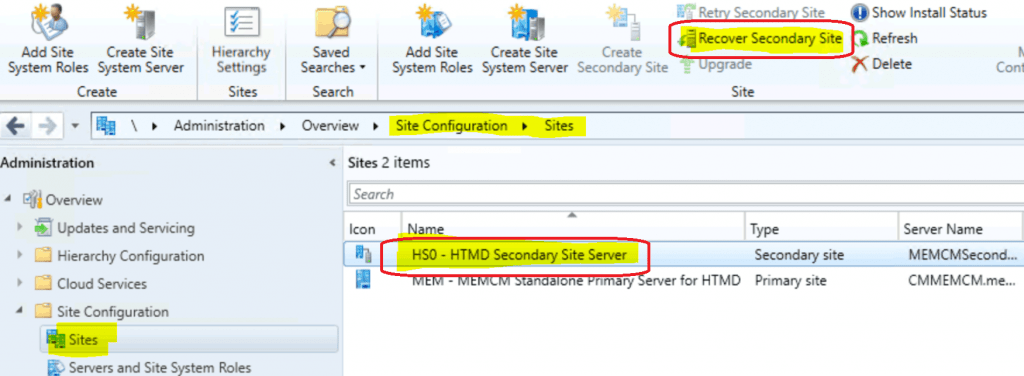
- Click Administration, click Site Configuration, click Sites, click Recover Secondary Site
- Then select the secondary site you want to upgrade.
- The primary site then reinstalls that secondary site by using the updated files.
Resources
- 28 Issues Fixed With ConfigMgr 2010 Update Rollup Hotfix KB4600089 | SCCM
- ConfigMgr 2010 Known Issues Fixes | SCCM How To Manage Devices
- SCCM Secondary Server Installation Failed Error | ConfigMgr | Fix
We are on WhatsApp now. To get the latest step-by-step guides, news, and updates, Join our Channel. Click here – HTMD WhatsApp.
Author
Anoop C Nair has been Microsoft MVP from 2015 onwards for 10 consecutive years! He is a Workplace Solution Architect with more than 22+ years of experience in Workplace technologies. He is also a Blogger, Speaker, and leader of the Local User Group Community. His main focus is on Device Management technologies like SCCM and Intune. He writes about technologies like Intune, SCCM, Windows, Cloud PC, Windows, Entra, Microsoft Security, Career, etc.




Discussion