






FIX: SCCM WSUS Sync Failed with UssInternalError SoapException Error 0x80131500 | ConfigMgr
Let’s check how to fix the SCCM WSUS Sync Failed issue. This morning, the ConfigMgr community reported that WSUS Sync failed with UssInternalError SoapException Error 0x80131500.
Microsoft MVP Panu Saukko reports that the SUP server failed to sync after 04/08 at 01.00 am (his local time). I tried to run WSUS Sync in my lab environment but couldn’t reproduce the sync issue.
The issue is not present in all the SCCM/WSUS environments. The impact is when you enable some of the Dev Tools product categories from the products list. More details are in the section below the post.
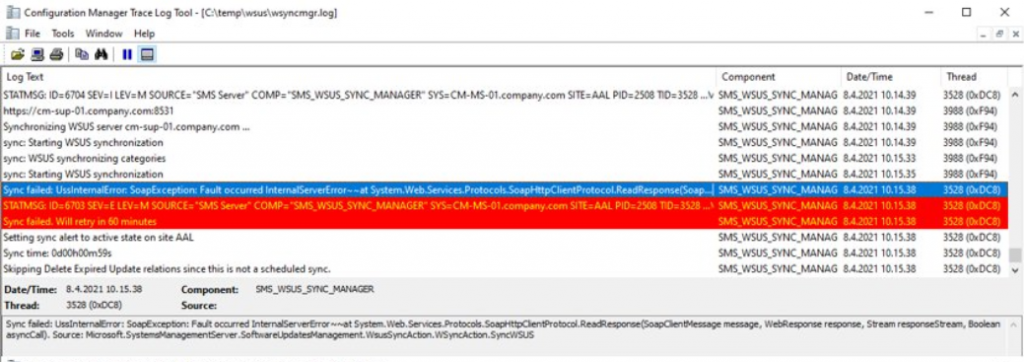
The following screenshot is taken from Panu’s tweet and gives you an idea about the WSUS sync error from Wsyncmgr.log.

Table of Contents
- Unpin Microsoft Store Apps from Taskbar with Intune | Do Not Allow Pinning Store App to the Taskbar
- Windows 10 KB5041580 August 2024 Patches and 7 Zero-Day Vulnerabilities
- Windows 11 KB5041585 KB5041592 August 2024 Patches and 7 Zero-Day Vulnerabilities
- Add or Remove All Program Lists from the Start Menu in Windows 11
- Fix Intune Device Internal Service Error Code 0X80180006
Workaround SCCM WSUS Sync Failed with UssInternalError SoapException Error 0x80131500
Sr. Support Escalation Engineer Vinay Pamnani provided the workaround solution. You have to follow the steps mentioned below to work around this issue.
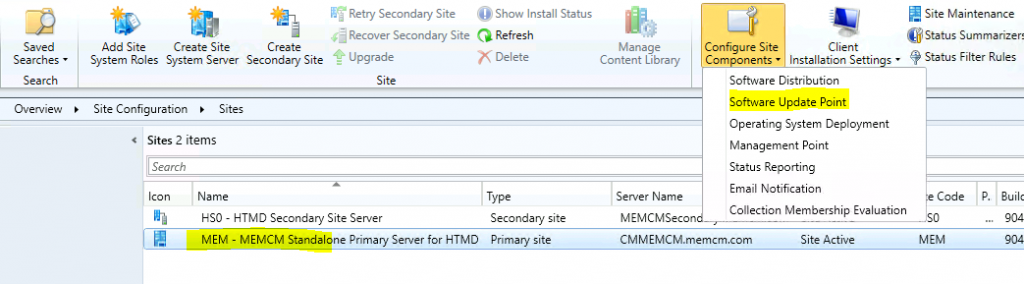
- Navigate to \Administration\Overview\Site Configuration\Sites
- Select the Standalone Primary server -> Configure Site Components -> Software Update Point
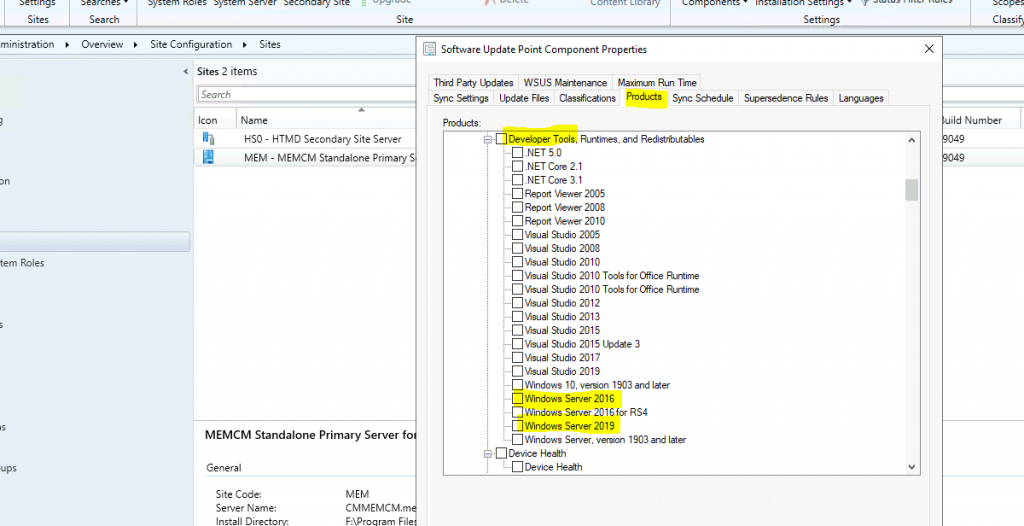
Click on the Products Tab. Uncheck Visual Studio 2017 and 2019 from the Developer category of products.
- Click OK to save the setting.
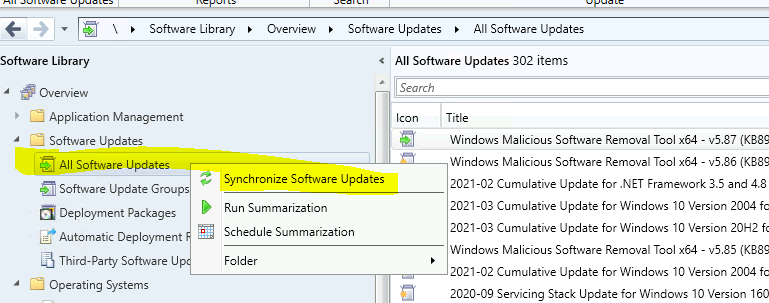
Navigate to \Software Library\Overview\Software Updates\All Software Updates. Initiate a manual WSUS sync to check whether the WSUS sync is going to work or not.
Monitor the WSUSSyncMgr.log to confirm the sync status.
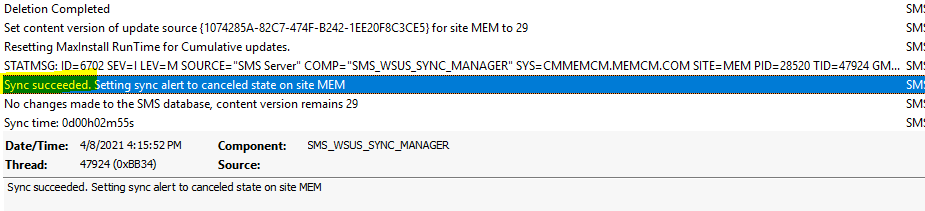
FIX SCCM WSUS Sync Error 0x80131500
Microsoft has yet to develop a fix for SCCM WSUS Sync, which failed with UssInternalError SoapException Error 0x80131500. I will keep you posted if I see more updates on this topic.
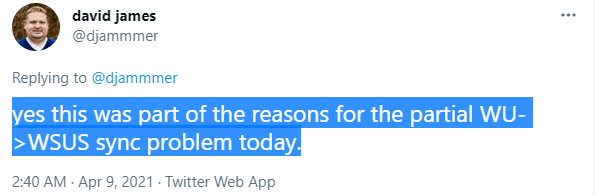
Update 09 April 2021 – The issue is fixed per David James’ tweet.
We believe this should be resolved now for everyone, without any manual workaround. If you experienced an issue before and didn’t do the workaround, just trigger sync and verify it is working. Customers that didn’t notice the issue should silently recover on the next sync.
David James Tweet
Root Cause
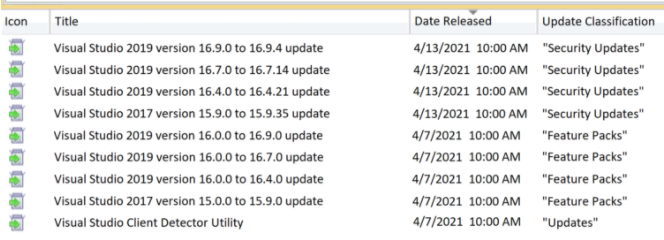
David James shares another news that begins next week (patch Tuesday); you can patch VS through WSUS and ConfigMgr (only security updates via SCCM). The backend changes related to these Visual Studio updates caused major issues with WSUS Sync.
You can deploy Visual studio updates with SCCM now. Feature Pack and regular updates of Visual studio are available in SCCM using the manual import method.
FAQ?
Let’s have a quick look at the WSUS Sync issue reported today morning.
Microsoft Released Fix for WSUS Sync Issue?
Root Cause of WSUS Sync Issue?
Did Microsoft provide a Workaround for this issue?
Is this WSUS Sync issue impacting all environments?
Resources
We are on WhatsApp now. To get the latest step-by-step guides, news, and updates, Join our Channel. Click here – HTMD WhatsApp.
Author
Anoop C Nair has been Microsoft MVP from 2015 onwards for 10 consecutive years! He is a Workplace Solution Architect with more than 22+ years of experience in Workplace technologies. He is also a Blogger, Speaker, and leader of the Local User Group Community. His main focus is on Device Management technologies like SCCM and Intune. He writes about technologies like Intune, SCCM, Windows, Cloud PC, Windows, Entra, Microsoft Security, Career, etc..




https://twitter.com/DSolodow/status/1380218231386996741
I have seen issue on Windows 2019 but this is not a fix
Asus pool getting stopped automatically.
WSUS sync works but SUP failed
StaffYes of course this is not the fix …. as I mentioned this is workaround … did you see that ?
HI Anoop,
After seeing you post, I have initiated the WSUS sync in my environment. I have received the below error. Looks like this error is not like which you mentioned in the post. But All Developer tools are checked in my environment under “Software Update point – Products”.
Please suggest is the below error also related this post.
Sync failures summary: SMS_WSUS_SYNC_MANAGER 4/9/2021 3:59:52 PM 41180 (0xA0DC)
Failed to sync update b60bca3b-829a-400f-b57c-463b6ae1217f. Error: Failed to save update 950514e6-5457-4758-8e0d-ab9052be5f17. CCISource error: -1. Source: Microsoft.SystemsManagementServer.SoftwareUpdatesManagement.UpdatesManager.UpdatesManagerClass.DefineUpdate SMS_WSUS_SYNC_MANAGER 4/9/2021 3:59:52 PM 41180 (0xA0DC)
Sync failed: Failed to sync some of the updates. Source: Microsoft.SystemsManagementServer.SoftwareUpdatesManagement.WsusSyncAction.WSyncAction.SyncUpdates SMS_WSUS_SYNC_MANAGER 4/9/2021 3:59:53 PM 6568 (0x19A8)
STATMSG: ID=6703 SEV=E LEV=M SOURCE=”SMS Server” COMP=”SMS_WSUS_SYNC_MANAGER” SYS= SITE= PID=3596 TID=6568 GMTDATE=Fri Apr 09 13:59:53.373 2021 ISTR0=”Microsoft.SystemsManagementServer.SoftwareUpdatesManagement.WsusSyncAction.WSyncAction.SyncUpdates” ISTR1=”Failed to sync some of the updates” ISTR2=”” ISTR3=”” ISTR4=”” ISTR5=”” ISTR6=”” ISTR7=”” ISTR8=”” ISTR9=”” NUMATTRS=0 SMS_WSUS_SYNC_MANAGER 4/9/2021 3:59:53 PM 6568 (0x19A8)
Sync failed. Will retry in 60 minutes SMS_WSUS_SYNC_MANAGER 4/9/2021 3:59:53 PM 6568 (0x19A8)
StaffI think the issue is fixed as per Microsoft’s recent update via Twitter…
StaffAnd I don’t think this is the same issue. You might have a different issue.
Thanks for the update.
Yes my issue is different and it got resolved.