






Windows 10 21H1 Version Number | Build Number | Best Easiest Way to Find out Build Numbers
Let’s find out Windows 10 21H1 version number and build number structure to avoid confusion for SCCM/ConfigMgr admins. The build number is the unique number for each major version of Windows 10. Windows 10 major versions are released twice a year.
I think the major versions of Windows 10 for the year 2021 would be 21H1 and 21H2. There are some confusing scenarios with Windows 10 21H1 OS Versions. It seems you get the wrong version number, like 10.0.19041.928, when you try to check the version number from SCCM Console Operating Systems Node.
Windows 10 version number and build number are not the same. How many of you know the structure of Windows 10 major.minor.build.rev version number standards? The structure of Windows 10 version details are explained in Windows 10 Build Numbers Version Numbers.
How to Find the Latest Windows 10 Version Number?
Let’s find out how to Find the Latest Windows 10 Version Number using the build-in Windows utility (WinVer.exe) and registry editor. You can click on the Start button and type WinVer to launch WinVer.exe.

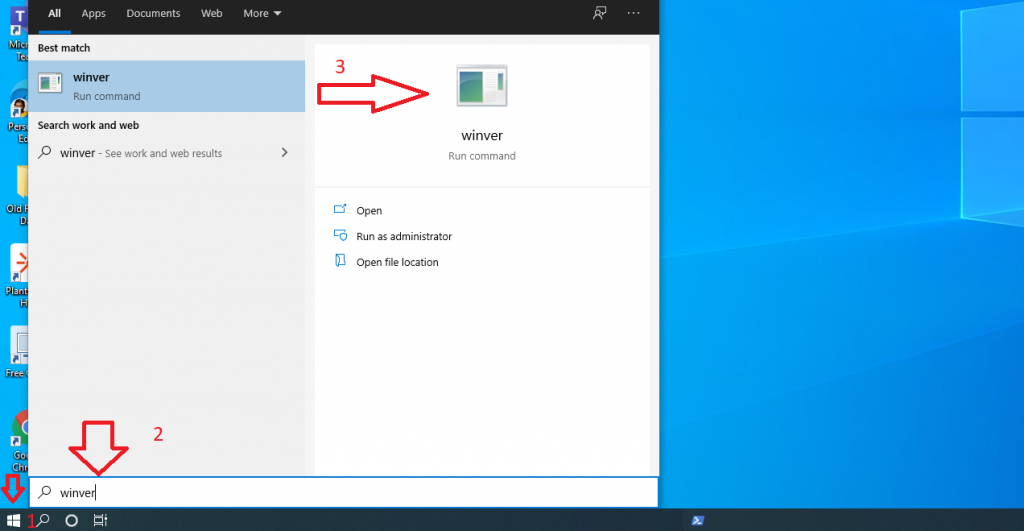
The next option is to double confirm the version number from the registry editor. You can launch the registry editor you using the following method. You can click on the Start button and start typing regedit to launch the Registry Editor utility.
You need to navigate it to the following path in the registry to get the details of the Windows 10 20H1 version number/build number. Check the CurrentBuildNumber string value to find out Windows 10 version details.
Computer\HKEY_LOCAL_MACHINE\SOFTWARE\Microsoft\Windows NT\CurrentVersion\CurrentBuildNumber
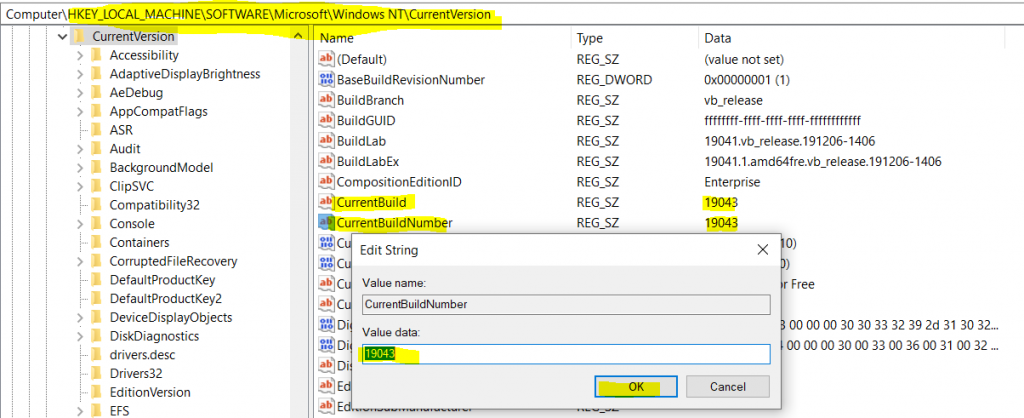
Windows 10 21H1 Version Number | Build Number Structure
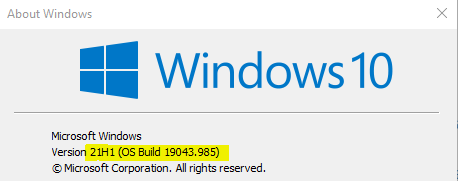
Let’s break down the Windows 10 21H1 major.minor.build.rev version number structure for all of you. When you try to find out the version number using the winver command or from the registry, you get only the last two parts of the version numbers of Windows 10.
Windows 10 21H1 Version Number 10.0.19043.985
So the question is how to get the full version number of Windows 10 21H1. I think it’s easy to get the version number if you understand the structure of the version numbers. There are 4 (four) parts to the version number structure.
The first 2 (two) parts of version numbers are common for all the Windows releases until now. The Windows 8, Windows 7, and Windows XP versions of Windows releases. I’m not sure how this will change for the next generation of Windows 10.
- Windows 10 Major Number = 10
- Windows 10 Minor Number = 0
- Windows 10 Build Number = 19043
- Windows 10 Rev Number = 985
Resources
Windows 10 – Release information
Author
Anoop C Nair has been Microsoft MVP for 10 consecutive years from 2015 onwards. He is a Workplace Solution Architect with more than 22+ years of experience in Workplace technologies. He is a Blogger, Speaker, and Local User Group Community leader. His primary focus is on Device Management technologies like SCCM and Intune. He writes about technologies like Intune, SCCM, Windows, Cloud PC, Windows, Entra, Microsoft Security, Career, etc.




Discussion