






How to Collect Intune Logs from iOS Device Company Portal
Let’s learn how to collect Intune logs from iOS devices. Intune troubleshooting is a bit different from on-prem device management solutions like ConfigMgr. Intune is a software service (SaaS), and IT admins cannot access server-side logs.
The Company Portal is one of the main client-side components on iOS devices. You need a Company Portal application to enroll devices in Intune, and the CP application is essential for collecting and viewing the Intune logs from iOS devices.
Intune server-side troubleshooting is also possible from the Endpoint Manager portal. Learn more about how to Start Troubleshooting Intune Issues. You can refer to Intune client-side logs for Windows PC.
When you have an iOS device and want to perform the Intune side of troubleshooting, Microsoft released an excellent document here, “Troubleshooting iOS device enrollment problems in Microsoft Intune.”

Table of Contents
View Intune Logs from an iOS Device
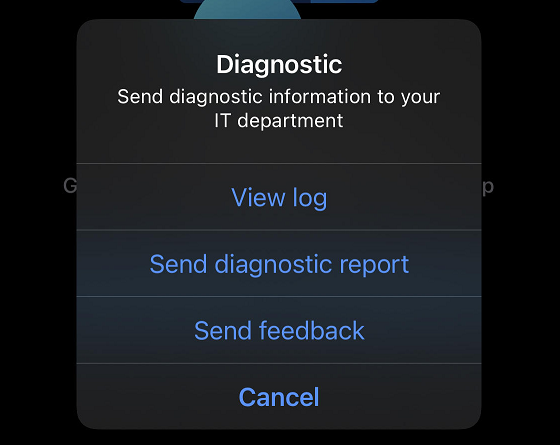
A shake gesture is a quick and easy way to view Intune logs from an iOS device. I also love the iOS SHAKE GESTURE, which lets you view the iOS company portal logs from a device.
- Open the Company Portal Application from an iOS device.
- Just Shake the iOS device (Shake Gesture).
- Tap the View log option to open the Company portal log file.
- Configure iOS Store Apps to Simplify App Management using Microsoft Intune
- Retrieve IOS VPP Managed App ID Publisher Platform Assignment And Last Modified Details Using Intune Copilot Explorer
- MS Intune Stop Supporting User Enrollment with Company Portal for iOS iPadOS
- Best Guide to Deploy New Intune Company Portal App on Windows using Intune
- MS Intune Multi-Admin Approval Expands Support to Mobile Non-Windows Devices Policy
You can get other options with shake gestures from iOS devices.
- Send Diagnostic report – to collect the logs from iOS device.
- Send feedback – to send feedback about the company portal app.
Sent Intune Logs from iOS Device – How to Collect Intune Logs from iOS Device Company Portal
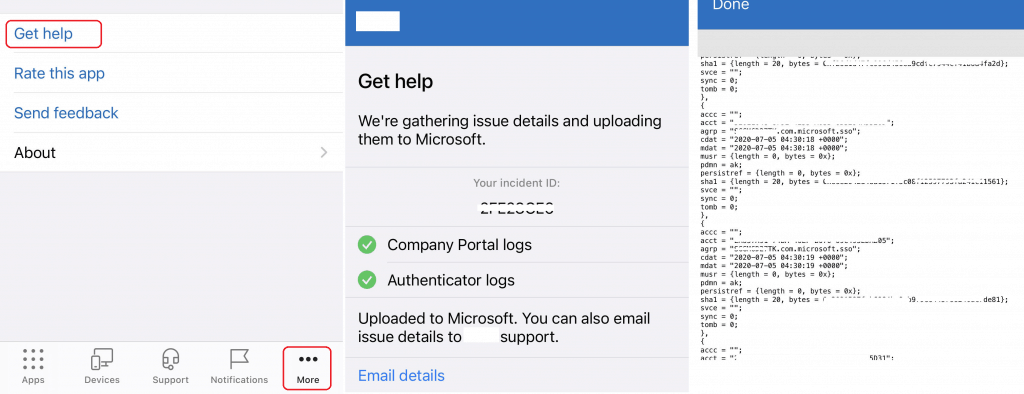
This is an option to upload the log file to Microsoft. You can collect the Intune logs from the Company portal installed on iOS devices.
- Open the Company Portal from iOS.
- Tap on … (three dots – more).
- Tap on the Get Help.
- Upload Authenticator app and Company Portal logs to Microsoft Logs.
Collect Intune logs from iOS device
Collecting Intune logs is a bit more complex than all the above methods. You can record and store diagnostic logs from iOS devices. To retrieve logs, you’ll need an iOS device, a USB cable, and a Mac running macOS 10.12 or later.
- Connect the iOS device to your Mac with the USB cable.
- Press command + Space and search for Console from a Mac device. You can also find it in Applications > Utilities > Console.
- Select the Trust option from the iOS device.
- Select iOS device from Mac OS.
You can monitor the log-gathering process from the MacOS console. You can include debugging messages in this log collection process. You must reproduce the problem from an iOS device via the Company Portal.
Now, it’s time to collect the logs from the iOS company portal and send them to Mac OS. Then, you can send the log file.
- From the MacOS -> Console toolbar, select Edit > Select All
- Select Edit > Copy.
- Paste the log contents in a text editor.
- From the menu, select Format > Make Plain Text.
- Save the file as a .log file (Example: IntuneiOS.log)
Resources
- Retrieve iOS app logs from the device
- Intune Logs in Windows PCs Location Details How to Collect Diagnostic Reports
We are on WhatsApp. To get the latest step-by-step guides and news updates, Join our Channel. Click here –HTMD WhatsApp.
Author
Anoop C Nair has been Microsoft MVP for 10 consecutive years from 2015 onwards. He is a Workplace Solution Architect with more than 22+ years of experience in Workplace technologies. He is a Blogger, Speaker, and Local User Group Community leader. His primary focus is on Device Management technologies like SCCM and Intune. He writes about technologies like Intune, SCCM, Windows, Cloud PC, Windows, Entra, Microsoft Security, Career, etc.


Thanks for writing this out. Is there a corresponding article on how to find the logs that were sent for a specific user? For example, the user receives an alpha numeric code when they submit logs. How does the admin find the corresponding logs related to this issue?