






Windows 11 Microsoft Update Health Tools
Let’s know more details about Windows 11 Microsoft Update Health Tools. This Microsoft update for health tools includes reliability improvements to Windows Update Service components.
The latest Windows 10 updates already include the Windows 10 update health tool. You can see the Microsoft update health tools application installed on Windows 11 PCs.
You might be wondering what the use of Windows 11 Microsoft Update Health Tools is. This tool is automatically installed and updated on all Windows 11 PCs.
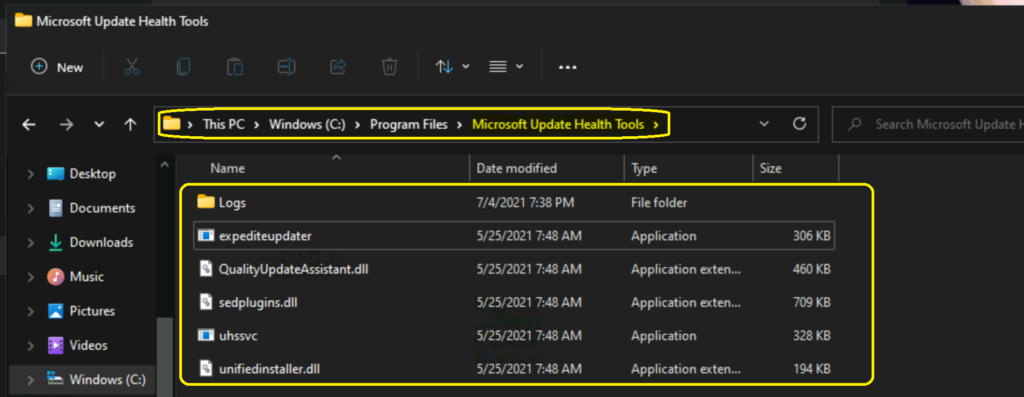
I can’t find Microsoft Update Health Service (uhssvc) running on Windows 11 devices. The Microsoft Update Health Tools application improves the reliability of the software update process, helping ensure that updates are installed seamlessly on your Windows 11 device.

Table of Contents
Windows 11 Microsoft Update Health Tools
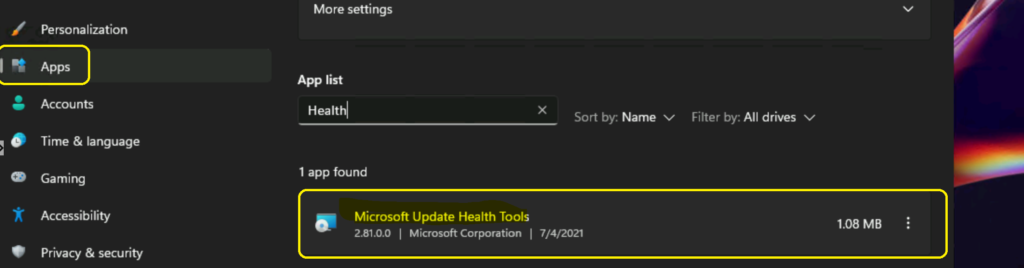
You can confirm that the Microsoft Update Health Tools are installed from the new Settings app on Windows 11.
- Click on the Start button.
- Select Settings application.
- Click on the Apps tab.
- Enter the keyword “Health” from the app list search bar.
If you can see Microsoft Update Health Tools in the app list, the application is installed on your Windows 11 PC.
NOTE: You must also ensure that Microsoft Update Health Service (uhssvc) is running to confirm that the app is working fine.
- 41 Windows Tools Run Commands for Windows
- Over Half of Workforce use Banned AI Tools
- Administrative Tools are Windows Tools Now on Windows 11
Features of Windows 11 Microsoft Update Health Tools
Let’s quickly go through the Microsoft Update Health Tools features. According to KB4023057, it helps improve the reliability and security of devices that are running Windows. This KB is for Windows 10, but I think this applies to the insider version of Windows 11.
Microsoft Update Health Tools (MUHT) helps request devices stay awake longer to complete Windows updates/patches. It also helps reset the network settings to resolve issues, if there are any.
This application helps repair disabled or corrupted Windows core components that determine the applicability of updates. Compressing user directory files also helps free up enough disk space to install important updates.
This helps to repair the problems that could prevent updates from installing successfully to reset the Windows Update database.
Resources
- Intune Reporting Issue: Expedite Windows Security Patch Deployment
- Latest Windows 11 update experience
We are on WhatsApp. To get the latest step-by-step guides and news updates, Join our Channel. Click here –HTMD WhatsApp.
Author
Anoop C Nair has been Microsoft MVP for 10 consecutive years from 2015 onwards. He is a Workplace Solution Architect with more than 22+ years of experience in Workplace technologies. He is a Blogger, Speaker, and Local User Group Community leader. His primary focus is on Device Management technologies like SCCM and Intune. He writes about technologies like Intune, SCCM, Windows, Cloud PC, Windows, Entra, Microsoft Security, Career, etc.




Discussion