






What is Windows 365 Cloud PC Windows in the Cloud
What is Windows 365 Cloud PC Windows in the Cloud? Let’s learn What Windows 365 Cloud PC is. Well, I used the Windows 365 brand name for Windows 11 PCs in one of the previous posts.
However, I didn’t know that Windows 365 is much more exciting than Windows 11, at least for me. What do you think? The newest virtualization service (W365) was announced on July 14, 2021.
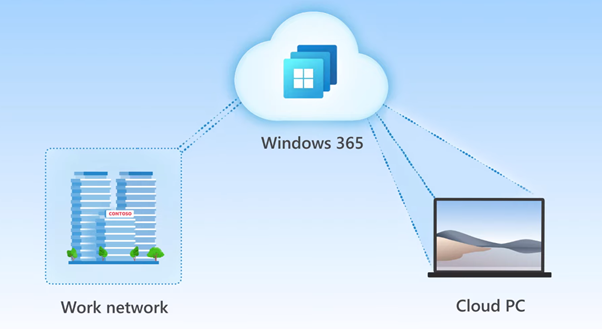
Windows 365 Cloud PC will generally be available on August 2nd, 2021. It delivers a complete, personalized Windows PC experience from the cloud. This offering can be accessed from any device and supports many user personas, offering more flexibility to workers and organizations.
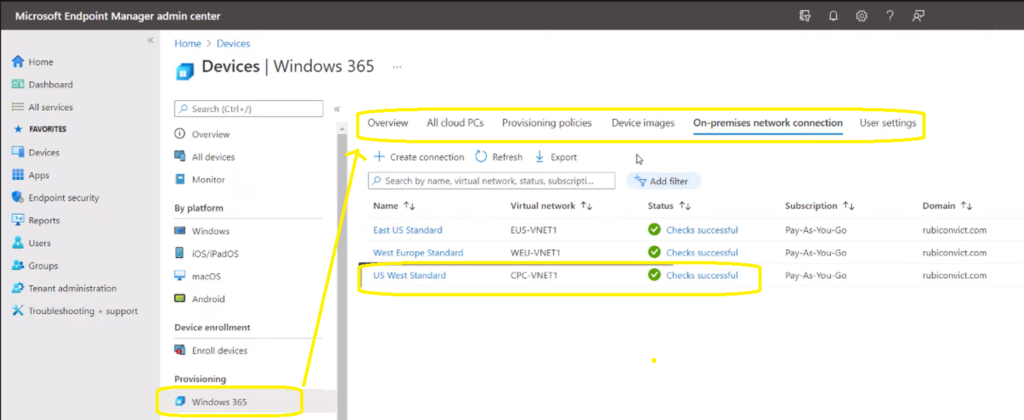
Windows 365 is a cloud service that introduces a new way to experience Windows 10 or Windows 11. Windows 365 is part of the MEM Intune Portal. All the admin workloads related to Cloud PC are part of the Endpoint Manager portal. More details Cloud PC Windows 365 FAQs Frequently Asked + Questions AMA.

Table of Contents
Windows 365 Enterprise Vs Business – What is Windows 365 Cloud PC
Microsoft 365 Business offers a solid set of ready-to-use tools. Still, its customization and integration options are more limited than the enterprise version, especially for small and medium-sized businesses (SMBs).
| Microsoft’s recommendation is to use: |
|---|
| Windows 365 Business -> Organizations with up to 300 employees |
| Windows 365 Enterprise -> Organizations with more than 300 employees |
- Windows 365 Cloud PC Password Reset Options | New Web Client Experience
- Remotely Run Windows 365 Cloud PC Device Actions Using Intune
- Remotely Manage Windows 365 Cloud PC Business Edition Admin Experience
- Assign Windows 365 Cloud PC License from Cloud PC Portal
Windows 365 Pricing
You can find all the pricing details below:
Azure Virtual Desktop Vs Windows 365 Cloud PC?
I think we have different use cases for both scenarios. Let’s share my quick/initial hypothesis/thoughts on this. What is Windows 365 Cloud PC Windows in the Cloud?
The Azure Virtual Desktop (AVD/WVD) is more suitable for shared workload scenarios where Windows 10/11 PCs will be treated as server workloads (multi-session).
The Windows 365 Cloud PC is mainly suitable for Single-Session/persistent personal desktop scenarios. I don’t think Microsoft will introduce shared PC or multi-session scenarios into cloud PCs. Will we see more clarifications from Microsoft soon? Here you go!
| Azure Virtual Desktop | Windows 365 Cloud PC (Enterprise) |
|---|---|
| Cloud VDI Solution | SaaS Solution |
| Windows 10 Single Session & Multi-Session Desktops and Remote Apps | Windows 10 Single Session |
| Full control over management and deployment (?) – You can use whichever tool you want (SCCM/Intune/Third-part)? | Simplified/Saasified Management only with MEM Intune/Other UEM solutions as well? |
| Citrix, VMWare integration | NA |
| Consumption-Based Pricing | Per-user pricing |
| Flexibility | Simplicity |
What is Windows 365 Cloud PC
Windows 365 is the next step in personal computing, the world’s first cloud PC. It’s Windows in the cloud for you. More details about Windows 365 service are available. Introducing Windows 365 Personal Desktop Cloud PC offering from Cloud. This Cloud PC is:
- Persistent Windows PC
- Always connected to Windows PC
Let’s dive into more details of Windows 365 Cloud PC. With the introduction of cloud PC, device management helps to migrate all your settings to the Cloud from the Physical PC.
This roaming includes the desktop, wallpapers, Favorites, Browser history, content, etc., using Azure AD and many other technologies (?).

Intune integration with Windows 365 Cloud PC
Windows Autopilot and Whiteglow (a.k.a. pre-provisioning) are all technologies integrated into the Windows 365 cloud PC, in my opinion.
As I mentioned above, all Cloud PC workloads are tightly integrated with MEM Intune, which is part of the MEM portal itself.
- Provision VMs
- Deploy OS Images (Device Images)
- On-premises network connection
- User Settings
- Resize VMs
- Check the performance of the VMs
- Deploy Apps
- Deploy Security Policies
- Deploy Defender policies
Cloud PC Workforce Scenarios
I have seen the following user personas created for Windows 365 PCs. Microsoft will be offering different types of virtual machine SKUs for each persona. The GPUs are not listed down in their offering now. But hopefully, that is something in place for the future.
- Frontline workers, Call centres, Education/Training/CRM access.
- Mergers and acquisition, Short-term and seasonal, Customer Services, Bring-Your-Own-PC, Work from home.
- Market Researchers, Government, consultants.
- Finance, Government, consultants, and Healthcare services.
- Software developers, engineers, content creators, and design and engineering workstations.
Windows 365 ISV Partners
The ISV partners use the cloud PC API/Graph API to provide a better experience for the organization and end-users. There are four ISV partners announced by Microsoft today, and those are:
- Nerdio
- UKG
- ServiceNow
- NetApp
Resources
- Get started with Windows 365
We are on WhatsApp. To get the latest step-by-step guides and news updates, Join our Channel. Click here –HTMD WhatsApp.
Author
Anoop C Nair has been Microsoft MVP for 10 consecutive years from 2015 onwards. He is a Workplace Solution Architect with more than 22+ years of experience in Workplace technologies. He is a Blogger, Speaker, and Local User Group Community leader. His primary focus is on Device Management technologies like SCCM and Intune. He writes about technologies like Intune, SCCM, Windows, Cloud PC, Windows, Entra, Microsoft Security, Career, etc.




Discussion