






SCCM Patch Deployment Issue with Windows Cumulative Updates ConfigMgr
Let’s fix the SCCM Patch Deployment issue with Windows Cumulative Updates and discuss it with Windows 10 or 11 Cumulative Updates. The July cumulative update KB5004245 for Windows 10 1909 might also have similar ConfigMgr (a.k.a SCCM) patching issues.
In the last two months, Microsoft has started deviating from the standard they introduced a while back to combine Windows SSUs and LCUs.
We can notice this with June and July cumulative updates for Windows 10. This is causing problems and confusion for IT admins.
SCCM admins also faced a similar issue with last month’s cumulative update KB5003637. The scenario becomes more critical when configuring the Decline superseded updates immediately policy. We have a post discussing the issue with June CU for Windows 10.

Update: SCCM Patch Software Update Deployment Process Guide.
Table of Contents
SCCM Patch Deployment Issue with Windows Cumulative Updates ConfigMgr
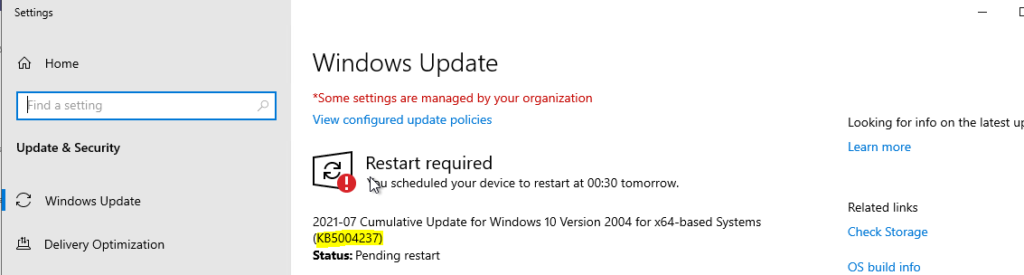
Let’s check the prerequisite for deploying Windows 10 July CU KB5004237. This prerequisite is only applicable to WSUS/SCCM patch deployment scenarios. Don’t worry about this if you use WUfB/Intune to deploy patches.
NOTE: The July CU KB5004237 applies to Windows 10 2004, 20H2, and 21H1.
- Fix Windows Update Issues For Windows 11 Errors Troubleshooting Tips
- Fix Windows Update Error 0x8007005 Failed To Restart
- Windows Upgrade Troubleshooting with Logs
- Enable Windows 11 Patching using SCCM WSUS
- Upgrade to Windows 11 using Intune Feature Update Deployment Policy
As mentioned above, your operating system’s latest servicing stack update (SSU) should be part of the latest cumulative update (LCU). You don’t need to install it separately. However, this is not true with June and July 2021 cumulative updates.
Issue: The prerequisite for WSUS/SCCM patch deployment is installing the May 11, 2021, update (KB5003173) before installing the latest cumulative update, KB5004237.
If you have not installed KB5003173, the July CU patch deployment might fail or give inconsistent reports like “this patch is not applicable for “this” Windows version. You need to ensure that all the devices are already installed with KB5003173 before installing the July CU update (KB5004237) for Windows 10 2004, 20H2, and 21H1.
Fix the SCCM Patch Deployment issue with Cumulative Updates
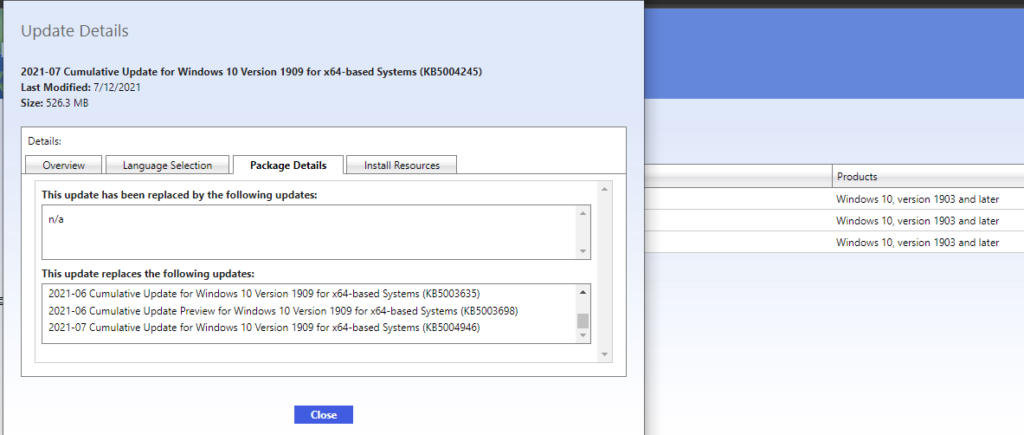
The latest cumulative update for Windows 10 1909 version kb5004245(July CU) and this patch depend on previous cumulative patches and SSU. The prerequisite for Windows 10 1909 July CU (kb5004245) is a bit more complex than the previous releases.
You must install the following before installing the July cumulative update (LCU) for 1909. Otherwise, the SCCM patch installation will fail, or the reports will show the LCU for July is not applicable, etc.
- Servicing stack update (SSU) (KB5001406)
- Latest SSU (KB5004748)
Recover Expired Updates from SCCM/WSUS
Let’s learn how to recover Expired Updates from the ConfigMgr console. SCCM patch management is not very easy if you are new to this process. I have a blog post that discusses an end-to-end process for recovering expired updates.
We are on WhatsApp. To get the latest step-by-step guides and news updates, Join our Channel. Click here –HTMD WhatsApp.
Author
Anoop C Nair has been Microsoft MVP for 10 consecutive years from 2015 onwards. He is a Workplace Solution Architect with more than 22+ years of experience in Workplace technologies. He is a Blogger, Speaker, and Local User Group Community leader. His primary focus is on Device Management technologies like SCCM and Intune. He writes about technologies like Intune, SCCM, Windows, Cloud PC, Windows, Entra, Microsoft Security, Career, etc.




the new update KB5004237 does not install on my laptop and give an error saying some files may be missing and the code is 0x8007000d. how do i sort this out. please help
There is a reddit thread with this and we are experiencing this issue on about 1% of our computer population that we’ve applied the update so far. We have a case open with Microsoft so far, but no progress.
https://www.reddit.com/r/sysadmin/comments/okotv5/windows_update_kb5004237_warning_for_possible_efi/