






The Best Method to Find Custom Client Settings for a Collection in SCCM ConfigMgr
This post explains the best method for finding custom client settings for a collection in SCCM (a.k.a. ConfigMgr). I don’t think there is an easy way to find custom client settings from the admin console. Let me know in the comments if you find a more easy way to do this.
Client settings help the admin define SCCM client-side policies. There are different types of client settings. The default client settings policy applies to all users and devices.
The custom client settings policy helps the admin assign special policies to a special set of devices or users. You can also find a list of SCCM client settings assigned for a device in ConfigMgr.
Well, you can also get details like who changed the client settings options from audit logs. Let’s find out how I know which client settings are deployed to a collection.

Table of Contents
Find Custom Client Settings for a Collection in SCCM
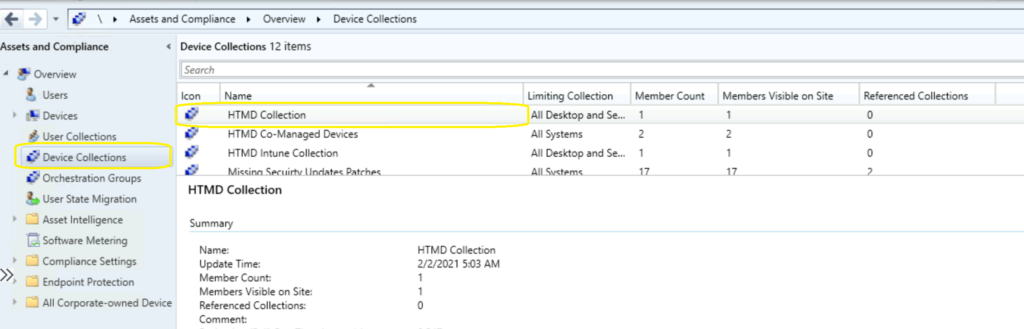
Let’s check how to find client settings targeted to a collection from the admin console assets and compliance node. There could be scenarios like you want to determine why devices from a particular collection are behaving differently. First of all, you will need to search for the collection that is in question.
- Launch ConfigMgr admin console.
- Navigate to Assets and Compliance -> Device collections.
- You can use User Collections as well.
- Click on the Device/User collection that you want to find out the details of deployments.
- Enable Disable Google Cast in Google Chrome with Intune Settings Catalog Policy
- SCCM Client Settings Custom Report with Priority Details using SQL query
- Manage App Settings options in Windows 11
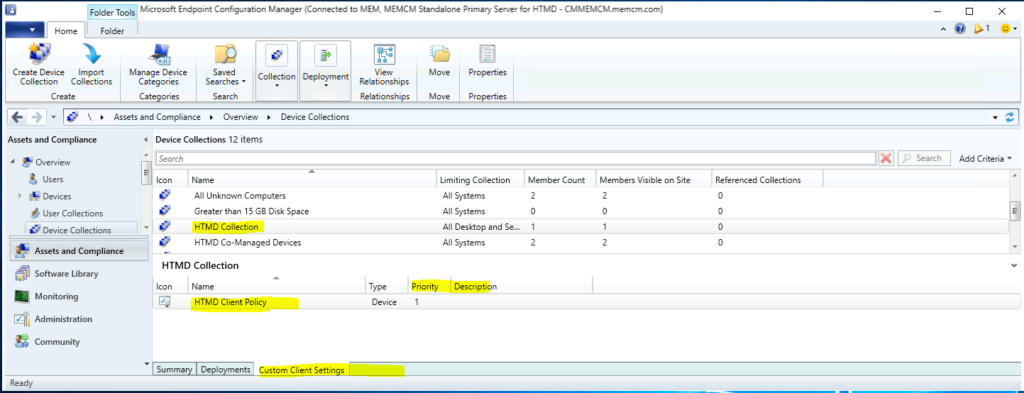
In the ConfigMgr admin console, you must navigate to the Details Pane at the bottom right side of the results pane. If you have appropriate access, you will see three tabs in the details pane.
- Summary
- Deployments
- Custom client settings
The third tab, Custom Client Settings, provides more details about the deployment of custom client settings policies to the device/user collection. In addition to the client settings policy name, you can also find the following details below this tab.
- Name of the Client settings policy.
- Type of policy – Device or User.
- Priority set for the policy – One (1) is the highest priority policy.
- Description.
Another Method Find out Client Settings Assigned to a Collection
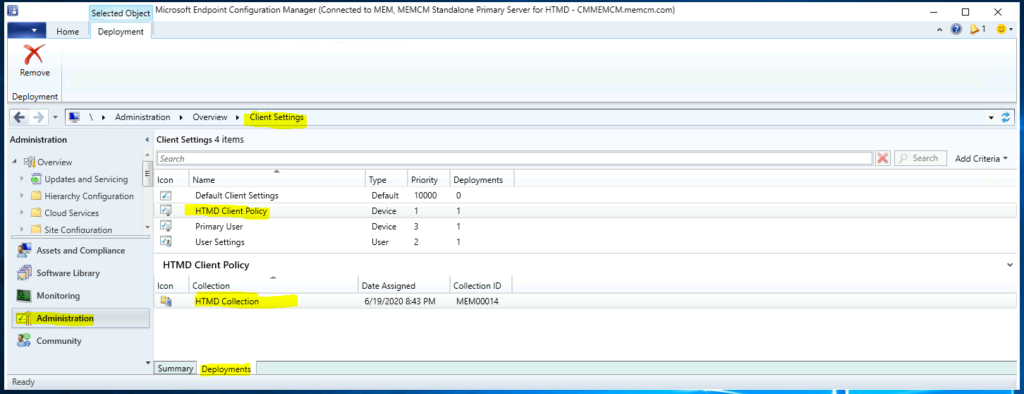
The above-mentioned method is used to find custom settings for a collection. However, you can navigate to the client settings node to find more details about the policy. Also, you can change the policy settings and deployments from there.
Normally, you can figure out whether a custom client settings policy is deployed to a collection from:
- Navigate to Administration workspace -> Client Settings node.
- Click on the Deployment tab to find out the targeted collections.
NOTE! – You don’t have summary and deployment nodes for Default client settings in SCCM. This is because this policy is applied on all devices connected to Configuration Manager.
Resources
We are on WhatsApp. To get the latest step-by-step guides and news updates, Join our Channel. Click here –HTMD WhatsApp.
Author
Anoop C Nair has been Microsoft MVP for 10 consecutive years from 2015 onwards. He is a Workplace Solution Architect with more than 22+ years of experience in Workplace technologies. He is a Blogger, Speaker, and Local User Group Community leader. His primary focus is on Device Management technologies like SCCM and Intune. He writes about technologies like Intune, SCCM, Windows, Cloud PC, Windows, Entra, Microsoft Security, Career, etc.




Discussion