


Skip to content
Windows 11 Family Safety Widget

Windows 11 Family Safety Widget

Written By Anoop C Nair
Last Updated March 10, 2022
Posted In Windows 11
SHARE

Microsoft added a new widget called family safety widget into Windows 11. Microsoft introduced a family safety widget option with the Windows 11 build version 22000.120. Let’s understand why the Windows 11 this widget is important for new generation consumers of Windows.

Microsoft is trying to reimagine the family experience with Windows 11. You can see modern families come in all sizes and locations. Microsoft is trying to help family members to keep kids safer online, have fun together, and stay connected.

You can read the following guide to learn more about Add or Remove Windows 11 Widgets Button on Taskbar Easy Option. Do you like using Widgets in Windows 11? Let me know in the comments?

Microsoft Defender Cloud-based solutionNew Cloud-Based Microsoft Defender App For Home Users | Step By Step User Guide HTMD Blog (anoopcnair.com).

Patch My PC

The best Antivirus solution for Windows 11 – Best Antivirus For Windows 11 Microsoft Defender | App Browser Protection | Firewall Protection HTMD Blog (anoopcnair.com).

How to Add Family Safety Widget into Windows 11

Let’s see how to add additional widgets. As mentioned above, there are seven widgets options available in Windows 11. The latest one introduced is the Family Safety-related activities in widgets.

  • Click on the Widgets icon from the taskbar.
  • Open Widgets.
  • Click or tap on the “Add widgets” button.
  • Choose the Family Safety+ widget to add an entertainment button.
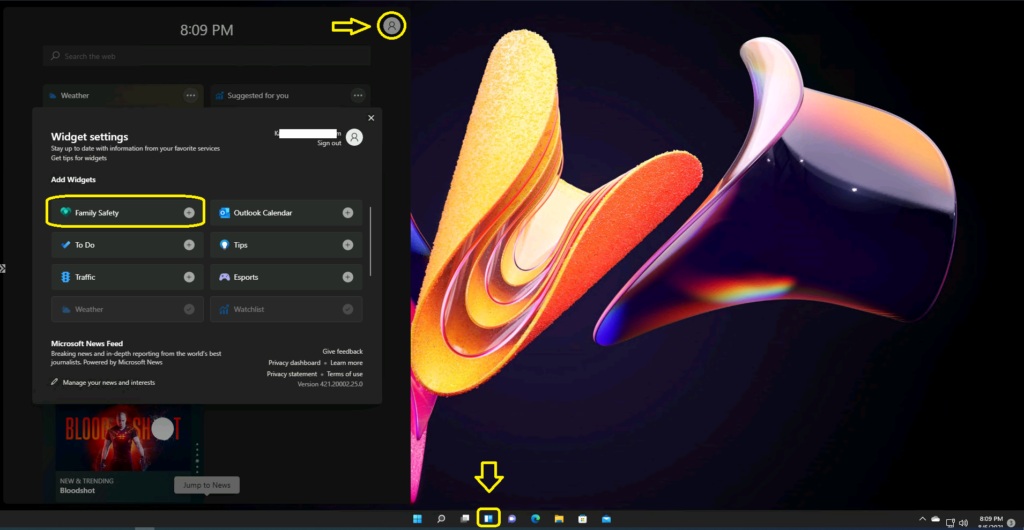
Windows 11 Family Safety Widget

The new Family Safety widget gives you quick access to setup the recommended family safety options from Microsoft’s account. Once you complete all the family configurations and added family members, you can use the family safety widget from Windows 11 to see recent activity from your Microsoft family group members.

I have not configured the family safety options from the Microsoft account, which is why I can’t see any activities in the widgets -> https://account.microsoft.com/family/?refd=winp2.
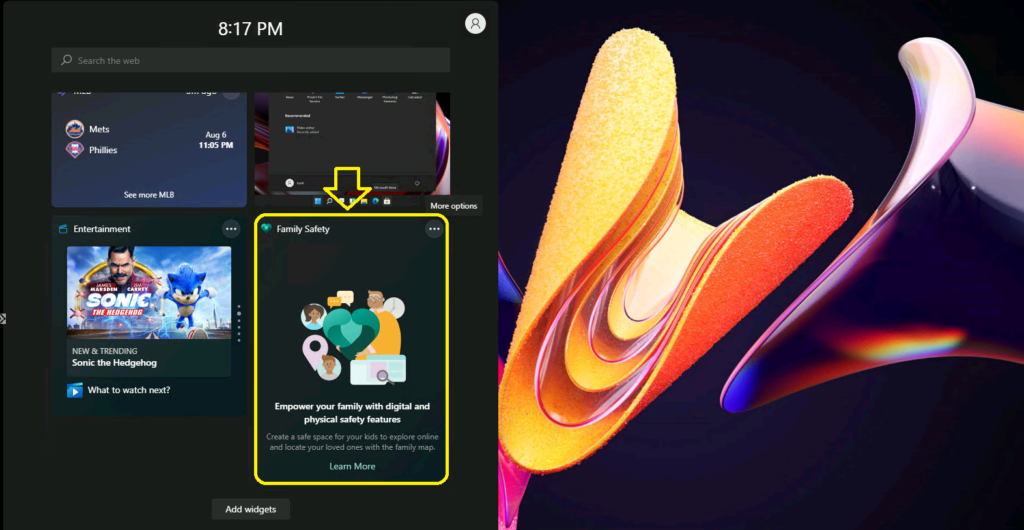

Windows 11 Family Safety Widgets
Windows 11 Family Safety Widget

Resources

Written by

Anoop C Nair is Workplace Technology solution architect with 25+ years of experience in global enterprise organizations such as JP Morgan, Capgemini, etc. Microsoft Certified Trainer. Microsoft MVP from 2015 onwards for consecutive 11+ years! He also conducts Intune and modern workplace tech training for enterprise organizations. He is Blogger, Speaker, and Founder of HTMD Community and HTMD Conference. His main focus is on Device Management technologies like Intune, Windows, Cloud PC. He writes about technologies like Intune, SCCM, Windows, Cloud PC, Windows, Entra, Microsoft Security.

Discussion

Join the discussion

Your email address will not be published. Required fields are marked *

Related guides

Security

Microsoft Fixes 570 Security Vulnerabilities and 3 Zero-Day Vulnerabilities in July 2026 Patch Tuesday

Key Takeaways Microsoft Fixes 570 Security Vulnerabilities and 3 Zero-Day Vulnerabilities in July 2026 Patch Tuesday! Microsoft fixed 3 zero-day vulnerabilities as part of the July 2026 Patch Tuesday updates. Two of them, CVE-2026-56164 (Microsoft SharePoint Server Elevation of Privilege) and CVE-2026-56155 (Active Directory Federation Services Elevation of Privilege), were actively exploited before the security […]

AC Anoop C Nair 29 min read
Intune

Windows 11 KB5101650 KB5099414 July 2026 Patch and 3 Zero Day Vulnerabilities and 570 Flaws

Key Takeaways Windows 11 KB5101650 KB5099414 July 2026 Patch and 3 Zero Day Vulnerabilities and 570 Flaws! In the July 2026 Patch, Microsoft introduced new features designed to improve the overall Windows experience. The update adds enhancements to Windows Update for more flexible update management and introduces Point-in-Time Restore, providing an additional recovery option for […]

AC Anoop C Nair 9 min read
Windows 11

Boost Productivity with Zoom Workplace on Windows 11 | Setup Guide for Meetings Chat Calls and Collaboration

Key Takeaways Hey, let’s learn about Boost Productivity with Zoom Workplace on Windows 11 | Setup Guide for Meetings Chat Calls and Collaboration. Zoom workplace is an AI-powered collaboration app used for online meetings, team collaboration, and video calls. This application helps to conduct meetings Including chat and messaging, screen sharing and Calendar Integration. Boost […]

AC Anoop C Nair 35 min read
Windows 11

13 Windows AI Features to Turn Off for Better Privacy

Key takeaways Hey, let’s discuss about 13 Windows AI features to turn off for better privacy. AI is widely used in modern systems such as Windows 11 to automate tasks, improve productivity, and enhance user experience. However, AI also has several disadvantages. It may raise privacy concerns because personal data can be collected and analysed […]

AC Anoop C Nair 15 min read


