


Skip to content
Co-Management Node Got Renamed to Cloud Attach | Co-management node is missing from SCCM 2107

Co-Management Node Got Renamed to Cloud Attach | Co-management node is missing from SCCM 2107

Written By Anoop C Nair
Last Updated March 1, 2022
Posted In SCCM
SHARE

Let’s see how Microsoft renamed Co-Management Node? The Co-Management node got renamed to Cloud Attach. The co-management node is missing from SCCM 2107 console. What happened to the co-management node?

And are there any changes in the Co-management functionality? Well, you won’t find the co-management node in Configuration Manager 2107 console onward for good reasons. Let’s see more details below.

I have already updated the top 5 features of SCCM 2107 about the changes of Co-management. The co-management feature that helps IT admins to manage Windows 10 (and Windows 11?) PCs with two device management tools (Intune and SCCM) concurrently.

Recently, Microsoft changed the definition of co-management to a more realistic way. The latest definition of Co-management is that this is one of the primary ways to attach your existing SCCM deployment to the Microsoft 365 cloud.

Patch My PC

Co-Management Node is Missing? Co-Management Node Got Renamed to Cloud Attach

Attaching SCCM workloads to the Microsoft cloud is a better way of defining the process that happens from the SCCM side. However, the co-management is a bit different from Windows 10/11 client-side. Maybe other MDM service providers also support co-management(?).
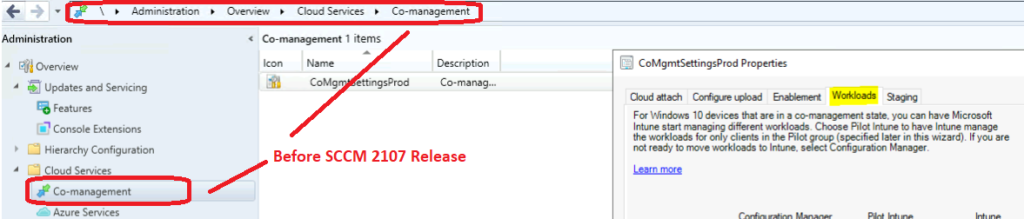
Co-Management Node is Missing from SCCM 2107 Console? What is changed

With the 2107 version of the SCCM release, Microsoft renamed/rebranded co-management to cloud attach. Is this just a naming standardization effort from Microsoft?

At this point, there are no changes in the functionalities and features of Co-management. However, now every connection between SCCM and Microsoft cloud is based on cloud attach.

You can find all the Co-management related workloads in the following path.

  • Launch SCCM Console.
  • Click on Adminstration workspae.
  • Expand the Cloud Servers folder.
  • Click on Cloud Attach node to manage all Co-management workloads.
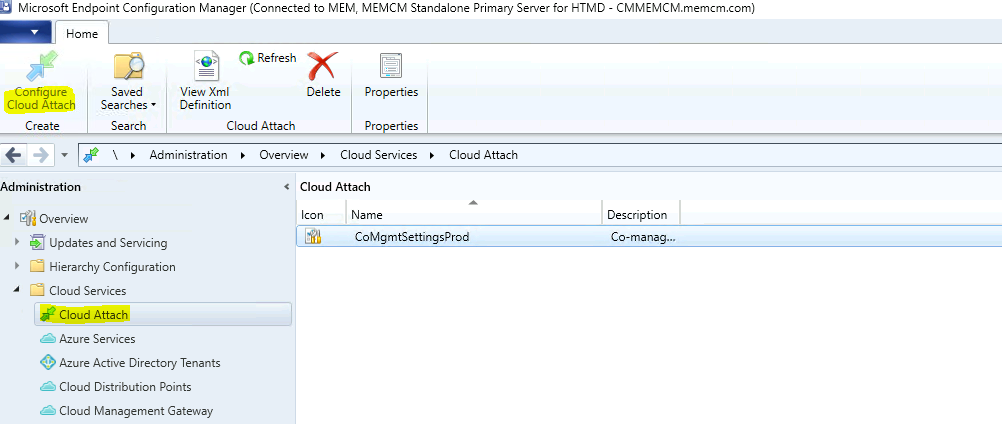
Co-Management Node is Missing from SCCM 2107 Console? What is changed

What is Cloud Attach in SCCM?

Attaching your ConfigMgr environment to the cloud allows you to continue to modernize and streamline your management solution. The SCCM Cloud attach allows you to transform your existing environment without having to worry about much disruption or risk.

NOTE! – Cloud Attach is the same as Co-Management with some device sync and client management functionalities from MEM Admin center console.

You don’t have to reconfigure anything because of these changes. The co-management is now part of the cloud attach feature. There are a bunch of other changes related to SCCM co-management as well:

  • The ribbon button is renamed from Configure Co-management to Configure Cloud Attach.
  • The Co-management Configuration Wizard is renamed to Cloud Attach Configuration Wizard.

Co-Management Node Got Renamed to Cloud Attach
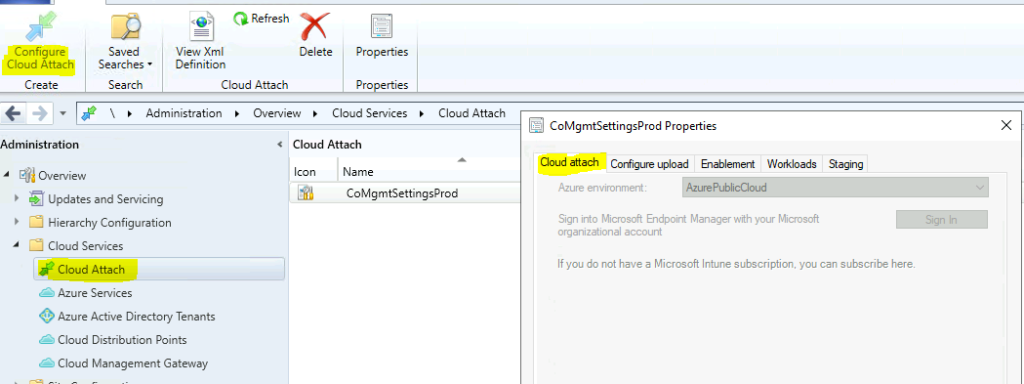
Co-Management Node is Missing from SCCM 2107 Console? What is changed

Co-management Vs. Cloud Attach

Co-Management is attaching SCCM deployments/workloads (list of co-mgmt workloads) to Microsoft 365 Cloud.
Cloud Attach is an integrated solution to manage device and device actions from the MEM portal by attaching SCCM managed devices to the Microsoft 365 cloud.


Resources

Written by

Anoop C Nair is Workplace Technology solution architect with 25+ years of experience in global enterprise organizations such as JP Morgan, Capgemini, etc. Microsoft Certified Trainer. Microsoft MVP from 2015 onwards for consecutive 11+ years! He also conducts Intune and modern workplace tech training for enterprise organizations. He is Blogger, Speaker, and Founder of HTMD Community and HTMD Conference. His main focus is on Device Management technologies like Intune, Windows, Cloud PC. He writes about technologies like Intune, SCCM, Windows, Cloud PC, Windows, Entra, Microsoft Security.

Discussion

Join the discussion

Your email address will not be published. Required fields are marked *

Related guides

Intune

Windows 11 KB5101650 KB5099414 July 2026 Patch and 3 Zero Day Vulnerabilities and 570 Flaws

Key Takeaways Windows 11 KB5101650 KB5099414 July 2026 Patch and 3 Zero Day Vulnerabilities and 570 Flaws! In the July 2026 Patch, Microsoft introduced new features designed to improve the overall Windows experience. The update adds enhancements to Windows Update for more flexible update management and introduces Point-in-Time Restore, providing an additional recovery option for […]

AC Anoop C Nair 9 min read
Intune

2026 June KB5094126 KB5093998 Windows 11 Patch | 3 Zero Day Vulnerabilities and 200 Flaws

Key Takeaways 2026 June KB5094126 KB5093998 Windows 11 Patch | 3 Zero Day Vulnerabilities and 200 Flaws! The June 2026 Windows 11 Patch Tuesday update brings several improvements to File Explorer. It adds support for additional archive formats, including UU, CPIO, XAR, and NuGet Packages (NUPKG). The update also preserves View and Sort preferences in […]

AC Anoop C Nair 10 min read
Intune

2026 May KB5089549 KB5087420 Windows 11 Patch | 0 Zero Day Vulnerabilities and 120 Flaws

Key Takeaways The Windows 11 May 2026 Patch KB5089549 KB5087420 Update brings important security fixes, performance improvements, and reliability enhancements across the operating system. The update introduces new features such as Xbox Mode for gaming, File Explorer improvements, enhanced input and sharing experiences, better taskbar and Windows Hello reliability, and additional enterprise management capabilities for […]

AC Anoop C Nair 8 min read
SCCM

ConfigMgr 2603 Introduces New Early Update Enrollment Process

Key Takeaways In this post we are discussing the ConfigMgr 2603 Introduces New Early Update Enrollment Process. Microsoft has officially released Configuration Manager version 2603 to the Early Update Ring, giving organizations an opportunity to test upcoming improvements before the global production rollout. The release is targeted at enterprises running ConfigMgr version 2409 or later […]

AC Anoop C Nair 3 min read

