






SCCM 2107 Known Issues Fixes
Let’s check and understand the SCCM 2107 known issues heard from the community and Microsoft. I will also update the KB articles or hotfixes whenever it’s released for these known issues. You can also check out our 2107 upgrade guide to know more about the latest version prerequisites, etc…
The latest version of ConfigMgr 2107 contains fixes and feature improvements compared with the previous versions. Microsoft will soon release a list. As I always say, this is not an all-inclusive list of known issues and fixes/workarounds included in the 2107 version.
I have also documented the KB articles already included with the SCCM 2107 version in the below section of the post. I have included a table for fixes that are part of this version of ConfigMgr for easy access.
There are a lot of SCCM 2107 known issues fixed with the latest versions of SCCM 2111. I have updated the list of those fixes in the following blog post. List Of SCCM 2111 Known Issues and Fixes.

SCCM 2107 Hotfixes
I don’t think Microsoft released any hotfixes related to the 2107 version of ConfigMgr. Let’s check the hotfixes released for the Configuration Manager 2107 production version after a few weeks. I will try to update this list whenever Microsoft releases new hotfixes for 2107.
- KB10503003 Hotfix Released for SCCM 2107 Early Ring (5 known issues fixed)
- SCCM 2107 Rollup Update KB11121541 – Most of the issues hightlited below are fixed with hotfix rollup update.
Windows 11-based boot image Error 80070002
When you use a Windows 11-based boot image with an OS deployment task sequence that includes the Pre-provision BitLocker step, the step might fail. You’ll see errors similar to the following strings in the smsts.log:
'TakeOwnership' failed (2147942402)
pTpm->TakeOwnership(sOwnerAuth), HRESULT=80070002
Failed to take ownership of TPM. Ensure that Active Directory permissions are properly configured
The system cannot find the file specified. (Error: 80070002; Source: Windows)
Process completed with exit code 2147942402
Failed to run the action: Pre-provision BitLocker. Error -2147024894
The workaround to this issue is a registry hack. You will need to add a Run Command Line step to the task sequence before the Pre-provision BitLocker step. You can use the following registry fix and the Run the following command:
reg.exe add HKLM\SOFTWARE\Policies\Microsoft\TPM /v OSManagedAuthLevel /t REG_DWORD /d 2 /fCommunity Feedback & Known issues with SCCM 2107
- SCCM 2107 Task Sequence application install fail after 2107 upgrade with error 0x87D00267.
- Workaround is to create a new app revisions, by updating the comment for example.
- Error validating the .CAB in the CMUStaging folder. SMS_DMP_DOWNLOADER could not be queried in Service Manager. Server reboot fixed it! Thanks to Daniel Ratliff.
- Management Point Failure after 2107 Upgrade – SCCM 2107 Prerequisite Errors shared by Mattias Melkersen Kalvåg. This issue is also highlighted in Microsoft docs as a bug with 2107.
- View collections Button failed to open the collection – Devices node -> click on any of the collection and directly navigate to that particular collection by View Collection button in the ribbon menu. I have already highlighted this in the top 5 features of SCCM 2107.
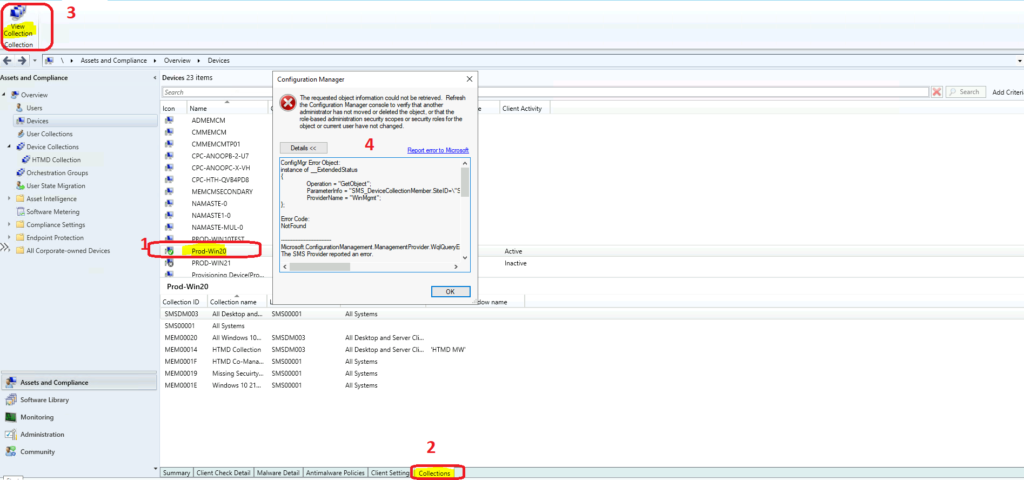
Error Code:
NotFound
-------------------------------
Microsoft.ConfigurationManagement.ManagementProvider.WqlQueryEngine.WqlQueryException
The SMS Provider reported an error.
System.Management.ManagementException
Not found
Stack Trace:
   at Microsoft.ConfigurationManagement.ManagementProvider.WqlQueryEngine.WqlResultObject.Get(ReportProgress progressReport)
Microsoft Documented – SCCM 2107 Known Issues
The following is the list of issues that Microsoft already documented. The first issue that they have highlighted is related to the download of the 2107 version of SCCM. The SCCM 2107 update fails to download because of a connectivity issue with internet endpoint configmgrbits.azureedge.net. I have highlighted this point in the SCCM 2107 upgrade guide.
- Task sequence and application policy issue with SCCM 2107. The ConfigMgr client won’t be able to get all of the policies for the TS and referenced applications. You can run the following SQ query to understand whether you have the issue or not. If the query returns zero, you don’t have the issue.
select COUNT(*) from Policy where PolicyID like '%/VI%'
  AND ((ISNULL(PolicyFlags, 0) & 4096 = 4096)
  OR (ISNULL(PolicyFlags, 0) & 2048 = 2048))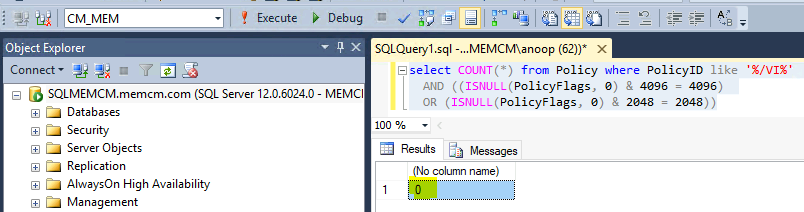
- You can check the workaround for this issue – task sequence and application policy issue in version 2107 early update ring from release note from the resources section below.
CMPivot Wrong Syntax Known Issues
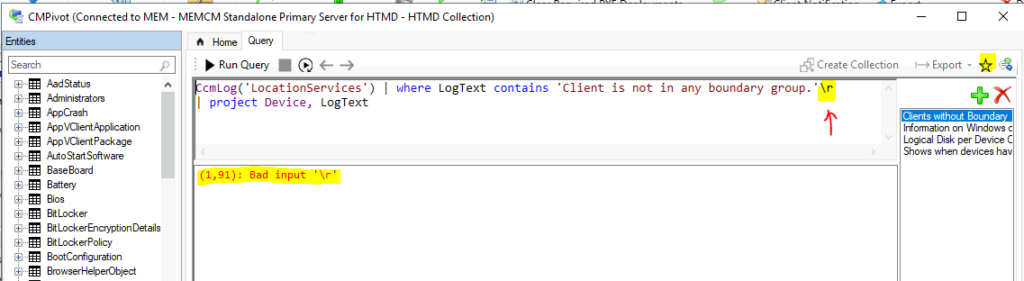
After the upgrade to the 2107 version of SCCM, CMPivot Favorite queries didn’t work because it automatically creates some additional characters, as mentioned below.
- When you click on the Favorite button from CMPivot, the query is displayed with additional characters like \r or \t.
- The part of the CMPivot query after the last comma (,) gets removed.
Lose SCCM Console Custom Settings
You will lose all the custom settings from the SCCM console after upgrading the console version to 2107. But the custom configurations after SCCM 2107 upgrade will get saved/persist when you reopen the console. Some of the examples are given below.
- Column changes
- Window size
- Searches
Windows 11 is automatically selected as Supported Platform
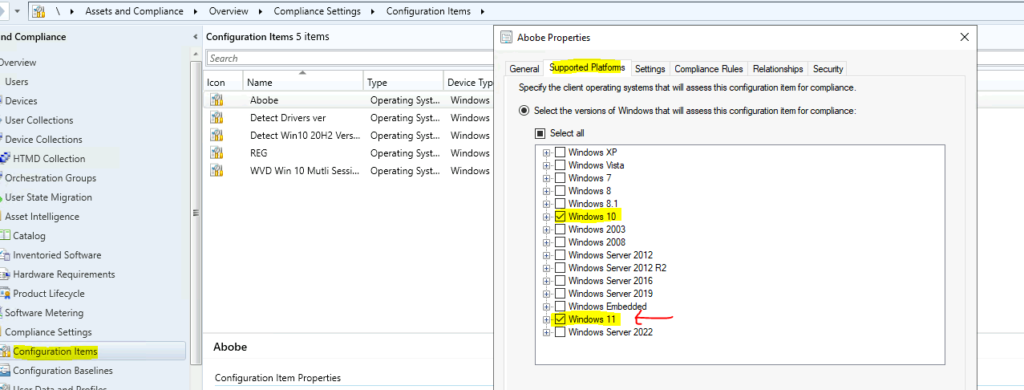
There is an SCCM 2107 bug related to supported platform selection for Windows 11 operating system. The SCCM will automatically add Windows 11 operating system option, as the supported platform will get added to all supported workloads (after 24 hours of 2107 upgrade). The Windows 11 option will be automatically selected, especially for the following workloads. You need to revise the supported platform list manually.
- Applications
- Configuration items
- Objects referenced in a Task Sequence
Issues Fixed with SCCM 2107
The SCCM 2107 known issues are already shared in the above sections. This is the list of fixes already available in the SCCM 2107 version. I have created a table with the fixes that are available in the 2107 version of SCCM. The following is the list of hotfixes included in the 2107 version:
- KB10036164: Update rollup for the version 2103.
- KB10216365: SQL Always On availability group related fix.
- KB10372804: MBAM related fix.
| Issues Related | Description |
|---|---|
| CMPivot Issue | The registry entity in CMPivot does not return the value of the (Default) property. |
| Scenario Health Issue | This task is executed every 30 minutes by default and fills up the Client Operations node. |
| Software Updates | SSL Config of SUP triggers – clients scanning for software updates using that SUP may switch to another SUP. |
| Software Updates | Run summarization task for a software update deployment fails to run on CAS. |
| Software Updates | Microsoft/Office 365 Apps Update failed to synchronize. |
| Software Updates | An available software update deployment shows as Required in the Deployments tab under collection properties. |
| Bit-Locker Mgmt | Script to set up BitLocker portals (MBAMWebSiteInstaller.ps1) fails. |
| Client management | Clients on the internet using a PKI certificate do not switch to the next available IBCM MP or CMG after a communication failure occurs. |
| Client Management | SCCM Clients are incorrectly considered to be in “coexistence” mode if Intune enrollment fails. |
| Collection Tab Issue | The collection tab does not populate any results if the user does not access the default security scope for operations. |
| Client Cache | Cache incorrectly gets removed from the client cache even when Persist content in the client cache option was set. |
| ContentLibraryCleanup.exe Issues | This content library cannot be cleaned up right now. Unable to load valid packages. |
| Content download history Issue | History data gets discarded if the client is offline for more than 2 days. |
| DP Reassign Issue | Reassigning a distribution point to another primary site won’t work and may fail if the server had an uninstalled site system role. |
| Content Library Cleanup Issue | Content for a package or operating system image is not deleted from the content library even after the deletion of the objects. |
Author
Anoop is Microsoft MVP! He is a Solution Architect in enterprise client management with more than 20 years of experience (calculation done in 2021) in IT. He is Blogger, Speaker, and Local User Group HTMD Community leader. His main focus is on Device Management technologies like SCCM 2012, Current Branch, and Intune. He writes about ConfigMgr, Windows 11, Windows 10, Azure AD, Microsoft Intune, Windows 365, AVD, etc……………




Discussion