






Fix PSFX_E_MATCHING_BINARY_MISSING Error for Windows 10 PCs cannot Install New Updates
Microsoft released a hotfix to fix the PSFX_E_MATCHING_BINARY_MISSING error for Windows 10 PCs that cannot install new updates. This post explains the workaround solution to fix the 0x800f0984 error. The issue is identified for Windows 10 21H1, 20H2, and 2004 versions. You can get more details in the sections below.
It is possible that even SCCM-managed devices could receive this error. When a Windows 10 PC tries to install the latest cumulative updates (LCU), you might receive this error. I have not seen this error for SCCM-managed devices. Let us know in the comments if you see this error with SCCM-managed Windows 10 devices.
You can work around the issue with Windows 10 software update error PSFX_E_MATCHING_BINARY_MISSING 0x800f0984.
I know the workaround solution is challenging to deploy through SCCM since registry entry changes are basically. But it’s possible to deploy a PowerShell script using SCCM to fix this issue.

0x800f0984 Issue
After installing the following cumulative updates: May KB5003214 and June KB5003690, some Windows 10 PCs cannot install the latest cumulative updates installed like KB5004945, KB5005033, or latest updates; etc.

This issue PSFX_E_MATCHING_BINARY_MISSING Error occurs on Windows 10 PCs that have been scavenged automatically to remove outdated resource records. When a system is scavenged:
- The recently installed latest cumulative update (LCU) is marked as permanent
- The older components are removed from the system.
- After scavenging is complete and a device is in this state,
- You cannot uninstall KB5003214 or KB5003690,
- And you cannot install future LCUs.
FIX to Software Update issue PSFX_E_MATCHING_BINARY_MISSING 0x800f0984
Microsoft provides the manual workaround in the KB article kb5005322. You can try to fix the Windows update error PSFX_E_MATCHING_BINARY_MISSING 0x800f0984.
NOTE! – There is already an automatic workaround in place for all Windows 10 devices, but this automatic fix won’t be available immediately on these PCs. The Windows Update Medic Service runs in the background and diagnoses and repairs Windows updates based on the WaaS Assessment Impact Level.
- Launch the Command Prompt with administrator access.

- Run the following command from the CMD with admin access on the problematic Windows 10 PC.
Reg.exe Add HKLM\SOFTWARE\Microsoft\Windows\CurrentVersion /v AllowInplaceUpgrade /t REG_DWORD /f /d 1
NOTE! – You should get a message similar to the operation completed successfully.

Confirmation
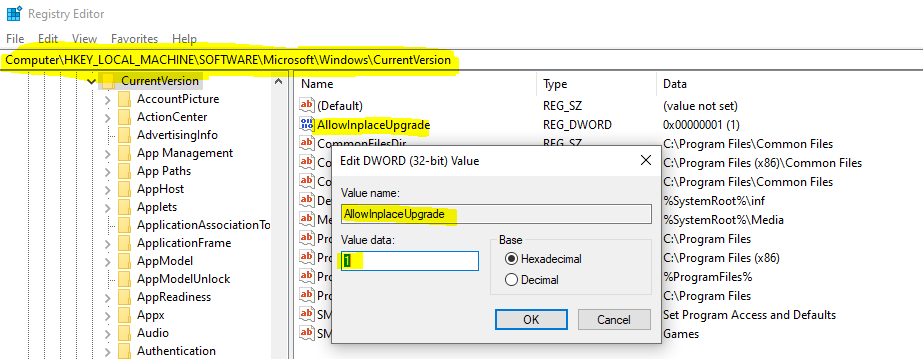
Let’s check whether you got the latest in-place upgrade or not. You can confirm the registry changes from the following registry location:
- Open Regedit.exe
- Navigate to Computer\HKEY_LOCAL_MACHINE\SOFTWARE\Microsoft\Windows\CurrentVersion
- Check the value set for the REG_DWORD entry called AllowInplaceUpgrade.
NOTE! This registry value will be removed once the WaaSMedicSVC service completes the in-place upgrade. It can take up to 48 hours for the in-place upgrade to be offered to the device.
Join the LinkedIn Page and Telegram group to get the latest step-by-step guides and news updates. Join our Meetup Page to participate in User group meetings. Also, Join the WhatsApp Community to get the latest news on Microsoft Technologies. We are there on Reddit as well.
Author
Anoop C Nair has been Microsoft MVP for 10 consecutive years from 2015 onwards. He is a Workplace Solution Architect with more than 22+ years of experience in Workplace technologies. He is a Blogger, Speaker, and Local User Group Community leader. His primary focus is on Device Management technologies like SCCM and Intune. He writes about technologies like Intune, SCCM, Windows, Cloud PC, Windows, Entra, Microsoft Security, Career, etc.



Discussion