






SCCM Cloud Management Dashboard in the Console
The SCCM cloud management dashboard provides a centralized view of cloud management. This dashboard also displays data about Azure AD users and joined devices. In this post, we will see more details about cloud management details.
The cloud management gateway (CMG) gives an easy way to manage Configuration Manager clients online.
You can check the Tenant Attach Dashboard (a.k.a Co-Management) from the SCCM console. The cloud management dashboard details Cloud Management Gateway traffic and online clients.
You can check the workflow options of Cloud Management Gateway (CMG) before implementing them—the latest guide for SCCM CMG Implementation with an EHTTP Certificate.

SCCM Cloud Management Dashboard
The Cloud Management dashboard helps you review cloud management services in the SCCM environment. It can help identify overall usage and provide a helicopter view of cloud management workflows that might need attention. The dashboard has two sections, which are given below.
| The sections of Dashboard |
|---|
| Azure AD Statistics |
| Cloud Management Gateway Statistics |
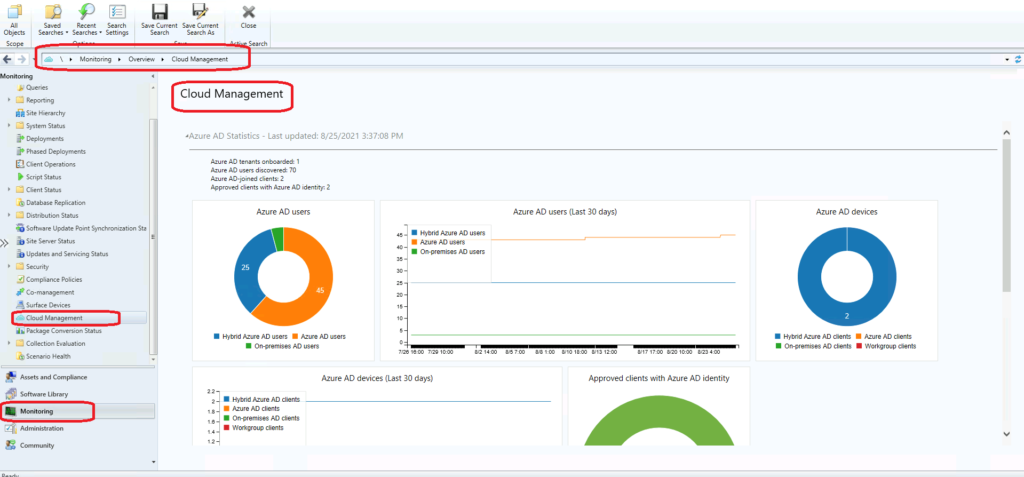
Launch SCCM Cloud Management Dashboard
You can launch a Cloud Management dashboard from the SCCM console itself. You don’t see any data in this dashboard if you have not enabled the Cloud Management feature. Let’s follow the steps mentioned below to launch:
- Launch CofigMgr Console
- Navigate \Monitoring\Overview\Cloud Management
Azure AD Statistics
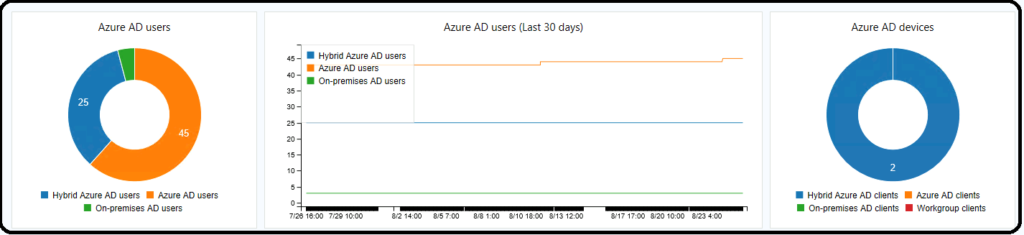
The Azure AD statistics are available in this section of the dashboard. You will get details about Azure AD tenants, AAD users, Azure AD joined clients, etc. There are four categories available in this cloud management dashboard.
- Azure AD tenants onboarded: 1
- Azure AD users discovered: 70
- Azure AD-joined clients: 2
- Approved clients with Azure AD identity: 2
The dashboard’s user section contains different types of users, including On-Premises AD users, Hybrid Azure AD Users, and Azure AD Users.
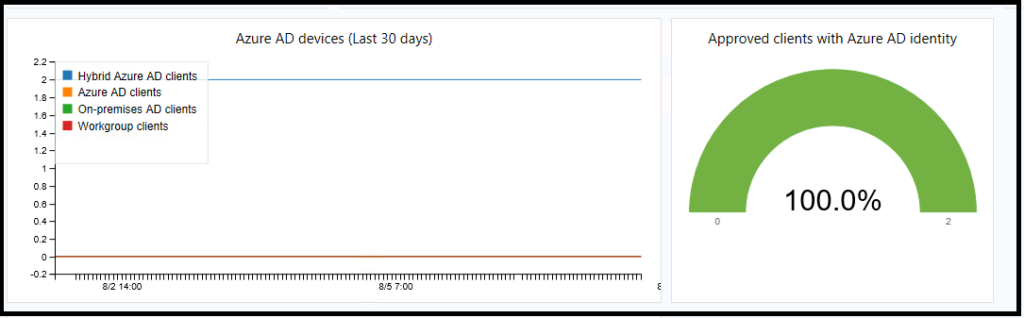
The following section provides Azure AD devices – Hybrid Azure AD clients, Azure AD Clients, On-premises AD clients, and Workgroup clients. You can also see Approved clients with Azure AD identity.
Cloud Management Gateway Dashboard
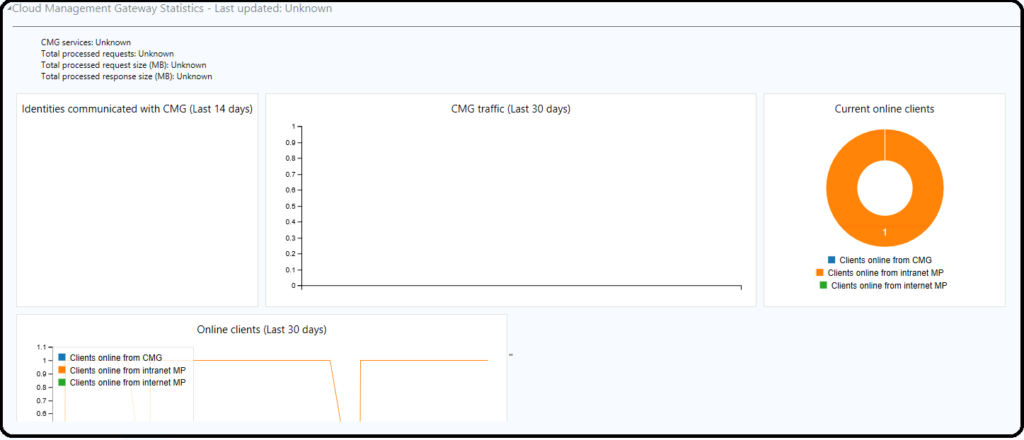
I don’t have Cloud Management Gateway (CMG) in the lab environment, but I can try to give you some idea about identities communicated with CMG, CMG traffic, and Current online clients. You can also get Clients online from CMG, Clients Online from intranet MP, and Clients online from internet MP.
- CMG services: Unknown
- Total processed requests: Unknown
- Total processed request size (MB): Unknown
- Total processed response size (MB): Unknown
NOTE! I think the SCCM CMG traffic details are useful for analyzing and estimating the cost of CMG.
Join the LinkedIn Page and Telegram group to get the latest step-by-step guides and news updates. Join our Meetup Page to participate in User group meetings. Also, Join the WhatsApp Community to get the latest news on Microsoft Technologies. We are there on Reddit as well.
Author
Anoop C Nair has been Microsoft MVP for 10 consecutive years from 2015 onwards. He is a Workplace Solution Architect with more than 22+ years of experience in Workplace technologies. He is a Blogger, Speaker, and Local User Group Community leader. His primary focus is on Device Management technologies like SCCM and Intune. He writes about technologies like Intune, SCCM, Windows, Cloud PC, Windows, Entra, Microsoft Security, Career, etc.




Discussion