






Windows 365 Cloud PC Audit Logs
Let’s try to understand more about Windows 365 Cloud PC audit logs. You can find the audit logs in the MS Endpoint Manager admin center portal. The Audit logs for Cloud PCs are essential because many automated activities are happening behind the scenes.
The audit logs are mainly for auditing reasons, for sure from the MEM admin perspective. However, Windows 365 audit logs help us to understand the back-end activities happening behind the scenes.
Some exciting activities help to understand few things, like how the MEM workflows are tightly integrated with Windows 365 workflows. The interesting audit reports are available for the Cloud PC provisioning or reprovisioning process.
Where is Cloud PC Audit Logs
You can find Cloud PC audit logs in the MEM Admin center portal. There is another PowerShell option to have a look at Audit logs. The admin needs to have Global admin, Intune Service Admin (Intune Administrator), or Administrators assigned to an Intune role with Audit data for read-only access.

- Launch -> https://endpoint.microsoft.com/
- Navigate to Tenant Administration -> Audit Logs.
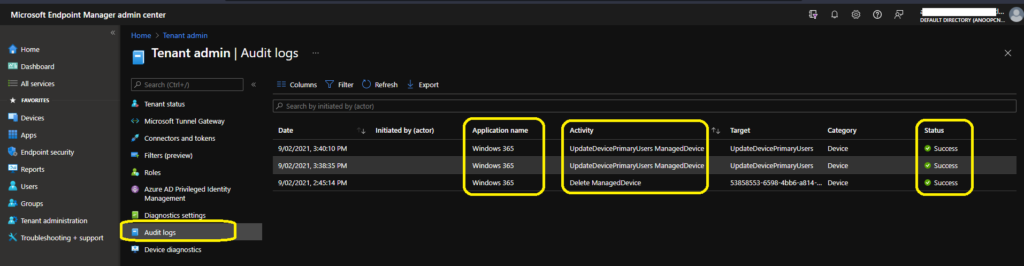
What are the Details available in Cloud PC Audit Logs
The following are some of the categories available for MEM portal audit logs. I have also noticed that Audit logs in the MEM portal are very short-lived, or it’s getting removed immediately after admin access. I have three alerts when I first opened the audit log, then got removed automatically.
- Date -> Date of the activities.
- Initiated by -> Who Initiated the Action? Admin or Application?
- Application Name -> the API name of the application.
- Activity Details -> The API details with Object ID.
- Activity Name -> UpdateDevicePrimaryUsers ManagedDevice, Delete ManagedDevice, etc…
| Date | Initiated by (actor) | Application name | Activity | Category | Status | Activity Name | Category | Operation Type | Actor Type |
|---|---|---|---|---|---|---|---|---|---|
| 2021-09-02T10:10:10.033Z | Windows 365 | UpdateDevicePrimaryUsers ManagedDevice | Target : Microsoft.Management.Services.Api.ManagedDevice, Name : UpdateDevicePrimaryUsers, ObjectID : cf3eb566-66dc-4132-9ea9-4c1dcd4797fa | Device | Success | UpdateDevicePrimaryUsers ManagedDevice | Device | Action | Application |
| 2021-09-02T10:08:35.260Z | Windows 365 | UpdateDevicePrimaryUsers ManagedDevice | Target : Microsoft.Management.Services.Api.ManagedDevice, Name : UpdateDevicePrimaryUsers, ObjectID : cc75ebd4-c250-4ec9-83a8-774a6b89e0a9 | Device | Success | UpdateDevicePrimaryUsers ManagedDevice | Device | Action | Application |
| 2021-09-02T09:15:14.367Z | Windows 365 | Delete ManagedDevice | Target : Microsoft.Management.Services.Api.ManagedDevice, Name : 53858553-6598-4bb6-a814-3ad020029042_Windows_7/21/2021_6:15 PM, ObjectID : 61149c2e-d8bf-4f33-b0c1-f094919914bd | Device | Success | Delete ManagedDevice | Device | Delete | Application |
Cloud PC Device Records Deletion Process
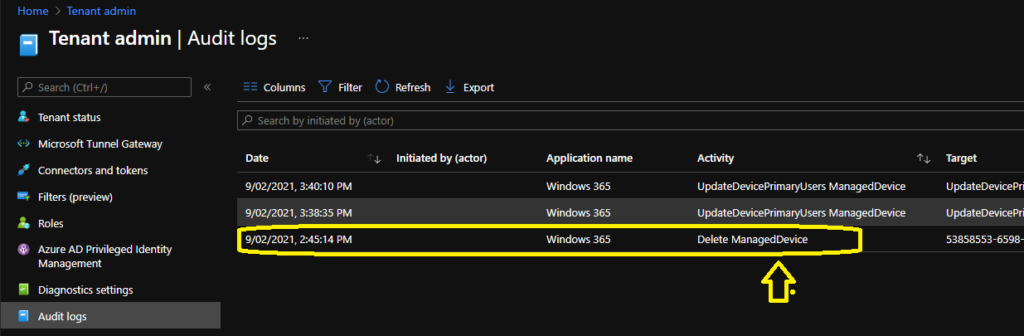
From the audit logs, I learned that the deletion of stale records Cloud PC records is pretty quick and effective if you compare it with the maintenance or cleanup activity of native Intune stale records. I reprovisioned a Cloud PC yesterday, and the old record got removed from Intune.
NOTE! – The disabled Cloud PC device records from Azure AD are not getting deleted, or it’s coming back via Azure AD connect sync from on-prem AD. We will have to perform more tests to confirm this behavior.
What is the Windows 365 Azure AD Application ID?
I find the Windows 365 Cloud PC application ID useful because this can be handy while checking the audit logs. Also, this would help us to create Azure AD conditional access policies for Windows 365.
- Windows 365 Server Side Cloud App -> 0af06dc6-e4b5-4f28-818e-e78e62d137a5





Anoop Thank you, the document written is very informative and good. I liked it
Can you please share if it records he errors that is encounter while it is process and how long does the Logs are stores.
Thank you