Skip to content
Windows 10 21H2 Deployment Options for Commercial Preview Build

Windows 10 21H2 Deployment Options for Commercial Preview Build

Written By Anoop C Nair
Last Updated September 4, 2021
Posted In Windows 10
SHARE

Let’s check Windows 10 21H2 deployment Options. Microsoft starts rolling out Windows 10 21H2 in preview ring. I would love to get into Windows 11 train, but most of my laptops don’t meet the requirements. However, I’m happy that I can continue using Windows 10 until 2025.

Microsoft announced Windows 11 Release Date, and it’s 5th Oct 2021 for consumer users. However, Microsoft already released Windows 11 final build to commercial customers. Microsoft already announced that Windows 10 21H2 Update from 2004 or Later would be via Enablement Package.

You can upgrade to Windows 10 21H2 or Windows 11 commercial preview build using any following methods. Windows 11 hardware requirements are blocking issues for many of the existing Windows 10 PCs in the market.

  • Windows Insider Program Release Preview Channel (Windows Update).
  • Windows Insider Program Release Preview Channel (Windows Update for Business – Intune policies).
  • WSUS/SCCM software updates preview options with Windows Insider Pre-Release product opton.
  • Download Windows Insider ISO.

Deploy Preview version of Windows 10 21H2 using WSUS/SCCM

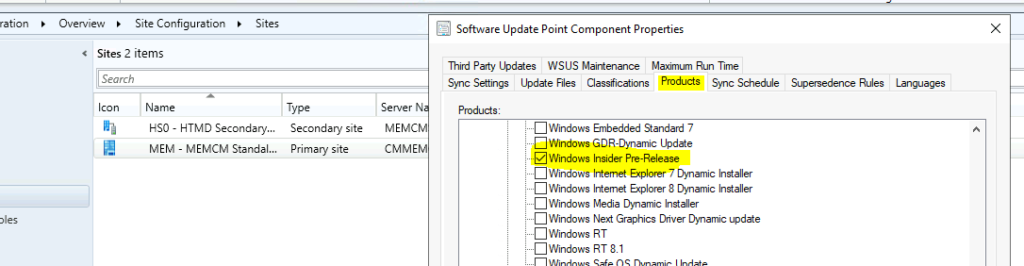
You can deploy preview versions of Windows 10 21H2 using SCCM. You can get the preview version of the Windows 10 21H2 enablement package in the SCCM console if you enable the following product called Windows Insider Pre-Release.

Patch My PC
Windows 10 21H1 KB5005101 Cumulative Update - Windows 10 21H2 Deployment Options for Commercial Preview Build
Windows 10 21H2 Deployment Options for Commercial Preview Build

Deploy Windows 10 21H2 Preview Release using Intune and WUfB

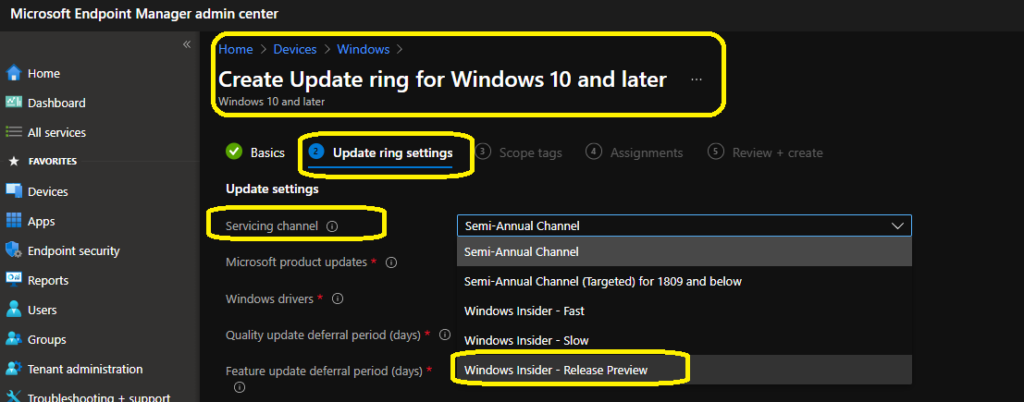
You can deploy the latest preview version of Windows 10 21H2 preview using Intune/WUfB. You can try to create an update ring for Windows 10 and later. You need to select Sevicing channel -> Windows Insider – Release Preview.
Windows 10 21H2 Deployment Options for Commercial Preview Build

Windows Update Way of Updating to Windows 10 21H2

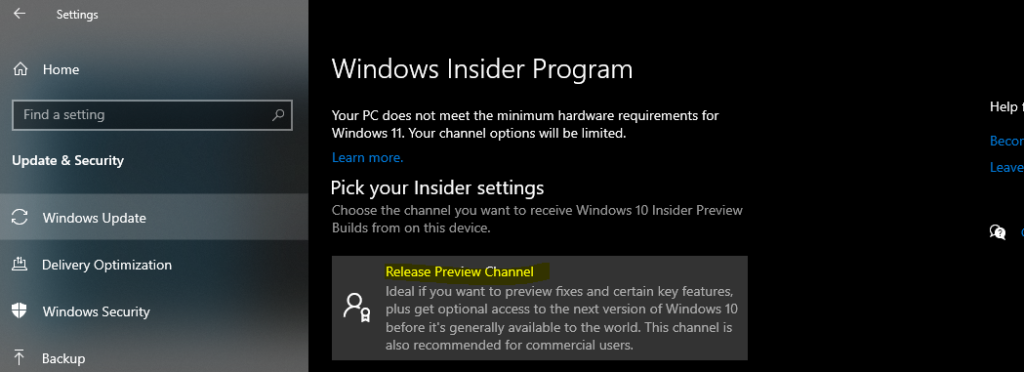
You don’t have to do anything apart from joining the Windows Insider program. Make sure you join the appropriate service channel within the insider program.

  • Select -> Release Preview Channel.
Windows 10 21H2 Deployment Options for Commercial Preview Build
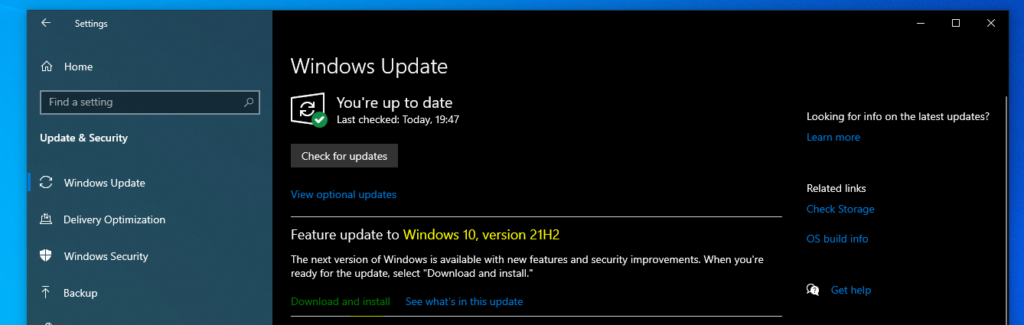
  • Try to manually look to sync from Windows Update tab -> Check for Updates (seek for update).
  • From “Feature update to Windows 10, version 21H2” – click on Download and Install.
Windows 10 21H2 Deployment Options for Commercial Preview Build

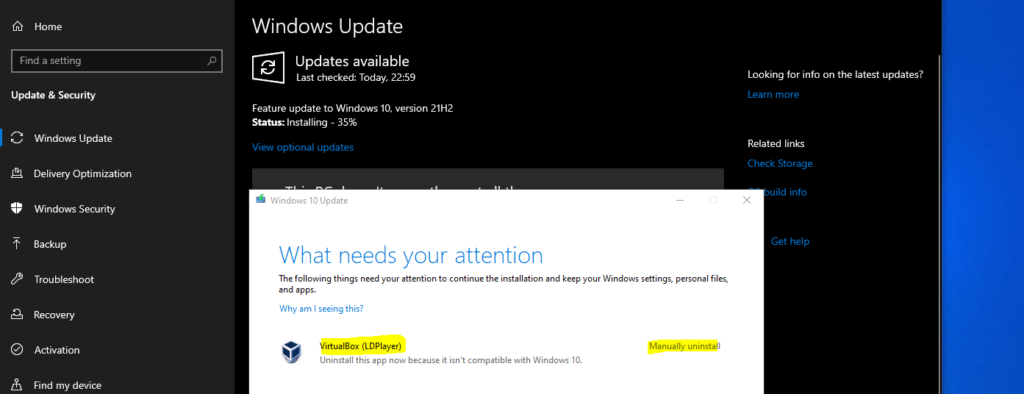
Well, if you have some funny applications that are not compatible with Windows 10 21H2 version. You can uninstall these types of applications. I’m not using Symantec or McAfee applications on this Windows 10 PC.
Windows 10 21H2 Deployment Options for Commercial Preview Build

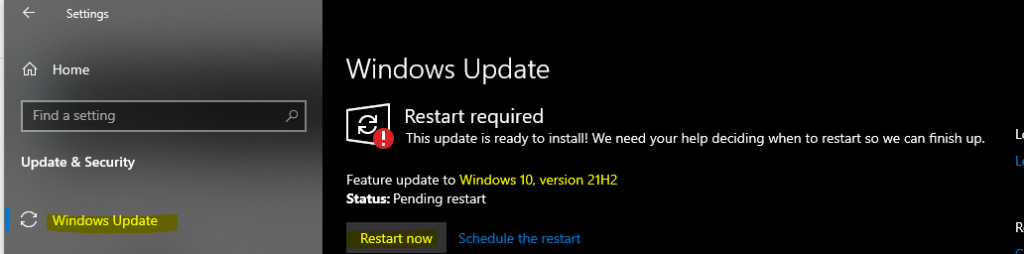
Once the Windows 10 21H2 download is completed, it’s time to restart the Windows 10 21H1 PC for the last time.

  • Click on Restart Now.
Windows 10 21H2 Deployment Options for Commercial Preview Build

Results

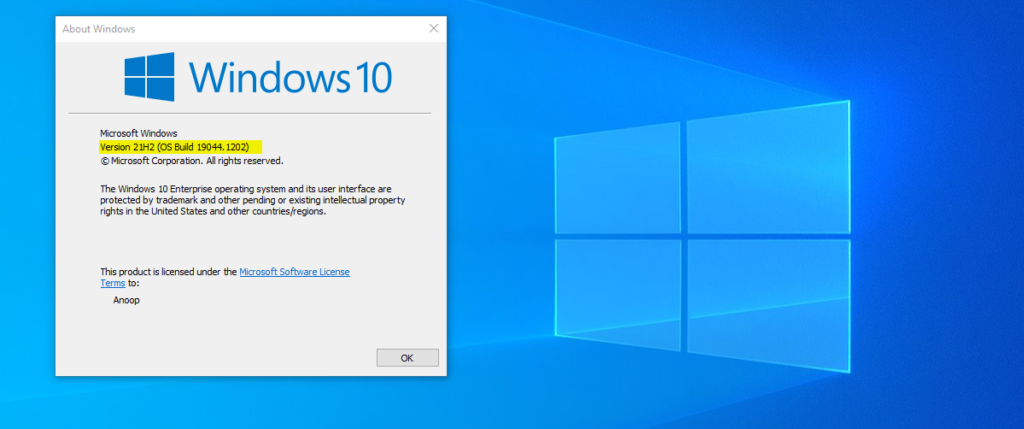
After the restart, you can check the Windows 10 21H2 version number: OS Build -> 19044.1202.
Windows 10 21H2 Update Options for Commercial Preview Build
Written by

Anoop C Nair is Workplace Technology solution architect with 25+ years of experience in global enterprise organizations such as JP Morgan, Capgemini, etc. Microsoft Certified Trainer. Microsoft MVP from 2015 onwards for consecutive 11+ years! He also conducts Intune and modern workplace tech training for enterprise organizations. He is Blogger, Speaker, and Founder of HTMD Community and HTMD Conference. His main focus is on Device Management technologies like Intune, Windows, Cloud PC. He writes about technologies like Intune, SCCM, Windows, Cloud PC, Windows, Entra, Microsoft Security.

Discussion · 2 comments

  1. Hi Anoop,

    Once we installed this Windows 10 21H2 on windows 10 system we will good until Dec-2025.
    Every month windows 10 Windows updates also install with out any fail, kindly advice on this.

    Thanks
    Siva

    1. StaffI don’t know whether there will be another update needed or not. You might get regular security updates for this version until the end of 21H2 support. And I think the normal support for H2 versions is 18 months. We will have to wait and see whether Microsoft increase support for 21H2 or not. If not, you will have to upgrade it to 22H1 etc …

Join the discussion

Your email address will not be published. Required fields are marked *

Related guides

Windows 10

New Snipping Tool Vulnerability in Windows can Leak NTLMv2 Hashes over Network

Key Takeaways Hey, let’s discuss about New Snipping Tool Vulnerability in Windows can Leak NTLMv2 Hashes over Network. Microsoft Windows Snipping Tool has a newly disclosed spoofing vulnerability, tracked as CVE-2026-33829, which could allow an unauthenticated attacker to capture a user’s NTLMv2 hash over a network. The issue was made public on April 14, 2026, […]

AC Anoop C Nair 4 min read
Windows 10

Unsupported Windows 10 Devices in Intune may Experience Limited or Unreliable Functionality

Let’s discuss Unsupported Windows 10 Devices in Intune may Experience Limited or Unreliable Functionality. Microsoft Announce the Official end of support announcement of Windows 10 free support on October 14, 2025. There is no more free security updates or non-security fixes via Windows Update for Windows 10 Home and Pro editions. Microsoft announced that, Windows 10 […]

AC Anoop C Nair 4 min read
Intune

Last Patch for Windows 10 with KB5066791 and 5 Zero Day Vulnerabilities and 118 Flaws

Let’s discuss Last Patch for Windows 10 with KB5066791 and 5 Zero Day Vulnerabilities and 118 Flaws. Microsoft Released last Patch Tuesday Updates for Windows 10 on October 2025. After October 14 2025, Microsoft will no longer provide free software updates from Windows Update, technical assistance, or security fixes for Windows 10. As you know […]

AC Anoop C Nair 6 min read
Intune

2025 September KB5065429 Windows 10 Patch | 2 Zero Day Vulnerabilities and 81 Flaws

Let’s discuss 2025 September KB5065429 Windows 10 Patch | 2 Zero Day Vulnerability and 81 Flaws. Microsoft addressed various security fixes and improvements on September 2025 Patch Tuesday of Windows 10 KB5065429. There are many security benefits can be accessed with parch tuesday update. Microsoft dedicated to provides patch Tuesday updates on Windows 11. Mainly […]

AC Anoop C Nair 7 min read