






FIX: SCCM TS environment is not initialized Error 0x80007002
Let’s see how you can FIX SCCM TS environment is not initialized Error 0x80007002. You might encounter a prompt message an error task sequence has failed to run this step for this computer during Operating System Deployment with SCCM Task Sequence. The Task Sequence Error 0x80007002 is generic, and the solution could be different based on the details you get into logs.
Generally, The error code 0X80070002 Translates SCCM Error Codes to Error “The system cannot find the file specified”. This is often seen when the specified command run in the task sequence step doesn’t execute the command, or the DP can’t be reached.
You can also check the possible solution to resolve SCCM Task Sequence Error 0x80004005 Failed to Run, SCCM Task Sequence Failed With Error Code 0x80070002.
Issue Summary –
This error appears at the apply driver task sequence step when you have started the deployment in the client machine with the deployment task sequence via PXE Boot. Task Sequence failed error message –

In this scenario, Task Sequence terminated after applying the operating system phase. You will collect the logs at WinPE C:\_SMSTaskSequence\Logs\Smstslog\smsts.log. To get the command prompt window, you have to press F8 key. More you can explore SCCM OSD Task Sequence Troubleshooting Steps by Step Ultimate Guide SMSTS.log. Here’s the highlight from the SMSTS.log –
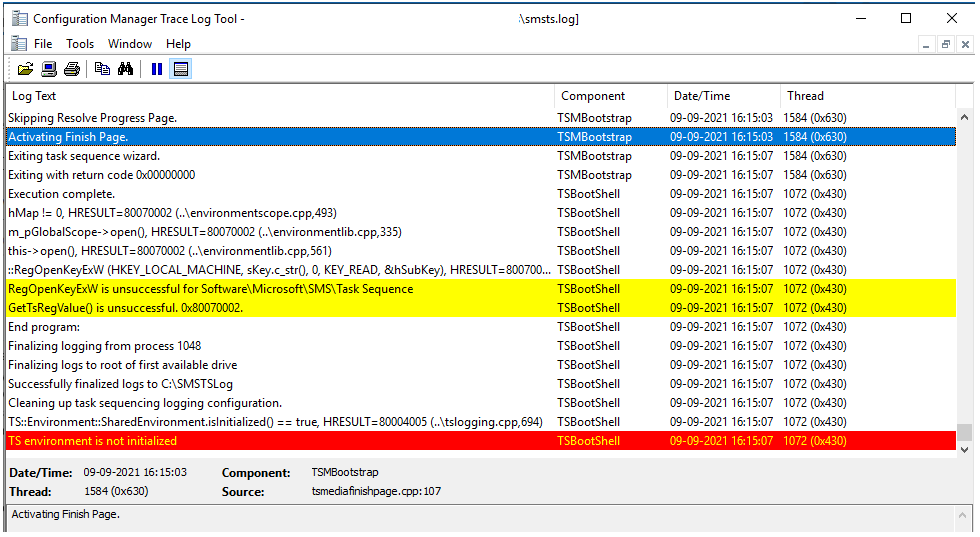
Activating Finish Page.	TSMBootstrap	09-09-2021 16:15:03	1584 (0x0630)
Exiting task sequence wizard.	TSMBootstrap	09-09-2021 16:15:07	1584 (0x0630)
Exiting with return code 0x00000000	TSMBootstrap	09-09-2021 16:15:07	1584 (0x0630)
Execution complete.	TSBootShell	09-09-2021 16:15:07	1072 (0x0430)
hMap != 0, HRESULT=80070002 (..\environmentscope.cpp,493)	TSBootShell	09-09-2021 16:15:07	1072 (0x0430)
m_pGlobalScope->open(), HRESULT=80070002 (..\environmentlib.cpp,335)	TSBootShell	09-09-2021 16:15:07	1072 (0x0430)
this->open(), HRESULT=80070002 (..\environmentlib.cpp,561)	TSBootShell	09-09-2021 16:15:07	1072 (0x0430)
::RegOpenKeyExW (HKEY_LOCAL_MACHINE, sKey.c_str(), 0, KEY_READ, &hSubKey), HRESULT=80070002 (..\utils.cpp,1107)	TSBootShell	09-09-2021 16:15:07	1072 (0x0430)
RegOpenKeyExW is unsuccessful for Software\Microsoft\SMS\Task Sequence	TSBootShell	09-09-2021 16:15:07	1072 (0x0430)
GetTsRegValue() is unsuccessful. 0x80070002.	TSBootShell	09-09-2021 16:15:07	1072 (0x0430)
End program: 	TSBootShell	09-09-2021 16:15:07	1072 (0x0430)
Finalizing logging from process 1048	TSBootShell	09-09-2021 16:15:07	1072 (0x0430)
Finalizing logs to root of first available drive	TSBootShell	09-09-2021 16:15:07	1072 (0x0430)
Successfully finalized logs to C:\SMSTSLog	TSBootShell	09-09-2021 16:15:07	1072 (0x0430) TS environment is not initialized
Cleaning up task sequencing logging configuration.	TSBootShell	09-09-2021 16:15:07	1072 (0x0430)
TS::Environment::SharedEnvironment.isInitialized() == true, HRESULT=80004005 (..\tslogging.cpp,694)	TSBootShell	09-09-2021 16:15:07	1072 (0x0430)
TS environment is not initialized	TSBootShell	09-09-2021 16:15:07	1072 (0x0430)
FIX – SCCM TS environment is not initialized Error 0x80007002
Let’s check the possible solution to fix the SCCM TS environment is not initialized Error 0x80007002. Since the deployment task sequence was using the auto-apply task sequence step for some onboarded models in SCCM.
The Auto Apply steps scan the hardware, find the plug-and-play IDs for all devices present on the system, and send them to the management point returns a list of compatible drivers from the driver catalog for each hardware device. For each hardware device, the task sequence picks the best driver.
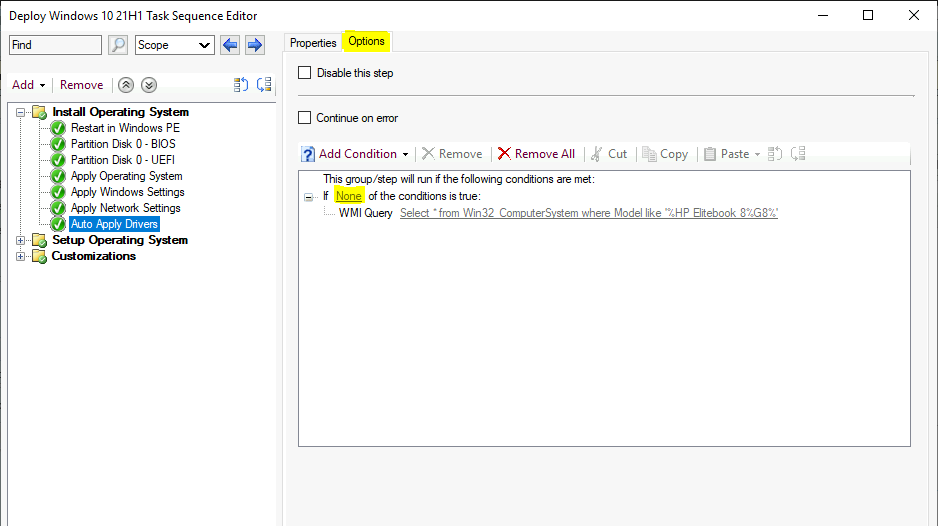
Here the task sequence was falling to find compatible drivers from the scan. We had excluded the deployed model with WMI query from the auto apply task sequence step and reinitiated the deployment. It worked successfully for us without an issue.
For Example, Select Add a condition > Query WMI from the drop-down menu to create a query not to target this step to the model. You can check more detailed steps to add a WMI query.
Use the HTMD Forum, the one-stop shop for all your device management queries related to ConfigMgr (a.k.a SCCM), Intune, and more!
Resources
- SCCM Driver Management Guide Best Practices ConfigMgr
- SCCM Driver Import Driver Package Creation Process Guide
- HTMD Blog #2 Archive Posts
Author
About Author -> Jitesh has over 5 years of working experience in the IT Industry. He writes and shares his experiences related to Microsoft device management technologies and IT Infrastructure management. His primary focus area is Windows 10 Deployment solution with Configuration Manager, Microsoft Deployment Toolkit (MDT), and Microsoft Intune.




Discussion