






Configuration Manager Technical Preview 2111 New Features
Let’s see the list of features released in ConfigMgr Technical Preview 2111. Microsoft has released the fourth Technical Preview Version after releasing SCCM 2107 Production Version. In terms of features, ConfigMgr 2111 Technical Preview is a minor release that comes with many improvements, including Windows Servicing, Co-management, app groups, task sequence deployment, and considered customers feedback to provide the best experience.
Features that were available in a previous version of the technical preview remain available in later versions. The technical preview introduces new functionality that Microsoft is working on and features that aren’t yet included in the current branch of Configuration Manager.
Let’s try out all exciting added features, help the Configuration Manager product team, continuously work for us to provide them your valuable feedback about the new features in the technical preview before the Microsoft product team finalizes the features.
Important ⚠️- The technical preview branch of Configuration Manager is not supported for use in a production environment. The technical preview is licensed for use only in a lab environment.

Download Technical Preview
You can install a baseline version for up to one year after its release. When installing a new technical preview site, use the latest baseline version, the Technical Preview 2110 is available as a baseline version. Download a baseline version from the Evaluation Center.
Let’s take a look at how to build Microsoft Endpoint Configuration Manager aka MECM Technical Preview LAB – How to Build Configuration Manager Technical Preview LAB | SCCM
Upgrade Technical Preview Version
ConfigMgr Technical Preview builds installation is active for 90 days before it becomes inactive. You need to install the available new technical preview updates within 90 days before the technical preview build expires. Typically, new versions of the technical preview are available each month.
Here’s how you can get technical preview 2111 –
- Launch the Configuration Manager console.
- Go to Administration > Overview > Updates and Servicing node.
- Right click Configuration Manager Technical Preview 2111 and click Install Update Pack.
- On General tab, You can ignore the prerequisite check warnings. Click Next and complete the process.
Features in Configuration Manager Technical Preview 2111
Let’s see what the improvement of Configuration Manager Technical Preview 2111 are –
Improvements to the Windows Servicing Dashboard
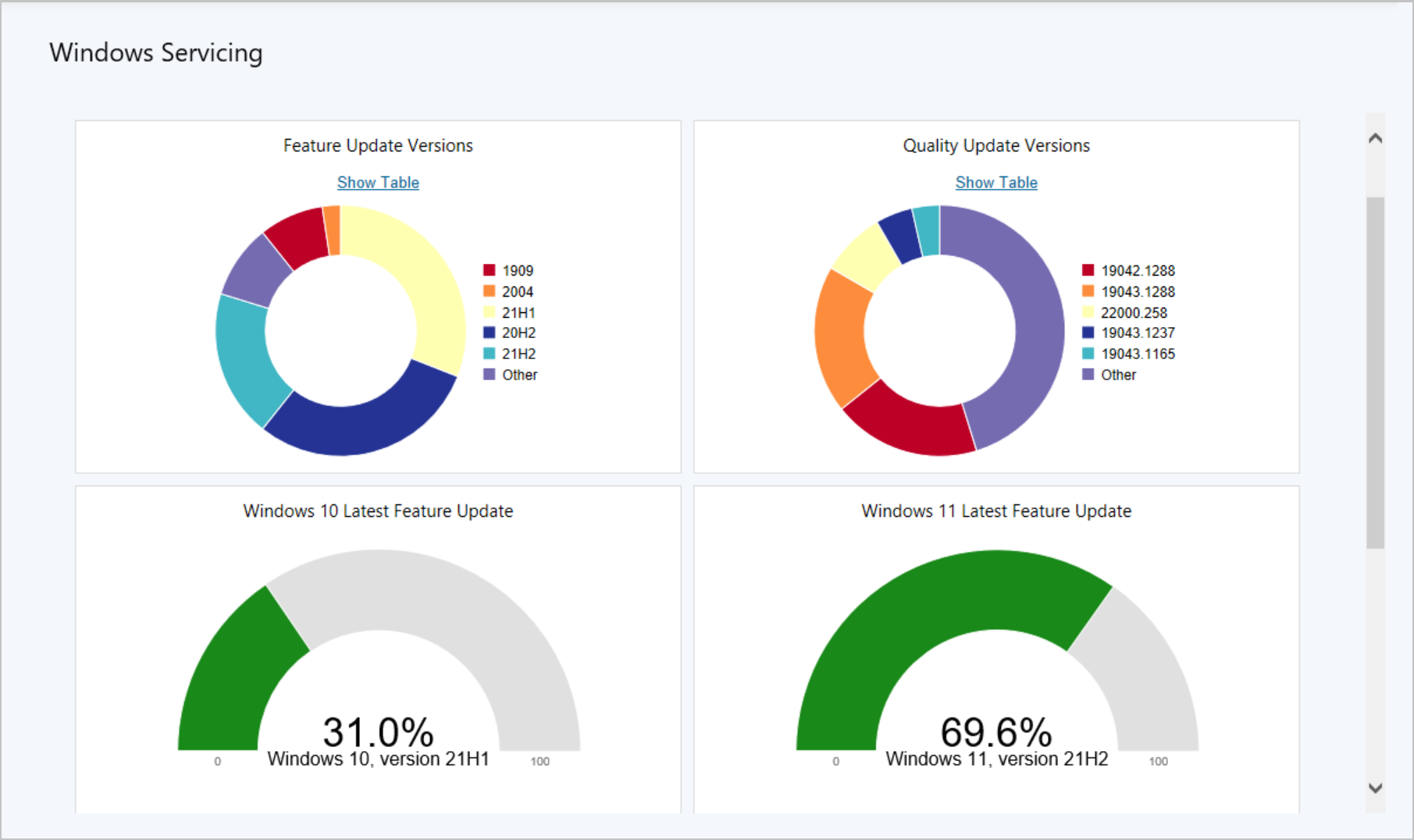
Starting in Configuration Manager Technical Preview 2111, SCCM displays Windows 11 Latest Feature Updates chart in the Windows Servicing dashboard. The new chart makes it easier to determine how many of your Windows 11 clients are on the latest feature update.
To display the dashboard, In the Configuration Manager console, go to the Software Library workspace, select Windows Servicing. The following charts are displayed –
- Feature Update Versions: Displays the distribution of Windows 10 major releases.
- Quality Update Versions: This chart displays the top five revisions of Windows 10 across your devices.
- Latest Feature Update: This chart shows the number of Windows 10 devices that installed the latest feature update.
- Windows 11 Latest Feature Update: This chart makes it easier to determine how many of your Windows 11 clients installed the latest feature update.
Improvement to App Groups
Configuration Manager Technical Preview 2111 release resolves one of the known issues for app groups from Technical Preview version 2110. Viewing and managing app groups in the Microsoft Endpoint Manager admin center doesn’t require an elevated role. It honors permissions and scopes as defined in Configuration Manager.
Improvement to Task Sequence Deployment Type
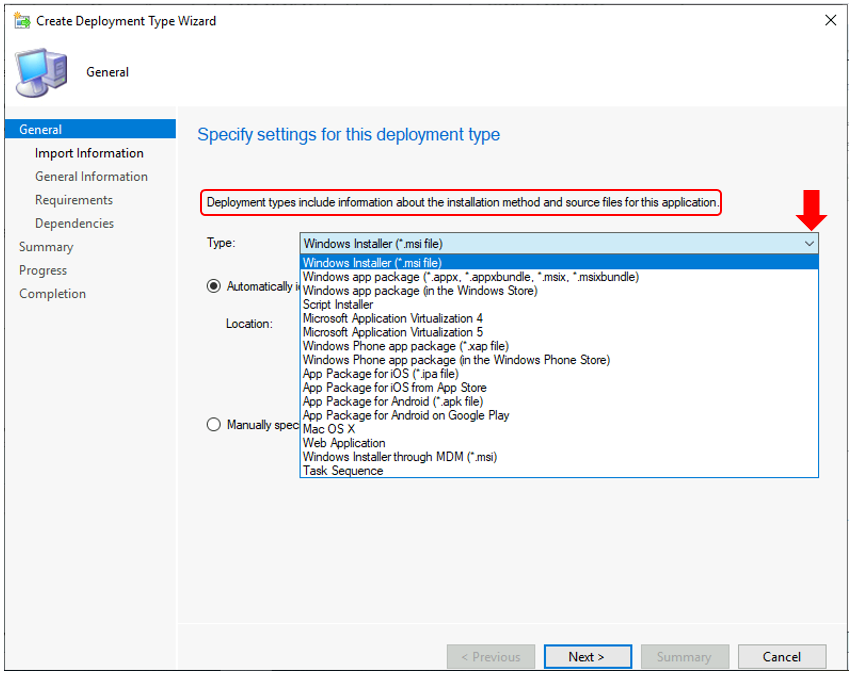
An application needs at least one deployment type, as it determines how to install the app. Use more than one deployment type to configure different content and installation program for the same application. You can visit the blog post to check the SCCM Application Supported Deployment Types in Configuration Manager.
In Configuration Manager, There are different ways to start the Create Deployment Type Wizard. Consider the following scenario –
- An application has a task sequence deployment type.
- It’s deployed as available.
- A device has maintenance windows defined.
- A user on the device runs the deployment in Software Center outside of a maintenance window.
Configuration Manager honors the user’s intent to install the application, even though there’s no available maintenance window. Previously, the Restart Computer step would fail when the task sequence ran because of the maintenance window.
Based on feedback received by customers to the Microsoft product team, this step now ignores maintenance windows only when the task sequence is run as an app deployment type.
Co-management Eligible Devices Collection
There’s a new built-in device collection for Co-management Eligible Devices. The Co-management Eligible Devices collection uses incremental updates and a daily full update to keep the collection up to date.
Author
About Author -> Jitesh has over 5 years of working experience in the IT Industry. He writes and shares his experiences related to Microsoft device management technologies and IT Infrastructure management. His primary focus area is Windows 10, Windows 11 Deployment solution with Configuration Manager, Microsoft Deployment Toolkit (MDT), and Microsoft Intune.




Discussion