






Easily Fix Matching Processor Architecture Boot Image not found
Let’s check the possible solutions to fix the Matching Processor Architecture Boot Image not found at operating system deployment using SCCM. The error you will encounter while doing the operating system deployment. It will cause the OS deployment to fail for targeted site locations.
When any device attempts a network boot off of an SCCM distribution point, that process is recorded in the SMSPXE log. Upon checking the SMSPXE log file, you will get Warning: Matching Processor Architecture Boot Image not found.
Your first step is to locate this log file to find details of the Matching Processor Architecture Boot Image not found. Check <Installed Drive>:\Program Files\SMS_CCM\Logs on your site server.
You will notice with the below message in the SMSPXE log file –

Warning: Matching Processor Architecture Boot Image (0) not found
PXE::CBootImageManager::FindMatchingArchitectureBootImage
- SCCM Create Custom Windows PE Boot Image Using MDT with ConfigMgr
- FIX: SCCM There are no task sequences available for this computer
- Easily FIX SCCM Unable to Read Task Sequence Configuration Disk
Fix Matching Processor Architecture Boot Image not found
Let’s check the possible solution to fix Matching Processor Architecture Boot Image not found –
#Option 1
Before proceeding with Operating System Deployment, you need to make appropriate changes to the Boot Images. You will find that two boot images, Boot Image (x64), Boot Image (x86), are default installed by SCCM.
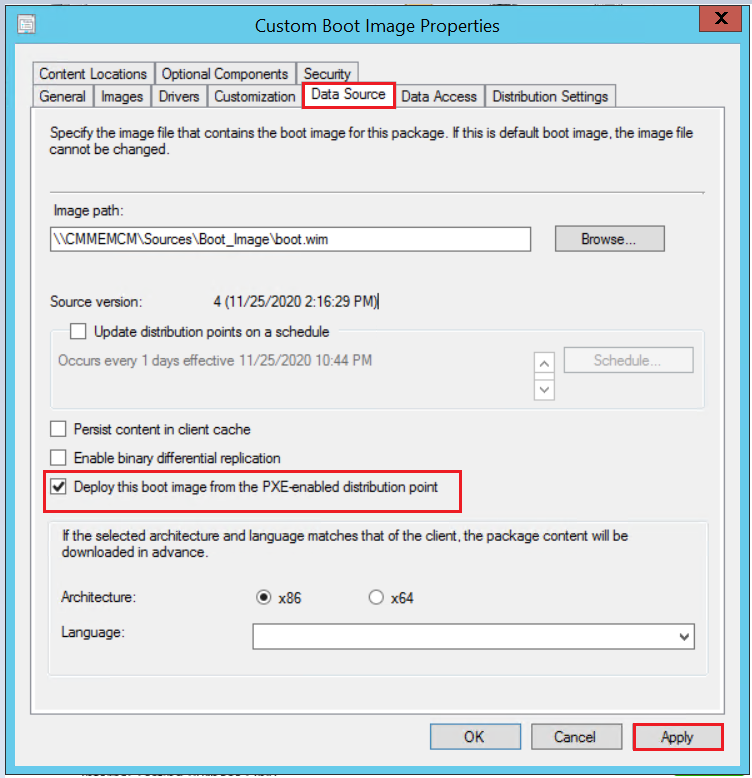
The first step is to ensure the option Deploy this boot image from the PXE-enabled Distribution Point is checked on both the boot images (x86 and x64).
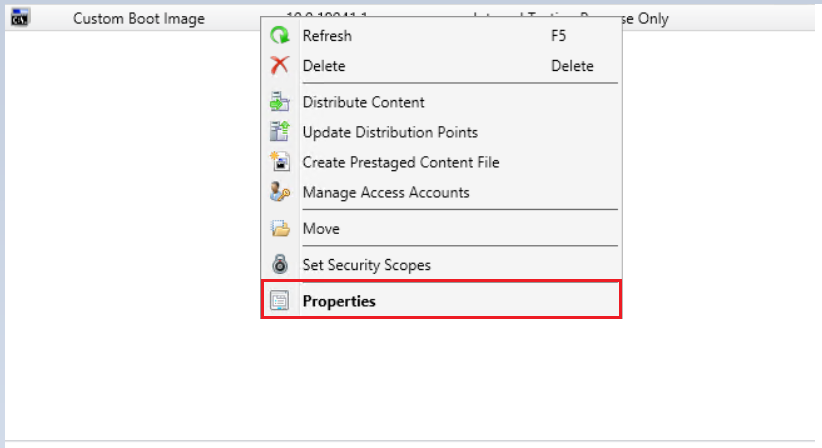
In the Configuration Manager console, click Software Library, expand Operating system, Click Boot Images. Select the Boot Image and click on Properties.
Click on the Customization tab and check the box Deploy this boot image from the PXE-enabled Distribution Point. Click on Apply.
#Option 2
The next thing you need to check is the boot image availability on the SCCM Distribution Point. Before using the boot image to deploy an OS, distribute the boot image to distribution points. Boot images are distributed to distribution points in the same way as you distribute other content.
To use PXE to deploy an OS, consider the following points before you distribute the boot image –
- Configure the distribution point to accept PXE requests.
- Distribute both an x86 and an x64 PXE-enabled boot image to at least one PXE-enabled distribution point.
- Configuration Manager distributes the boot images to the RemoteInstall folder on the PXE-enabled distribution point.
#Option 3
In case the boot image is distributed to DPs. You could try removing the default boot images from distribution points and redistributing the content.
If you had already distributed the boot images to DP previously and make changes to them, you need to choose the option Update Distribution Points.
#Option 4
If the boot image shows 100% compliance on all the necessary DPs, the PXE service could not locate it. Everything looked right, the helper addresses were correct on the switches, and the DHCP range was in place on the DHCP server. Restart the Windows Deployment Service on your Distribution Point. Windows Deployment Services (WDS) is the service that supports PXE boot to install operating systems.
You can also share your experience with the different errors and steps taken to resolve them in Comment Section or HTMDForum for helping the community members.
Author
About Author -> Jitesh has over 5 years of working experience in the IT Industry. He writes and shares his experiences related to Microsoft device management technologies and IT Infrastructure management. His primary focus area is Windows 10, Windows 11 Deployment solution with Configuration Manager, Microsoft Deployment Toolkit (MDT), and Microsoft Intune.




Id don’t see x86 boot image it only got x64 image in the boot image , how can i add x86 in sccm 2309 version ?