






ConfigMgr 2111 Hotfix KB12709700 Released with Fixes
Microsoft released SCCM 2111 Hotfix KB12709700. Microsoft released the first hotfix for the 2111 version of Configuration Manager production version. Let’s check the details of fixes issued with the hotfix for the 2111 version.
ConfigMgr 2111 hotfix KB12709700 update is available to address important, late-breaking issues that were resolved after version 2111 became available globally. It applies both to the globally available and early update ring releases.
You can access the update in the Updates and Servicing node of the Configuration Manager console for environments that downloaded version 2111 before December 20, 2021.
Note – This ConfigMgr 2111 hotfix KB12709700 update does not apply to sites that downloaded version 2111 on December 20, 2021, or a later date. Therefore, it will not be listed in the Configuration Manager console for those sites.

The newly released KB12709700 hotfix is applicable for environments running SCCM 2111. If you’re still running with the older sccm version, You can upgrade to use all exciting features. More you can check out our 2111 upgrade guide.
The SCCM environments with version 2006 are eligible to receive the 2111 update in the console. If your SCCM infra runs lower than 2006, that version is already out of support. The 2002 version of ConfigMgr is out of support on February 11, 2022.
List of Fixes SCCM 2111 Hotfix KB12709700
- The Configuration Manager client fails to install during the Windows Autopilot deployment process.
- When setting up virtual private network (VPN) boundaries based upon network adapters, the boundaries won’t work because the adapters are not resolving.
- Adding or deleting orchestration post-installation script can cause the deletion of post-installation scripts from other orchestration groups.
- The issue unable to open console because extension installation loops is resolved.
An update to resolve these issues is available in the Updates and Servicing node of the Configuration Manager console for environments that downloaded version 2111 before December 20, 2021. The update applies to installations of version 2111 from packages with the following GUIDs –
- 653BACCA-5BCE-4B4C-9A83-10932A561F71
- B07144F6-3B8E-4587-B1F0-BB47DA54C566
- C77888E5-7499-4885-9EED-811BB2D958C0
Install ConfigMgr 2111 Hotfix KB12709700
Let’s follow the steps below to Install ConfigMgr 2111 Hotfix KB12709700 –
- Launch the Configuration Manager Console.
- Select the Administration tab.
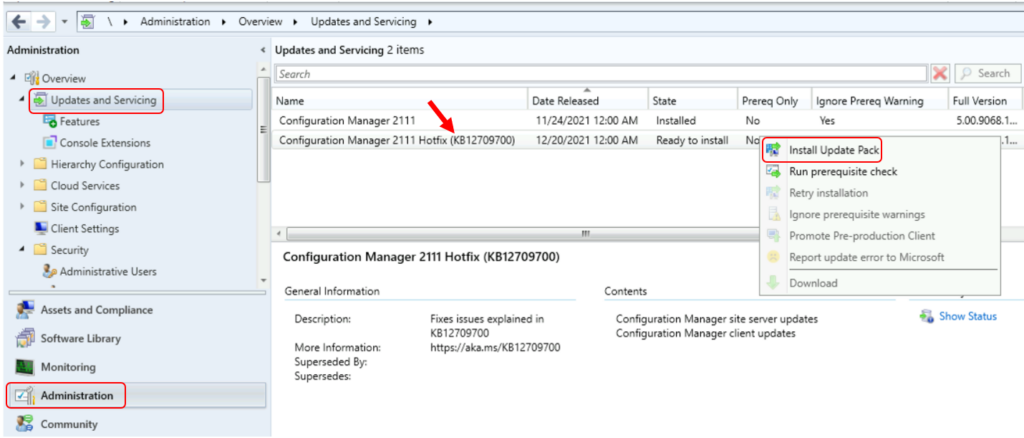
- Expand Overview -> Select Updates and Services.
- The update Configuration Manager 2111 Hotfix KB12709700 is Ready to install stage.
- Right-click Configuration Manager 2111 hotfix KB12709700 and select Install Update Pack.
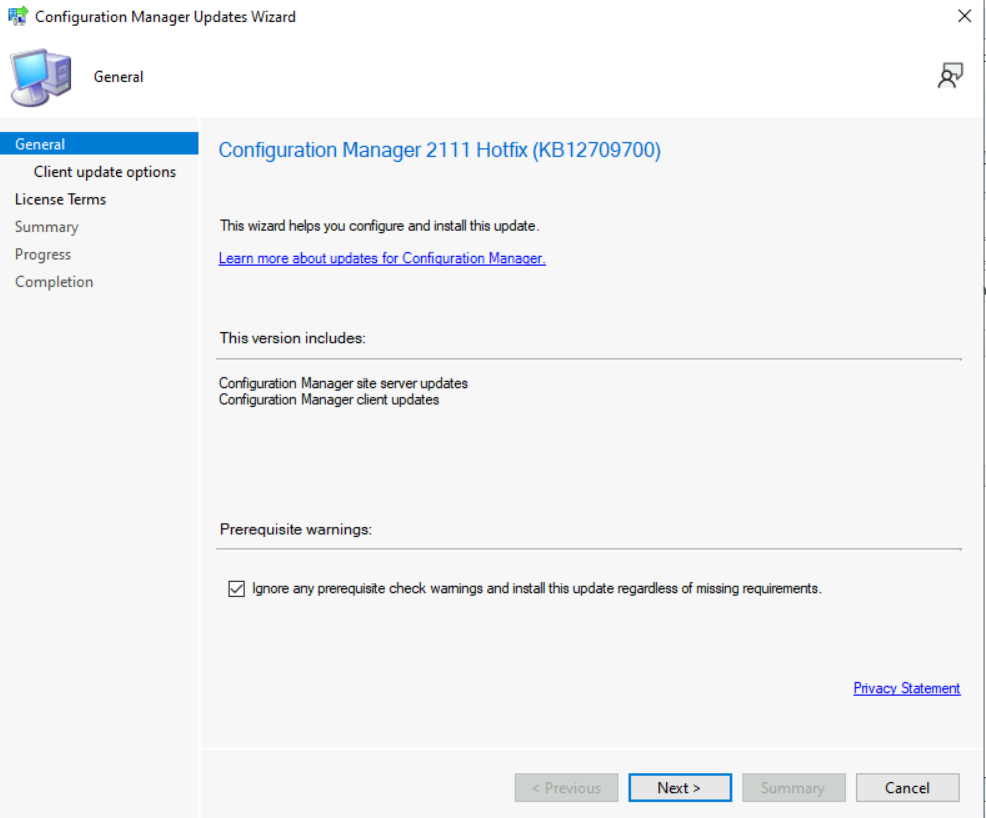
- The Configuration Manager 2111 Hotfix (KB12709700) includes Configuration Manager site server updates, Configuration Manager client updates. Click Next.
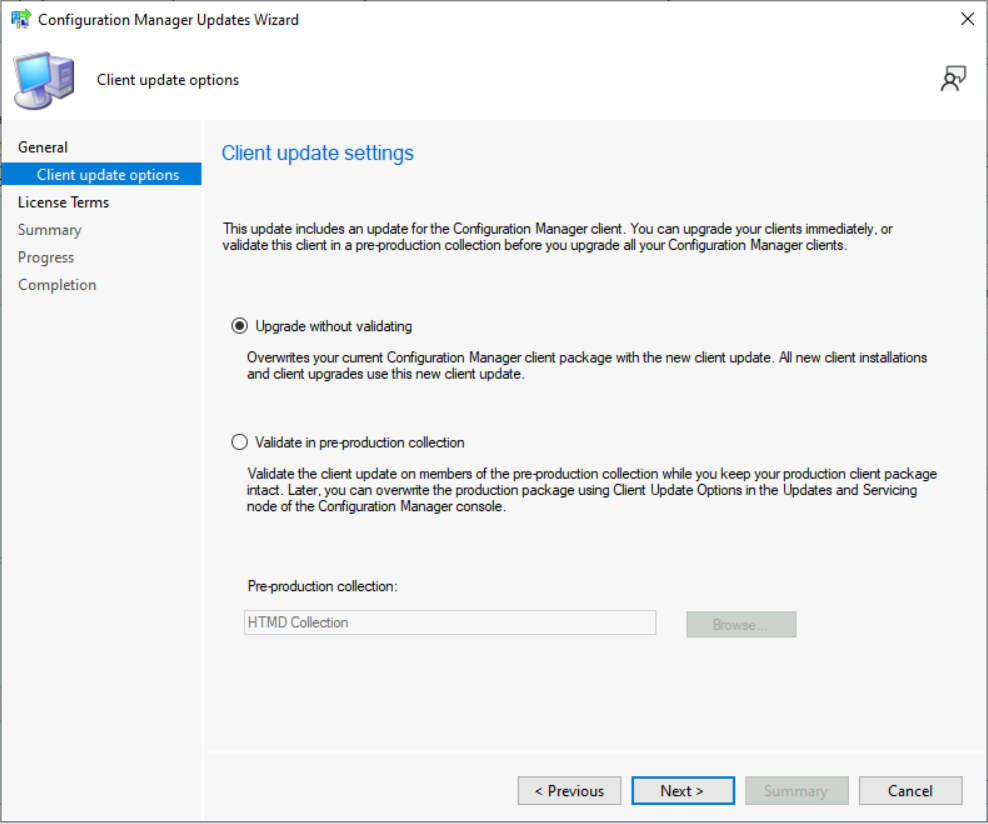
Select Client Update Settings. More details about the pre-prod client testing option are given in the following post – SCCM Client Upgrade – Promote Pre-Production Client To Production (anoopcnair.com). I selected this option for LAB Upgrade without validating.
Validate in a pre-production collection. Click on Next.
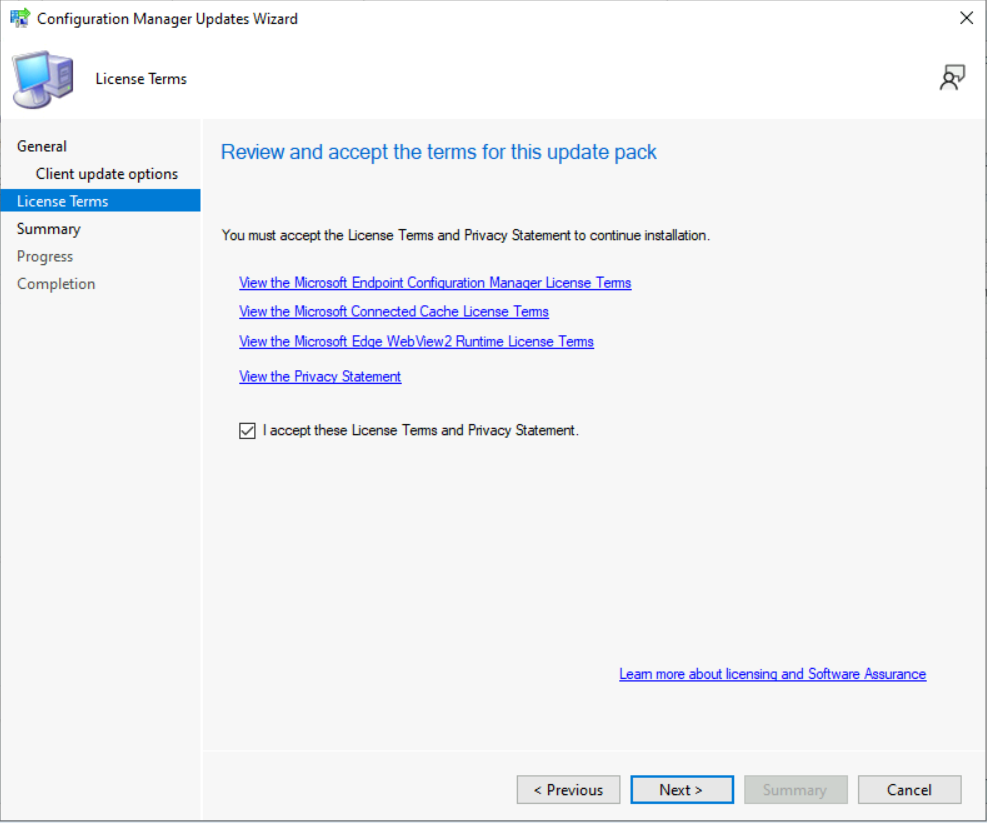
Accept the license and click on Next to continue.
If you have already enabled Cloud Attach in your SCCM setup, you shouldn’t see this option during the hotfix installation. However, you can skip the cloud attach settings by unchecking the Enable Cloud Attach option. Click Next.
- Check the Summary of updated package installation
- Click on Close to complete Configuration Manager Updates Wizard.
Summary of update package installation
 Install Update Package Configuration Manager 2111 Hotfix (KB12709700)
 Prerequisite warnings will be ignored
 Test new version of the client in production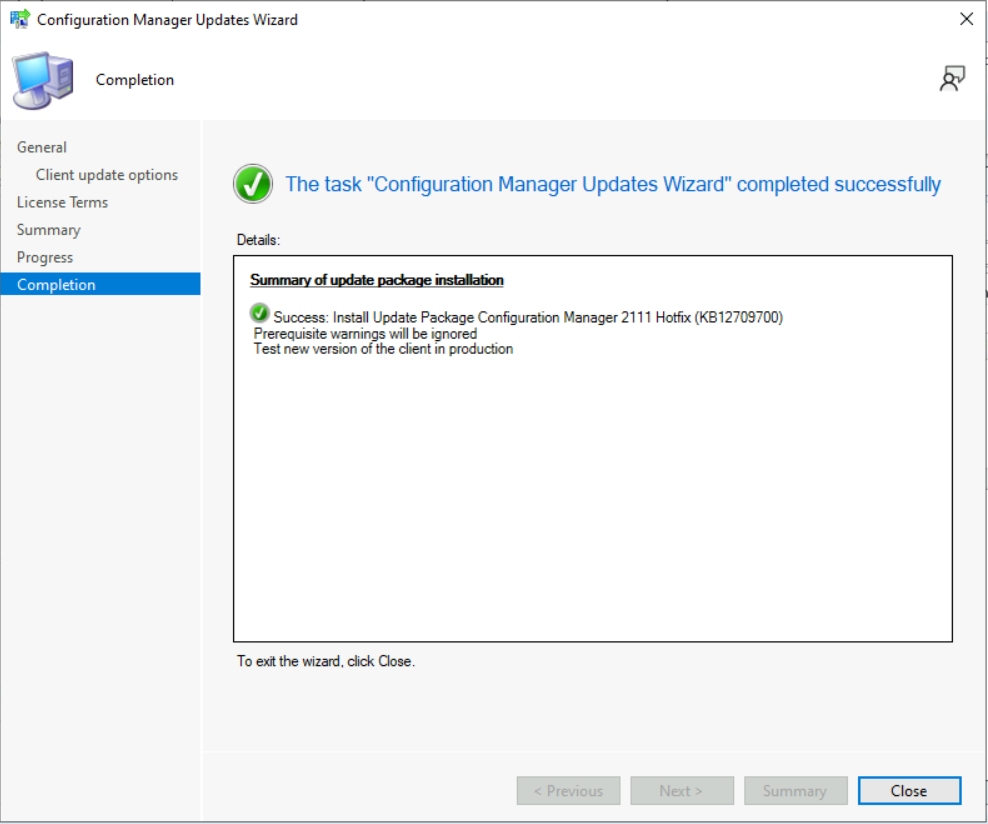
Install KB12709700 Hotfix on Secondary Server
To install Hotfix KB12709700 on ConfigMgr (a.k.a SCCM) secondary servers, you can follow the below steps. The following blog posts provide more details about the secondary server installation, troubleshooting, and update installation.
Recommended Posts –
- SCCM Secondary Server Hotfix Installation Guide | ConfigMgr
- Check SCCM Secondary Server Hotfix Installation Status
- SCCM Secondary Server Installation Guide | Step by Step | ConfigMgr
Let’s follow the steps below –
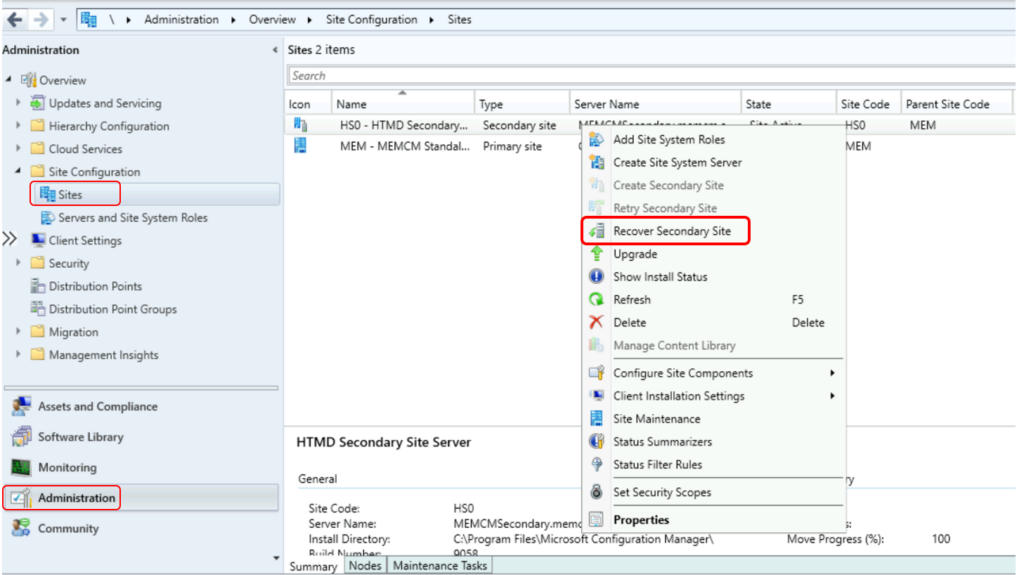
- To update a secondary site in the ConfigMgr console.
- Click Administration, click Site Configuration, click Sites, click Recover Secondary Site
- Then select the secondary site you want to upgrade.
- The primary site then reinstalls that secondary site by using the updated files.
Verification of Successful Installation of KB12709700
Following are the verification steps for SCCM 2111 Hotfix KB12709700 Update –
- In Configuration Manager Console, Navigate to the Monitoring workspace.
- \Monitoring\Overview\Updates and Servicing Status\Configuration Manager 211 Hotfix (KB12709700)
You can also review the cmupdate.log to know the hotfix installation progress.
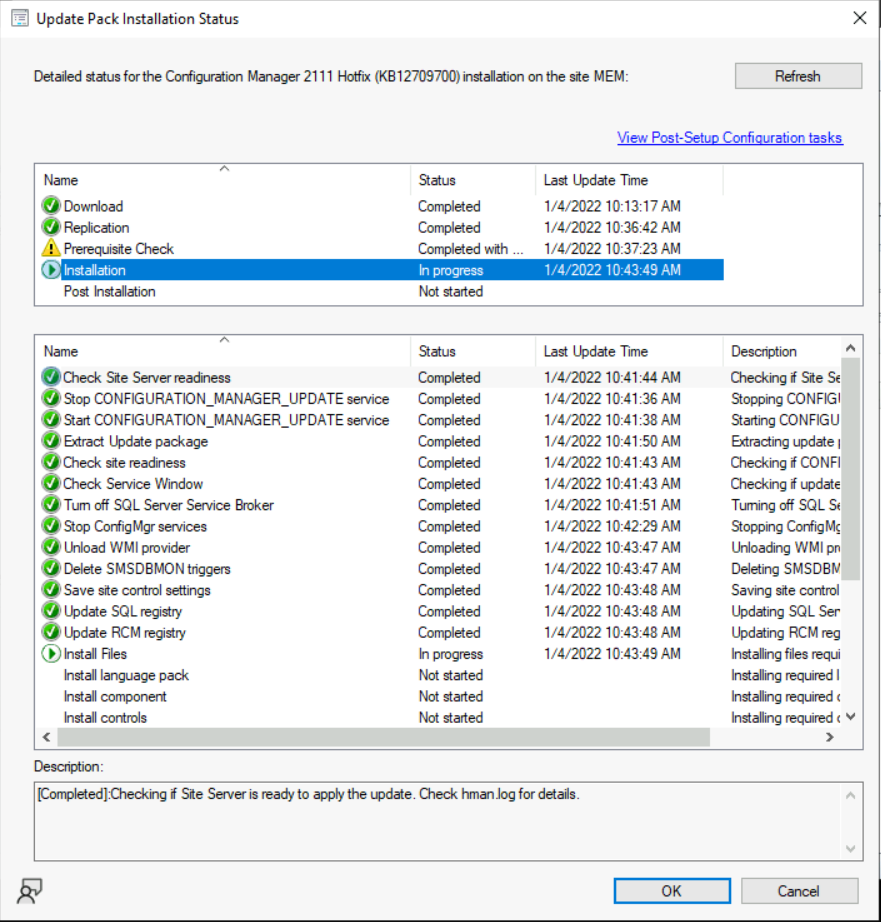
The ConfigMgr 2111 hotfix KB12709700 update does not require a computer restart but will initiate a site reset after installation.
ConfigMgr Version Numbers after Installing KB12709700
Let’s check the latest version of the Configuration Manager site, client, and other details –
Full Version – 5.00.9068.1008
Client Version – 5.00.9068.1008
Configuration Manager Console – 5.2111.1052.1700
Site Version – 5.00.9060.1000
Author
About Author -> Jitesh has over 5 years of working experience in the IT Industry. He writes and shares his experiences related to Microsoft device management technologies and IT Infrastructure management. His primary focus area is Windows 10, Windows 11 Deployment solution with Configuration Manager, Microsoft Deployment Toolkit (MDT), and Microsoft Intune.




I’m getting the below error in the LocationServices.log after upgrading to 2111. Client version is 5.00.9068.1008
Error reading location override information from WMI. Return code: 0x80041010
Looks to be a bug?