






Workaround for Untrusted Forest SCCM MP Rotation Issue
Workaround for Untrusted Forest SCCM MP Rotation Issue. In my previous post, I highlighted SCCM 2012 clients’ MP selection or rotation issues for untrusted forests (DMZ).
We will have an ” MP rotation ” issue when we have multiple MPs in untrusted DMZ forests under an SCCM ConfigMgr primary site. The above post explains this issue.
Microsoft confirmed this is the default product design or behavior (from the SCCM architect or admin perspective, it’s not an excellent product design ).
This will be fixed in the next version of the product. Next version? Am I unsure if the next version is SCCM ConfigMgr CB or SCCM 2012 R3?

- FIX SCCM Management Point MP Rotation Issue Partial WSUS Sync Issue
- Fix SCCM Failed to Run Task Sequence because it is not active yet
- SCCM Possible MP Rotation Selection Forest Trust Related Bug
- FIX: SCCM There Are No Task Sequences Available For This Computer
- FIX SCCM Agent Installation Error 0x80200010
Workaround for Untrusted Forest SCCM MP Rotation Issue
UPDATE: Install SCCM ConfigMgr 2012 R2 CU3 and Stop the MP rotation issue with a registry key called “AllowedMPs.” More details here. Another helpful topic:- Do you have multiple SUPs in SCCM 2012? Are you getting into a scenario where the clients cannot switch back to the original SUP?
One of the useful Technet forum threads you can look into http://social.technet.microsoft.com/Forums/en-US/57433aa3-2c26-4a46-a94e-7e734e2214c6/sup-assignment-not-correct?forum=configmanagersecurity.
We need to find a workaround to the SCCM 2012 MP rotation issue. We’ve identified 3 workarounds (my colleague contributed more on workarounds) for the SCCM ConfigMgr 2012 MP rotation issue.
The best option identified for our environment is “Remove AD publishing and add DNS service records for MP lookup.” The following sections discuss all 3 workarounds.
1. Remove AD Publishing and Add DNS Service Records for MP Lookup
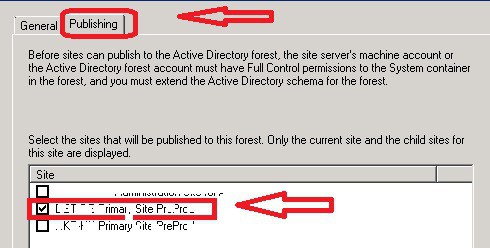
Navigate SCCM 2012 console – Hierarchy Configuration: Active Directory Forests: Select the untrusted (DMZ) forest from where you want to remove AD published details:: Publishing tab, remove the checkmark against your primary server. This will remove all the published details from the untrusted (DMZ) forests AD system management container.
Unlike SCCM 2007, we don’t need to delete anything from the System Management container manually; all site-related data, such as boundary and MP details, will be removed automatically.
You must repeat these steps for all the untrusted forests under that particular primary site (wherever remote MP is installed).
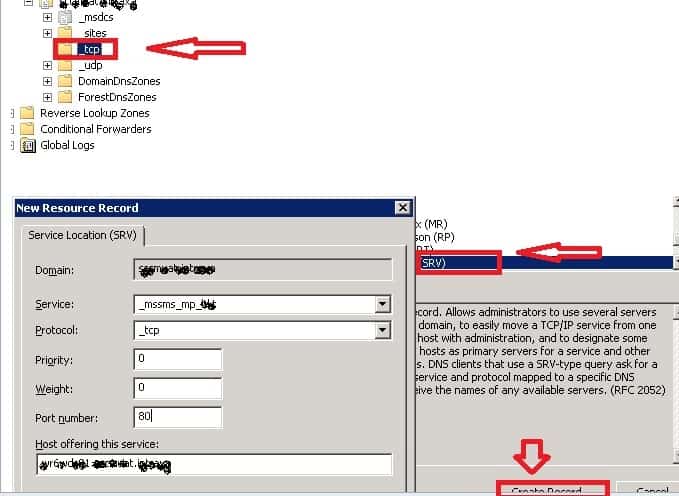
Publish DNS service record for MP Lookup on each local forest DNS server (wherever remote MP is installed). How to perform this?
More details are available in the section “To manually publish the default management point to DNS on Windows Server” of the Technet document http://technet.microsoft.com/en-us/library/bb632936.aspx.
Also, to get the preferred results, we must add the SMSMP and DNSSUFFIX options to the SMSClientInstallProperties TS variable.
2. Redirect the Foreign Forest MPs to Local Forest MP
Make each DMZ (untrusted) forest DNS server point the “blocked” MPs (which are located in another untrusted forest) at the IP address of the MP that we want the clients to use.
This is cheating the SCCM ConfigMgr 2012 client. The client rotates the MPs and tries to communicate with different MPs from the MP list, but it is reaching the MP you want it to reach.
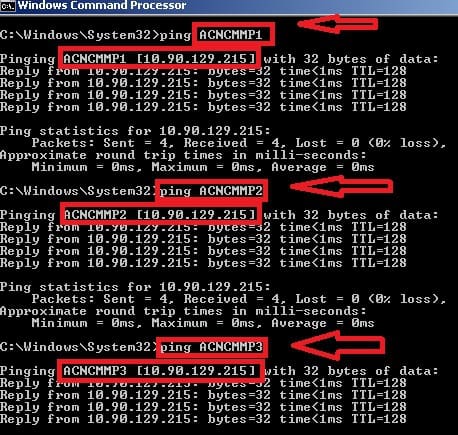
Your DNS server will resolve the MPs in the other untrusted (DMZ) forest to the local forest MP. All the MPs (ACNCMMP1, ACNCMMP2, and ACNCMMP3) are resolving to the same IP 😉
3. Redirect the Foreign Forest MPs to the Loop-Back Address
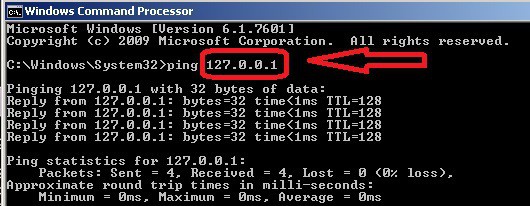
In each DMZ (untrusted) forest, we need to make adjustments in the client machine’s host file to point the “blocked” MPs (which are located in another untrusted forest) at the loopback address. Immediately, the client will fail to connect. This won’t stop the SCCM 2012 MP rotation issue.
However, it can reduce the client’s time to try contacting other blocked MPs. The host file changes can be achieved using Robert Marshall’s (MVP) SCCM SwitchMP.
Otherwise, you may need to try some settings on the DNS server to resolve blocked MPs’ names in the loopback address.
Resources
SCCM Related Posts Real World Experiences Of SCCM Admins
We are on WhatsApp now. To get the latest step-by-step guides, news, and updates, Join our Channel. Click here. HTMD WhatsApp.
Author
Anoop C Nair has been Microsoft MVP from 2015 onwards for 10 consecutive years! He is a Workplace Solution Architect with more than 22+ years of experience in Workplace technologies. He is a Blogger, Speaker, and Local User Group Community leader. His main focus is on Device Management technologies like SCCM and Intune. He writes about technologies like Intune, SCCM, Windows, Cloud PC, Windows, Entra, Microsoft Security, Career etc…




Discussion · 1 comment