






SCCM Software Update List Packages are not Visible on Child Primary Servers ConfigMgr
SCCM Software Update List Packages are not Visible on Child Primary Servers ConfigMgr. I’m not going to post anything new in this post. We’ve loads of posts about SCCM ConfigMgr Software Update replication issues when you have a large environment with a 3-tier hierarchy and many child primary servers.
I’ve seen many issues, like the latest Software Update packages (A.K.A SCCM patch packages) and software update lists created at the central server not being visible on the child’s primary server console.
Hence, the SCCM ConfigMgr administrators at regional locations cannot deploy the latest patches to their workstations. This will get highlighted very soon within the organization as this is a security issue 🙂
One of the very detailed deep-dive blogs about this issue is Michael Wiles! Read his full post http://blogs.technet.com/b/mwiles/archive/2011/06/24/troubleshooting-failed-to-insert-object-error-message.aspx . So many other blogs tell you about various ways to resolve this issue.

- SCCM Software Update List Packages Are Not Visible On Child Primary Servers ConfigMgr
- ConfigMgr 2006 Hotfix KB4578605 SCCM | Update Rollup | 22 Fixes
- SCCM ConfigMgr How To Remove Orphaned Collections
- Uninstall Or Delete Or Remove SCCM Secondary Site | ConfigMagr
- SCCM Secondary Server Installation
- SCCM Secondary Server Installation Failed Error | ConfigMgr | Fix
- SCCM ConfigMgr Hardware Related Reports | Default Reports | Configuration Manager
- SCCM SQL-Based Replication Guide
- SCCM Related Posts Real World Experiences Of SCCM Admins
| Index |
|---|
| SCCM Software Update List Packages are not Visible on Child Primary Servers |
SCCM Software Update List Packages are not Visible on Child Primary Servers
I must warn you that most resolution steps include “Microsoft does not support Editing Database” and direct editing unless you’re a Microsoft CSS engineer. SCCM Software Update List and Packages are not Visible on Child Primary Servers.
In the troubleshooting process of the SCCM ConfigMgr Software Update Package and Software Update Update list replication issue, ObjReplMgr.log is the best friend. What must we do to resolve Software Update or Patch package replication issues (not visible)?
I won’t recommend editing the SQL database or running the SQL query to fix the issue. Instead, I would suggest dropping <3 Digit Child Site Code>.SHA (3-digit site code) file in the folder “<SCCM Installation Folder>\inboxes\objmgr.box” at your Central site.SHA file is nothing but a blank file with an extension.SHA.
When you create a blank file using Notepad, the file’s extension is SHA.TXT by default. Make sure to remove the extension. TXT.
| Issue |
|---|
| SCCM Software Update List Packages are not visible on child primary servers in ConfigMgr. |
For example, I cannot see the latest software update packages when I have an SCCM child primary site with SITE CODE = ACN and an SCCM console on that primary server. In this case, I need to place ACN.SHA file in inboxes\objmgr.box folder. Software Update List Packages are not Visible.
Note that this will initiate the complete replication of all the objects between the SCCM child primary site and the SCCM central primary server. This could be bandwidth-intensive. If you don’t have good network bandwidth between both SCCM servers, perform this during off-peak hours. SCCM Software Update List Packages are not Visible on Child Primary Servers.
As mentioned above, monitor the ObjReplMgr.log log file at central and child primary SCCM sites for more details about progress when SCCM finishes its object replication, the ACN.SHA file will get deleted (disappear) from the Inboxes\ObjMgr.box. Look for the following entry: “Deleted site attachment file D:\SCCM\inboxes\objmgr.box\G02.SHA” in Objreplmgr.log. After finishing this process, we should allow SCCM to update all the tables and entries related to these objects, so it may take another 3-To 4 hours to complete the entire process.
I’ve seen that following this method can resolve 90 % of SCCM software update-related replication issues without editing the Database. SCCM Software Update List Packages are not Visible on Child Primary Servers. Sharad Singh has documented the best troubleshooting steps if the above step doesn’t resolve your replication issue.
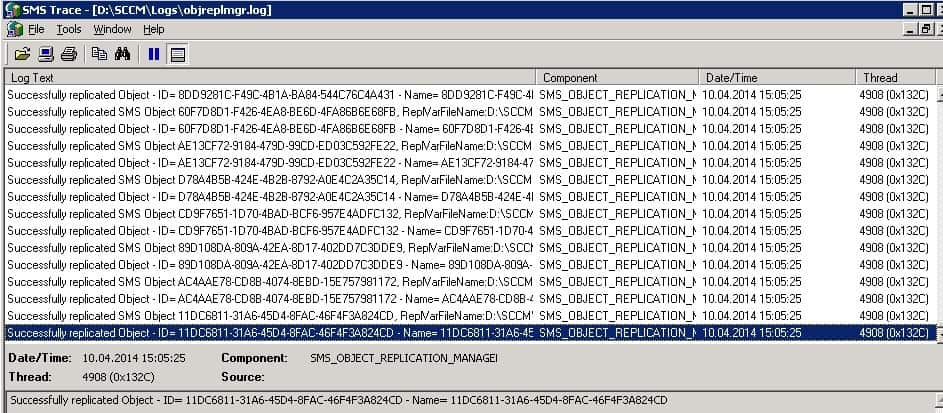
Sample ObjReplMgr.log entries
~Successfully replicated Object - ID= 4dd19ecb-f551-4241-8a9a-031696f310b1 - Name= $<sms_object_replication_manager><thread=4908 (0x132c)="">
~Successfully replicated SMS Object b9a4a30a-e494-4eaf-8094-2c1d92323108, ReplVarFileName:D:\SCCM\inboxes\objmgr.box\mannj1t7.TMP $<sms_object_replication_manager><thread=4908 (0x132c)="">
~Successfully replicated Object - ID= b9a4a30a-e494-4eaf-8094-2c1d92323108 - Name= $<sms_object_replication_manager><thread=4908 (0x132c)="">
~Successfully replicated SMS Object 82625326-e038-4b34-b4ce-8980489c4b6e,
Deleted site attachment file D:\SCCM\inboxes\objmgr.box\G02.SHA $<sms_object_replication_manager><thread=4908 (<span="" class="hiddenSpellError" pre="">0x132c)
Resources
SCCM Related Posts Real World Experiences Of SCCM Admins
We are on WhatsApp now. To get the latest step-by-step guides, news, and updates, Join our Channel. Click here. HTMD WhatsApp.
Author
Anoop C Nair is Microsoft MVP from 2015 onwards for consecutive 10 years! He is a Workplace Solution Architect with more than 22+ years of experience in Workplace technologies. He is a Blogger, Speaker, and Local User Group Community leader. His main focus is on Device Management technologies like SCCM and Intune. He writes about technologies like Intune, SCCM, Windows, Cloud PC, Windows, Entra, Microsoft Security, Career etc…




Hi Anoop,
Do you have a list of any other control files like this one? These are very useful to know about!
Superb man…. I am having same issue. Going to do as per your document lets c how it goes
Hi Anoop,
we are facing the same issue in SCCM 2012. can you please suggest on the same