






FAQs Related to SCCM SQL Based Database Replication Configuration Manager | ConfigMgr
FAQs Related to SCCM SQL Based Database Replication Configuration Manager | ConfigMgr. In this post, I’ll cover five questions raised to me and answers that I found.
All these relate to the database replication between SCCM primary server SQL DB and Secondary server SQL DB.
List of all Replication Groups and Article Names (Tables) Involved SCCM SQL DB Replication here. FAQs Related to SCCM SQL-Based Database Replication Configuration Manager | ConfigMgr.
This post will get all the FAQs Related to SCCM SQL-Based Database Replication Configuration Manager | ConfigMgr.

- FIX SCCM SQL Replication Issues using Replication Link Analyzer
- Troubleshoot and FIX SCCM SQL Backlog Issues using SSMS
- FIX SCCM SQL-Based Database Replication Failure Between CAS Primary
FAQs Related to SCCM SQL-Based Database Replication
SQL-based database replication in SCCM ensures data consistency across sites. This FAQ section addresses common queries about configuring, managing, and troubleshooting database replication within SCCM environments.
1. Have you Ever Noticed that the SCCM 2012 Database Replication Link Schedule or Throttling Option is Grayed out in the Console?
Yes, Database SQL-based replication between SCCM 2012 Secondary and Primary sites can’t be controlled!! FAQs Related to SCCM SQL-Based Database Replication Configuration Manager | ConfigMgr.
2. Why is the SQL Database Replication between the SCCM 2012 Secondary Server and the Primary Server Throttling Option Missing?
Honestly, I don’t know. However, I think very little data is replicated between the primary and secondary site DB; hence, there is no need to throttle it. Some of us can still trace GBs of data copied from the SCCM Primary SQL server to the secondary server.
More details about this replication data: Only a subset of Global Data (called Global Proxy data) is replicated to the SCCM 2012 secondary server SQL DB. Moreover, this SQL (Database) replication is ONE-way. The Global Proxy replication data is replicated from the SCCM 2012 primary SQL server to the secondary server SQL database.
3. Which Replication Groups Fall under the Replication Pattern Called Global Proxy (Secondary Server Data)?
In the SCCM 2012 SQL DB, I can see two Replication Patterns names under Global Proxy. FAQs Related to SCCM SQL-Based Database Replication Configuration Manager | ConfigMgr.
SQL query :- Select * from vReplicationData where ReplicationPattern = ‘Global_proxy’
ID ReplicationPattern ReplicationGroup
21 global_proxy Secondary_Site_Replication_Configuration
22 global_proxy Secondary Site Data
4. What is ArticleName in SCCM 2012 DB?
Article Names are nothing but Tables that contain actual policy data. The Replication Groups (mentioned above) are further divided into Article Names based on ReplicationID.
To find out what exactly is replicated from SCCM 2012 Primary SQL DB to Secondary server SQL DB, we have 104 Article Names replicated to SCCM 2O12 Secondary server SQL DB. The more detailed list is in the following table.
Replication IDs vary between environments, so use the SQL query in Question 3 to find the replication group IDs Secondary_Site_Replication_Configuration and Secondary Site Data.
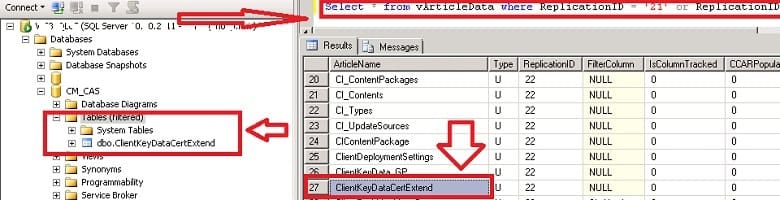
Select * from vArticleData where ReplicationID = ’21’ or ReplicationID = ’22’. For example, you can see an ArticleName = ClientKeyDataCertExtend, and when you check the table, you can see the table with the same name: ClientKeyDataCertExtend. So, all article names seem to be referenced in the table name.
5. How Much SQL Data will get Transferred or Replicated from the SCCM 2012 Primary Server DB to the Secondary Server SQL DB?
Update: We can use exec spDiagGetSpaceUsed to get the size of reach replication groups with table details. Umair Khan helped me get this information. FAQs Related to SCCM SQL-Based Database Replication Configuration Manager | ConfigMgr.
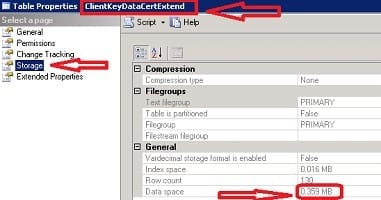
We may need to check all the tables that are part of the Global_proxy Replication pattern (the list of tables is below). I cannot find an easy way to do this calculation for all the tables involved. The manual method is to open the table properties, then Storage, and check Index Space.
List of Article Names or Tables which are Under the Category of Global_Proxy Replication Pattern
These tables are replicated from SCCM 2012 Primary server SQL DB to secondary server DB.
| ArticleName | ReplicationID |
|---|---|
| ActiveDirectoryForestPublishingStatus | 22 |
| ActiveDirectoryForests | 22 |
| ActiveDirectoryForestTrusts | 22 |
| AlertVariable_G0 | 22 |
| AlertVariable_G1 | 22 |
| AlertVariable_S | 22 |
| AlertVariableXml_G | 22 |
| ArticleData | 21 |
| AutoClientUpgradeConfigs | 22 |
| AutoClientUpgradeSettings | 22 |
| BGB_Server | 22 |
| BootImgPkg_References | 22 |
| BoundaryEx | 22 |
| BoundaryGroup | 22 |
| BoundaryGroupMembers | 22 |
| BoundaryGroupSiteSystem | 22 |
| CI_ConfigurationItemContents | 22 |
| CI_ConfigurationItems | 22 |
| CI_ContentFiles | 22 |
| CI_ContentPackages | 22 |
| CI_Contents | 22 |
| CI_Types | 22 |
| CI_UpdateSources | 22 |
| CIContentPackage | 22 |
| ClientDeploymentSettings | 22 |
| ClientKeyData_GP | 22 |
| ClientKeyDataCertExtend | 22 |
| ClientPushMachine_G | 22 |
| CM_SiteConfiguration | 22 |
| ContentDPMap | 22 |
| CP_System_Resource_N_ARR | 22 |
| DeviceDiscoveryTranslation | 22 |
| DeviceMPSettings | 22 |
| DistributionStatus | 22 |
| DPUpgradeStatus | 22 |
| DrsSendHistorySummary | 22 |
| InventoryAction | 22 |
| InventoryClass | 22 |
| InventoryClassProperty | 22 |
| MIG_AppVPackageMapping | 22 |
| PackageContentInfoHash | 22 |
| PkgAccess | 22 |
| PkgProgramOS | 22 |
| PkgPrograms_G | 22 |
| PkgServers_G | 22 |
| PkgStatus_G | 22 |
| PkgStatusHist | 22 |
| PortalInfo | 22 |
| ProceduresToForward | 21 |
| PullDPResponse | 22 |
| RcmSqlControl | 22 |
| RcmSqlControlProperty | 22 |
| RcmSqlControlType | 22 |
| ReplicationData | 21 |
| SC_Address | 22 |
| SC_Address_Property | 22 |
| SC_Address_PropertyList | 22 |
| SC_AddressType | 22 |
| SC_ClientCfg_Property | 22 |
| SC_ClientCfg_PropertyList | 22 |
| SC_ClientComponent | 22 |
| SC_ClientComponent_Property | 22 |
| SC_ClientComponent_PropertyList | 22 |
| SC_ClientConfiguration | 22 |
| SC_Component | 22 |
| SC_Component_Property | 22 |
| SC_Component_PropertyList | 22 |
| SC_Configuration | 22 |
| SC_Configuration_Property | 22 |
| SC_Configuration_PropertyList | 22 |
| SC_GlobalProperty | 22 |
| SC_GlobalProperty_Property | 22 |
| SC_GlobalPropertyList | 22 |
| SC_GlobalPropertyList_PropertyList | 22 |
| SC_MISCItem | 22 |
| SC_MISCItemType | 22 |
| SC_PublicKeys | 22 |
| SC_RoleType | 22 |
| SC_SiteDefinition | 22 |
| SC_SiteDefinition_Property | 22 |
| SC_SiteDefinition_PropertyList | 22 |
| SC_SysResUse | 22 |
| SC_SysResUse_Property | 22 |
| SC_SysResUse_PropertyList | 22 |
| SC_UserAccount | 22 |
| SC_UserAccount_Property | 22 |
| SC_UserAccount_PropertyList | 22 |
| SCCMAutoUpdates | 21 |
| SCCMAutoUpdateStatus | 22 |
| ServerData | 21 |
| SiteExchangeKeys | 22 |
| SitesInfo | 22 |
| SMSContentHash | 22 |
| SMSPackageHash | 22 |
| SMSPackages_G | 22 |
| Summarizer_SiteSystem | 22 |
| TS_AppReferences | 22 |
| TS_References | 22 |
| TS_TaskSequence | 22 |
| UnknownSystem_DISC | 22 |
| Update_SyncStatus | 22 |
| UpgradeVersionMap | 21 |
| WebServiceInfo | 22 |
| WSUSServerLocations | 22 |
Resources
SCCM Related Posts Real World Experiences Of SCCM Admins
We are on WhatsApp now. To get the latest step-by-step guides, news, and updates, Join our Channel. Click here. HTMD WhatsApp.
Author
Anoop C Nair is Microsoft MVP from 2015 onwards for consecutive 10 years! He is a Workplace Solution Architect with more than 22+ years of experience in Workplace technologies. He is a Blogger, Speaker, and Local User Group Community leader. His main focus is on Device Management technologies like SCCM and Intune. He writes about technologies like Intune, SCCM, Windows, Cloud PC, Windows, Entra, Microsoft Security, Career etc…




exec spDiagGetSpaceUsed
You can use this for the 5th question which tells you the size of reach replication groups with table details.
StaffHi Umair ! – Thank you Much Dear!
I missed that stored procedure.
Regards
Anoop
Hello Anoop,
We may have a need to feed downstream reporting teams with data in SCCM 2012. They would like to enrich their reporting with some of the underlying tables from SCCM that gather data related to servers and workstations. Is there any type of best practice documentation or recommendations for transmitting some of these core tables / views downstream?
Hi, I have this scenario:
CAS and reporting with sql 2012
6 primary sites with sql 2012 version.
Is possible migrate the CAS SQL database and reporting database to sql 2017 keeping the 6 primary sites with sql 2012?
what about replication?
Thanks
StaffI think all the supported versions of sql is fine. I don’t think it’s necessary to have same version of SQL for cas and primary servers.
My recommendations is to perform tests in the lab or pre prod environment before implementing this in production