





SCCM How to Find the List of Patches Installed Via Quick Fix Engineering
SCCM How to Find the List of Patches Installed Via Quick Fix Engineering? I’ve seen people requesting reports of a list of Software Updates (patches) installed on a system, along with the Installed dates.
ConfigMgr is not collecting the Software Updates (patches) list for Windows 7/Vista/ 2008/ 2008 Core operating systems. This information is stored in the “Win32_QuickFixEngineering” WMI class on these operating systems (it’s no longer listed in Add Remove Programs).
This class’s inventory is NOT enabled in SMS_DEF.MOF (by default). Hence, ConfigMgr. The report won’t provide these details until you allow the appropriate WMI class in SMS_DEF.MOF.
- SCCM CMPivot Query Patches Installed In Last 90 Days | ConfigMgr
- Customize Windows Update Autopatch Settings For Automatic Patch
- PowerShell Script Patch Installation Status Remote Computer1
- Run CMPivot Queries from Intune Portal | SCCM | ConfigMgr
| Index |
|---|
| SCCM How to Find the List of Patches Installed Via Quick Fix Engineering |
SCCM How to Find the List of Patches Installed Via Quick Fix Engineering
In Windows XP, Windows 2003, etc., operating systems, the list of Software Updates (patches) is stored in Add Remove Programs, and the WMI class for Add Remove program is enabled by default SMS_DEF.MOF. Hence, you will get these details from ConfigMgr reports for Windows XP, Windows 2003, etc.

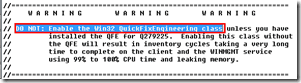
Enabling the “Win32_QuickFixEngineering” WMI class is not recommended. Refer to the warning given in the SMS_DEF.MOF file below. SCCM How to Find the List of Patches Installed Via Quick Fix Engineering
- PowerShell Script to Find Out Patch Installation Status on Remote Computers
- SCCM Download a Custom Report to Find Out All Patches Installed ConfigMgr
- SCCM Tenant Attach Troubleshooting Issues via Logs | ConfigMgr
- Free Microsoft Copilot for Security Training in Audit Mode | 5 Modules
- Windows Autopatch Implementation Setup Guide
“DO NOT: Enable the Win32_QuickFixEngineering class unless you have installed the QFE for Q279225. Enabling this class without the QFE will result in inventory cycles taking a very long time to complete on the client and the WINMGMT service using 99% to 100% CPU time and leaking memory.”
The easiest way to get details from a single system is given below.
One-liner command to list down the patch details (applicable only for Windows 7/Vista/ 2008/ 2008 Core operating systems).
Wmic qfe list >c:\list.txt
This will provide you with the list of Software Updates (patches) applied to a system along with the Caption, CSName (the system’s hostname—computer name), Description (the category of the software update—update, Hotfix, Security Update, etc.), HotFixID, installed, installed (the Date of Installation).

- ClickUp App for Windows Detailed Review
- New Unified Outlook Experience Overview
- Big News Microsoft to Publish Root Cause for all Microsoft CVEs
- Fix SCCM Failed to Run Task Sequence because it is not active yet
- Defender Settings Getting Removed for Comanaged SCCM 2309 and 2403 Clients
- 11 Days Of Free Intune Training Course By HTMD Community – HTMD Blog #2 (howtomanagedevices.com)
We are on WhatsApp. To get the latest step-by-step guides and news updates, Join our Channel. Click here –HTMD WhatsApp.
Author
Anoop C Nair has been Microsoft MVP from 2015 onwards for 10 consecutive years! He is a Workplace Solution Architect with more than 22+ years of experience in Workplace technologies. He is also a Blogger, Speaker, and leader of the Local User Group Community. His main focus is on Device Management technologies like SCCM and Intune. He writes about technologies like Intune, SCCM, Windows, Cloud PC, Windows, Entra, Microsoft Security, Career, etc..




Awesome information. Thanks Anoop for sharing it
Hi Anoop ,
So the report’s like Enforcement States for a deployment and other related reports are also giving the same info like what systems are compliant ,failed deployments etc .
So what about that information . Is that information not legitimate . I believe since its fetching data from SQL database it would be the information that client has sent after giving it’s status against a particular deployment .
Please advice …
Thanks in advance…
Please advice on this coz we are using sql reporting to fetch the data and i guess we are getting correct data on compliance of WIn7 machines .coz it also fetches data from SQL database .
hai anoop c nair
iam learning sccm2012 i want list of error codes iam search in google it show different error codes pls share it
StaffHi ! – What kind of error codes you’re looking for ? Please let me know. Windows error codes?
StaffThese is nothing called SCCM 2012 error codes. Windows error codes can be found here http://msdn.microsoft.com/en-us/library/windows/desktop/ms681381(v=vs.85).aspx
also, you can use > “net helpmsg ” from cmd to get more details.
Any way to get the list of patches that are missing?
StaffHi ! MBSA is the best tool to find out missing patches.
Good article.
On another note, to find out the list of patches that are missing on machines, a custom report can be created against view v_Update_ComplianceStatusAll with condition status=2
Great article Anoop. I don’t know if you have approached a software update report from this angle. But to emulate the “product” column in the software update list in the console. That way you can get metrics on how many updates are missing by the OS and what those updates are. Going against the System table and aggregating the OS Version does not seem to have the same values as the product column.
Thanks,
Jim
Great article. Was struggling for a while to do this. Just a question, if my environment does not have any Win 2000, 2003, XP, do I still need to worry about the caution and install the hotfix?
Hi Anoop,
I am looking to create a dynamic collection which will add machines to it once a particular patch is installed. Can you help me with this please.
Thanks,
Piyush
So if we enable the Win32_QuickFixEngineering WMI class for hardware inventory, in which view is that data stored?
Excellent article Anoop, thanks a lot.
Fantastic! ! Thanks for sharing.
here is an sql query that direcly queries the hotfixes and related hostnames from SCCM database
https://bestitsm.wordpress.com/2018/07/12/how-to-get-list-of-installed-hotfixes-from-sccm-database/
HI Anoop,
how can we check, list of server and server names for which latest windows patches installed in SCCM and also how to generate server list which is pending of windows patch update in SCCM
and
also how can we trigger patch updates from SCCM console for a perticular client server