






Technical Preview 2205 New Features in Configuration Manager
Let’s check the list of features added in ConfigMgr Technical Preview 2205. Microsoft has released the second Technical Preview Version after announcing SCCM 2203 Production Version.
In terms of features, ConfigMgr 2205 Technical Preview is a minor release that comes with improvements for CMG Workflow, and added features considered customer feedback to provide the best experience.
Update 2205 for Technical Preview Branch is available in the Microsoft Endpoint Configuration Manager Technical Preview console. The 2202 baseline version of the Microsoft Endpoint Configuration Manager Technical Preview Branch is available for new installations.
Technical Preview Branch releases allow you to try out new Configuration Manager features in a test environment before they are generally available.

Let’s try out all added features, help the Configuration Manager product team, and continuously work for us to provide them your valuable feedback about the new features in the technical preview before the Microsoft product team finalizes the features.
If you missed exploring the previously added new feature, here you can check it out, New Features of Configuration Manager Technical Preview 2204
Important⚠️- The technical preview branch of Configuration Manager is not supported for use in a production environment. The technical preview is licensed for use only in a lab environment.
Download SCCM Technical Preview 2205
When installing a new technical preview site, use the latest baseline version. After installing a baseline version, use in-console updates to update your installation with the most recent Technical preview version 2205.
Here’s how you can download a baseline version of Technical Preview 2202 from the Microsoft Evaluation Center. The following post helps you to prepare for the technical preview LAB.
Build Microsoft Endpoint Configuration Manager Technical Preview LAB – How to Build Configuration Manager Technical Preview LAB | SCCM
New Features in ConfigMgr Technical Preview 2205
Features in Configuration Manager technical preview version 2205, Let’s see what the features and improvements of Configuration Manager 2205 Technical Preview are –
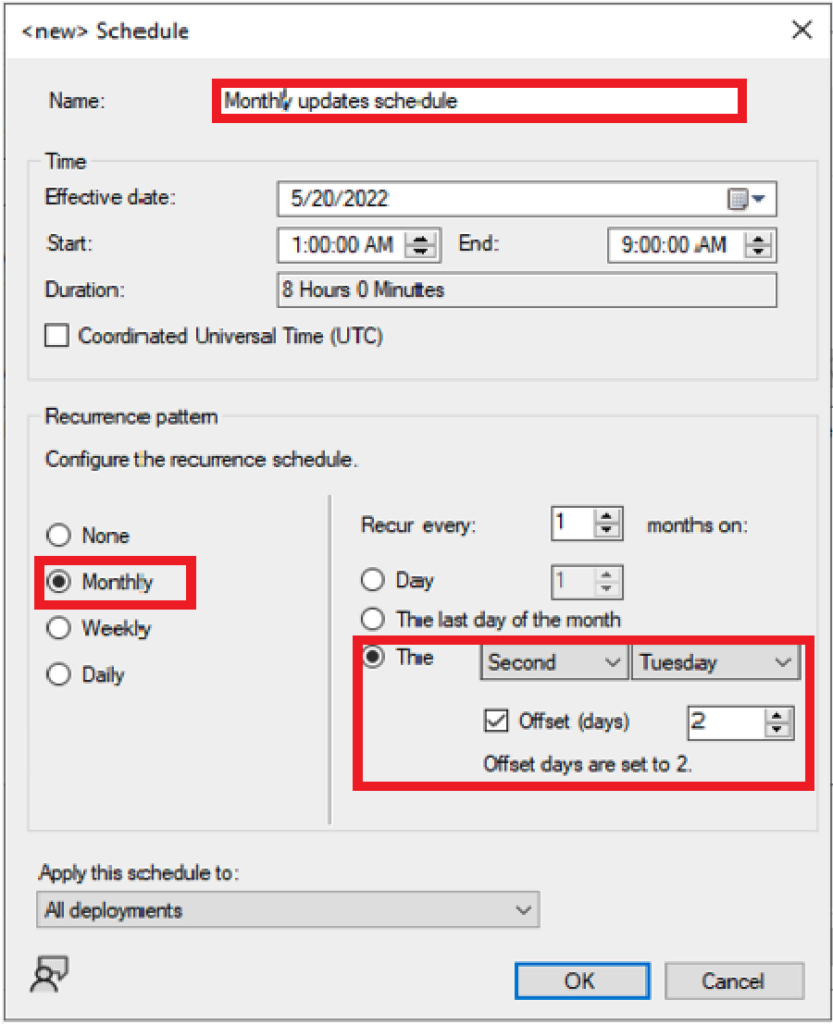
Offset for reoccurring monthly maintenance window schedules
Starting in Configuration Manager Technical Preview 2205, you can now offset monthly maintenance window schedules to better align deployments with the release of monthly security updates.
For example, using an offset of two days after the second Tuesday of the month sets the maintenance window for Thursday.
Script Execution Timeout for Compliance Settings
You can now define a Script Execution Timeout (seconds) when configuring client settings for compliance settings. The timeout value can be set from a minimum of 60 seconds to a maximum of 600 seconds.
This new setting allows you more flexibility for configuration items when you need to run scripts that may exceed the default of 60 seconds.
Improvements to Cloud Management Gateway (CMG) Workflow
Starting in Configuration Manager Technical Preview 2205, You can now approve the application workflow through email. For the application approvals through email, manually add the CMG URL in the Azure Active Directory app as a single-page application redirect URI.
New PowerShell cmdlets in Configuration Manager Technical Preview 2205
These release notes summarize changes to the Configuration Manager Technical Preview 2205 PowerShell cmdlets –
- Approve-CMOrchestrationGroupScript -> Use this cmdlet to approve an orchestration group script.
- Deny-CMOrchestrationGroupScript -> Use this cmdlet to deny an orchestration group script.
- Get-CMOrchestrationGroupScript -> Get a script from the specified orchestration group.
- Get-CMTrustedRootCertificationAuthority -> Use this cmdlet to get the certificates for trusted root certification authorities from the site.
- New-CMAADClientApplication -> Use this cmdlet to create a client app registration in Azure Active Directory (Azure AD). Running this cmdlet will prompt you to sign in to your tenant.
- New-CMAADServerApplication -> Use this cmdlet to create a server app registration in Azure AD. Running this cmdlet will prompt you to sign in to your tenant.
You can use PowerShell cmdlets to automate the package creation and deployment process with Configuration Manager (aka MEMCM), similar to using SCCM Console.
This post helps the PowerShell enthusiast to start working on a PowerShell scripting solution for SCCM Application and Package creation process.




Discussion