






FIX SCCM PKI Client Registration Issue Hotfix KB14480034
Let’s see how to fix SCCM PKI client registration issue. Microsoft Released a new hotfix KB14480034 for SCCM 2203 version. There have been reports of PKI client registration failing after upgrading to SCCM 2203.
This behavior change was documented for the Workgroup client’s approval process in SCCM 2203 known issues. I don’t think this change in the behavior triggered the PKI client registration issue with MEMCM 2203 clients.
The newly installed workgroup clients are not automatically approved as expected in environments using PKI-issues certificates. The SCCM Workgroup client’s Approval behavior is changed recently and was documented by Microsoft as part of the 2203 version changelogs.
Read More on SCCM Client PKI – SCCM Configure Settings For Client PKI Certificate and Fix SCCM Sites That Don’t Have Proper HTTPS Configuration Issue

Microsoft has fixed 5 known issues with the early version of the SCCM 2203 with the hotfix KB13953025. This hotfix is applicable for preview ring versions of 2203. The hotfix KB13953025 must be installed before installing KB14480034 if running the early ring version of 2203.
The new hotfix released to fix SCCM PKI client registration issue is applicable for all the versions of SCCM 2203. No client and console updates are required for the SCCM 2203 Hotfix KB14480034 (https://aka.ms/KB14480034).
KB14480034 – FIX SCCM PKI Client Registration Issue
Let’s check more details on KB14480034 and the SCCM PKI Client Registration Issue in this section of the post. Microsoft identified a bug causing issues SCCM Clients that use PKI certificates to communicate with SCCM servers (https enabled scenario) failed to register.
The client registration process is getting failed after upgrading to SCCM 2203. This bug is only applicable if clients use public key infrastructure (PKI) for client authentication and if they are unable to authenticate against the domain.
The following are the scenarios:
- Newly installed workgroup clients using PKI.
- Clients joining an AD or Azure AD domain for the first time generating a new device identity.
- Existing clients that are trying to renew their client authentication certificate.
As per Microsoft documentation, the file change that happens as part of the KB14480034 update is baseobj.dll. The version of the DLL is 5.00.9078.1014.
How to Identify SCCM Client PKI Registration Issue
Let’s see How to Identify the SCCM Client PKI Registration Issue. You can check the DDM.log file on the site server for each affected SCCM client to confirm whether the Client PKI issue is impacting the client or not.
The DDM.log will have the following entries for each impacted client.
ClientIdentity is not a hex string
The registration record is not valid. Bad RDR
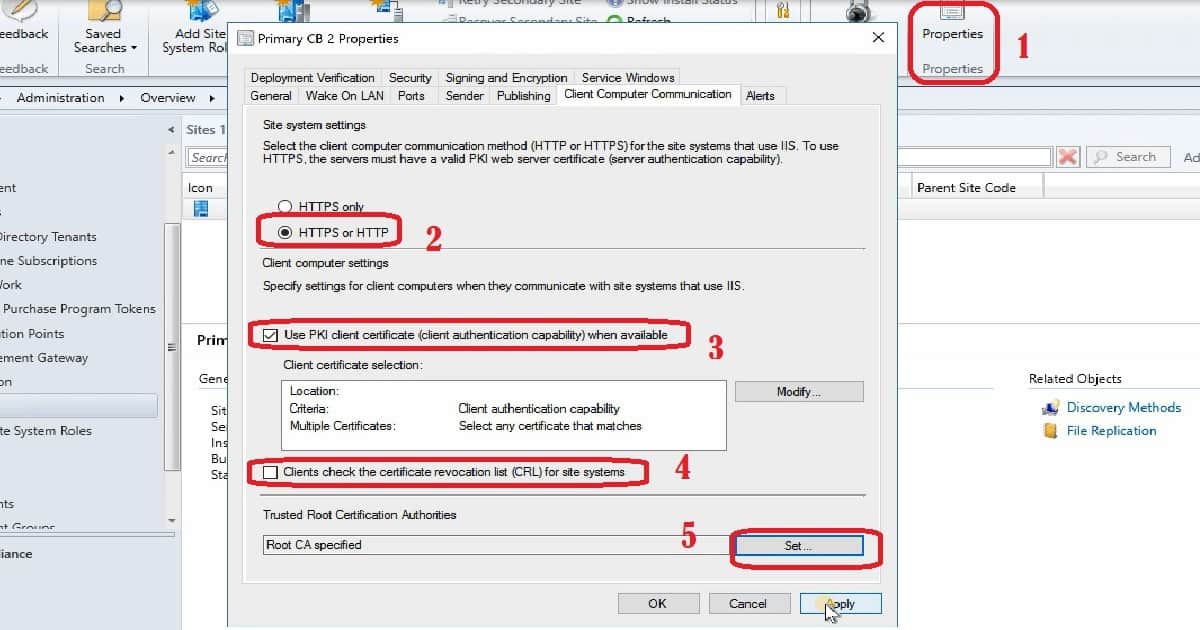
You would also be able to see an increase in the number of Bad DDR files in the SCCM Inbox folder. The .RDR file(s) will be moved to ..\Program Files\Microsoft Configuration Manager\inboxes\auth\ddm.box\BAD_DDRS on the site server. Normally BAD DDR folder will be empty.
Install SCCM 2203 Hotfix KB14480034
Let’s check how to install SCCM 2203 Hotfix KB14480034. This process is going to take much lesser time than the 2203 upgrade. This update hotfix rollup includes SCCM server-side updates (only). There is no console and client update required for this hotfix.
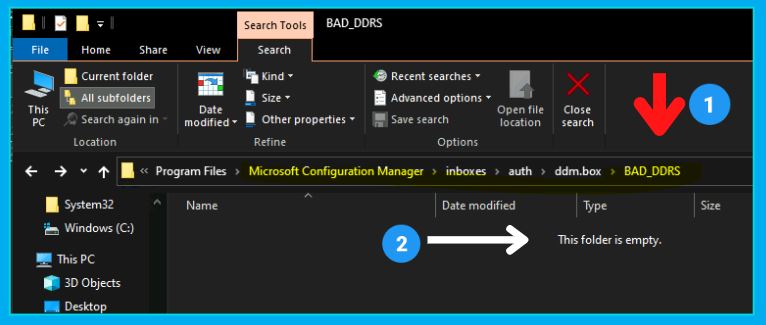
You can install this Hotfix from \Administration\Overview\Updates and Servicing, similar to any other updates and servicing option in SCCM. Make sure the update is downloaded and in a Ready to Install state.
NOTE! – If there is any download issue with KB13953025, refer to the following article that might help fix the issue with download ➡ CM Update Reset Tool Fixes SCCM CB Update Download Issue.
- Launch the Configuration Manager Console.
- Select the Administration tab.
- Expand Overview -> Select Updates and Services node.
- Right, Click on the update Configuration Manager 2203 Hotfix KB14480034 once it’s Ready to install stage.
- Click on Install Update Pack.
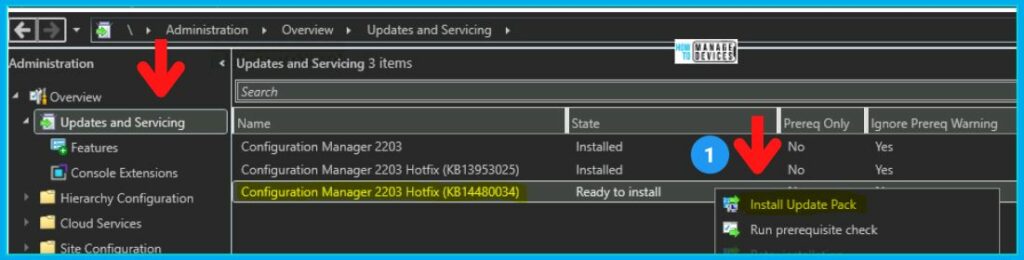
Click on the button from Next after selecting Ignore any prerequisite check warnings and install the update regardless of the missing requirements option, as shown in the below picture.
NOTE! Ensure you enable the option called Ignore any prerequisite check warnings and install the update regardless of missing requirements from Configuration Manager Updates Wizard to avoid setup will not continue issues.
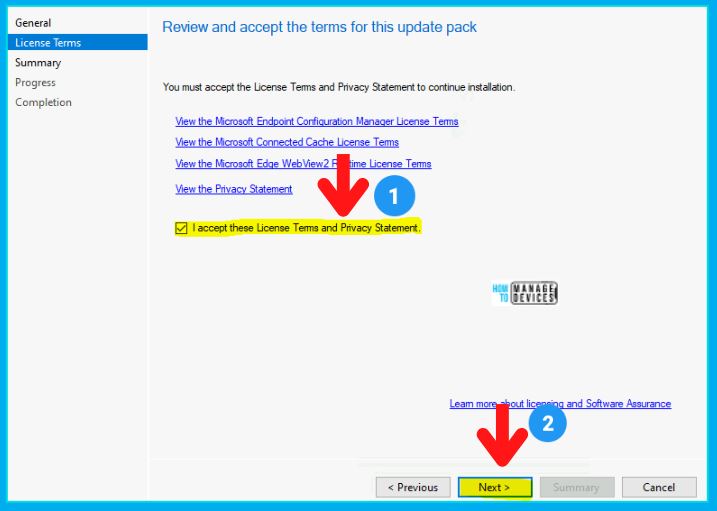
Review and accept the terms of this update pack KB14480034 to fix SCCM client PKI registration issues. After accepting the terms, click on the Next button, as shown in the screenshot.
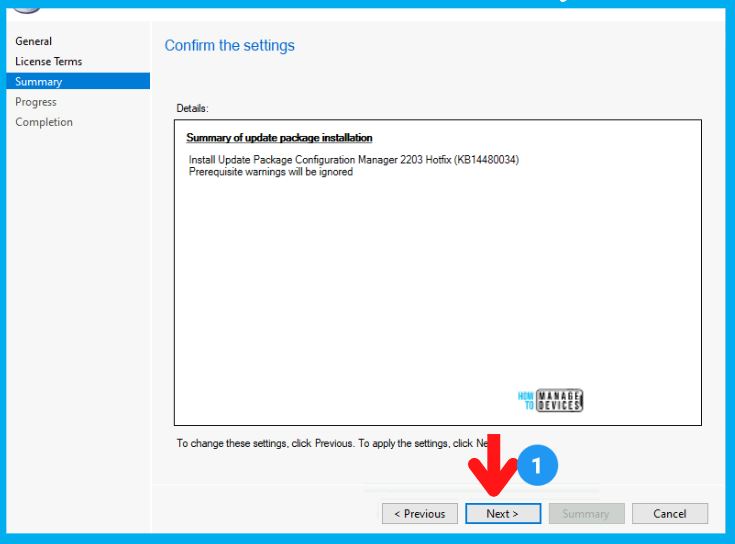
Summary of update package KB14480034 installation. There is no client update for this hotfix, and that is why you can see any client-side pages in this wizard. Click on the NEXT button to continue.
Install Update Package Configuration Manager 2203 Hotfix (KB14480034)
Prerequisite warnings will be ignored
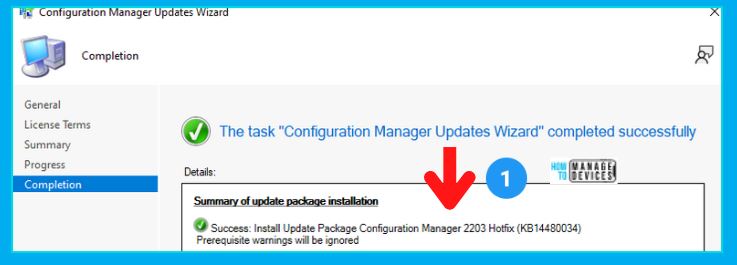
Click on the Close button to complete the Configuration Manager Updates Wizard. Once the Wizard is closed, the actual installation of the Hotfix will begin.
Monitor SCCM Hotfix KB14480034 Installation
Let’s check how to monitor the SCCM hotfix KB14480034 installation progress. There are several options to monitor the status of the SCCM hotfix installation.
I would recommend monitoring the status from the SCCM admin console itself.
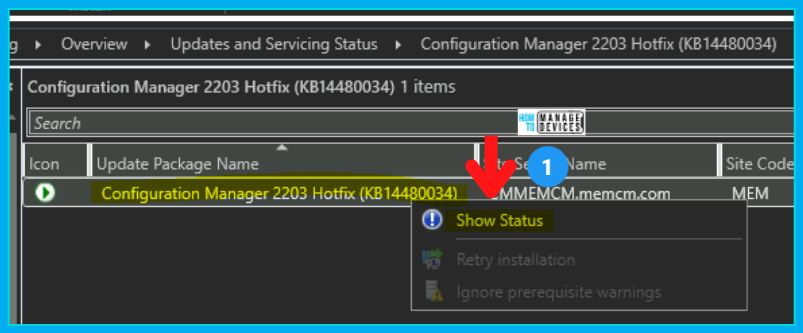
- Navigate to \Administration\Overview\Updates and Servicing
- Select the Hotfix Update KB14480034.
- Click on the Show Status link as shown in the below screenshot.
The update pack installation status window from \Monitoring\Overview\Updates and Servicing Status\Configuration Manager 2203 Hotfix (KB14480034).
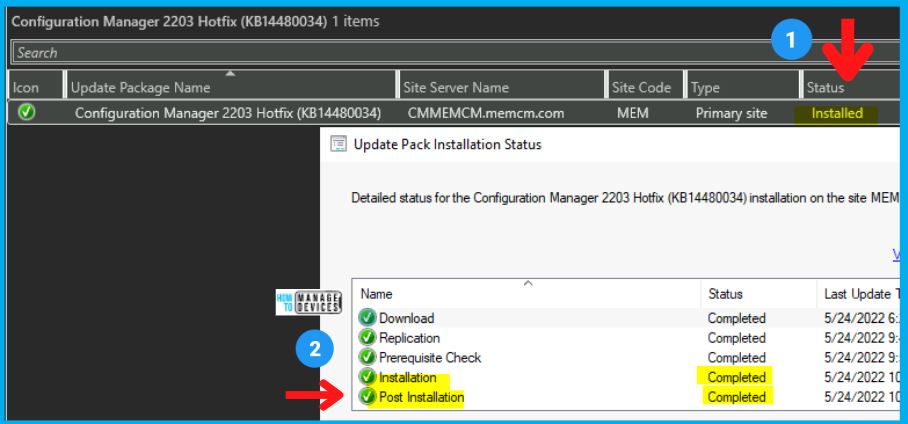
Let’s check the SCCM full site version number after the hotfix KB14480034 installation. 5.00.9078.1014 is the full version number after the installation of the first hotfix.
- The build number of SCCM 2203 stays the same as 9078 even after the hotfix installation.
Secondary Server Update
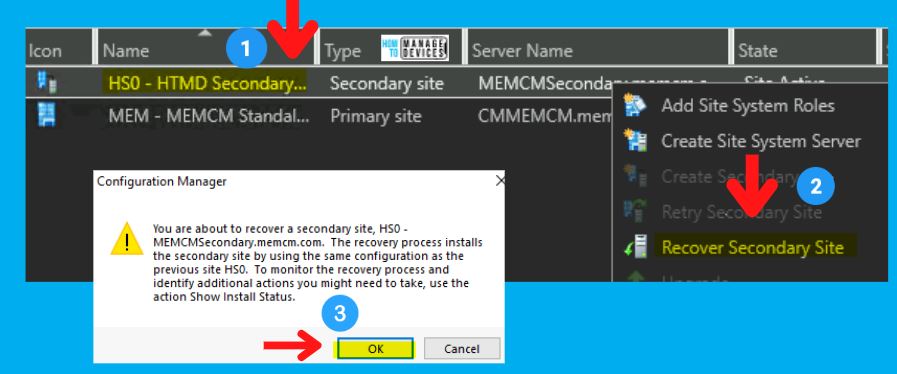
Let’s check how to update the SCCM secondary server with 2203 hotfix to the PKI client registration issue.
- Navigate Administration > Site Configuration > Sites > Recover Secondary Site
- Click on the OK button to start the update process for the secondary server.
Read More -> SCCM Secondary Server Hotfix Installation Guide | ConfigMgr HTMD Blog (anoopcnair.com)




Discussion