






Changes of Windows Updates Icon WindowsUpdate Log in Windows 10
Changes of Windows Updates Icon and WindowsUpdate Log in Windows 10. Have you noticed the changes to the Windows update and WindowsUpdate.log files in Windows 10?
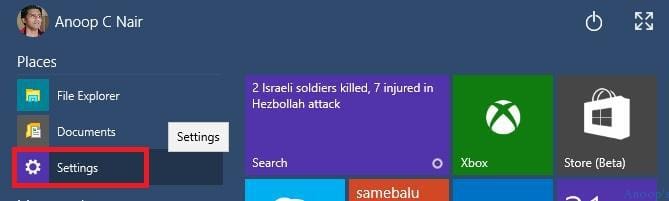
The Windows Update icon has been removed from the classic control panel! In Windows 10, you can reach Windows Update via the Start menu and settings. It has a Modern application look!
So what happened to WindowsUpdate.log? Is it still in use? We’ll see all these in this post. A one-line command at the bottom of this post can still take you directly to the Windows Update settings!
In this post, you will get all the details of the changes to Windows Updates Icon WindowsUpdate Log in Windows 10.

| Index |
|---|
| Changes of Windows Updates Icon WindowsUpdate Log in Windows 10 |
| Where are Windows Update Settings Located in Windows 10? |
| Where is WindowsUpdate.log ? |
- Reading Tips for Windows Update Logs in Windows 11
- Top Windows Update Issues and Fixes Revealed by Microsoft
- Turn on Automatic Store App Updates in Windows 11
Changes of Windows Updates Icon WindowsUpdate Log in Windows 10
In Windows 10, the Windows Update icon and the corresponding WindowsUpdate.log have changed to enhance the user experience and improve functionality. Here are the fundamental changes:
The https://support.microsoft.com/kb/3036646 provides you with more details as well. Two topics are covered in this post.
- Where is the Windows Update setting located in Windows 10?
- Where is WindowsUpdate.log in Windows 10?
Where are Windows Update Settings Located in Windows 10?
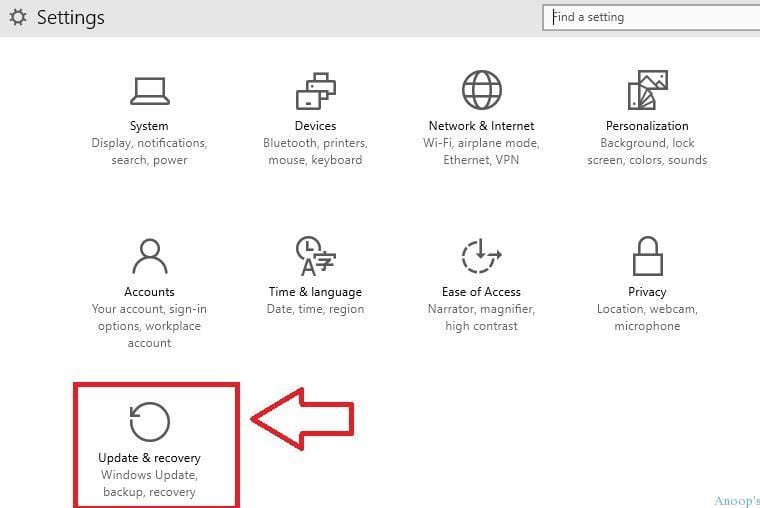
Changes of Windows Updates Icon WindowsUpdate Log in Windows 10. 1) Click the Update and Recovery icon on the settings page.
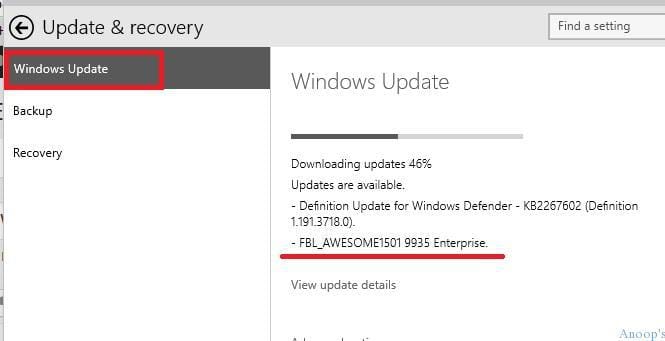
2) On the recovery and Update page, you can find the option to check for the latest updates of the Windows 10 preview. As you can see, the Windows update is getting downloaded in the following screenshot.
3) On the Update and Recovery page, you’ll also have another option to change advanced settings.
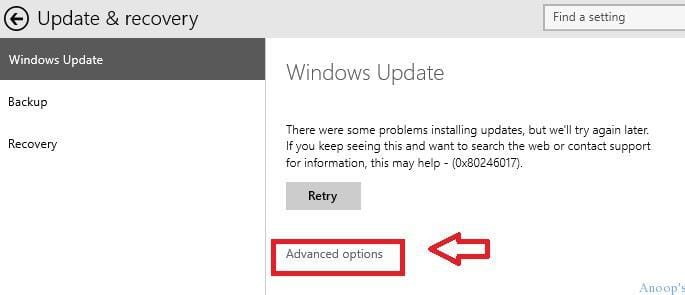
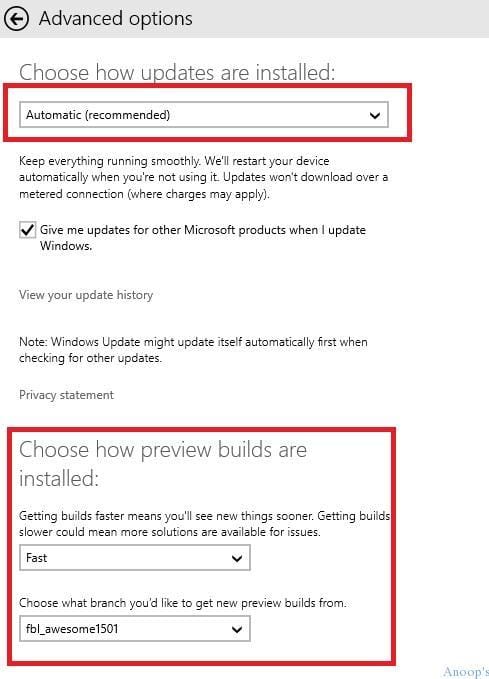
4) The Advanced Options page will allow you to select “Choose how updates are installed.” Do you want Windows to automatically restart the machine after installing the Windows update? The second important option is to have “Choose How Preview Builds are installed.”
Where is WindowsUpdate.log ?
WindowsUpdate.log is still located in the C:\Windows folder. This log file will give you details about the Windows Update-related activities (in previous versions of Windows).
However, you’ll be surprised when you open WindowsUpdate.log on a Windows 10 machine. Changes of Windows Updates Icon WindowsUpdate.Log in Windows 10
Windows update logs are now generated using ETW (Event Tracing for Windows). Please visit http://go.microsoft.com/fwlink/?LinkId=518345 for instructions to decode and obtain windowsupdate.log
So where do we get the log details of Windows Update-related activities in Windows 10 ?, As mentioned in the above stanza, it’s moved to Event Logs, similar to WMI logs! By default, Windows update Logging is NOT enabled; follow the process explained below to enable it.
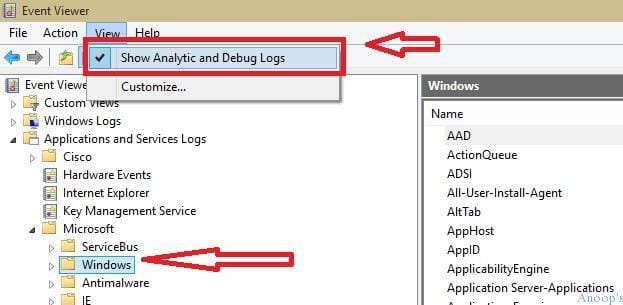
1) Launch Event Viewer and run the “eventvwr” command. From the View option in the menu bar, enable “Show Analytic and Debug Logs“. Then browse through Applications and Services Logs -> Microsoft -> Windows.
| Where is WindowsUpdate.log ? |
|---|
| Show Analytic and Debug Logs |
| Windows |
| Operational |
| Enable Log |
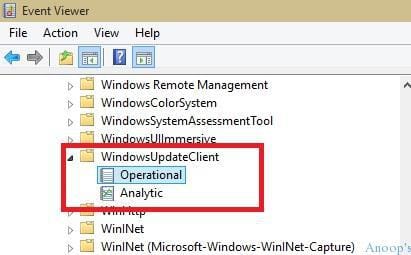
2) As mentioned above, browse through Applications and Services Logs -> Microsoft -> Windows –> WindowsUpdateClient. You will see two items: operational and analytic.
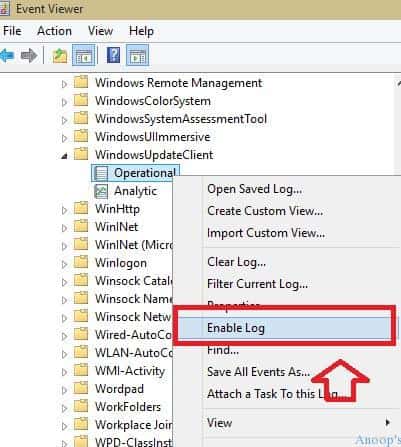
3) By default, these options (operational and analytic) are not enabled; you need to manually allow those (operational and analytic) to track the Windows Update events.
So Bonus:- What is the command for Windows Update “control /name Microsoft.WindowsUpdate”. The above command will open the Windows Update settings on your Windows 10 machine.
Resources
Windows 10 is the Latest Version Of Client Operating System From Microsoft
We are on WhatsApp now. To get the latest step-by-step guides, news, and updates, Join our Channel. Click here. HTMD WhatsApp.
Author
Anoop C Nair is Microsoft MVP! He is a Device Management Admin with more than 20 years of experience (calculation done in 2021) in IT. He is a Blogger, Speaker, and Local User Group HTMD Community leader. His main focus is on Device Management technologies like SCCM 2012, Current Branch, and Intune. He writes about ConfigMgr, Windows 11, Windows 10, Azure AD, Microsoft Intune, Windows 365, AVD, etc.



In build 9926 it appears that the WindowsUpdateClient Operational log is enabled by default or by MDT. If not, this PowerShell can check the status and enable it.
$logName = ‘Microsoft-Windows-WindowsUpdateClient/Operational’
Get-WinEvent -ListLog $logName | Format-List *
#Enable Windows Update logging:
$log = New-Object System.Diagnostics.Eventing.Reader.EventLogConfiguration $logName
$log.IsEnabled=$true
$log.SaveChanges()
Get-WinEvent -ListLog $logName | Select IsEnabled | Format-List *
StaffThank you Chad!! Very helpful. Regards
Anoop
update